Key takeaways
- Huge virtual screen: a private display up to around 200 inches.
- Portable: far lighter and more compact than a VR headset.
- Sharp micro-OLED: bright, vivid image quality.
- Wide compatibility: works with PC, handhelds, phones, and consoles via adapters.
What's inside
Virtual display glasses have quietly become one of the coolest ways to game on a giant private screen, whether you are connected to a PC, a handheld, or a console. Wearing a pair of AR glasses gives you the equivalent of a massive floating display without dominating your room, which is perfect for gaming in bed, on the couch, or while traveling. If you want a big-screen experience for your Xbox and other devices, these are worth a look.
This review covers leading AR and XR glasses including the XREAL One Pro, VITURE Pro, RayNeo Air 4 Pro, and TOZO VIZO Z1, plus other options. One important note up front: most of these glasses connect via USB-C DisplayPort, so pairing with an Xbox typically requires a compatible adapter or dock, since Xbox consoles output over HDMI.
As an Amazon Associate we earn from qualifying purchases at no extra cost to you.


🎮 Get More From Your Setup — Free
Prime Gaming gives you free PC games every month, in-game loot, and a free Twitch channel sub — plus fast free shipping on all the gear above. New members get a 30-day free trial.
Watch: Virtual Glasses For Xbox: Review & Buyer’s Guide — Video Review
Design & Build
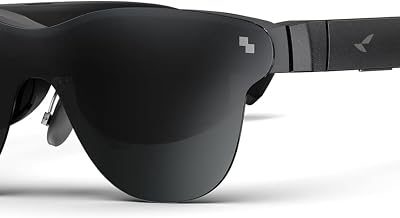
These glasses aim to look like chunky sunglasses rather than bulky headsets, and they mostly succeed. The XREAL One Pro and VITURE Pro are the premium picks, with sleek frames, built-in speakers, and electrochromic or shaded lenses that block ambient light for a more immersive picture. The VITURE Pro adds handy myopia adjustment dials so glasses-wearers can skip prescription inserts. The RayNeo Air 4 Pro leans into style with a Batman limited edition and Bang & Olufsen audio, while the TOZO VIZO Z1 is a lightweight, more affordable option. All are far more portable than a VR headset and slip into a case easily.
Performance
The magic is the virtual screen. These glasses project a large, sharp micro-OLED image, often equivalent to a 130 to 200-inch display floating in front of you, with high brightness and vivid color. The XREAL One Pro stands out with its X1 chip and 3 DoF tracking that anchors the screen in space, plus a wide field of view, making it excellent for gaming and productivity. The VITURE Pro offers a bright 120Hz panel ideal for fast games. Connected to a PC, Steam Deck, ROG Ally, or a console via the right adapter, they deliver a genuinely impressive personal big-screen experience. Just remember that for Xbox specifically, you will need an HDMI-to-USB-C solution.
Pros & Cons
- Huge virtual screen: a private display up to around 200 inches.
- Portable: far lighter and more compact than a VR headset.
- Sharp micro-OLED: bright, vivid image quality.
- Wide compatibility: works with PC, handhelds, phones, and consoles via adapters.
- Xbox needs an adapter: HDMI output requires a compatible USB-C solution.
- Not standalone: they mirror a device rather than run apps on their own.
- Fit and comfort vary: myopia adjustment or inserts may be needed.
Alternatives to Consider
If you want the most polished experience with the best tracking and field of view, the XREAL One Pro is the top pick. For a bright, fast panel with built-in myopia adjustment, the VITURE Pro is excellent. Budget-minded buyers can look at the TOZO VIZO Z1 or the AR glasses with a 201-inch virtual theater for big-screen thrills at a lower price. For Xbox specifically, confirm you have a working HDMI-to-USB-C adapter before buying.
Frequently Asked Questions
Do these glasses work directly with Xbox?
Not directly. Xbox outputs over HDMI, while most of these glasses use USB-C DisplayPort. You will need a compatible HDMI-to-USB-C adapter or dock that supplies power and video.
Are AR glasses better than a monitor for gaming?
They offer a much larger, private screen and portability, which is great for handhelds and small spaces. A monitor still wins for shared viewing and the lowest latency.
Can I wear them with glasses?
Some, like the VITURE Pro, include myopia adjustment dials. Others support prescription lens inserts. Check the specific model if you wear glasses.
Which pair has the best image?
The XREAL One Pro and VITURE Pro lead for image quality, brightness, and immersion, making them the top picks for gaming.
Verdict
Virtual display glasses are a fantastic way to enjoy a giant private screen for gaming and media. The XREAL One Pro and VITURE Pro are the standout performers, while options like the TOZO VIZO Z1 offer strong value. Just plan for an HDMI-to-USB-C adapter if you intend to connect an Xbox, and you will unlock a big-screen experience anywhere you go.