Our Top Picks
The handheld gaming PC accessories that earn a place in a travel bag are a carry case with real protection, a power bank that is legal on a plane, a compact dock for hotel TVs, a fast microSD card and a pair of low-latency wireless earbuds. Our top pick is the Syntech Sling Bag because it protects the console and carries the rest of the kit in one crossbody bag, and the runner-up is the INIU 20000mAh 45W power bank because it is flight-safe and small enough to forget about. The rest of this guide covers seven main picks, four alternatives, and the thresholds that matter when you decide what fits in a carry-on.
A handheld PC such as the Steam Deck, ROG Ally, Legion Go or MSI Claw is a small computer with a battery, a fan and an exposed screen, so travel stresses it differently from a phone. Airport security, cabin air, hotel Wi-Fi and a few hours with no outlet all create specific needs. We built this list around those needs, not around the most popular gadgets, and we kept every pick strictly on the handheld-gaming side of things.

Hard Carrying Case for OneXPlayer 3/X2 Mini/X2 Mini Pro/Apex/Apex Air - Protective EVA Travel Bag with Accessories Organizer for Handheld Gaming PC
Picked as a relevant option in this category.
View on Amazon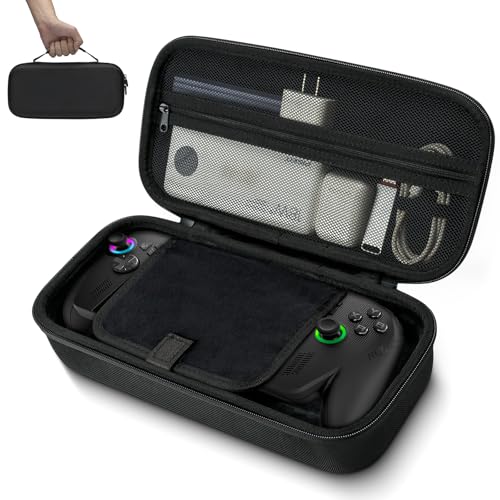
G-STORY Carrying Case for ROG Ally X & Ally 7" Handheld Travel Bag
Picked as a relevant option in this category.
View on Amazon
JYGamhanbil Travel Carrying Case Bag for MSI Claw 8 AI+ A2VM Polar Tempest | EVA Standing Hard Shell Cover with Accessories Pocket for MSI Claw 8 AI+ PC Gaming Handheld Console Power Cord
Picked as a relevant option in this category.
View on Amazon
JYGamhanbil Hard Shell Carrying Case Waterproof Bag for MSI Claw 8 AI+ A2VM | Large Capacity Travel Cover for MSI Claw 8 AI+ A2VM Polar Tempest Edition Gaming Handheld PC Console Dock,Charger,Accessories
Chosen because it specifies Charger and Accessories.
View on AmazonTop Picks at a Glance
- Best Overall: Syntech Sling Bag, a padded crossbody case with three compartments and cable pass-through.
- Best Value Power: INIU 20000mAh 45W Portable Charger, flight-safe with a built-in USB-C cable.
- Best High-Output Power: JSAUX 20000mAh 65W Power Bank, for handhelds and laptops that want more than 45W.
- Best Dock: Anker Steam Deck Dock 6-in-1, a small hub for hotel TVs and ethernet.
- Best Storage: Lexar 1TB Play microSD, a large and fast card for offline libraries.
- Best Premium Audio: SteelSeries Arctis GameBuds, earbuds with ANC and a 2.4GHz dongle.
- Best Budget Peripheral: Logitech G305 Lightspeed, a small wireless mouse for desktop-mode play.
Comparison Table
| Product | Best for | Key specs | Watch for | Price tier |
|---|---|---|---|---|
| Syntech Sling Bag | Carrying console plus accessories | 3-layer protection, 3 compartments, cable pass-through, crossbody strap | Check your exact model is on the compatibility list | Mid-range |
| INIU 20000mAh 45W | Flights and long days out | 20000mAh, 45W, built-in USB-C cable, flight-safe | 45W is the ceiling, so power-hungry handhelds charge slowly while gaming | Budget |
| JSAUX 20000mAh 65W | Bigger handhelds and laptops | 20000mAh, 65W USB-C PD, cable included | Larger and heavier than 45W units; port layout not fully listed | Mid-range |
| Anker Steam Deck Dock 6-in-1 | Hotel TV and wired internet | 4K@60Hz HDMI, 2 USB-A, USB-C, 1Gbps Ethernet, charging | Listing says not for ROG Ally X | Budget |
| Lexar 1TB Play microSD | Offline game libraries | 1TB, up to 205MB/s read, V30, UHS-I, A2 | Write speed not listed; puts a lot of storage on one card | Premium |
| SteelSeries Arctis GameBuds | Quiet, low-latency listening | 2.4GHz plus Bluetooth 5.3, ANC, IP55, 40h with case, Qi charging | Expensive for earbuds; fit is personal | Premium |
| Logitech G305 Lightspeed | Desktop mode in a hotel room | 12,000 DPI, 6 buttons, 250h battery, on-board memory | Needs a free USB port, so pair it with a dock or hub | Budget |
1. Syntech Sling Bag: Best for Carrying Everything in One Place
- Fits ROG Xbox Ally X20, Steam Deck, Switch 2 and PS Portal per the listing
- 3-layer protection
- 3 compartments for console, charger and extras
- Cable pass-through so you can charge while it stays zipped
- Crossbody travel design
Best for: travelers who want a single bag for the console, charger, earbuds and a small power bank. Skip if: you already own a rigid case you like, or your device is a larger, non-listed model.
The main reason a sling beats a clamshell case is that you stop carrying two things. A hard shell protects the console but leaves the charger and cables loose in a backpack, where they can press against the screen when the case is not fully closed. A sling puts the console in its own padded layer and gives the cables their own pocket, so the whole kit moves as one unit. The cable pass-through is the feature to value on a long-haul flight, because it lets you run a power bank cable to the console without unpacking.
The crossbody strap also matters in airports. Hands-free carrying means you can handle a passport and a boarding pass without balancing a case. The tradeoff is size: a sling is bulkier than a slim shell, so it takes more of the under-seat space. If your console is a larger model, check the exact name on the compatibility line before ordering, because the listing names specific devices.
Pros: one bag for the kit; padded layers; cable pass-through; hands-free carry. Cons: bulkier than a shell; compatibility is by named device; internal dimensions not listed.
2. INIU 20000mAh 45W: Best Everyday Travel Power Bank
- 20000mAh capacity
- 45W fast charging
- Built-in USB-C cable
- Marketed as flight-safe and travel-sized
- Weight and exact port count: not listed here
Best for: flights, trains and long days where the handheld spends hours away from a wall socket. Skip if: your handheld wants 65W or more while you play at full power.
Airlines treat power banks by watt-hour rating, not milliamp-hours. A 20000mAh pack at the usual 3.7V cell voltage works out to about 74Wh (20Ah x 3.7V), which is under the common 100Wh limit for carry-on batteries. That is why this capacity class is so popular for travel. Always carry it in the cabin, never in checked luggage, and check your airline’s current rule before you fly.
The built-in cable is a quiet advantage. Loose cables are what people forget, and a short integrated USB-C lead means the bank works the moment you pull it out. At 45W it will roughly match what a Steam Deck charger delivers, but it will not outrun the draw of a handheld running a demanding game at a high power setting. Expect it to slow the battery’s decline in that case, not to refill it quickly.
Pros: flight-friendly capacity; integrated cable; compact; approachable cost tier. Cons: 45W ceiling; the cable is fixed to the unit; limited to what the listing shows.
3. JSAUX 20000mAh 65W: Best for Power-Hungry Handhelds
- 20000mAh capacity
- 65W USB-C Power Delivery
- USB-C cable included
- Named for Steam Deck, Switch 2, ROG Ally, laptops and phones
- Weight: not listed
Best for: bigger-battery handhelds and anyone who also wants to top up a laptop. Skip if: you only carry a phone and one small console, where a 45W unit is lighter and cheaper.
The 65W figure is the reason to choose this one. Newer handhelds ship with chargers around that level, and a bank that matches it can charge the device while you play without the battery falling. Think of it as the difference between draining slowly and holding steady. If you play at a lower power setting, even a 45W bank can keep up, but 65W gives headroom.
The same 74Wh nominal rating applies, so the cabin rules are the same as for the INIU. The practical cost is weight and size, which you will feel after a day of walking. A good compromise is to pick one bank per trip based on the longest stretch without an outlet. If it is a single flight, the lighter unit is enough; if it is a train day and a hotel with no free outlets, take the higher-output unit.
Pros: 65W PD; cable included; broad compatibility list; same airline-friendly class. Cons: heavier; output port layout not listed; more than light travelers need.
4. Anker Steam Deck Dock 6-in-1: Best for Hotel TVs
- 4K@60Hz HDMI output
- USB-C port and 2 USB-A data ports
- 1Gbps Ethernet
- Fast charging passthrough
- Listing notes it is not for ROG Ally X
Best for: turning a hotel television into a big screen with a controller and wired internet. Skip if: you own the ROG Ally X, which the listing excludes, or you never play on a TV.
A dock is the item most travelers underestimate. Hotel Wi-Fi is slow and often blocks local game streaming, and a wired port solves both. Plug the dock into the TV’s HDMI, add a USB mouse or a wireless dongle in one of the two USB-A ports, and the handheld behaves like a small desktop. The USB-C passthrough keeps the battery topped up while you play, which pairs well with the power banks above if the room has no free socket.
Note that 4K@60Hz is the output ceiling, so high-refresh external displays will not be fully used. That is fine for television. If you want a stand built into the dock or higher data speeds, look at the UGREEN alternative in the Also Consider section. Also remember that many hotels need a captive-portal login on the device, and a wired link may still ask for it.
Pros: compact; ethernet plus HDMI; two USB-A ports; passthrough charging. Cons: excludes ROG Ally X; no card reader listed; 60Hz cap.
5. Lexar 1TB Play microSD: Best for Offline Libraries
- 1TB capacity
- Up to 205MB/s read
- V30, UHS-I, A2 classes
- Listed as compatible with Steam Deck, ROG Ally, Switch and Android devices
- Write speed: not listed
Best for: carrying a large offline game library, saves and emulation files for flights with no Wi-Fi. Skip if: you mostly stream games, or you would rather split storage across two cheaper cards.
Travel exposes the weakness of cloud libraries: no signal means no game. A large microSD removes that dependency, and 1TB holds many modern titles. The A2 class is designed for app and random-access performance, which is closer to how a game loads than sequential speed numbers, and V30 guarantees a baseline sustained write for video. UHS-I is the interface the Steam Deck and most handheld slots use, so you do not gain anything from a faster bus on those devices.
The real caution is concentration. One 1TB card holds everything, so a lost or corrupted card hurts. Many travelers buy two smaller cards and keep one as a spare. Format the card in the device itself, keep your saves backed up, and do not buy the largest card on impulse if your library is only a few hundred gigabytes.
Pros: large; strong read speed; right classes for games; wide compatibility. Cons: one-card risk; premium cost tier; write speed not shown.
6. SteelSeries Arctis GameBuds: Best Premium Earbuds
- 2.4GHz wireless plus Bluetooth 5.3
- Active noise cancelling
- IP55 water and dust resistance
- 40 hours battery with the charging case
- Qi charging case
Best for: flights and trains where engine noise would otherwise force the volume up. Skip if: you only play at home with a headset or want the cheapest option.
Game audio over standard Bluetooth lags, and a 2.4GHz dongle plugged into the handheld avoids most of that delay. The earbuds can then switch to Bluetooth for your phone, so one pair covers games and calls. ANC reduces constant cabin noise, which lets you listen at lower volume and hear dialogue clearly. IP55 resistance helps with sweat and rain between terminals.
The battery figure includes the case, so earbud runtime alone is shorter per charge. Qi charging in the case lets you top up on a wireless pad in a hotel. The cost is the main drawback: this is a premium product, and a Bluetooth-only budget set would suit someone who does not mind a little latency. The Razer Hammerhead V3 is the closest alternative.
Pros: 2.4GHz plus Bluetooth; ANC; sealed against splashes; wireless case charging. Cons: premium cost; earbud fit varies; needs a USB port for the dongle.
7. Logitech G305 Lightspeed: Best Budget Mouse for Desktop Mode
- 12,000 DPI sensor
- 6 programmable buttons
- 250-hour battery
- Lightspeed wireless, on-board memory
- Listed as PC and Mac compatible
Best for: hotel-room strategy games, shooters and desktop work on a handheld. Skip if: you only use the touchscreen and sticks, or you want a foldable mouse.
Handhelds run PC games, and many of them, such as strategy titles and shooters, play far better with a mouse. The G305 is a common travel mouse because it is light, its battery lasts for months, and its receiver is small. Pair it with the dock above and you have a pocketable desktop setup. The receiver takes a USB-A port, so a dock or hub is required on devices that only have USB-C.
It is a standard-size mouse, so it takes up space in a bag. If you want something flatter, look at a compact folding mouse. Also consider surface: a hotel desk or a fold-out tray needs a mouse pad or at least a matte surface, because glossy glass can confuse an optical sensor.
Pros: lightweight; long battery; small receiver; on-board settings. Cons: needs USB-A; full-size body; uses a single battery you must carry a spare for.
Also Consider
Spigen Rugged Armor Pro Hard Shell Case
A rigid shell with accessory pockets and charger storage, named for the ROG Xbox Ally X, Switch 2, MSI Claw 7 AI+ and ROG Ally. Choose it over the sling if you want a slimmer, harder case that slides into a backpack.
UGREEN Steam Deck Dock 9-in-1
Adds a foldable stand, PD 100W, 10Gbps USB-A and USB-C 3.2 ports and a TF/SD slot on top of HDMI 4K@60Hz and Gigabit Ethernet. Pick it if you want one hub for a laptop as well.
EJGAME Desktop Stand
A small anti-slip stand listed for the Ally family, PlayStation Portal, Steam Deck and Switch 2. It is a low-cost way to prop a handheld for tabletop play on a flight tray or hotel desk.
Razer Hammerhead V3 Wireless Earbuds
Listed with 2.4GHz and Bluetooth 6.0, ANC, THX spatial audio and 40 hours of battery. A reasonable alternative if the SteelSeries pair does not fit your ears.
How We Chose
We did not use these products ourselves, and this article makes no claim of laboratory measurement. The picks come from research: manufacturer product pages, retailer listing details, and independent reviews and teardowns of handheld PCs and travel accessories from outlets such as Rtings, Tom’s Hardware and PC Gamer. We only repeat specifications that the product listing states. When a detail was missing, such as weight or internal dimensions, we wrote that it is not listed.
We selected products against five criteria: carry-on legality, compatibility with the major handhelds, how many separate items the bag saves, what the product does when it is not connected to power, and how forgiving it is if you pick the wrong size. We capped each brand at two products, favored items that are currently sold, and described cost by tier word only because prices change often.
Buying Guide
Power: capacity, output and airline rules
Multiply milliamp-hours by 3.7 and divide by 1,000 to estimate watt-hours. A 20000mAh bank is about 74Wh, under the common 100Wh carry-on threshold. Banks between 100 and 160Wh usually need airline approval, and anything larger is generally not allowed. For output, match your handheld’s charger: 45W is enough for many Steam Deck sessions, while a device with a larger battery benefits from 65W. Always carry banks in the cabin.
A worked example: a 40Wh handheld and a 74Wh bank with roughly 75 percent conversion efficiency gives about 55Wh of usable energy, or one to one and a half full charges. Plan accordingly if your flight is longer than your battery. If you also charge a phone and earbuds from the same bank, subtract those from the total before you count on a second full charge.
Cases: hard shell or sling
Choose a hard shell if you pack in a backpack and carry a few cables. Choose a sling if you want accessories to travel with the console and need quick access at security. Compare the compatibility line against your exact model, not just the brand. A case that fits a Steam Deck may be too short for a larger handheld, and a case sized for a larger model leaves a smaller console sliding around, which defeats the padding.
Docks: ports that matter
Look for HDMI, one USB-A for a mouse or dongle, Ethernet for hotel rooms, and USB-C power passthrough rated at your charger’s wattage. If you own a model the listing excludes, do not guess. Also remember that HDMI 4K@60Hz is plenty for television. A dock with a built-in stand adds convenience, but it also adds weight, so decide whether you would rather carry a separate lightweight stand.
Storage: speed classes and capacity
Look for A2 and V30 or higher, and note that UHS-I is the interface your handheld’s slot uses. Buy the capacity you need plus a margin, and consider two cards for redundancy. Format in the device and back up saves. Keep the card in a small case, because microSD cards are easy to lose in a bag pocket.
Audio and peripherals
For gaming, prefer a 2.4GHz dongle for low latency, with Bluetooth as a backup. For peripherals, count your free USB ports before buying; many handhelds have only one USB-C port, which is why a dock or hub is the real enabler of travel desktop mode. A pocket USB-C to USB-A adapter is a cheap way to avoid being stuck without a port.
Common Travel Mistakes
- Packing a power bank in checked luggage.
- Buying a dock that the listing excludes for your model.
- Relying on cloud libraries for a flight.
- Forgetting that mouse receivers need a USB-A port.
- Choosing a bank on capacity alone and ignoring output wattage.
- Leaving the console in a bag pocket with loose keys or coins.
A simple packing routine helps. Before you leave, charge everything, download the games you plan to play, update the system while you still have fast internet, and put the console, charger, bank and earbuds into their assigned compartments. At security, the power bank and console may both need to come out, so keep them reachable. Updating before you leave matters more than people expect, because a large system update over hotel Wi-Fi can eat the first evening of a trip.
Frequently Asked Questions
What accessories do I need to travel with a handheld gaming PC?
You need a protective case, a charger or power bank, and a way to store games offline. A dock, earbuds and a mouse are useful extras once those basics are covered.
Can I take a handheld gaming PC on a plane?
Yes, it goes in carry-on. Power it off or use airplane mode as the airline asks, and be ready to remove it for screening if requested.
How big a power bank can I bring on a flight?
Most airlines allow banks up to 100Wh in the cabin, which covers 20000mAh models. Larger ones usually need approval, so check your airline’s rule.
Is a dock worth carrying on a trip?
Yes, if you plan to use a hotel television or wired internet. If you only play on the device screen, skip it and save bag space.
How much microSD storage should I take?
Take enough for the games you will actually play offline, plus a margin. A 512GB or 1TB card covers most libraries, and a spare card is cheap insurance.
Do wireless earbuds work with handheld gaming PCs?
Yes, via Bluetooth, but a 2.4GHz dongle gives lower latency for games. Check that the earbuds list your platform.
Are these accessories compatible with the Steam Deck and ROG Ally?
Mostly, but check each listing. The Anker dock, for example, says it is not for the ROG Ally X.
Which One Should You Buy?
If you buy only one item, make it the Syntech Sling Bag for protection and organization. Add the INIU power bank for flights, and the Anker dock if you play on hotel televisions. Choose the JSAUX bank if your handheld has a large battery and draws more power, the Lexar card for offline libraries, the SteelSeries earbuds for noisy cabins, and the Logitech mouse for desktop mode. Start with the bag and power bank, and add the others as your trips demand.
If you travel a few times a year, the bag and one power bank cover most situations. If you travel weekly or work remotely with a handheld, the dock, mouse and storage card make the device behave like a small laptop, and they are worth adding.
Sources
- Valve Steam Deck support and specifications pages
- ASUS ROG Ally product pages
- Product listing details from Syntech, INIU, JSAUX, Anker, Lexar, SteelSeries and Logitech
- Airline and aviation-authority guidance on lithium batteries in cabin baggage
- Independent accessory reviews from Rtings and Tom’s Hardware
Last updated: October 2026