Our Top Picks
 SteelSeries Apex 3 TKL RGB Gaming KeyboardApex 3 TKL5.9 x 14.3 x 1.57 inches1.4 poundsCheck on Amazon
A tenkeyless keyboard is a full-size board with the number pad cut off, and the payoff is mouse room: the right edge of the keyboard ends sooner, so your mouse arm moves more freely. The best tenkeyless gaming keyboard for most people is one that keeps the full function row and arrow keys, uses a connection you trust and fits your budget. Here are nine, from quiet membrane boards to Hall effect speed machines, with two labeled runner-ups that are smaller than a real TKL.
Quick picks
SteelSeries Apex 3 TKL RGB Gaming Keyboard – Black | Tenkeyless Compact Form Factor - 8-Zone RGB Illumination – IP32 Water & Dust Resistant – Whisper Quiet Gaming Switch
One of the home product options compared in this guide.
View on Amazon
Logitech G413 TKL SE Mechanical Gaming Keyboard - Black | Tactile switches, anti-ghosting, compatible with Windows and macOS, compact design
One of the home product options compared in this guide.
View on Amazon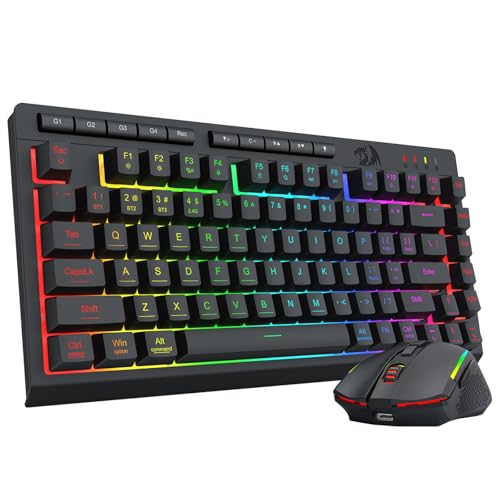
Redragon Wireless Gaming Keyboard and Mouse Combo, 75% Portable, Black | Bluetooth/2.4G/USB-C Wired, RGB Backlit, Quiet Rechargeable Macro Membrane Keyboard & 12800 DPI Mouse for Win/MAC
One of the home product options compared in this guide.
View on Amazon
Redragon K552 Mechanical Keyboard, LED Gaming Keyboard with Red Switches | 87-Key TKL Compact, Anti-Ghosting, Metal Frame for PC Gaming & Typing, Beginner-Friendly, Redragon Classic Gaming Keyboard
One of the home product options compared in this guide.
View on Amazon
Corsair K55 CORE TKL RGB Gaming Keyboard – Tenkeyless, 8-Zone RGB, Quiet Membrane Keys, Spill Resistant, Media Keys, 1000Hz Polling – NA Layout – Black
One of the home product options compared in this guide.
View on Amazon
SteelSeries Apex 3 TKL Gaming Keyboard - White | Tenkeyless Compact Form Factor — 8-Zone RGB Illumination — Water and Dust Resistant — Whisper-Quiet Gaming Switch
One of the home product options compared in this guide.
View on Amazon
HyperX Alloy Origins Core - Tenkeyless Mechanical Gaming Keyboard, Software Controlled Light & Macro Customization, Compact Form Factor, RGB LED Backlit, Linear HyperX Red Switch,Black
One of the home product options compared in this guide.
View on Amazon
Razer BlackWidow V4 TKL Wireless Gaming Keyboard, Orange Switches | Hot Swappable, Wireless & Bluetooth, Multi-Function Roller & Control Buttons, Chroma RGB, Long Battery Life, HyperSpeed
One of the home product options compared in this guide.
View on Amazon
AULA WIN68 HE Mechanical Gaming Keyboard 60%, Hall Effect Magnetic Switch, Fast Trigger Mode Adjustable Actuation, 8000Hz Polling Rate, RGB Backlit, Wired Black Keyboard for Laptop/PC Gamer
One of the home product options compared in this guide.
View on Amazon
Corsair K70 PRO TKL RGB Magnetic-Mechanical Wired Gaming Keyboard – Black | QWERTY NA, Pre-Lubricated CORSAIR MGX Hyperdrive Adjustable Switches, Rapid Trigger Mode, 8000Hz Hyper-Polling
One of the home product options compared in this guide.
View on Amazon- SteelSeries Apex 3 TKL – best for a quiet compact board with water and dust resistance
- Corsair K55 CORE TKL – best for a quiet membrane board with a stated 1000Hz polling rate
- Redragon K552 – best for a first mechanical TKL with red switches
- Logitech G413 TKL SE – best for tactile switches from a big brand
- HyperX Alloy Origins Core – best for a software-driven mechanical TKL with linear switches
- Razer BlackWidow V4 TKL Wireless – best for wireless play plus hot-swap
- Corsair K70 PRO TKL – best for rapid trigger and 8000Hz polling
- Runner-ups (smaller than TKL): Redragon 75% combo, AULA WIN68 HE 60%
Spec table at a glance
| Model | Switch type | Key details from the title | Best for |
|---|---|---|---|
| SteelSeries Apex 3 TKL (black and white listings) | Quiet gaming switch (check the listing for design) | 8-zone RGB, water and dust resistant | Quiet desks |
| Corsair K55 CORE TKL | Quiet membrane | 8-zone RGB, spill resistant, 1000Hz polling | Budget TKL |
| Redragon K552 | Mechanical, red switches | 87 keys, metal frame, LED | Beginners |
| Logitech G413 TKL SE | Mechanical, tactile | Anti-ghosting, Windows and macOS | Everyday play |
| HyperX Alloy Origins Core | Mechanical, linear red | RGB, software macros | Customizers |
| Razer BlackWidow V4 TKL Wireless | Mechanical, orange | Hot-swappable, Bluetooth, HyperSpeed, Chroma RGB | Wireless play |
| Corsair K70 PRO TKL | Magnetic-mechanical | Rapid Trigger, 8000Hz polling, adjustable switches | Competitive FPS |
| Redragon 75% combo (runner-up) | Membrane | Bluetooth/2.4G/wired, mouse included | Starter set |
| AULA WIN68 HE 60% (runner-up) | Hall effect | 8000Hz polling, adjustable actuation, wired | Budget speed |
The boards, one at a time
SteelSeries Apex 3 TKL: black and white listings
Two listings share this model: a black version and a white version, with near-identical wording. Both describe a tenkeyless compact form factor, 8-zone RGB lighting, water and dust resistance (the black listing states IP32) and a whisper quiet gaming switch. Treat them as the same keyboard in two colors and check which has the better offer at the moment. SteelSeries does not name the switch design in these titles, so confirm that on the listing. The lighting uses zones, not per-key control. Because the model is a few steps above the cheapest membrane boards, it makes sense mainly if the quiet switch and the dust and water rating matter to you; otherwise a plain budget board does the same job.
- Pros: quiet design; stated water and dust resistance; two color choices.
- Cons: zone lighting only; switch design not named in the title.
Who it’s for: players who share a room or work near drinks. Who should skip it: anyone who wants hot-swap or macro keys.
Corsair K55 CORE TKL: the quiet membrane budget pick
This listing describes a tenkeyless membrane board with 8-zone RGB, spill resistance, media keys and a 1000Hz polling rate in an NA layout. It is the plainest membrane option on the page, which is a compliment when you want a quiet board that handles typing and games. It does not offer mechanical feel, hot-swap or macro keys. Compared with the Apex 3, the title gives a polling figure but no rating for water. The NA layout wording means a North American key arrangement, so check the Enter key shape if you are used to another standard. For the price tier, this is the listing to beat when someone asks for a quiet TKL that just works.
- Pros: quiet membrane keys; 1000Hz polling stated; media keys.
- Cons: no mechanical feedback; zone lighting.
Who it’s for: budget-minded shooters. Who should skip it: typists who want a crisp mechanical press.
Redragon K552: an 87-key mechanical starter
The K552 shows up with red switches, an 87-key tenkeyless layout, a metal frame, anti-ghosting and LED backlighting, and is pitched as beginner-friendly. Red switches are linear, so presses are smooth and not bumpy, which suits quick taps. A metal frame adds weight on the desk. The listing talks about LED backlighting rather than full RGB per-key control, so lighting is basic. A metal frame usually makes a board feel sturdier and less likely to flex, but it also makes the keyboard heavier to carry, which matters for LAN bags. Red switches are quick to press, and some players find them easy to double-tap by accident until they adjust.
- Pros: mechanical red switches; metal frame; classic 87-key TKL.
- Cons: basic lighting; no wireless.
Who it’s for: first-time mechanical buyers. Who should skip it: people who want a per-key lighting show.
Logitech G413 TKL SE: tactile and compact
The title says tactile switches, anti-ghosting, compatibility with Windows and macOS and a compact design. That makes it a good fit for typists who like a small bump on each press while still gaming. The listing does not describe lighting zones or software, so check those details. If you decide you miss the number pad later, a full-size G413 SE also exists in the same family, so you are not locked into a layout. Tactile switches suit people who type a lot between matches, since the bump gives a small confirmation of each press without the full noise of a clicky switch.
- Pros: tactile switches; Windows and macOS named; compact layout.
- Cons: lighting and software are not described; no wireless.
Who it’s for: mixed typing and gaming. Who should skip it: wireless buyers.
HyperX Alloy Origins Core: software-controlled linear TKL
The Alloy Origins Core listing features a tenkeyless mechanical design with software-controlled lighting and macros, RGB LED backlighting, a compact form factor and linear HyperX Red switches. The software mention is the differentiator; you can save profiles and remap keys. As with any software-driven board, check whether profiles live on the board or only inside the app. Linear red switches are a common starting point for fast shooters because they have no bump to overcome, and the compact body keeps the mouse area open. The title does not mention wireless, a wrist rest or hot-swap, so assume none of them.
- Pros: software for lighting and macros; linear red switches; compact.
- Cons: wired only per the title; software dependence for custom profiles.
Who it’s for: players who like to customize. Who should skip it: buyers who want hot-swap.
Razer BlackWidow V4 TKL Wireless: wireless, hot-swap and a roller
This listing packs a lot into the title: orange switches, hot-swappable sockets, wireless and Bluetooth connections, a multi-function roller and control buttons, Chroma RGB, long battery life and HyperSpeed. HyperSpeed is Razer’s wireless link name. Hot-swap here is the only such claim among the tenkeyless picks. The battery life claim is a seller statement, so look for the conditions behind it. As the only wireless full TKL here, it carries a premium over wired rivals. The multi-function roller and control buttons give quick access to volume and similar controls without reaching for a function layer, which is a nice convenience if you switch between game audio and voice chat. Orange switches are named in the title; confirm their feel on the listing, since brands use color names differently.
- Pros: hot-swap sockets; wireless modes; extra control buttons.
- Cons: battery claim unspecified; higher price tier.
Who it’s for: players who want cable-free desks. Who should skip it: buyers on a tight budget.
Corsair K70 PRO TKL: magnetic switches and 8000Hz
The K70 PRO TKL is the speed-focused listing: magnetic-mechanical wired design, pre-lubricated MGX Hyperdrive adjustable switches, Rapid Trigger mode and 8000Hz hyper-polling. The adjustable switches let you change actuation, and Rapid Trigger resets a key as soon as it rises. These features are most useful in fast shooters. Check tournament rules if you play organized events, as some have their own policies. The pre-lubricated claim suggests smoother travel out of the box, but it is a seller statement. Because this listing is a wired board, it is the one to pick when you want maximum speed and do not care about cutting the cord.
- Pros: adjustable actuation; Rapid Trigger; 8000Hz polling.
- Cons: highest price tier here; requires software tuning to get the full benefit.
Who it’s for: serious FPS players. Who should skip it: casual players and typists.
Runner-up: Redragon 75% wireless combo (not a TKL)
Not a tenkeyless keyboard – it is a 75 percent layout, which is smaller than a TKL, and it ships as a keyboard-and-mouse combo. The listing says Bluetooth, 2.4G and USB-C wired use, RGB backlight, a quiet rechargeable macro membrane keyboard and a 12800 DPI mouse for Windows and Mac. The mouse is a bonus; the keyboard is a different layout from a real TKL, so arrows and function keys may be arranged differently. It is included because buyers searching for a tenkeyless board often land on compact combos like this, and it is better to describe the trade clearly than to hide it. If you need a mouse anyway, the bundle can be good value; if you already own one, look elsewhere.
- Pros: three connection modes; mouse included; quiet membrane.
- Cons: not a true TKL; combo mouse quality is not described.
Who it’s for: a portable starter setup. Who should skip it: players who want a standard TKL layout.
Runner-up: AULA WIN68 HE (60%, Hall effect)
Not a tenkeyless keyboard – the title says 60%, which drops the function row and arrow cluster. It lists Hall effect magnetic switches, a fast trigger mode with adjustable actuation, 8000Hz polling and wired RGB. It is here because it offers speed features at a lower price tier than the K70 PRO, but expect layer-key shortcuts for missing keys. If you already know you need dedicated arrow keys and a function row, you will likely be happier with a true TKL from this page. Adjustable actuation is only valuable if you are willing to spend time tuning it in software.
- Pros: adjustable actuation; 8000Hz polling; very small footprint.
- Cons: not a TKL; fewer dedicated keys.
Who it’s for: speed-focused players on tight desks. Who should skip it: anyone who needs a function row.
How we picked these
We began with the actual listings tied to this keyword and kept the ones whose titles describe a tenkeyless or near-tenkeyless layout. Specifications come from published product titles, manufacturer documentation and buyer reviews, and we flag any claim the listing does not support. Nobody on the team used or measured these units. The two Apex 3 listings are grouped because they appear to be the same model in two colors, and the two smaller-layout boards are labeled as runner-ups.
What to look for in a tenkeyless gaming keyboard
Layout honesty: TKL versus 75 and 60 percent
A true TKL keeps the function row, navigation cluster and arrows. A 75 percent board compresses them into a tighter grid and a 60 percent board removes them. Always count the keys: 87 is the classic TKL count, while 68 points to a smaller board. Titles that say 60% or 75% are not tenkeyless in the strict sense.
Switch family
Linear switches (like red) are smooth and quiet; tactile switches add a bump; clicky switches add sound. Membrane keys are the quietest and lowest cost, but individual keys cannot be swapped. Magnetic or Hall effect switches use sensors and allow adjustable actuation points and, on some boards, Rapid Trigger.
Polling rate and latency
Standard gaming keyboards report at 1000Hz. Listings now advertise 8000Hz, which cuts the reporting interval, but the real-world difference is small for most players and may demand a good USB port and a capable CPU. Wireless links add their own latency, with dongle modes usually faster than Bluetooth.
Rapid Trigger and adjustable actuation
Magnetic boards can set how far a key must travel before it registers, and Rapid Trigger resets the key the moment it moves back up, which supports sharp strafing in shooters. The benefit shows most in movement-heavy games. Check the software and, if you compete, the tournament rule book.
Keycaps, build and noise
Plastic cases keep weight down; metal frames or plates add stiffness. Keycaps are commonly ABS or PBT, and the material changes how they wear: PBT usually resists shine longer. Open-frame boards can rattle if keycaps sit loose, so scan buyer comments for a hollow or pinging sound. If you stream or voice chat, a quiet membrane or linear switch makes a mic less likely to pick up keystrokes.
Lighting and software
Zone lighting splits the keyboard into blocks; per-key RGB lets you color each key. Software unlocks macros, profiles and effects, but it also adds a background app. If you want a board that works the same on any machine, favor listings that mention on-board memory or no-software operation, and keep in mind that the quiet membrane picks on this page lean simple on purpose.
Connection and portability
Cables suit fixed desks. A wireless TKL such as the BlackWidow V4 gives you a clean desk but needs charging. Multi-mode boards offer Bluetooth for laptops and a dongle for games.
Which switch family fits which player
| Player type | Good fit | Why |
|---|---|---|
| Quiet-room gamer | Membrane or quiet linear | Soft bottom-out, low noise |
| Typist who also games | Tactile | Bump confirms each press |
| Fast shooter | Linear or magnetic | Smooth, adjustable travel |
| Tinkerer | Hot-swap mechanical | Change switches later |
Worked example: mouse room on a 100 cm desk
Take a 100 cm desk. A full-size keyboard is often around 44 cm wide and a TKL is typically around 36 cm, though sizes vary by model. With a 45 cm mousepad, the full-size leaves roughly 11 cm free between pad and edge, and the TKL leaves roughly 19 cm. Players using low sensitivity and long mouse swipes feel that extra space. Measure your desk and your usual swipe length before choosing.
Mistakes buyers make
First, buying a 60 or 75 percent board labeled as compact and expecting a TKL layout. Second, assuming a higher polling rate always wins, when most gains show only on fast displays and fast hands. Third, picking the wrong switch for the room: tactile and clicky boards are louder than membrane. Fourth, ignoring software: Rapid Trigger and macros need configuration. Fifth, forgetting that a numeric pad is gone, then needing one for work. Sixth, believing that wireless always means delay; a 2.4 GHz link is often good enough for most players, while Bluetooth is the weaker choice for fast games. Seventh, overlooking keyboard region: an NA or US layout will differ from other regional layouts in Enter shape and symbol placement. Finally, skipping return terms on a keyboard you cannot try in person, since feel is personal and a board that seems fine on paper can annoy you after a few evenings.
Verdict
For the best quiet budget pick, the Corsair K55 CORE TKL or the Apex 3 TKL does the job. For a first mechanical TKL, the Redragon K552 and Logitech G413 TKL SE are the straightforward choices. If you want wireless and hot-swap, the Razer BlackWidow V4 TKL Wireless is the standout. For competitive speed, the Corsair K70 PRO TKL is the most complete listing, with the AULA WIN68 HE as a smaller, cheaper runner-up. Whatever you choose, read the final listing text for switch type, region and return terms, because those details change faster than any article can.
Related guides
Frequently asked questions
What is a tenkeyless gaming keyboard?
A tenkeyless, or TKL, keyboard is a standard layout without the number pad on the right. It keeps the letter keys, function row and arrow cluster, but removes the ten-key block, so the board is narrower. That leaves more room to swing a mouse, which is why it is popular for shooters. You give up quick numeric entry, which matters for spreadsheets.
Is a 75 or 60 percent board the same as tenkeyless?
No. A tenkeyless board keeps the full function row and navigation cluster, while 75 percent boards squeeze those keys into a tighter block and 60 percent boards drop the function row and arrows. If a listing says 60 or 75 percent, it is a smaller layout than TKL. We label such listings as runner-ups so you can compare honestly.
Do I need Hall effect or rapid trigger switches?
Not for most players. Hall effect boards use magnets to sense key position, which allows adjustable actuation points and a rapid trigger mode that resets the key as soon as you release. Competitive shooter players value this, but it adds cost, and some tournaments have their own rules. Casual players are rarely limited by a standard switch.
Are wireless TKL keyboards fast enough for gaming?
Many are, particularly those with a 2.4 GHz receiver. Bluetooth adds more latency than a proprietary wireless link, so players who are sensitive to delay usually pick the dongle mode or a cable. Check the listing for the connection types offered, how the board charges, and whether lighting affects the battery claim.
Can I put different switches on these keyboards?
Only on hot-swap models. The Razer BlackWidow V4 TKL listing mentions hot swappable switches, which allows switch changes without soldering. Most of the other titles here do not claim hot-swap, so treat the installed switches as permanent. Membrane and magnetic boards use their own designs and are not interchangeable the same way.