
Key takeaways
- Very affordable entry into DLSS 4 gaming.
- High-refresh 144-165Hz displays across the board.
- Capable CPUs like the i7-13650HX in the Legion LOQ.
- Solid 1080p performance in current titles.
What's inside
NVIDIA’s RTX 5050 laptop GPU is aimed squarely at players who want a genuine gaming machine without stretching into flagship territory. It brings the Blackwell architecture and DLSS 4 down to the most affordable tier of dedicated graphics, making high-refresh 1080p gaming accessible to a much wider audience in 2026.
This review examines what an RTX 5050 laptop realistically delivers, which configurations offer the strongest value, and how the leading options from Acer, ASUS, Lenovo, and Alienware differ in build, cooling, and display quality.
As an Amazon Associate we earn from qualifying purchases at no extra cost to you.



🎮 Get More From Your Setup — Free
Prime Gaming gives you free PC games every month, in-game loot, and a free Twitch channel sub — plus fast free shipping on all the gear above. New members get a 30-day free trial.
Watch: Laptop 5050: Review & Buyer’s Guide — Video Review
Design & Build
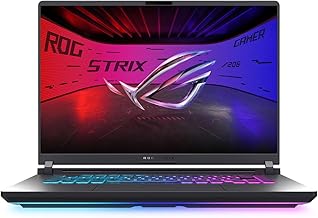
The RTX 5050 shows up across a variety of chassis. The Acer Nitro V 15 keeps costs low with a 15.6-inch 165Hz IPS panel and a no-frills but sturdy body, while the ASUS TUF Gaming F16 steps up to a 16:10 165Hz display and military-grade durability. The Lenovo Legion LOQ adds a refined 144Hz screen with G-Sync, and the Alienware 16 Aurora brings a premium WQXGA panel. Most share plastic-heavy but reliable construction with airflow-focused venting.
Performance
With CPUs like the Intel Core i5-13420H or i7-13650HX, the RTX 5050 delivers smooth 1080p gaming at high settings in most modern titles, and DLSS 4 frame generation helps push demanding games to high frame rates. The 8GB of GDDR7 VRAM is adequate for 1080p, though texture-heavy games at max settings can approach that limit. The 16GB RAM and fast PCIe SSD configurations keep the overall experience responsive for gaming and everyday work alike.
Pros & Cons
- Very affordable entry into DLSS 4 gaming.
- High-refresh 144-165Hz displays across the board.
- Capable CPUs like the i7-13650HX in the Legion LOQ.
- Solid 1080p performance in current titles.
- 8GB VRAM can limit max-setting texture headroom.
- 1440p gaming often needs upscaling to stay smooth.
Alternatives to Consider
If you can spend a bit more, an RTX 5060 laptop adds meaningful headroom for 1440p and future titles. The Acer Nitro V with the Core 7 240H and a 180Hz WUXGA panel is a strong mid-tier step up within the 5050 family itself. Those chasing a premium screen should weigh the Alienware 16 Aurora, whose WQXGA display outclasses the budget IPS panels, even if it costs more.
Frequently Asked Questions
Is the RTX 5050 enough for modern games?
For 1080p high settings, yes. DLSS 4 makes even demanding titles playable at good frame rates.
Is 8GB of VRAM a problem?
It is fine for 1080p in most games. A few texture-heavy titles at maximum settings may require dialing back a notch.
Which CPU should I look for?
An i5-13420H handles gaming well; the i7-13650HX in the Legion LOQ gives extra multitasking and streaming muscle.
Can these run on battery for gaming?
Briefly. Like all gaming laptops, they perform best plugged in; unplugged play sharply reduces frame rates and battery life.
Verdict
An RTX 5050 laptop is the most budget-friendly way to get real DLSS 4 gaming in 2026. The Acer Nitro V 15 leads on value, the Lenovo Legion LOQ offers the best CPU and G-Sync combo, and the ASUS TUF Gaming F16 balances durability with a tall 16:10 screen. For pure 1080p players watching their wallet, this tier is hard to beat.







