
Key takeaways
- Enormous 18-inch 300Hz display that is immersive for gaming and productivity.
- Top-tier components up to the RTX 5090 and Core Ultra 9 275HX.
- Serious cooling with quad-fan designs on flagship configurations.
- Generous memory and storage options reaching 64GB RAM and 2TB SSD.
What's inside
The Alienware 18 Area-51 is Dell’s statement piece, an 18-inch desktop replacement that refuses to apologize for its size. This is not a laptop you slip into a backpack for a coffee-shop session; it is a portable powerhouse built to deliver desktop-class frame rates wherever you set it down. For enthusiasts who want the biggest screen and the fastest silicon money can buy, it demands a serious look.
In this review we dig into what the Area-51 lineup actually offers across its many configurations, from RTX 5070 builds to the flagship RTX 5090, and whether that massive 18-inch, 300Hz display justifies the footprint. If you have been eyeing the reborn Area-51 badge, here is what you need to know.
As an Amazon Associate we earn from qualifying purchases at no extra cost to you.




🎮 Get More From Your Setup — Free
Prime Gaming gives you free PC games every month, in-game loot, and a free Twitch channel sub — plus fast free shipping on all the gear above. New members get a 30-day free trial.
Watch: Alienware 18 area-51 Gaming Laptop Review: Review & Buyer’s Guide — Video Review
Design & Build
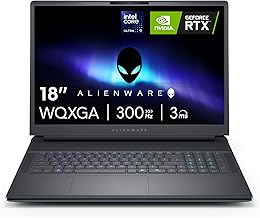
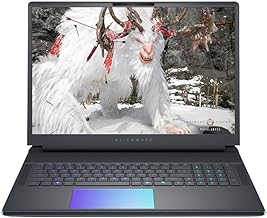
Everything about the Area-51 is engineered for thermal headroom. The chassis is large and purposeful, with quad-fan cooling on the top configurations to keep the Intel Core Ultra 9 275HX and high-wattage GPUs from throttling. The 18-inch WQXGA panel runs at 300Hz with a 3ms response time, and the Liquid Teal colorway gives the machine a distinctive identity. AlienFX RGB lighting, a comfortable backlit keyboard, and a 4K or FHD IR camera round out a build that feels every bit the premium flagship. This is unapologetically a desk-bound machine.
Performance
Raw power is the whole point. The Intel Core Ultra 9 275HX anchors nearly every configuration, and GPU options scale from the RTX 5070 all the way to the RTX 5090. The RTX 5080 builds with 32GB or 64GB of DDR5 hit the sweet spot for high-refresh 1440p gaming with plenty of headroom, while the RTX 5090 model with 64GB DDR5 and a 2TB PCIe SSD is a genuine desktop replacement that eats demanding titles alive. Wi-Fi 7 keeps online play snappy, and the quad-fan cooling on the top SKUs lets these components stretch their legs during long sessions without dramatic thermal throttling.
Pros & Cons
- Enormous 18-inch 300Hz display that is immersive for gaming and productivity.
- Top-tier components up to the RTX 5090 and Core Ultra 9 275HX.
- Serious cooling with quad-fan designs on flagship configurations.
- Generous memory and storage options reaching 64GB RAM and 2TB SSD.
- Heavy and bulky, making true portability impractical.
- Short battery life under load, as expected from this class.
- High price on the RTX 5080 and 5090 configurations.
Alternatives to Consider
If 18 inches is more than you need, the Alienware 16 Area-51 delivers similar internals in a more manageable body. Buyers who want the absolute ceiling should target the RTX 5090 configuration with 64GB DDR5 and a 2TB SSD, while the RTX 5080 builds offer nearly the same experience for less. For those on a tighter budget, the RTX 5070 and RTX 5060 Area-51 variants still bring the big display and strong Intel silicon at a friendlier entry point.
Frequently Asked Questions
Is the Alienware 18 Area-51 portable?
Not really. At 18 inches with heavy cooling hardware, it is a desktop replacement meant to stay mostly in one place and plugged in.
Which GPU configuration is the best value?
The RTX 5080 builds strike the best balance of price and performance, delivering excellent high-refresh gaming without the premium of the flagship 5090.
How much RAM do I need in this laptop?
32GB handles gaming comfortably. Opt for the 64GB configurations if you also do heavy content creation or run demanding multitasking workloads.
Does the 300Hz display make a difference?
For competitive and fast-paced games, yes. Paired with high frame rates from the top GPUs, the 300Hz panel delivers exceptionally smooth motion.
Verdict
The Alienware 18 Area-51 is a triumph of no-compromise engineering. If you want the largest screen and fastest silicon in a single machine, the RTX 5080 and RTX 5090 configurations are outstanding. Just go in knowing this is a stay-at-home flagship, not a travel companion. For raw performance and immersive scale, few laptops make a bigger statement.







