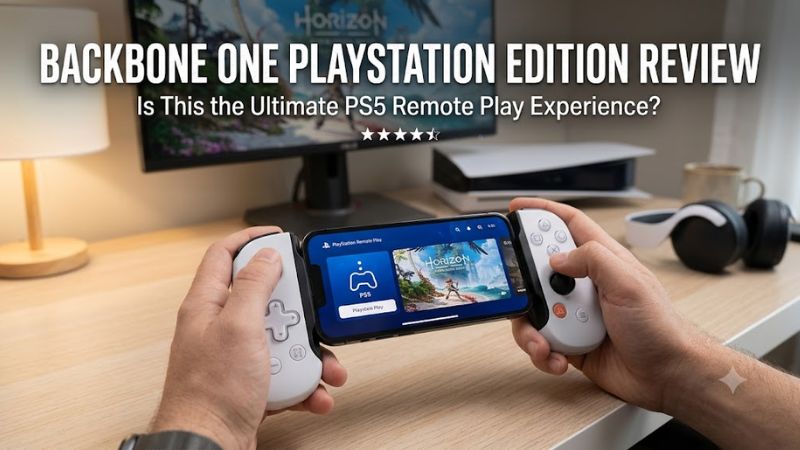
The Backbone One PlayStation Edition is a mobile gaming controller designed for players who want to play smartphone games with physical controls or stream PS5 and PS4 games through PlayStation Remote Play. Its compact design, PlayStation-inspired buttons, and direct phone connection make it appealing to mobile gamers, but its value depends on phone compatibility, comfort, and price.
Unlike a standalone handheld console, the Backbone One relies on a compatible smartphone to run games or stream them from another device. It does not replace a PS5 or reproduce every feature of Sony’s DualSense controller.
This review examines the Backbone One PlayStation Edition’s design, specifications, performance considerations, compatibility, pricing, and alternatives. The assessment uses manufacturer documentation and published third-party reviews rather than claiming firsthand testing by Real Gaming News.
Backbone One PlayStation Edition
The Backbone One PlayStation Edition is a good option for players who frequently use PS Remote Play or play controller-compatible mobile games. Its direct phone connection eliminates the need for a separate Bluetooth pairing process, and its compact design makes it convenient to carry.
However, the slim grips may not suit everyone, and the controller lacks the DualSense’s advanced haptic feedback and adaptive triggers. Buyers must also select the correct Lightning or USB-C version.
Best for: Mobile gamers who want a portable controller for supported smartphone games and PlayStation Remote Play.
Biggest advantage: A compact, PlayStation-style controller that connects directly to a compatible phone.
Biggest drawback: Limited ergonomics compared with a full-size controller and dependence on a compatible smartphone.
Price consideration: Manufacturer-listed prices observed on October 27, 2026, differed by connector version. The USB-C model was listed at $69.99 but marked sold out, while the Lightning model was listed at $99.99. Availability and prices can change.
Backbone One PlayStation Edition Specifications
The Backbone One is a telescoping mobile controller that connects to a smartphone through its physical port. Its PlayStation Edition features a white finish and PlayStation-symbol face buttons.
| Specification | Details |
| Product category | Mobile gaming controller |
| Design | Telescoping smartphone controller |
| Finish | PlayStation-inspired white design |
| Connection | Lightning or USB-C, depending on version |
| Controls | Analog sticks, D-pad, face buttons, shoulder buttons and analog triggers |
| Built-in battery | No rechargeable controller battery |
| Charging | Pass-through charging on supported configurations |
| Software | Backbone app |
| Console gaming | PS Remote Play on compatible devices |
| Mobile gaming | Supported controller-compatible games |
| Phone included | No |
Specifications can differ between product generations and revisions. Buyers should verify the exact version, connector, audio support, and phone-case compatibility before purchasing.
Design and Build Quality
The Backbone One PlayStation Edition uses a compact, expandable design that holds a smartphone between two controller sections. Its white finish and PlayStation-symbol buttons give it a look that complements a PS5 setup.
Because the phone serves as the display and gaming platform, players do not need to carry a separate screen. The controller can be packed more easily than a full-size gamepad paired with a phone mount.
The trade-off is grip size. The Backbone One prioritizes portability, so it does not provide the same substantial handholds as a conventional DualSense controller. Players with larger hands or those who regularly play for several hours may prefer a larger controller.
Controls and Button Layout
The controller includes the main inputs expected from a modern gamepad:
- Two analog sticks for movement and camera control.
- A D-pad for directional input.
- PlayStation-symbol face buttons.
- Shoulder buttons and analog triggers.
- Additional buttons for shortcuts and app functions.
TechRadar’s published review praised aspects of the controller’s construction and responsiveness while identifying limitations involving the D-pad, auxiliary-button placement, and touchpad interaction during Remote Play.
These considerations matter because PlayStation games sometimes rely on touchpad input for maps, menus, or other functions. The Backbone One is a compact mobile controller, not a complete replacement for every DualSense feature.
Phone Cases and Physical Fit
Phone compatibility involves more than choosing the correct connector. A thick case, oversized camera bump, unusual phone dimensions, or connector placement can affect how securely a smartphone fits.
The second-generation Backbone One includes magnetic adapters designed to accommodate more phone and case configurations. Even so, check compatibility for your exact handset and case before buying.
If the controller only fits your phone after removing its case, consider whether that inconvenience is acceptable for everyday use.
Gaming Performance: What to Expect
The Backbone One’s direct phone connection is a practical advantage because it avoids a separate wireless controller connection. However, it does not increase the phone’s processing power or automatically improve a game’s frame rate.
Actual gaming performance depends on the smartphone, the game, its settings, and—in streaming scenarios—the quality of the network connection.
Native Mobile Games
For controller-compatible mobile games, the Backbone One replaces touchscreen buttons with physical inputs. Analog sticks and triggers can be more convenient for games involving movement, aiming, driving, or other actions that benefit from dedicated controls.
Compatibility varies by game. Some titles support gamepads natively, while others rely on touchscreen input or provide only partial controller support.
The Backbone app can help players find supported games and gaming services, but it does not make every smartphone game compatible with a controller.
PS5 and PS4 Remote Play
PlayStation Remote Play allows players to stream compatible PS5 or PS4 games to a supported phone. The console runs the game, while the phone displays the streamed image and the controller sends player input.
To use Remote Play, you need:
- A compatible PS5 or PS4 with Remote Play enabled.
- The PS Remote Play app and a PlayStation account.
- A supported smartphone and controller configuration.
- A reliable internet connection.
Sony recommends a minimum upload and download speed of 5 Mbps, with 15 Mbps or higher recommended for a better experience. Actual results depend on latency, network stability, and the connection between the console and phone.
The Backbone One cannot compensate for unstable Wi-Fi, network congestion, or poor mobile coverage. A direct controller connection addresses the controller-to-phone link, not the entire streaming path.
Does It Offer the Full DualSense Experience?
No. Although the PlayStation Edition uses familiar PlayStation-style controls, it does not reproduce all the features of a DualSense controller.
The Backbone One lacks the DualSense’s advanced haptic feedback and adaptive triggers. Certain touchpad actions during Remote Play may also require interaction with the phone screen rather than a dedicated touchpad surface.
Players who value those features in PS5 games should keep a standard DualSense controller as their primary option.
Compatibility: Which Phone Should You Choose?
The Lightning and USB-C versions are designed for different devices. Selecting the wrong version can make the controller unsuitable for your phone.
| Device | Compatibility guidance |
| iPhone with Lightning | Choose the Lightning version and verify the specific model |
| iPhone 15 or newer with USB-C | Choose a compatible USB-C version |
| Android phone with USB-C | Verify supported-device status and physical fit |
| PS5 or PS4 | Requires a compatible phone running PS Remote Play |
| Other devices | Wired use depends on the device, connection, and supported functionality |
For Android Remote Play, Backbone identifies the PlayStation Edition as the supported Backbone One model on Sony’s compatibility list. On iOS, other Backbone One editions can also support Remote Play.
Before purchasing, confirm your phone’s connector, operating-system requirements, dimensions, and case compatibility. Do not assume that every USB-C phone will fit or support every advertised function.
Backbone App and Subscription Costs
The Backbone app provides an interface for accessing compatible games and gaming services. It can simplify switching between supported titles and remote-play applications.
Some additional app functions require Backbone+, the company’s subscription service. However, a subscription is not required simply to operate the controller with supported games.
Potential additional costs include:
- The controller itself.
- Paid mobile games or gaming-service subscriptions.
- Backbone+ features that require a subscription.
If your main use is playing compatible mobile games or connecting to PS Remote Play, basic controller functionality may be sufficient. Check the current subscription terms if you want particular integrations or cross-device features.
Battery Life and Charging
The Backbone One does not have a built-in rechargeable battery. It draws power from the connected smartphone, removing the need to recharge the controller separately.
Its pass-through charging feature allows a compatible charger to supply power to the phone while you play. This can be useful for longer gaming sessions, although it does not eliminate smartphone battery consumption.
Demanding games, high screen brightness, and video streaming can still drain the phone quickly.
To manage battery use:
- Connect a compatible charger when playing for extended periods.
- Reduce screen brightness when practical.
- Use a stable Wi-Fi connection when appropriate.
- Check the exact controller revision for audio and charging support.
The lack of a separate controller battery is convenient, but your phone remains the limiting factor for extended sessions.
Backbone One PlayStation Edition Price and Value in 2026
Manufacturer-listed US prices observed on October 27, 2026, differed between the connector versions.
| Version | Listed price | Availability observed |
| PlayStation Edition, Lightning, second generation | $99.99 | Listed on the manufacturer’s product page |
| PlayStation Edition, USB-C, second generation | $69.99 | Marked sold out |
These are observed manufacturer listings, not guaranteed prices across all US retailers. The USB-C price may reflect a promotion rather than a permanent price reduction, and availability can change.
At $69.99, the USB-C version represents a more appealing purchase if it becomes available at that price and fits your phone. At $99.99, the Lightning model makes more sense for existing Lightning iPhone owners who expect to use it regularly.
The most useful question is how frequently you will play away from your television. If mobile gaming is a regular part of your routine, the convenience may justify the cost. If you primarily play PS5 games at home, a conventional controller may offer better value.
Is Backbone+ Worth Paying For?
Backbone+ is worth considering only if its additional features match your needs. Basic controller operation in supported games does not require a subscription.
Before paying, check which app features are currently included, which require a subscription, and whether your preferred gaming services have separate fees.
Pros and Cons
Pros
- Compact design for portable smartphone gaming.
- PlayStation-inspired controls and styling.
- Direct phone connection without a separate Bluetooth pairing process.
- Support for compatible native mobile games and Remote Play.
- No separate controller battery to recharge.
- Pass-through charging for supported configurations.
Cons
- Lightning and USB-C versions are not interchangeable.
- Slim grips may be less comfortable for some players.
- No DualSense-style advanced haptic feedback or adaptive triggers.
- Touchpad-related actions can be less convenient.
- Long sessions still consume smartphone battery power.
- Some additional app features require Backbone+.
- Remote Play remains dependent on network quality.
Backbone One PlayStation Edition vs. Alternatives
The best alternative depends on whether you prioritize portability, traditional controller ergonomics, or a dedicated handheld gaming device.
| Controller or device | Best for | Main advantage | Main trade-off |
| Backbone One PlayStation Edition | Smartphone gaming and Remote Play | Compact design and PlayStation styling | Phone compatibility and smaller grips |
| Sony DualSense | Traditional PS5 gaming | Full-size controls and DualSense features | Requires a separate phone mount for handheld phone gaming |
| Backbone Pro | Mobile gamers wanting additional controls | Larger joysticks, rear buttons, and customization | Different form factor and price |
| PlayStation Portal | Dedicated PS5 Remote Play | Integrated display and controller layout | Requires a PS5 for its Remote Play function |
Backbone One vs. DualSense
Choose the Backbone One if you want a controller that travels with your phone and is easy to carry. Choose the DualSense if you prioritize full-size ergonomics, adaptive triggers, and advanced haptic feedback.
A DualSense can also be used with supported mobile devices, although a separate mount is needed to create a similar handheld setup.
Backbone One vs. Backbone Pro
The standard Backbone One prioritizes compact portability. The Backbone Pro adds larger joysticks, rear buttons, expanded customization, and wireless compatibility with supported devices.
The standard model is suitable for players who want a lightweight phone controller. The Pro is worth comparing if you prefer more control customization or expect to play for extended periods.
Backbone One vs. PlayStation Portal
The Backbone One uses a smartphone as its display and gaming platform. The PlayStation Portal is a dedicated handheld device designed primarily for streaming compatible games from a PS5.
The Backbone is more flexible if you also play native mobile games and want to use your existing phone. The Portal may suit players who prefer a dedicated PlayStation handheld rather than a phone accessory.
Who Should Buy the Backbone One PlayStation Edition?
The Backbone One is best suited to players who regularly game on a smartphone rather than those who only play on a television.
Buy it if:
- You frequently use PS Remote Play on a compatible phone.
- You play controller-supported mobile games.
- You want a compact alternative to carrying a full-size gamepad.
- You value direct connectivity and pass-through charging.
- You have confirmed that your phone and case fit the correct version.
Skip it if:
- You mainly play PS5 games on a television.
- You want the complete DualSense feature set.
- You prefer larger controller grips.
- Your phone has an incompatible connector or physical fit.
- You rarely play mobile games.
Frequently Asked Questions
Is the Backbone One PlayStation Edition worth buying in 2026?
Yes, if you regularly play supported mobile games or stream PS5 and PS4 games through Remote Play. Its portability and direct phone connection are useful, but its value is lower if you rarely game on your phone.
Does the Backbone One PlayStation Edition require a PS5?
No, the controller can be used with supported native mobile games without a PlayStation console. A PS5 or PS4 is required if you want to stream games from that console using Remote Play.
Does the Backbone One PlayStation Edition work with Android?
Yes, the USB-C PlayStation Edition supports compatible Android phones. For Android Remote Play, Backbone identifies the PlayStation Edition as the supported Backbone One model on Sony’s compatibility list. Verify your phone’s fit and operating-system compatibility before buying.
Do you need a Backbone+ subscription to use the controller?
No, a Backbone+ subscription is not required for basic controller functionality in supported games. Some additional app integrations and features may require a subscription.
Final Verdict
The Backbone One PlayStation Edition is a compelling mobile gaming accessory for players who value portability and frequently use PS Remote Play.
Its strongest features are the direct phone connection, familiar PlayStation controls, compact design, and support for compatible mobile games. Its limitations include compact ergonomics, the absence of advanced DualSense features, and dependence on a compatible phone and reliable network for streaming.
At the observed $69.99 USB-C listing price, it would be an attractive purchase if that version becomes available and fits your phone. At $99.99, the Lightning version is easier to justify for existing Lightning iPhone owners who expect to use it frequently.
Final recommendation: Buy the Backbone One PlayStation Edition if mobile gaming is a regular part of your routine. If you mainly play PS5 games at home, a standard DualSense controller is likely to be a better value.