Key takeaways
- What is the AM5 platform? A clear guide to the LGA1718 socket, DDR5-only memory, A620/B650/X670 and 800-series chipsets, CPU support and cooler fit.
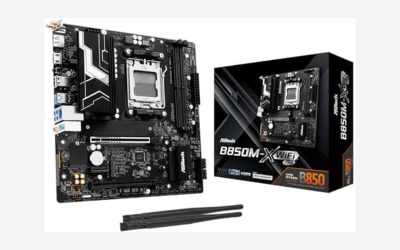
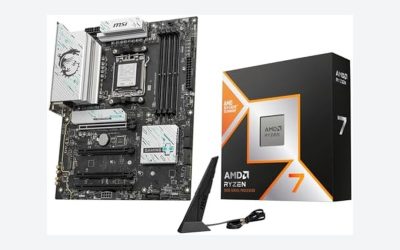
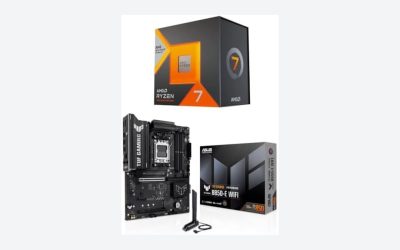
The AM5 platform is AMD’s current desktop processor platform, introduced with the Ryzen 7000 series. It uses the LGA1718 socket, supports only DDR5 memory, and offers PCI Express 5.0 on many boards. Unlike the older AM4 socket, AM5 puts the contact pins on the motherboard instead of the processor. This guide explains what changed, which chipsets exist, which processors fit, how cooler compatibility works, and what to check before you buy a board or a CPU.
The short version of what AM5 is
AM5 is a socket and platform generation. The socket is the physical connector; the platform also includes the chipset, memory type, and expansion options defined for it. AMD launched AM5 in the second half of 2022 as the successor to AM4, and it has since carried several processor families on the same socket.
Three headline traits define it. First, the socket is an LGA design with 1718 contact points, so the pins live in the motherboard socket and the processor has flat contact pads on its underside. Second, it supports DDR5 memory only, with no DDR4 option. Third, it brings newer PCI Express generations and USB capabilities, depending on the chipset. These features arrive at a cost: boards and memory for a new platform are usually more expensive than those for a mature one.
LGA1718 and why the pins moved
On AM4, the processor carried a grid of pins that slid into holes in the socket. AM5 reverses this. The motherboard socket holds delicate spring pins, and the processor has a flat grid of pads. A retention arm and a loading plate press the processor down onto the pins.
For builders, this changes where the risk is. A bent pin now means a damaged motherboard, not a damaged processor, so installation deserves care. Place the processor with the corner marker aligned to the socket marker, let it settle under its own weight, and never press or slide it. If the retention plate does not close easily, stop and re-check alignment instead of forcing it. Power the system down and unplug it before touching anything, and handle the socket area only by the board edges.
Warranty terms often treat bent socket pins as handling damage, so patience here protects your coverage.
DDR5 only and what that means for memory
AM5 uses DDR5 memory exclusively. DDR5 modules look similar to DDR4 but have a different notch position, so they cannot be installed in the wrong slot. Compared with DDR4, DDR5 starts at higher data rates and manages power on the module itself.
AMD’s memory overclock profiles are called EXPO, and many DDR5 kits advertise them; Intel XMP kits may also work, though the board’s memory support list is the safer reference. Enabling the profile in the BIOS is how you reach the advertised speed.
Expect long first boots. DDR5 trains its timings when the configuration changes, and on AM5 this can mean a blank screen for a minute or more at first startup or after a memory change. It is usually normal, so wait before assuming a fault.
AM5 chipsets at a glance
Chipsets decide how many USB ports, storage lanes and expansion options a board can offer. The groupings below are general; individual boards differ, so confirm specifics on the product page.
| Chipset family | Typical tier | What to expect |
|---|---|---|
| A620 | Entry | Lowest cost; usually limited overclocking and fewer high-speed lanes |
| B650 / B650E | Mainstream | Popular value tier; the E variant generally adds PCIe 5.0 for the graphics slot |
| X670 / X670E | High end | More connectivity and lanes, often at higher board cost |
| B850 / X870 / X870E | Newer 800 series | Newer generation with updated connectivity; check each board’s exact features |
Most buyers do not need the top tier. A mainstream chipset covers a single graphics card and one or two fast SSDs, which is what most gaming and general builds use. Choose a higher tier only if you need extra M.2 slots, many USB ports or specific high-speed features.
Processor families that fit AM5
Several processor lines use the socket. The overview below is intended as a guide, and the board maker’s CPU support list is the final authority.
| CPU series | Architecture | Board and BIOS note |
|---|---|---|
| Ryzen 7000 | Zen 4 | First AM5 generation; supported by launch-era boards |
| Ryzen 8000G (APUs) | Zen 4 with integrated graphics | May need a BIOS update on older boards |
| Ryzen 9000 | Zen 5 | 600-series boards often need a BIOS update; 800-series boards generally list support |
| X3D variants | Extra cache models of the above | Same socket; verify BIOS and cooler clearance |
Because support depends on BIOS versions, an older board in a retail box may not recognize a newer processor out of the box. If your board has USB BIOS Flashback, you can update the BIOS without a processor installed; it is not available on all boards, so check the specification list first.
Coolers, brackets and case fit
AMD kept the mounting hole spacing similar to AM4, so many existing coolers can be reused. The mounting hardware is not always identical, though. Some coolers include a new bracket or backplate for AM5, while others use the standard backplate supplied with the board. Check the cooler maker’s compatibility page, and keep any bracket from your existing cooler.
AM5 processors have a distinctive heat spreader with notches around the edges, which hold small components, so it looks different from older processors. Use thermal paste as the cooler maker describes, and press the cooler evenly. Tall air coolers can also collide with memory modules or the case panel, so check cooler height against the case clearance before ordering.
Upgrade path and who should buy AM5
The main appeal of AM5 is a longer upgrade runway. AMD has said it plans to support the socket for several years, which can mean dropping in a newer processor later without a new board. Treat that as an intention, not a guarantee, and avoid paying extra today for an upgrade that may or may not suit your needs.
Picking the processor comes first, and the guide to the best CPU for gaming is a good place to narrow it down. AM5 makes sense when you are building new, want DDR5 and newer storage and graphics lanes, or want to keep a path to future processors. It is harder to justify if you already own DDR4 memory and a working AM4 system that meets your needs. In that case the cost of a new board, new memory and possibly a new cooler adds up.
Use this short checklist before buying:
- Confirm the board chipset matches the features you need.
- Read the CPU support list for your exact processor and note the minimum BIOS version.
- Choose DDR5 memory from the board’s qualified list where possible.
- Check cooler compatibility and case clearance.
- Look for USB BIOS Flashback if the processor is newer than the board.
Related guides
Frequently asked questions
Does an AM5 motherboard work with DDR4 memory?
No. AM5 processors have memory controllers built for DDR5 only, and the motherboard slots are keyed for DDR5 modules, so DDR4 sticks will not physically fit. If you want to keep older DDR4 memory, you need a DDR4 platform such as AM4 or a compatible Intel board. Check the memory type in the board’s specification list before buying any kit.
Do AM4 coolers fit AM5?
In many cases yes, because AMD kept the cooler mounting hole pattern similar between the two sockets. The retention bracket and backplate arrangement can differ, however, and some coolers need a new mounting kit. Check the cooler maker’s compatibility list for AM5 and confirm the bracket in your box is the correct one before building.
Is a BIOS update needed for a new processor on an older AM5 board?
Sometimes. A board built before a newer processor series launched may need a BIOS update to recognize it, and the board maker’s CPU support list shows the minimum version. Some boards offer USB BIOS Flashback, which updates the BIOS without an installed processor. If your board lacks it, the retailer or maker may offer help, so plan before buying.
How long will AM5 be supported?
AMD has publicly said it intends to support the platform for several years, but exact end dates are not a promise you can plan around, and the company’s statements have been updated over time. Check AMD’s current announcements before relying on future processor compatibility. Buy the processor and board you need now, and treat any future upgrade as a bonus.
Why does an AM5 PC take a long time to start the first time?
DDR5 memory goes through a training process the first time it runs with a given configuration, and on AM5 this can take a minute or longer with a blank screen. This is common and usually normal. Leave the PC powered on and do not interrupt it. If the screen stays blank for many minutes, power down, reseat the memory and check the manual.
Written by the Editorial team using published specifications, manufacturer documentation and general technical knowledge. Always confirm CPU and BIOS support on your board maker’s page.