Key takeaways
- Inputs and channels: A single XLR input is fine for solo streamers or podcasters, but co-hosted shows or multi-mic setups need dual XLR inputs or more.
- Phantom power (48V): If you’re using a condenser microphone, confirm the interface supplies 48V phantom power — dynamic mics don’t need it, but many popular studio mics do.
- Sample rate and bit depth: Look for at least 24-bit/192kHz recording if you care about studio-quality audio fidelity for music, vocals, or professional podcasting.
- Built-in mixing features: Streamers and gamers benefit from onboard soundpads, voice effects, and Bluetooth for mixing game audio, chat, and music without extra software.
- Software and compatibility: Check that the interface works with your OS (Mac, Windows, iPad) and comes with usable bundled software, especially if you’re just starting out.
What's inside
Choosing the right audio interface can make or break your streaming, podcasting, or recording setup. With so many options claiming crystal-clear sound, built-in mixers, and RGB flair, it’s easy to end up with a device that doesn’t match how you actually work — whether that’s solo voiceovers, co-hosted podcasts, or full gaming streams with music and soundboards running at once.
This guide breaks down six popular audio interfaces, from studio-grade XLR preamps built for musicians to streaming-focused mixers designed for gamers and content creators. We’ll cover what to look for before you buy, give honest takes on each product’s strengths, and answer the most common questions so you can pick the right interface for your setup and budget.
As an Amazon Associate we earn from qualifying purchases at no extra cost to you.




🎮 Get More From Your Setup — Free
Prime Gaming gives you free PC games every month, in-game loot, and a free Twitch channel sub — plus fast free shipping on all the gear above. New members get a 30-day free trial.
Watch: Best Audio Interface: Top Picks Reviewed — Video Review
How to Choose an Audio Interface
- Inputs and channels: A single XLR input is fine for solo streamers or podcasters, but co-hosted shows or multi-mic setups need dual XLR inputs or more.
- Phantom power (48V): If you’re using a condenser microphone, confirm the interface supplies 48V phantom power — dynamic mics don’t need it, but many popular studio mics do.
- Sample rate and bit depth: Look for at least 24-bit/192kHz recording if you care about studio-quality audio fidelity for music, vocals, or professional podcasting.
- Built-in mixing features: Streamers and gamers benefit from onboard soundpads, voice effects, and Bluetooth for mixing game audio, chat, and music without extra software.
- Software and compatibility: Check that the interface works with your OS (Mac, Windows, iPad) and comes with usable bundled software, especially if you’re just starting out.
The Best Audio Interfaces Reviewed
Focusrite Scarlett Solo 3rd Gen
A long-standing favorite for musicians and podcasters, the Scarlett Solo 3rd Gen delivers clean 24-bit/192kHz recording with a reliable XLR mic preamp and Hi-Z instrument input. Its Air Mode adds a nice presence boost to vocals and acoustic instruments, making it a dependable, no-frills choice for solo creators.
Focusrite Scarlett Solo 4th Gen
The 4th Gen builds on its predecessor with a wider 120dB dynamic range and improved Air Modes for even more detailed, studio-quality sound. It’s a strong pick for guitarists, vocalists, and producers who want future-proofed fidelity without stepping up to a multi-channel interface.
FIFINE Gaming Equipment Bundle (AmpliGame KS5)
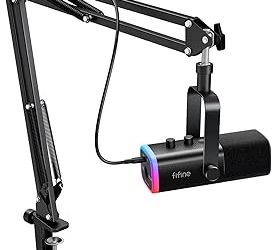
This bundle pairs a dynamic XLR/USB microphone with a compact RGB streaming mixer, giving gamers and podcasters an all-in-one setup with a volume fader and XLR interface right out of the box. It’s a practical entry point for anyone who wants mic and mixer in a single purchase.
MAONO G1 Neo
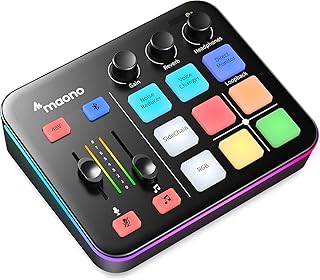
Built specifically for streamers, the G1 Neo combines an XLR input with 48V phantom power, Bluetooth connectivity, and four custom soundpads for quick sound effects during live streams. Its RGB lighting and gamer-focused layout make it a fun, functional hub for PS5, TikTok Live, and PC streaming.
MAONO AME2
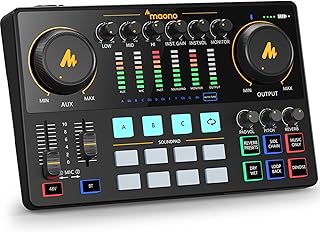
The AME2 steps things up with 11 custom sound pads and Bluetooth streaming support, making it well-suited for podcast hosts who want more voice effect and soundboard flexibility. Its XLR input with 48V phantom power keeps recording quality solid for YouTube and TikTok Live sessions alike.
Frequently Asked Questions
Do I need an audio interface if I already have a USB microphone?
No — USB microphones connect directly to your computer and don’t require an interface. An audio interface is necessary if you’re using an XLR microphone, which needs a preamp and often phantom power to function.
What’s the difference between an audio interface and a mixer?
A traditional audio interface focuses on converting analog mic signals into digital audio for your computer, while a mixer like the MAONO series adds onboard controls for blending multiple audio sources, soundpads, and effects in real time.
Can I use these interfaces for both gaming and music production?
Yes, though the best fit depends on your priority. The Focusrite Scarlett Solo models are better suited for high-fidelity music recording, while the FIFINE and MAONO options are optimized for streaming, gaming chat, and live soundboards.
Do I need 48V phantom power for my microphone?
Only if you’re using a condenser microphone, which requires phantom power to operate. Dynamic microphones, common in gaming and streaming setups, typically don’t need it.
Final Thoughts
For studio-quality recording and long-term versatility, the Focusrite Scarlett Solo 4th Gen is our top pick, with the 3rd Gen as a budget-friendly alternative. Streamers and podcasters who want built-in mixing and soundpad control should look to the MAONO AME2 or MAONO G1 Neo for the best all-in-one experience.