Key takeaways
- Shape and hump position: Claw grip works best with a symmetrical or high-hump shape that lets your fingertips rest naturally on the front of the buttons without stretching.
- Weight: Lighter mice (sub-60g) reduce fingertip fatigue during quick flicks and repositions, which matters more in claw grip than in palm grip.
- Sensor and polling rate: Look for a modern optical sensor with accurate tracking at high DPI, and consider 4K/8K polling if you play competitive shooters.
- Button placement: Side buttons and the main clicks should sit within easy reach of curled fingers, not spread out for a flatter palm grip.
- Connection type: Wireless mice have closed the latency gap with wired options, but check battery life if you game for long stretches without a charging break.
What's inside
Claw grip is one of the most demanding ways to hold a mouse, and most mice on the market simply aren’t built for it. If your fingertips arch down onto the buttons while your palm hovers above the shell, you need a shape, weight, and button placement that supports that stance without causing fatigue or accidental clicks. Picking the wrong mouse can mean cramped fingers, inconsistent clicks, or a shell that digs into your palm during long sessions.
This guide breaks down what actually matters when shopping for a claw grip gaming mouse, then reviews five standout options that cover different price points, weights, and connection types. Whether you want a featherlight fingertip-style mouse for competitive FPS play or a fuller-bodied option with more buttons for MMOs and MOBAs, you’ll find a solid match below.
As an Amazon Associate we earn from qualifying purchases at no extra cost to you.


🎮 Get More From Your Setup — Free
Prime Gaming gives you free PC games every month, in-game loot, and a free Twitch channel sub — plus fast free shipping on all the gear above. New members get a 30-day free trial.
Watch: Best Claw Grip Gaming Mouse: Top Picks Reviewed — Video Review
How to Choose a Claw Grip Gaming Mouse
- Shape and hump position: Claw grip works best with a symmetrical or high-hump shape that lets your fingertips rest naturally on the front of the buttons without stretching.
- Weight: Lighter mice (sub-60g) reduce fingertip fatigue during quick flicks and repositions, which matters more in claw grip than in palm grip.
- Sensor and polling rate: Look for a modern optical sensor with accurate tracking at high DPI, and consider 4K/8K polling if you play competitive shooters.
- Button placement: Side buttons and the main clicks should sit within easy reach of curled fingers, not spread out for a flatter palm grip.
- Connection type: Wireless mice have closed the latency gap with wired options, but check battery life if you game for long stretches without a charging break.
The Best Claw Grip Gaming Mouses Reviewed
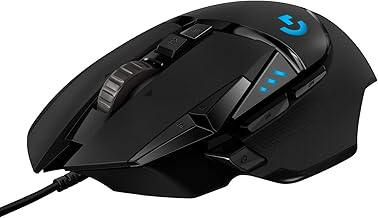
Logitech G502 Hero
The Logitech G502 Hero Wired Gaming Mouse remains a benchmark for accuracy and customization, with its 25,600 DPI Hero sensor and adjustable weight system letting claw grip users fine-tune balance to their hand size. It’s heavier than dedicated claw-grip mice, so it suits players with larger hands or those who prefer a hybrid claw/palm grip.
ATTACK SHARK X3
At just 49g, the ATTACK SHARK X3 Wireless Gaming Mouse is built for fast, low-fatigue claw grip play, and its PAW3395 sensor delivers the tracking precision competitive players expect. The flexible Bluetooth/2.4G/wired connectivity and 200-hour battery life make it a strong budget pick without cutting corners on performance.
Logitech G305 Lightspeed
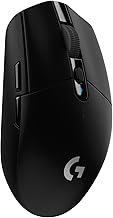
The Logitech G305 Lightspeed Wireless Gaming Mouse pairs a compact, claw-friendly shape with dependable Lightspeed wireless performance and up to 250 hours of battery life on a single AA. Its 99g weight and six programmable buttons make it a reliable all-rounder for claw grip users who don’t want to babysit a charger.
Lamzu Inca
Purpose-built for claw grip, the Lamzu Inca Gaming Mouse uses a symmetrical high-hump shell, PAW3950 sensor, and 8K polling rate to deliver exceptional responsiveness with minimal input lag. Optical switches and a TTC encoder add durability and click consistency that serious claw-grip competitors will appreciate.
Razer Basilisk V3
The Razer Basilisk V3 Customizable RGB Wired Gaming Mouse offers a more ergonomic, contoured shape that suits claw grip users with medium to large hands, backed by a 26K DPI optical sensor and Razer’s fastest mechanical switches. Its HyperScroll tilt wheel and 11 programmable buttons make it especially versatile for MMO and MOBA players who still want fast FPS-level clicks.
Frequently Asked Questions
Is claw grip better than palm or fingertip grip?
No single grip is objectively better; claw grip offers a balance of speed and control that many FPS and MOBA players prefer, but comfort depends on hand size and personal habit.
What mouse weight is ideal for claw grip?
Most claw grip users prefer mice between 40g and 90g, since lighter shells reduce strain on the fingertips during quick, repeated movements.
Does mouse shape matter more than sensor specs for claw grip?
Shape matters first, since an uncomfortable shell undermines aim consistency regardless of sensor quality; once the shape fits your hand, sensor accuracy becomes the deciding factor.
Can a larger mouse like the Logitech G502 Hero still work for claw grip?
Yes, but it works best for players with larger hands or those using a hybrid claw-palm grip, since its bulkier shell isn’t optimized for pure fingertip-style claw grip.
Final Thoughts
For dedicated claw grip players, the Lamzu Inca and Pulsar Gaming Gears LAB X2F stand out as purpose-built options thanks to their lightweight shells and high-hump, fingertip-friendly shapes, while the Logitech G305 Lightspeed offers the best mix of comfort, reliability, and value for players who want a proven all-around performer.