
Key takeaways
- Key Count & Layout: Fewer keys means a smaller footprint, but make sure every key you actually use in-game (movement, abilities, chat, macros) is included and reachable without stretching.
- Switch Type: Mechanical switches offer tactile feedback and durability, while magnetic Hall-effect switches allow adjustable actuation points for faster, more precise inputs.
- Connectivity: Wired keypads guarantee zero input lag and no charging downtime, while 2.4GHz wireless models trade a small amount of setup complexity for a cleaner desk.
- Programmability: Look for onboard macro keys and multiple profile slots so you can create per-game binds without relying on software running in the background.
- Comfort & Build: A detachable wrist rest and sturdy plate (aluminum or reinforced plastic) matter more on a compact board, since your hand stays in one position for hours.
What's inside
Full-size keyboards force you into an awkward split: one hand glued to WASD, the other stuck juggling a mouse and reaching across a dozen unused keys. For gamers who want faster reaction times, less desk clutter, and a setup that actually fits how they play, a one-handed gaming keyboard solves the problem by putting only the keys you need within a thumb’s reach.
This guide breaks down six of the most popular one-handed keypads on the market, from budget-friendly mini boards to hot-swappable mechanical and magnetic-switch models. We’ll cover what separates a good one-handed keyboard from a frustrating one, review the top picks in detail, and answer the questions buyers ask most before choosing one.
As an Amazon Associate we earn from qualifying purchases at no extra cost to you.




🎮 Get More From Your Setup — Free
Prime Gaming gives you free PC games every month, in-game loot, and a free Twitch channel sub — plus fast free shipping on all the gear above. New members get a 30-day free trial.
Watch: Best One Handed Gaming Keyboard: Top Picks Reviewed — Video Review
How to Choose a One Handed Gaming Keyboard
- Key Count & Layout: Fewer keys means a smaller footprint, but make sure every key you actually use in-game (movement, abilities, chat, macros) is included and reachable without stretching.
- Switch Type: Mechanical switches offer tactile feedback and durability, while magnetic Hall-effect switches allow adjustable actuation points for faster, more precise inputs.
- Connectivity: Wired keypads guarantee zero input lag and no charging downtime, while 2.4GHz wireless models trade a small amount of setup complexity for a cleaner desk.
- Programmability: Look for onboard macro keys and multiple profile slots so you can create per-game binds without relying on software running in the background.
- Comfort & Build: A detachable wrist rest and sturdy plate (aluminum or reinforced plastic) matter more on a compact board, since your hand stays in one position for hours.
The Best One Handed Gaming Keyboards Reviewed
Redragon K585 Wired
The Redragon K585 packs a 42-key tactical layout with 28 onboard combo slots and 4 profiles, making it one of the most customizable wired options available. Its swap-ready sockets, USB pass-through port, and detachable wrist rest make it a strong all-rounder for gamers who want mechanical-level control without sacrificing desk space.
Redragon K585 PRO Wireless
The K585 PRO takes the same reliable 42-key layout and adds a 0-delay 2.4GHz wireless connection, so competitive players don’t have to worry about lag despite cutting the cord. With hot-swap sockets, onboard macros, and a USB pass-through port, it’s a smart upgrade pick for anyone who values a tidy setup.
RedThunder 35-Key
The RedThunder keypad trims down to 35 RGB-backlit keys in a genuinely portable, mini form factor, making it a great entry point for gamers testing out one-handed play for the first time. It’s simple, affordable, and light enough to toss in a bag for LAN parties or travel.
MechLands AJAZZ AK029
The AJAZZ AK029 stands out with an 8KHz polling rate, magnetic switches, and adjustable actuation, plus SOCD and DKS support for rapid, precise inputs favored by competitive players. Its 29-key aluminum-plate design is compact but built for performance rather than casual use.
MageGee Mechanical 35-Key
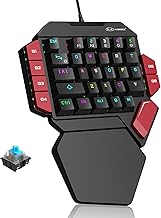
The MageGee keyboard uses genuine blue mechanical switches across 35 RGB-backlit keys, giving it a satisfying tactile click that budget membrane boards can’t match. With 6 supported macro keys, it’s a solid mechanical option for gamers who want real switch feel without paying for a full hot-swap system.
Frequently Asked Questions
Is a one-handed gaming keyboard better than a full keyboard for gaming?
For gaming specifically, yes for many players — it reduces mouse travel distance and keeps your most-used keys within easy reach, though you’ll still want a full keyboard nearby for typing or chat-heavy tasks.
Do one-handed keyboards work with consoles like Xbox and PS4/PS5?
Some models, like standard USB wired keypads, are compatible with consoles that support keyboard input, but always check the specific product’s compatibility list since not all one-handed keyboards support every console.
What’s the difference between mechanical and magnetic switches on these keypads?
Mechanical switches use a physical actuation point and give tactile or clicky feedback, while magnetic switches detect key position electronically, allowing adjustable actuation depth for faster or more customized responses.
Can I remap keys and save custom profiles on these keyboards?
Most models with onboard macro support let you program custom binds and combos directly to the board, and higher-end options with multiple profile slots let you switch between game-specific layouts instantly.
Final Thoughts
For most gamers, the Redragon K585 Wired offers the best balance of customization and value, while the Redragon K585 PRO Wireless is the top pick if you want that same layout without the cable. If you want the sharpest competitive edge, the MechLands AJAZZ AK029’s magnetic switches and 8KHz polling rate make it the standout choice for speed-focused players.
