Key takeaways
- 1080p60 recording: the sweet spot for smooth, clear gameplay at a budget-friendly price
- 4K passthrough: keeps your TV picture sharp even if the recorded stream is lower resolution
- Higher-end options like the Elgato 4K S push to 4K60 capture and 1440p120 passthrough for creators who want to grow into higher production value
Streaming your gameplay used to require an expensive dedicated PC and a pile of specialized gear, but that’s no longer the case. With the right capture card, a modest computer, and a few smart choices, you can start broadcasting console or PC gameplay in crisp quality without draining your bank account. The key is understanding which components actually matter for stream quality versus which are nice-to-haves you can add later.
In this guide, you’ll learn how capture cards work, what specs actually affect your stream’s look and feel, how to avoid latency headaches, and which budget-friendly setups deliver the best results for new streamers. Whether you’re streaming from a PS5, Xbox, Switch, or a second PC, the fundamentals below will help you spend wisely from the start.
Our top picks
 XIIXMASK Video Capture Card
- 【4K Loop-out & 2K30 Capture】 This HDMI game…
- 【Strong Stability, Ultra-low Latency】 The HDMI capture card…
- 【Support Mic-in for Commentary】This audio video capture card…
 Elgato 4K S Capture Card for PS5
- 4K60 Capture: Record in cinematic quality with crisp…
- HFR Support: Play and capture in 1440p120 or…
- HDR10 Support: Capture brilliant HDR content with tone…
 Capture Card
- 【4K60 Loop-Out & 1080P60/2K30 Capture】 This HDMI game…
- 【Plug-and-Play, Stable & Ultra-Low Latency】 No driver or…
- 【HDMI Loop-Out & Mic-In】 High-speed USB 3.0 single-channel…
| Product | Key specs | |
|---|---|---|
| XIIXMASK Video Capture Card | 【4K Loop-out & 2K30 Capture】 This HDMI game… 【Strong Stability, Ultra-low Latency】 The HDMI capture card… 【Support Mic-in for Commentary】This audio video capture card… | Check price |
| Elgato 4K S Capture Card for PS5 | 4K60 Capture: Record in cinematic quality with crisp… HFR Support: Play and capture in 1440p120 or… HDR10 Support: Capture brilliant HDR content with tone… | Check price |
| Capture Card | 【4K60 Loop-Out & 1080P60/2K30 Capture】 This HDMI game… 【Plug-and-Play, Stable & Ultra-Low Latency】 No driver or… 【HDMI Loop-Out & Mic-In】 High-speed USB 3.0 single-channel… | Check price |
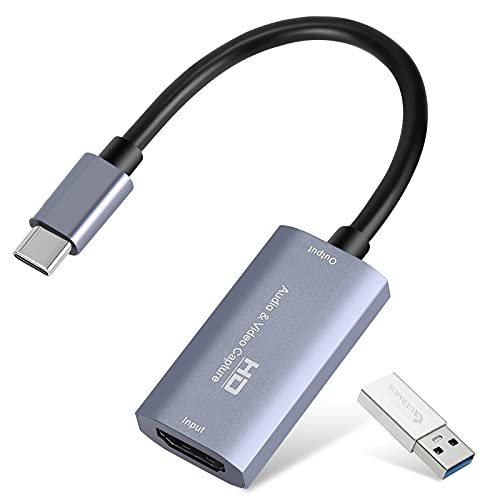 Guermok Video Capture Card | 【1080P 60FPS Video Capture Card】 This HDMI game… 【Ultra Low Latency Screen Sharing】 HDMI capture card… 【Plug and Play, Easy to Carry】 This HDMI… | Check price |
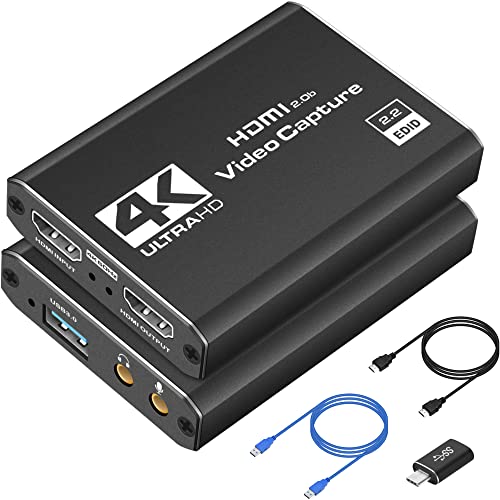 4K HDMI Capture Card USB 3.0 | High-Quality Video Capture, 4K HDMI Capture Card Ready:… Plug-and-Play USB Capture Card, No Drivers Needed: Designed… Universal Compatibility PS5, Xbox, Switch & More: Stream… | Check price |
 acer USB 3.0 HDMI Capture Card | 【4K Clarity, 1080P Performance】Enjoy stunning clarity with our… 【Mic-in for Easy Commentary】Plug in a headset or… 【Plug and Play, no Extra-Drivers】No extra drivers or… | Check price |
 4K HDMI Capture Card | 【1080P 60FPS Video Capture Card】This 4K HDMI capture… 【Plug & Play USB Capture Card】Designed for convenience,… 【Wide Compatibility for Gaming & Streaming】This game capture… | Check price |
 Video Capture Card | 【4K HDMI Input, 2K@30Hz Recording】Powered by a true… 【Ultra Low Latency Screen Sharing】Built with a premium… 【Easy Plug and Play, Compact & Portable】No driver… | Check price |
As an Amazon Associate we earn from qualifying purchases at no extra cost to you.
🎮 Get More From Your Setup — Free
Prime Gaming gives you free PC games every month, in-game loot, and a free Twitch channel sub — plus fast free shipping on all the gear above. New members get a 30-day free trial.
Watch: How to Build a Budget Streaming Setup — Video Review
Understanding What a Capture Card Actually Does
A capture card takes the HDMI video output from your console or gaming PC and converts it into a format your streaming computer can read, typically over USB. Most budget cards, including options like the XIIXMASK Capture Card or the Guermok Capture Card, handle this conversion while also offering HDMI loop-out so you can still see gameplay on your TV or monitor in real time. Without a capture card, you’re limited to software capture (fine for PC games) or nothing at all if you’re streaming from a console.
Resolution and Frame Rate: What You’re Actually Paying For
Most entry-level cards advertise “4K” but actually record at 1080p60 or 1440p30, using 4K only for passthrough to your display. This is perfectly fine for most streamers, since Twitch and YouTube compress heavily anyway. Focus on what the card records, not just what it passes through.
- 1080p60 recording: the sweet spot for smooth, clear gameplay at a budget-friendly price
- 4K passthrough: keeps your TV picture sharp even if the recorded stream is lower resolution
- Higher-end options like the Elgato 4K S push to 4K60 capture and 1440p120 passthrough for creators who want to grow into higher production value
Latency: The Silent Setup-Killer
Nothing ruins a stream faster than noticeable input lag between your screen and your controller. Look for cards that advertise “near-zero latency” or “low-latency” passthrough, since this describes how quickly the signal loops back to your display. Budget cards vary here, so pairing a capture card with a quality HDMI cable and avoiding cheap USB hubs helps keep delay to a minimum.
USB Connections and Compatibility
Check your computer’s available ports before buying. Many budget cards, such as the acer USB 3.0 HDMI Capture Card, offer both USB-A and USB-C connectors for flexibility across laptops and desktops. USB 3.0 is essentially mandatory now, since USB 2.0 can’t reliably handle 1080p60 data without dropped frames. Also confirm your console or camera outputs standard HDMI, as most modern consoles and cameras do.
Software: OBS and Beyond
Nearly every capture card on the market today, including all the picks above, is built to work seamlessly with OBS Studio, a free and powerful streaming and recording software. OBS handles your scene layout, overlays, and stream output to platforms like Twitch or YouTube. Before buying a capture card, confirm it’s UVC (USB Video Class) compatible, which most budget options are, so it shows up automatically in OBS without needing extra drivers.
Tips
- Test your capture card with a short recording before going live to catch dropped frames or audio sync issues early.
- Use a wired Ethernet connection instead of Wi-Fi whenever possible to reduce stream buffering and dropped frames.
- Keep your capture card’s USB cable short and avoid daisy-chaining through hubs, which can introduce latency or connection drops.
- Label your OBS audio sources clearly (game audio, mic, capture card audio) to avoid mixing confusion during your first few streams.
Frequently Asked Questions
Do I need a capture card if I’m streaming from a gaming PC?
Not necessarily. If you’re playing on the same PC you’re streaming from, OBS can capture your screen or game window directly without additional hardware. Capture cards become essential when you’re streaming from a separate console or a second gaming PC.
Will a budget capture card reduce my stream quality?
Budget capture cards can absolutely deliver clean, professional-looking 1080p60 streams. The differences at higher price points usually show up in 4K recording capability, HDR support, and passthrough resolution rather than everyday stream clarity.
Can I use a capture card with a Nintendo Switch or Switch 2?
Yes, most modern capture cards, including budget models, support Switch and Switch 2 as long as they accept standard HDMI input. Just confirm the card’s compatibility list before purchasing, since a few older models don’t support newer console HDMI output standards.
Does capture card latency affect my gameplay, or just the stream?
It depends on your setup. If you’re viewing gameplay only through the capture card’s passthrough on a monitor, latency can affect what you see while playing. If you’re playing on a separate TV and only using the card to record for streaming, latency mainly affects stream sync rather than your in-game reaction time.
Conclusion
Building a budget streaming setup comes down to prioritizing the fundamentals: reliable 1080p60 capture, low latency, solid USB 3.0 connectivity, and smooth OBS integration. Once those basics are covered, you can grow into higher resolutions, HDR, and more advanced gear as your channel expands, without ever feeling like your first purchase was wasted.
FAQ
Do I need a capture card if I’m streaming from a gaming PC?
Will a budget capture card reduce my stream quality?
Can I use a capture card with a Nintendo Switch or Switch 2?
Does capture card latency affect my gameplay, or just the stream?
More from Amazon
Programs that pair well with the guide above. Offers and eligibility are set by Amazon and may change.
Free shipping on eligible items, Prime Video and more. Eligible new members can start with a free trial.
Start a Prime free trialAd-free music streaming. Eligible new subscribers can start with a free trial.
Try Music Unlimited freeA Prime membership for ages 18-24 with a trial period. Eligibility is set by Amazon.
See Prime for Young AdultsAudiobooks and podcasts to listen to on the go. Eligible new members can start with a free trial.
Try Audible freeAs an Amazon Associate we earn from qualifying purchases.