Key takeaways
- Sensor and DPI: Most modern optical sensors exceed what any human can use effectively; prioritize tracking accuracy and consistency over raw DPI numbers above 16,000.
- Wired vs. wireless: Top-tier wireless mice now match wired latency for competitive play, but budget wireless models may introduce noticeable input delay—check polling rate specs if esports performance matters.
- Weight and shape: Lightweight mice (under 70g) suit fast flick-based games and claw/fingertip grips, while heavier ergonomic shapes favor palm grips and longer, slower sessions.
- Switch type: Optical and magnetic switches offer faster actuation and longer lifespans than traditional mechanical switches, with magnetic analog switches enabling adjustable trigger points for competitive titles.
- Battery life and charging: If you’re going wireless, look at real-world battery estimates (not marketing peaks) and whether the mouse supports USB-C fast charging or wireless charging pads for topping off without downtime.
What's inside
Choosing a gaming mouse in 2026 means wading through overlapping specs: DPI counts that sound impressive but rarely matter past a certain point, wireless latency claims that vary wildly between brands, and weight differences that can make or break your aim depending on your grip style and genre. With sensor technology, switch designs, and battery life all converging toward “good enough” at the high end, the real differentiators are ergonomics, build quality, and how a mouse feels during long sessions or split-second plays.
This guide breaks down six standout gaming mice for 2026, covering wired and wireless options across competitive esports builds, all-around workhorses, and budget-friendly picks. Whether you’re chasing the lowest possible latency, the lightest possible shell, or just a reliable mouse that won’t quit mid-match, you’ll find a fit below.
As an Amazon Associate we earn from qualifying purchases at no extra cost to you.


🎮 Get More From Your Setup — Free
Prime Gaming gives you free PC games every month, in-game loot, and a free Twitch channel sub — plus fast free shipping on all the gear above. New members get a 30-day free trial.
Watch: Best Gaming Mice — Video Review
How to Choose a Gaming Mouse (2026)
- Sensor and DPI: Most modern optical sensors exceed what any human can use effectively; prioritize tracking accuracy and consistency over raw DPI numbers above 16,000.
- Wired vs. wireless: Top-tier wireless mice now match wired latency for competitive play, but budget wireless models may introduce noticeable input delay—check polling rate specs if esports performance matters.
- Weight and shape: Lightweight mice (under 70g) suit fast flick-based games and claw/fingertip grips, while heavier ergonomic shapes favor palm grips and longer, slower sessions.
- Switch type: Optical and magnetic switches offer faster actuation and longer lifespans than traditional mechanical switches, with magnetic analog switches enabling adjustable trigger points for competitive titles.
- Battery life and charging: If you’re going wireless, look at real-world battery estimates (not marketing peaks) and whether the mouse supports USB-C fast charging or wireless charging pads for topping off without downtime.
The Best Gaming Mice (2026) Reviewed
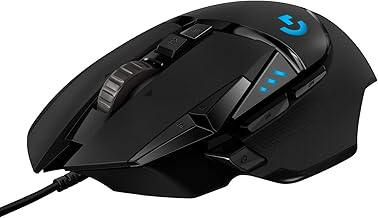
Logitech G502 Hero
A long-running favorite for good reason: the G502 Hero pairs a proven 25,600 DPI sensor with adjustable weights and 11 programmable buttons, making it one of the most customizable wired mice available. It’s a great all-rounder for players who want tournament-grade tracking without paying wireless prices.
Razer Basilisk V3
The Basilisk V3’s HyperScroll tilt wheel and 26K DPI sensor make it a strong pick for players who lean on MMO or MOBA-style button layouts. Razer’s optical switches here are genuinely fast, and the ergonomic shape holds up well through extended sessions.
Razer Viper V3 Pro
At 54g with an 8000 Hz polling rate and 95-hour battery life, the Viper V3 Pro is built for esports players who want zero compromise between wireless freedom and competitive responsiveness. This is as close to a wired feel as wireless currently gets.
Logitech G PRO X2 SUPERSTRIKE
Logitech’s most advanced release brings magnetic analog switches with adjustable rapid trigger to a mouse for the first time, letting competitive players fine-tune actuation points the way keyboard enthusiasts already do. At 61g with USB-C charging, it’s a forward-looking pick for serious FPS players.
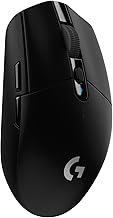
Logitech G305 Lightspeed
The G305 remains the budget wireless champion, running up to 250 hours on a single AA battery while still delivering Logitech’s reliable HERO 12 sensor and sub-1ms Lightspeed wireless. It won’t wow with buttons or RGB, but it’s a dependable, no-fuss workhorse.
Frequently Asked Questions
Do I need a high-DPI mouse for competitive gaming?
Not really—most competitive players use sensitivities well under 1600 DPI. What matters more is sensor consistency and low latency, both of which the mice above deliver regardless of their max DPI rating.
Is wireless lag still a concern in 2026?
For premium wireless mice with polling rates of 1000 Hz or higher, no. Budget wireless options can still introduce minor delay, so check specs carefully if you play fast-paced shooters competitively.
How much does mouse weight actually affect performance?
Weight affects comfort and fatigue more than raw performance for most players, but competitive FPS gamers often prefer sub-70g mice for faster flicks and reduced arm strain during long sessions.
Are magnetic switches worth the extra cost?
If you play competitive shooters and want to fine-tune actuation distance like a rapid-trigger keyboard, yes—they offer a tangible edge. Casual players likely won’t notice the difference versus quality optical switches.
Final Thoughts
For most players, the Logitech G502 Hero remains the smartest all-around value, while esports-focused gamers should look at the Razer Viper V3 Pro for its featherweight design and elite polling rate. If cutting-edge customization matters more than price, the Logitech G PRO X2 SUPERSTRIKE’s magnetic switches make it the most future-proof choice on this list.