Key takeaways
- Adjustable vs. built-in: Adjustable lumbar pillows let you dial in the fit, while built-in ergonomic support offers a fixed but consistent curve.
- Support quality: Pocket-spring or firm foam support holds up far better than a thin, floppy pillow that flattens quickly.
- Overall ergonomics: Pair lumbar support with adjustable armrests, recline, and height for a truly comfortable position.
- Weight capacity and frame: A sturdy metal frame and appropriate weight rating ensure lasting support and stability.
- Material and breathability: Breathable fabric or quality leather keeps you comfortable during long sessions.
What's inside
Lumbar support is the single feature that separates a gaming chair you’ll love from one you’ll quietly resent. Your lower back carries the load during long sessions, and without proper support that natural inward curve collapses, leading to slouching and aches. A chair that cradles your lumbar region keeps your spine aligned, letting you focus on the game instead of your posture.
We evaluated gaming chairs specifically for the quality of their lower-back support, from adjustable pillows to built-in ergonomic contours. Comfort, adjustability, and build quality all factored in. Below are our picks, followed by a guide to choosing a chair whose lumbar support actually protects your back through hours of play.
As an Amazon Associate we earn from qualifying purchases at no extra cost to you.


🎮 Get More From Your Setup — Free
Prime Gaming gives you free PC games every month, in-game loot, and a free Twitch channel sub — plus fast free shipping on all the gear above. New members get a 30-day free trial.
Watch: Best Gaming Chair With Lumbar Support — Video Review
How to Choose a Gaming Chair with Lumbar Support
- Adjustable vs. built-in: Adjustable lumbar pillows let you dial in the fit, while built-in ergonomic support offers a fixed but consistent curve.
- Support quality: Pocket-spring or firm foam support holds up far better than a thin, floppy pillow that flattens quickly.
- Overall ergonomics: Pair lumbar support with adjustable armrests, recline, and height for a truly comfortable position.
- Weight capacity and frame: A sturdy metal frame and appropriate weight rating ensure lasting support and stability.
- Material and breathability: Breathable fabric or quality leather keeps you comfortable during long sessions.
The Best Gaming Chairs with Lumbar Support Reviewed
Razer Iskur V2 X
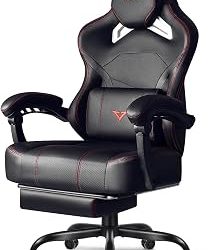
The Iskur V2 X features built-in lumbar support, a wide seat, and high-density foam cushions. Its integrated ergonomic curve makes it the standout for gamers who want dedicated back support.
GTPLAYER Big and Tall
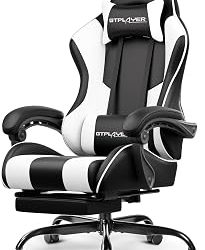
This GTPLAYER pairs pocket-spring lumbar support with a saddle-shaped cushion and a 400 lb capacity. It’s the top pick for larger users seeking serious back-pain relief.
DXRacer Drifting L
The DXRacer Drifting L offers a lumbar pillow, headrest, and racing-style adjustability in a proven ergonomic design. Its reclining and height options make it a versatile, supportive choice.
N-GEN Gaming Chair
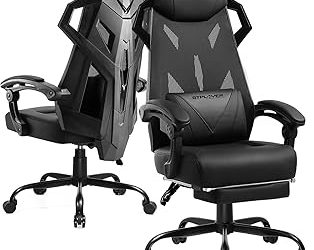
The N-GEN combines lumbar support with breathable fabric, linkage armrests, and high-density foam. It’s a comfortable, well-rounded mid-range chair for everyday desk use.
Executive Big and Tall Chair
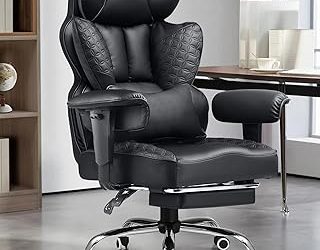
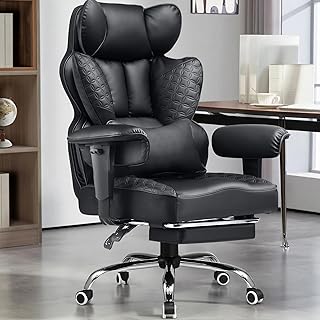
This executive-style chair blends lumbar support with a 350 lb capacity and a 360-degree swivel. Its office-friendly leather design suits gamers who also work from the same seat.
Frequently Asked Questions
Is built-in or adjustable lumbar support better?
Adjustable support lets you customize the fit to your back, while built-in support offers a consistent ergonomic curve. Both work well if the support is firm and well-designed.
Does lumbar support really help with back pain?
Yes, proper lumbar support helps maintain your spine’s natural curve, reducing slouching and lower-back strain during long sessions.
What weight capacity should I look for?
Choose a chair rated comfortably above your weight for stability. Big-and-tall models rated for 400 lbs suit larger users best.
Can I add lumbar support to a chair?
An external lumbar pillow can help, but a chair with proper built-in or adjustable support offers a more reliable, integrated solution.
Final Thoughts
The Razer Iskur V2 X leads for integrated lumbar support, while the GTPLAYER Big and Tall is ideal for larger users needing back relief. The DXRacer Drifting L is a versatile, proven alternative.