Our Top Picks
 Sandisk 2TB Optimus GX C50 Storage Expansion Card2TB2.18 x 0.3 x 1.24 inches0.06 PoundsCheck on Amazon
Before you pick a drive, know the rule that governs every listing in this roundup: according to Microsoft’s published guidance, an external hard drive on Xbox Series X|S can store Series X|S games but cannot run them. Older Xbox One, Xbox 360 and original Xbox titles can run from it. If you want Series X|S games to run from added storage, you need the internal SSD or the proprietary expansion card. With that in mind, the best external hard drive for most Series X owners is a roomy, licensed USB drive from Seagate or WD_BLACK, and the one expansion card in this list belongs in a separate category.
That rule changes how to read the seven listings below. A cheap 1 TB portable drive can be a fine archive shelf for games you are not playing this month. It is a poor choice if what you want is a bigger place for your newest games to launch from. Several of the listings below are generic portable drives that mention Xbox in the title, and we will say which are which. Check Microsoft’s current support page for the exact rules, because they can change with console software updates.
The seven options at a glance

Seagate 2TB Game Drive for Xbox | USB 3.0 (STKX2000400) | Officially Licensed HDD for Xbox. Archive Series X|S games. Play Xbox One games directly. Xbox Game Pass. Warranty + Rescue
One of the product options compared in this guide.
View on Amazon
WD_BLACK 5TB P10 Game Drive, Portable External Hard Drive, Works with Playstation, Xbox, & PC - WDBA3A0050BBK-WESN
One of the product options compared in this guide.
View on Amazon
GAZELLE High-Speed 1TB Ultra Slim Portable External Hard Drive - 2-in-1 Type C & USB 3.0, Compatible with PC, Mac, Laptop, PS4, Xbox, iPad, Tablet, Mobile (Black) - 1 Year Warranty
One of the product options compared in this guide.
View on Amazon
WD_BLACK 5TB P10 Game Drive for Xbox - 1-Month Xbox Game Pass, Portable External Hard Drive for On-The-Go Access To Your Xbox Game library - WDBA5G0050BBK-WESN
One of the product options compared in this guide.
View on Amazon
YOTUO 1TB External Hard Drive, Portable Storage Expansion HDD, USB 3.0 & USB-C for PC, Mac, Desktop, Laptop, Smartphone, PS4, Xbox One, Xbox 360, Office & Game, Black
One of the product options compared in this guide.
View on AmazonSandisk 2TB Optimus GX C50 Storage Expansion Card for Xbox | 1 Month Xbox Game Pass & 1 Month Discord Nitro, Plug & Play, NVMe SSD Expansion for Xbox Series X|S, SDCEOGN-2T00-GNAGX
One of the product options compared in this guide.
View on Amazon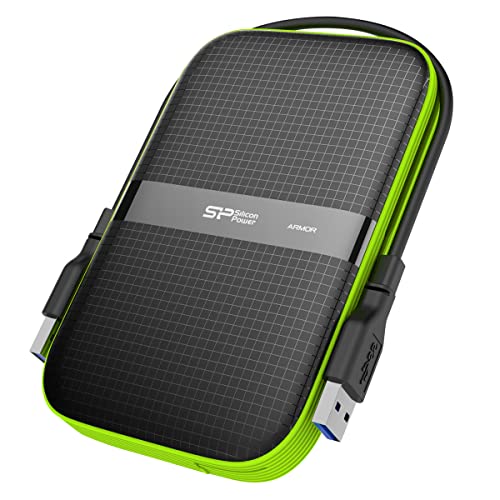
SP Silicon Power 2TB Rugged Portable External Hard Drive Armor A60 Shockproof USB 3.1 Gen1 for PC Mac Xbox and PS4 Black
One of the product options compared in this guide.
View on AmazonPrice tiers here are relative within this set. The Gazelle and YOTUO drives sit at the low end, the SanDisk card at the top, and the rest between. Open each listing for the current price.
| Model | What it is, from the title | Price tier | Best for |
|---|---|---|---|
| Seagate 2TB Game Drive for Xbox | Licensed HDD, USB 3.0, archive Series X|S games, play Xbox One games, warranty and rescue | Budget | Balanced capacity and licensing |
| WD_BLACK 5TB P10 (PlayStation, Xbox, PC) | Portable HDD, works across consoles and PC | Mid-range | Large library, shared across devices |
| GAZELLE 1TB Ultra Slim | Type-C and USB 3.0, broad device list, 1 year warranty | Budget | Smallest-budget archive |
| WD_BLACK 5TB P10 for Xbox | Xbox-branded 5TB, includes 1-month Game Pass | Premium | Large Xbox-only library |
| YOTUO 1TB | USB 3.0 and USB-C, wide device list incl. Xbox One and 360 | Budget | Light backward-compatible use |
| SanDisk 2TB Optimus GX C50 | NVMe SSD expansion card for Series X|S | Premium | Running Series X|S games from added storage |
| Silicon Power 2TB Armor A60 | Rugged shockproof portable HDD, USB 3.1 Gen1 | Mid-range | Travel and rough handling |
Seven listings, one at a time
Seagate 2TB Game Drive for Xbox
The listing title does most of the explaining: an officially licensed HDD for Xbox over USB 3.0, “Archive Series X|S games. Play Xbox One games directly,” a Game Pass mention, and “Warranty + Rescue.” Those sentences match the rule above, which is a small but reassuring sign that the listing is describing the product honestly.
At 2 TB it hits the middle of the capacity range. After formatting, a 2 TB drive typically presents somewhere around 1.8 TB of usable space, so as a planning figure with 70 GB per Series X|S game it archives about two dozen titles, or more than forty if your library leans on smaller Xbox One games. Those numbers are assumptions, not measurements.
“Rescue” in the title likely refers to a data recovery service, but the title does not give terms. Read the listing for length, what counts as a covered failure and whether the service applies to data stored on a console-formatted drive. Do not treat it as a promise that your saves are safe; keep your saves synced to the cloud through your Xbox profile.
Because it is licensed, setup should be the simplest in the set: connect, follow the console’s prompts and let it format. The drive’s price field puts it in our Budget tier within this set, which is notable for a licensed product.
The model number in the title, STKX2000400, is worth copying into a note. If you ever need a warranty claim or want to compare it against another listing of the same drive, that code is how the maker identifies the product. Also check the listing for the cable included and whether it is a short cable, since a drive that must sit on top of the console can get warm.
Pros
- Officially licensed for Xbox, per the title
- States the archive-versus-play rule plainly
- Warranty and Rescue named in the title
Cons
- Cannot run Series X|S games, like any external HDD
- A 2 TB capacity fills quickly with large modern titles
- Rescue terms are not in the title; check the listing
Who it’s for: an Xbox owner who wants the simplest licensed drive for archiving and backward-compatible titles.
WD_BLACK 5TB P10 Game Drive (Works with PlayStation, Xbox and PC)
The first of two 5 TB listings uses the broad wording: “Portable External Hard Drive, Works with Playstation, Xbox, & PC.” It is the more generic of the pair, with no Game Pass offer in the title, and a model number ending in a different code than the Xbox-branded version.
The capacity is the draw. On our planning assumptions, a 5 TB drive formats to roughly 4.6 TB and holds about 66 archived Series X|S games at 70 GB each, or well over 100 older Xbox One titles at 40 GB each. For anyone who rotates dozens of games, this means fewer re-downloads over a home internet connection.
“Works with PlayStation, Xbox & PC” suggests it can serve multiple devices, but note that a drive formatted for one console is not meant to hold files for another; the file systems and layouts differ. You would reformat when you move the drive between platforms, which erases it. The title does not explain this, so read the setup notes.
It is a portable hard drive, so expect a spinning disk’s sensitivity to knocks while running. Place it where it will not get bumped, and do not move the console while it is reading or writing. The warranty and cable length are not in the title.
If you do share it between machines, label the drive with the console it is formatted for. A small piece of tape with the platform name saves a lot of confusion, especially in a house where a PC, a PlayStation and an Xbox all use similar-looking black drives.
Pros
- 5 TB of capacity for a large archive
- Works with PlayStation, Xbox and PC per the title
- Portable form factor
Cons
- Spinning-disk design; not for running Series X|S games
- Sharing across platforms requires reformatting
- Near-duplicate of the Xbox-branded 5 TB listing
Who it’s for: a player with a very large library who may switch the drive between devices over time.
GAZELLE High-Speed 1TB Ultra Slim Portable External Hard Drive
This is a generic slim portable drive. The title lists a 2-in-1 Type-C and USB 3.0 connection and a long compatibility list: PC, Mac, laptop, PS4, Xbox, iPad, tablet, mobile, with a one-year warranty. The title says “Xbox,” not a specific model, and it does not say licensed. So treat it as a drive that can be formatted for Xbox, not as a product designed around the console.
The reason to consider it is price: the price field puts it in the lowest group. A 1 TB drive formats to about 930 GB, which is roughly 13 Series X|S games or 23 Xbox One titles on our planning figures. That is enough as a short shelf of games you play seasonally, and not enough to be a long-term library.
The dual connection helps if you also want to use the same drive with a laptop or tablet, though for Xbox use you would format it for the console and lose general file use unless you reformat. Check the listing for whether the cable included is the right one for the Xbox’s USB-A port, and confirm the drive meets the console’s USB 3.0 requirement.
The title states a one-year warranty. Ask about the return window too, because generic drives vary in quality and an early failure is the risk you want covered.
Since the drive is ultra slim, it fits easily beside a console, but a thin enclosure leaves less room for heat to escape. Keep it out of enclosed shelves and off soft surfaces, and check the listing for the cable length so the drive is not left hanging by its connector.
Pros
- Lowest price tier in this set
- Type-C and USB 3.0 connection with a broad device list
- One-year warranty named in the title
Cons
- 1 TB fills fast
- Not licensed for Xbox per the title
- Generic brand; support quality unknown
Who it’s for: a player on a tight budget who wants a small archive shelf.
WD_BLACK 5TB P10 Game Drive for Xbox (1-Month Game Pass)
This second 5 TB listing is the Xbox-branded one: “for Xbox,” “1-Month Xbox Game Pass,” and “Portable External Hard Drive for On-The-Go Access To Your Xbox Game library.” Its model code differs from the previous listing, and its price field sits higher, so the extra cost may be the bundled Game Pass month and the Xbox-specific packaging. We cannot confirm that from the titles.
If you are comparing the two WD_BLACK listings, line them up on the same checklist: included cable, warranty period, return window, whether the Game Pass offer is redeemable by existing subscribers or new ones only, and the expiration of that offer. A one-month code has value only if you can redeem it.
Capacity planning is the same as the other 5 TB: roughly 4.6 TB after formatting, about 66 archived Series X|S games at 70 GB or over a hundred smaller Xbox One games, using our assumptions. The title’s “on-the-go access” speaks to portability, which matters if you carry the library to a friend’s console. Remember that your games are tied to your account, so you will need to sign in and manage licenses there.
Another small point: a bundled subscription month usually requires a new redemption window, and any offer in the title may expire, so check the listing for the redeem-by date. If you already hold a Game Pass subscription, the bonus month may stack or may not, and the title does not say.
The same hard-drive caveats apply. It can archive Series X|S games but cannot run them, and a spinning disk should not be knocked while active.
Pros
- 5 TB capacity and Xbox branding in the title
- 1-month Game Pass offer included, per the title
- Portable for use on a friend’s console
Cons
- Higher price tier than the otherwise similar 5 TB listing
- Game Pass terms are not spelled out in the title
- Still a hard drive; cannot run Series X|S games
Who it’s for: an Xbox-only owner with a big library who likes the bundled subscription month.
YOTUO 1TB External Hard Drive
YOTUO’s listing is another generic portable drive: 1 TB, USB 3.0 and USB-C, for PC, Mac, desktop, laptop, smartphone, PS4, Xbox One, Xbox 360, “Office & Game.” Note which Xbox models appear in the title: Xbox One and Xbox 360. It does not mention Series X|S. That does not mean it will not work, but it is a cue to verify the USB version, the formatted capacity and the compatibility before buying.
Series X|S requires a USB 3.0 or later drive according to Microsoft’s guidance, and the YOTUO title says USB 3.0 and USB-C, so the interface claim is there. What the title does not provide is a transfer-speed figure or a warranty term. Look at the listing’s specifications and the seller’s return policy.
At 1 TB it offers the same planning range as the Gazelle: about 13 Series X|S games archived or 23 Xbox One titles after formatting, using our estimates. Because the title lists Xbox 360, it may appeal to someone who keeps a backward-compatible library of older games running from the drive.
The price field puts it in the low tier. That is attractive, though in this category the cheapest drives can hide the weakest enclosures, and a drive is the sort of product where reliability matters more than speed. Think about how often you will move the drive and where the cable plugs in, since a loose connector can cause disconnects mid-download.
If you buy it, run the console’s first-time setup with the drive on a stable surface and watch the formatted size shown on screen. A drive that reports a much smaller capacity than the label, or that disconnects during the first large download, should go back within the return window rather than be kept and hoped for.
Pros
- Low price tier
- USB 3.0 and USB-C named in the title
- Xbox One and Xbox 360 explicitly listed
Cons
- Series X|S not named in the title
- No warranty term or speed figure in the title
- 1 TB limit
Who it’s for: someone who mostly plays backward-compatible games and wants a cheap extra shelf.
SanDisk 2TB Optimus GX C50 Storage Expansion Card for Xbox (Not a Hard Drive)
This is not an external hard drive, and it is worth saying so plainly. The title calls it a “Storage Expansion Card for Xbox” with an “NVMe SSD Expansion for Xbox Series X|S,” plug and play, plus one month of Game Pass and one month of Discord Nitro. A card like this fits into the console’s expansion slot instead of connecting by USB.
Why include it? Because it solves the problem that every other item here cannot. Storage added in the expansion slot is the kind of storage that Series X|S games can run from, according to Microsoft’s guidance. If your internal SSD is full and you want to keep new games ready to launch, this category fits and a USB hard drive does not.
The trade-off is cost. The price field puts it at the top of the set, well above the 5 TB hard drives, and it carries 2 TB for that price. You pay for speed and for the ability to run current-generation games from it, not for capacity per dollar. The expansion slot is on the back of the console, and you should follow the manufacturer’s installation instructions when inserting or removing the card, with the console powered down.
Compatibility is worth a quick check: the title says it is for Xbox Series X|S, so it is not for older consoles or for PC use. Keep the card out of the slot when the console is moved, and store it in a static-safe sleeve if you take it out.
Many households pair the two: an expansion card for what they play now and a cheaper hard drive for what they play rarely. Our planning assumptions put 2 TB at roughly 26 large games.
Pros
- Expands storage that Series X|S games can run from
- Plug and play per the title
- Includes 1-month Game Pass and Discord Nitro offers
Cons
- Highest price tier in the set
- Not portable between devices like a USB drive
- 2 TB for the price; poor value per terabyte
Who it’s for: a Series X|S owner who wants current-generation games to launch from added storage and is willing to pay for it.
SP Silicon Power 2TB Rugged Portable External Hard Drive Armor A60
The Armor A60 stands out for its build: the title says “Rugged,” “Shockproof,” USB 3.1 Gen1, for PC, Mac, Xbox and PS4. The shockproof claim has no stated standard in the title, so ask the listing what drop height or certification stands behind it.
Rugged design is a sensible match for spinning disks, which dislike impacts. If you carry a drive in a backpack to a friend’s house, or if a pet and kids move around your console, a shell that absorbs knocks gives some peace of mind. It does not make the drive immune to a drop while it is running, and the manufacturer will say as much in the manual.
USB 3.1 Gen1 is the same data rate as USB 3.0 under a newer name, which meets the console’s stated requirement. The title says “Xbox” and “PS4,” not Series X|S by name, so treat Series X|S use as an inference and check the listing for compatibility statements.
At 2 TB it matches the Seagate’s capacity. The price field puts it above the licensed Seagate drive, so the premium is for the rugged shell. If you do not move the drive, the Seagate looks like a better value on paper.
Handling still matters. Even a rugged enclosure is no reason to bump the drive while the console is writing to it, and a rubber shell can trap heat if it is wrapped in a cloth or stuffed in a bag while in use. Look at the listing photos to see how the cable connects and whether the shell protects the port, since a bent connector is a more common failure than a cracked case. Check the warranty length and return window as you would for any generic drive.
Pros
- Rugged, shockproof design named in the title
- USB 3.1 Gen1 interface
- 2 TB capacity
Cons
- Not licensed for Xbox per the title
- Shockproof rating not specified
- Higher price than the licensed 2 TB Seagate
Who it’s for: a player who carries the drive between homes and wants some protection against bumps.
How we picked these
The Editorial team built this list from published specifications, manufacturer documentation and buyer reviews. Nobody on the team used or measured these units, so we do not quote load times or transfer speeds from experience. Everything in the descriptions comes from the listing titles and from Microsoft’s published guidance on external storage for Xbox.
We included seven listings that shoppers might land on when searching for an external hard drive for Xbox Series X. Two are licensed Xbox products, three are generic portable drives, one is a rugged drive and one, the SanDisk card, is not a hard drive at all. We labeled the odd one out and kept it because the platform rule makes the difference between “archive” and “play” a central decision.
Price tiers are relative to the set and come from each listing’s price field. They are a quick way to compare, not a statement of what a drive should cost. Look up the current price on the product page.
How many games fit: a planning table
Capacity labels on drives use decimal terabytes, and the formatted space shown by the console is lower. As an assumption, we use about 93 percent of the label as usable space. We also use two sizes for games: 70 GB for a large Series X|S title and 40 GB for a typical Xbox One title. Both are estimates, since game sizes vary widely and change with patches.
| Label capacity | Approx. usable | Series X|S games at 70 GB | Xbox One games at 40 GB |
|---|---|---|---|
| 1 TB | 930 GB | about 13 | about 23 |
| 2 TB | 1,860 GB | about 26 | about 46 |
| 5 TB | 4,650 GB | about 66 | about 116 |
Use the table as a rough guide. Tally your actual library by checking the sizes shown in your Xbox “Manage” screen, then add 10 to 15 percent for updates. If your list adds up to 600 GB, a 1 TB drive covers you today but leaves little headroom. If it adds up to 1.4 TB, move up to the 2 TB class or the 5 TB drives.
A second calculation matters if you move games frequently. Suppose a hard drive sustains about 100 MB/s when copying large files, a figure that is our assumption, since real rates vary by drive and file. Moving a 70 GB game is 70,000 MB divided by 100 MB/s, or about 700 seconds, close to 12 minutes. A fast SSD or expansion card could be several times quicker. If you swap games weekly, that time adds up; if you move one or two a month, it hardly matters.
Hard drive, SSD or expansion card?
The hard drive case
Hard drives win on capacity per dollar. That is why the 5 TB listings exist. For a library of games you play in rotation, one that includes many Xbox One and 360 titles, a hard drive is sensible.
The external SSD case
Portable SSDs are quicker to copy and quieter, and are more resistant to knocks. They still follow the same rule: Series X|S games can be archived but not run from them. If you are weighing speed, our guide to the best external SSDs for PS5 and Xbox covers that alternative.
The expansion card case
The only way to add storage that Series X|S games can run from is the proprietary card, as in the SanDisk listing. Pay for it if you are constantly deleting current games to make room.
Timing the purchase
Storage prices swing during sales seasons. If you can wait, read our note on whether to buy an external SSD on Black Friday or wait, since much of the reasoning applies to hard drives too.
If your household also has a PlayStation, the rules differ; our PS5 hard drive buying guide explains how.
Setup and care checklist
- Back up first. Formatting erases the drive. Move anything you want to keep to another device.
- Use a rear USB port. Plug directly into the console, not through a hub, unless the manufacturer says otherwise.
- Let the console format it. Follow the on-screen prompts and choose the games-and-apps option.
- Do not unplug while active. Power the console down or follow the safe removal steps before pulling the cable.
- Keep it ventilated and still. Spinning disks dislike heat and vibration.
- Keep saves in the cloud. Games are replaceable; a lost save is not.
Five ways shoppers go wrong
- Expecting a hard drive to run new games. It can only archive Series X|S titles.
- Buying on capacity alone. A 5 TB drive of unknown quality is riskier than a 2 TB licensed drive with clear warranty terms.
- Ignoring the cable. Check that the cable fits the console’s port and is long enough to rest the drive somewhere safe.
- Using the same drive for files and games. Once formatted for Xbox, treat it as a console-only drive.
- Treating duplicate listings as different products. The two WD_BLACK 5 TB entries look alike; compare warranty and bundle terms, not just titles.
Verdict
For most people the Seagate 2TB Game Drive for Xbox is the straightforward choice because the title is clear about what it does and the licensing removes doubt. If your library is large, the WD_BLACK 5TB P10 family offers the most room; pick between the two listings on warranty and bundle terms. For the lowest cost, the Gazelle or YOTUO 1 TB drives work as small archive shelves, with the caveats above. If you travel with the drive, the Silicon Power Armor A60 has the protective shell. And if what you actually want is more space for running Series X|S games, skip the hard drives and look at the SanDisk expansion card.
Frequently asked questions
Can I play Xbox Series X games from an external hard drive?
According to Microsoft’s published guidance, an external USB hard drive can store Series X|S games but not run them, so you copy them back to the internal SSD or an expansion card to play. Xbox One, Xbox 360 and original Xbox backward-compatible titles can run from a compatible external drive. The Seagate Game Drive listing says as much: archive Series X|S games, play Xbox One games directly. Check the current Xbox support page, since policies can change.
How much external storage do I need?
Start from your library and your habits. Many modern Series X|S games are very large, so as a planning assumption of 70 GB per title, a 1 TB drive holds roughly 13 archived games after formatting, a 2 TB drive roughly 26 and a 5 TB drive roughly 66. Xbox One titles are often smaller, so counts rise. These are estimates, not measurements. Pick the size that fits the games you rotate, then add room for patches.
Will an external drive be erased when I connect it to Xbox?
If you choose to format the drive for games and apps, the console erases it and sets up its own file system. Back up anything you want to keep first. A drive formatted for the Xbox is generally not meant to hold files for other devices, so use a separate drive for photos and documents. The console will prompt you before it formats, and the steps are in Microsoft’s documentation.
Is the SanDisk Optimus GX C50 an external hard drive?
No. The listing describes a storage expansion card for Xbox, an NVMe SSD expansion for Series X|S that plugs into the console’s expansion slot. It is not a portable USB drive and it is not a hard drive. Its role is different: it is the only item in this roundup whose title says it expands the storage that Series X|S games can run from. It is the most expensive listing here, so decide whether you need it.
Are the two WD_BLACK 5TB P10 listings the same drive?
They look like near-duplicate listings. Both are titled WD_BLACK 5TB P10 Game Drive, one saying it works with PlayStation, Xbox and PC, the other adding Xbox branding and a one-month Game Pass offer. The model numbers differ, so the difference may come down to packaging and the bundled offer. Compare both listing pages for warranty terms, included cable and price before you choose, and do not assume either is faster.