Key takeaways
- Real, actionable numbers for PSU sizing, cost estimates, and efficiency checks.
- Backlit displays make readings easy in any lighting.
- Multiple measurement modes on models like the HBN reveal detailed data.
- Overload protection adds a safety margin during use.
Knowing exactly how much power your PC draws is useful for more than curiosity. It helps you size a power supply correctly, estimate running costs, spot inefficient components, and verify that a new build or overclock is behaving as expected. A dedicated power meter turns those unknowns into hard numbers you can act on.
This review examines the best power meters for measuring PC consumption, from simple plug-in wall monitors to USB-C testers for peripherals. We look at accuracy, display clarity, measurement modes, and extra features so you can pick the right tool for tracking your system’s energy use.
Our top picks




As an Amazon Associate we earn from qualifying purchases at no extra cost to you. Ratings are shown as listed on Amazon.
🎮 Get More From Your Setup — Free
Prime Gaming gives you free PC games every month, in-game loot, and a free Twitch channel sub — plus fast free shipping on all the gear above. New members get a 30-day free trial.
Watch: Power Meter For Pc: Review & Buyer’s Guide — Video Review
Design & Build
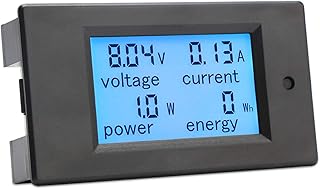
Most PC power meters take the plug-in wall form: you insert them between your outlet and the PC, and they read the load passing through. The Upgraded Watt Power Meter and the Watt Meter with Cost Calculator both use large backlit displays with overload protection, making them easy to read in a dim office corner. The HBN Watt Meter steps up with nine display modes for detailed breakdowns of voltage, amps, wattage, and cumulative energy. For measuring individual components or USB devices, the USB-C Power Meter Tester takes a different form, a small inline tester with a color screen showing current, voltage, and even CPU temperature. The Briidea monitor adds dual outlets, while the DROK digital multimeter suits DC bench measurement.
Performance
For whole-system measurement, the plug-in wall meters are the practical choice. They accurately report real-time wattage, accumulated kilowatt-hours, voltage, and amperage, letting you see idle draw, gaming spikes, and total consumption over time. The cost-calculator models translate that into running expenses, which is handy for budgeting or justifying an efficiency upgrade. The multi-mode HBN and upgraded meters are the most informative, cycling through detailed readouts for those who want granular data. The USB-C tester serves a narrower but valuable role, verifying charger output and peripheral draw rather than full-system load. Across the wall meters, overload protection and backlit displays make them safe and convenient for everyday monitoring.
Pros & Cons
- Real, actionable numbers for PSU sizing, cost estimates, and efficiency checks.
- Backlit displays make readings easy in any lighting.
- Multiple measurement modes on models like the HBN reveal detailed data.
- Overload protection adds a safety margin during use.
- Wall meters measure at the outlet, so they include PSU inefficiency, not just component draw.
- USB-C testers only cover peripherals, not whole-system power.
- Accuracy varies between budget models, so cross-check if precision is critical.
Alternatives to Consider
For most PC users, a plug-in wall meter like the Upgraded Watt Power Meter or the multi-mode HBN unit is the ideal tool, giving a complete picture of system consumption and cost. If you mainly want to test chargers, cables, and USB devices, the USB-C Power Meter Tester is more appropriate. Bench builders and hobbyists measuring DC rails directly may prefer the DROK digital multimeter, though it requires more setup than a simple pass-through plug.
Frequently Asked Questions
Does a wall power meter measure my exact PC wattage?
It measures the power drawn from the outlet, which includes your power supply’s inefficiency. That is the real cost figure you pay for, but it is slightly higher than the raw wattage your components consume internally.
Can a power meter help me choose a PSU?
Yes. By measuring your system’s peak draw under load, you can confirm your PSU has adequate headroom or size a new one correctly, leaving comfortable margin for stability and future upgrades.
What is the difference between a wall meter and a USB-C tester?
A wall meter measures the entire PC’s consumption at the outlet, while a USB-C tester measures the power flowing to a single device or through a cable. Choose based on whether you want whole-system or peripheral data.
Will it show my electricity cost?
Models with a cost calculator, like the Watt Meter cost-calculator unit, let you enter your rate and display running costs directly. Others show kilowatt-hours that you can multiply by your rate manually.
Verdict
A power meter is an inexpensive tool that pays for itself in insight, whether you are sizing a PSU, chasing efficiency, or curious about running costs. For whole-system monitoring, the Upgraded Watt Power Meter and the multi-mode HBN meter are excellent, clear, and safe choices. If your focus is on chargers and peripherals, the USB-C Power Meter Tester covers that niche neatly. Match the tool to what you actually want to measure.