Key takeaways
- VRAM: Aim for 12GB or more for comfortable 1440p headroom with high textures in modern games.
- Upscaling: DLSS, FSR, and XeSS boost frame rates, letting cards punch above their weight at QHD.
- Performance target: Decide between high-refresh esports frames and 60fps+ in demanding AAA titles.
- Connectivity: HDMI 2.1 and DisplayPort 2.1 support high-refresh 1440p displays.
- Power and cooling: Check power requirements and case fit; dual-fan designs with 0dB modes run quiet.
What's inside
1440p is the gamer’s sweet spot, balancing crisp detail with high frame rates — and the right graphics card makes all the difference. The best cards for 1440p gaming pair ample VRAM with modern upscaling like DLSS, FSR, and XeSS, delivering smooth, sharp QHD performance across AMD, NVIDIA, and Intel options for every budget.
Below we round up the top graphics cards for 1440p gaming available now, from strong value picks to higher-end performers, plus how to choose the right one.
As an Amazon Associate we earn from qualifying purchases at no extra cost to you.




🎮 Get More From Your Setup — Free
Prime Gaming gives you free PC games every month, in-game loot, and a free Twitch channel sub — plus fast free shipping on all the gear above. New members get a 30-day free trial.
Watch: Best Card For 1440p Gaming — Video Review
How to Choose a 1440p Graphics Card
- VRAM: Aim for 12GB or more for comfortable 1440p headroom with high textures in modern games.
- Upscaling: DLSS, FSR, and XeSS boost frame rates, letting cards punch above their weight at QHD.
- Performance target: Decide between high-refresh esports frames and 60fps+ in demanding AAA titles.
- Connectivity: HDMI 2.1 and DisplayPort 2.1 support high-refresh 1440p displays.
- Power and cooling: Check power requirements and case fit; dual-fan designs with 0dB modes run quiet.
The Best 1440p Graphics Cards Reviewed
GIGABYTE Radeon RX 9070 XT Gaming OC 16GB
The performance leader here, the RX 9070 XT pairs 16GB GDDR6 with PCIe 5.0 and a robust cooler for confident 1440p gaming in demanding titles. Its generous VRAM and strong raster performance make it the most capable and future-proof pick on this list.
ASUS Dual GeForce RTX 5060 Ti 16GB OC
With 16GB GDDR7, DLSS 4, and a compact 2.5-slot design, the RTX 5060 Ti is an excellent 1440p performer that leverages NVIDIA’s latest upscaling. Quiet 0dB fan tech and ample memory make it a smooth, well-rounded QHD choice.
ASUS Dual Radeon RX 9060 XT 16GB
The RX 9060 XT brings 16GB GDDR6, PCIe 5.0, and modern HDMI 2.1b and DisplayPort 2.1a outputs at a friendly price. It’s a strong value option for high-settings 1440p gaming with FSR, offering plenty of memory for the money.
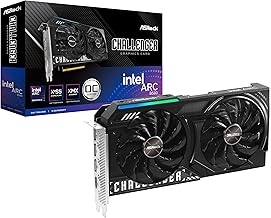
ASRock Intel Arc B580 Challenger 12GB OC
Intel’s Arc B580 delivers 12GB GDDR6, a 2740MHz GPU, and fast dual-fan cooling with DisplayPort 2.1 and HDMI 2.1a. With improving drivers and generous VRAM, it’s a compelling budget-friendly challenger for capable QHD play.
ASRock Intel Arc B570 Challenger 10GB OC
The value entry, the Arc B570 offers 10GB GDDR6, fast 19 Gbps memory, and a metal backplate with 0dB cooling. It’s best for 1440p at high settings with upscaling, giving budget builders an affordable route into QHD gaming.
Frequently Asked Questions
How much VRAM do I need for 1440p?
12GB is a comfortable target for 1440p, while 16GB cards like the RX 9070 XT and RTX 5060 Ti offer extra headroom for ultra textures in the newest games. Upscaling also reduces memory demands.
Do DLSS and FSR help at 1440p?
Yes — these upscaling technologies render at a lower resolution and intelligently sharpen the image, boosting frame rates significantly. They’re a key reason mid-range cards handle 1440p so well.
AMD, NVIDIA, or Intel for QHD?
All three are competitive. AMD offers strong raster value, NVIDIA leads on DLSS and features, and Intel Arc provides generous VRAM at low prices. Choose based on the features and budget that matter to you.
Which card is best for demanding AAA games?
The RX 9070 XT and RTX 5060 Ti handle AAA titles best at high settings, while the RX 9060 XT and Arc cards do well with upscaling. Match the card to your target frame rate and settings.
Final Thoughts
A great 1440p card delivers crisp, smooth QHD gaming. The RX 9070 XT and RTX 5060 Ti lead for demanding titles, the RX 9060 XT offers strong value, and the Arc B580 and B570 are budget-friendly challengers. Match the VRAM and performance to your favorite games, and you’ll enjoy excellent 1440p play.