Our Top Picks
 LIAN LI 4 Slots Vertical GPU Kit6.61 x 5.81 x 9.25 inches6.61 x 5.81 x 9.25 inches2.36 poundsCheck on Amazon
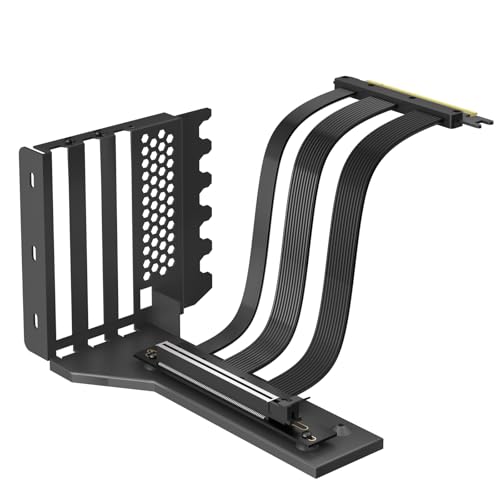
GLOTRENDS PCIe 5.0 Vertical GPU Mount Kit with Riser Cable, 2/3-Slot GPUs | RTX 5090/5080 & RX 9070 Ready. Full-Open 7/8-Slot PCIe Panel Required, for ATX/E-ATX PC Case Builds.
Chosen because it specifies 2/3-Slot GPUs and for ATX/E-ATX PC Case Builds..
View on Amazon
GLOTRENDS PCIe 4.0 Vertical GPU Mount Kit with Riser Cable, 2/3-Slot GPUs | RTX 4090/4080/4070, RX 7900/7800 Ready. Full-Open 7/8-Slot PCIe Panel Required, for ATX/E-ATX PC Case Builds.
Chosen because it specifies 2/3-Slot GPUs and RTX 4090/4080/4070.
View on AmazonA vertical GPU mount can make a gaming PC look cleaner by displaying the graphics card through its side panel, but the wrong bracket can restrict airflow or create installation problems. This guide to the vertical gpu mount kit best options compares adjustable designs, PCIe risers, GPU clearance, and case compatibility to help you choose confidently.
How to Choose the Best Vertical GPU Mount Kit
The right vertical GPU mount kit depends on more than appearance. Your case must provide the necessary mounting space, the bracket must accommodate your graphics card, and the included riser must support the appropriate PCIe generation. These four considerations help narrow the choices before you spend money on an accessory that may not fit.
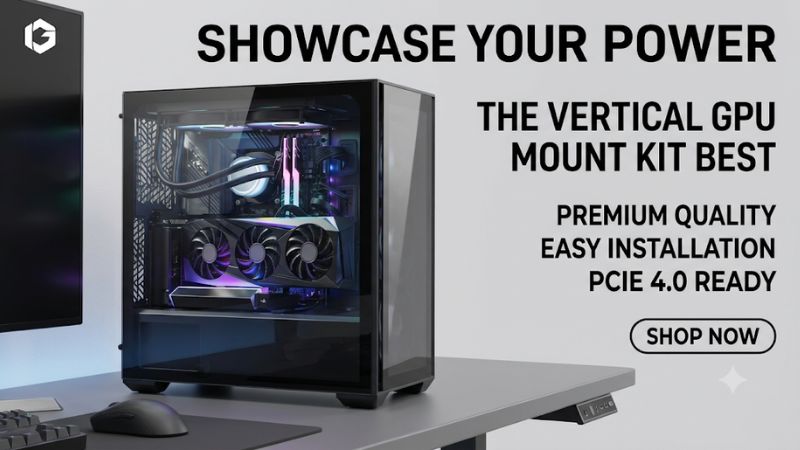
1. Check Case Compatibility and Expansion Slots
Case compatibility should be your first consideration. Some vertical GPU kits attach directly to the rear expansion-slot area, while others use additional mounting points or a support structure inside the chassis. A bracket advertised as universal is not automatically compatible with every ATX or Micro-ATX case.
Check the number of available expansion slots, whether the case has dividers between them, and whether the mounting area provides enough room for the bracket. For example, the Cooler Master V3 Gen 5 requires at least four PCI expansion slots, while the Phanteks Premium Gen5 requires seven open PCI slots.
2. Match the PCIe Riser Cable to Your Hardware
The riser cable connects the graphics card to the motherboard after the card is repositioned. Its PCIe generation matters because the cable must support the connection standard you intend to use.
PCIe 4.0 and PCIe 5.0 risers are not interchangeable in terms of their maximum supported link generation, although newer GPUs and motherboards can negotiate lower supported generations. A PCIe 5.0 riser is a sensible consideration for a newer build, while a properly specified PCIe 4.0 cable can remain suitable for a PCIe 4.0 system.
Cable length and routing also matter. A cable that is too short can create excessive bending or prevent the bracket from reaching its intended position. Avoid sharp folds, excessive tension, and pressure on the connectors.
3. Measure GPU Thickness and Side-Panel Clearance
Graphics card thickness is one of the most important measurements when selecting a mount. A two-slot GPU occupies considerably less space than a large three-slot or four-slot model, and not every vertical bracket accommodates thicker cards.
Measure the distance between the motherboard expansion-slot area and the side panel. Include the graphics card’s cooler dimensions and power connector when calculating the available clearance.
A vertically mounted GPU can sit close to tempered glass, potentially restricting the intake airflow of its cooling fans. This is especially important for high-power graphics cards with large cooling assemblies.
4. Consider Adjustment, Support, and Installation
Adjustability can make installation easier because different graphics cards and cases have different internal layouts. Height adjustment helps position the GPU around case fans, radiators, and other components.
An integrated support arm is also useful for heavier graphics cards. It helps stabilize the card and reduces unwanted movement after installation.
Look for a metal mounting structure, secure screw locations, and clear installation instructions. RGB lighting is an optional aesthetic feature rather than a reason to overlook structural support or compatibility.
Top Vertical GPU Mount Kits Worth Considering
The following four options cover different PC-building requirements, including compact mounting arrangements, large graphics cards, PCIe 5.0 connectivity, and adjustable showcase configurations. Their recommendations are based on manufacturer-published specifications and intended compatibility rather than comparative performance testing.
| Product | Best For | Key Spec | Compatibility | Watch Out For |
|---|---|---|---|---|
| Cooler Master V3 Gen 5 | Best Overall | PCIe 5.0, 165mm riser | ATX, Micro-ATX, E-ATX | Maximum three-slot GPU |
| Lian Li VG4v4 | Best for Large GPUs | PCIe 5.0, 200mm riser | Compatible ATX cases | Requires substantial case space |
| Phanteks Premium Gen5 | Best Premium | PCIe 5.0, 220mm riser | Cases with seven open slots | Large mounting footprint |
| NZXT Vertical GPU Mounting Kit PCIe 5.0 | Best NZXT Integration | PCIe 5.0, 175mm riser | Supported NZXT and compatible ATX cases | Five expansion slots occupied |
1. Cooler Master Vertical Graphics Card Holder Kit V3 Gen 5 – Best Overall
The Cooler Master Vertical Graphics Card Holder Kit V3 Gen 5 is a strong general-purpose option for builders who want an adjustable mounting arrangement without purchasing a separate riser cable. It includes a 165mm PCIe 5.0 x16 riser and supports PCIe 5.0 and earlier generations.
Its tool-less adjustment design helps accommodate different internal layouts. Cooler Master lists support for E-ATX, ATX, and Micro-ATX chassis, with graphics cards up to three slots wide and a minimum requirement of four PCI expansion slots.
One important limitation is its internal clearance requirement. Cooler Master specifies a maximum CPU cooler height of 70mm in the relevant configuration, and the bracket may interfere with rear-panel component installation. Its GPU thickness limit also makes it unsuitable for four-slot cards.
Who should consider it: Builders with compatible ATX or Micro-ATX cases and graphics cards no thicker than three slots. Those using particularly large GPUs should consider the Lian Li alternative.
2. Lian Li 4 Slots Vertical GPU Kit VG4v4 – Best for Large GPUs
LIAN LI 4 Slots Vertical GPU Kit (VG4v4), PCIe 5.0 Riser, 4-Slot, White | NOTE: Verify 6 open case slots for vertical or 7 for angled mounting, plus clearance for a 31mm GPU shift.
Chosen because it specifies PCIe 5.0 Riser and 4-Slot.
View on AmazonThe Lian Li VG4v4 is designed for builders who need additional graphics card thickness support and greater positioning flexibility. Its steel bracket accommodates graphics cards up to four slots thick, making it particularly relevant for large modern GPU designs.
The kit includes a 200mm PCIe 5.0 x16 riser cable with backward compatibility for PCIe 2.0 through PCIe 4.0. Its three-level height adjustment uses 10.16mm increments, while the bracket supports forward, neutral, and backward tilt.
Another useful feature is the reinforced support arm, which Lian Li rates for loads up to 10kg. Integrated 5V ARGB lighting provides an additional customization option.
However, the mounting arrangement requires considerable space. Lian Li specifies six expansion slots for vertical installation or seven for angled mounting. The bracket also shifts the GPU forward by 31mm, so compact cases require particularly careful clearance checks.
Who should consider it: Enthusiasts using thick graphics cards who want adjustable positioning and additional structural support. Builders with smaller cases or limited rear expansion space should look elsewhere.
3. Phanteks Premium Gen5 Vertical GPU Bracket – Best Premium Option

GIGA-MEGA PCIe X16 GEN5 Right Angle Riser Cable PCIe 4.0 and 5.0 with GPU Vertical Mount Bracket for RTX4090,RTX5090D, RX7900XT, RX9070 ATX (16cm GEN5 Black Bracket V3)
Chosen because it specifies RTX5090D and RX7900XT.
View on AmazonThe Phanteks Premium Gen5 Vertical GPU Bracket is another option for showcase-oriented gaming PCs. Its powder-coated steel construction and adjustable mounting arrangement provide a more customizable presentation than a basic fixed-position bracket.
It includes a 220mm PCIe 5.0 x16 riser cable and supports graphics cards up to 365mm long. The bracket can position a GPU vertically or at an adjustable angle between 15 and 30 degrees.
Phanteks also includes integrated D-RGB lighting. The lighting can connect to a compatible Phanteks controller or an addressable RGB motherboard header. Its mounting system provides two positioning options for different GPU lengths and an additional mounting position for compatible NVIDIA graphics cards.
The main limitation is its seven-open-slot requirement. The bracket may not suit smaller cases or systems where other expansion cards need access to the rear slots. Its 365mm GPU length specification must also be checked against the actual case clearance.
Who should consider it: Builders with spacious seven-slot cases who prioritize adjustable presentation and integrated lighting. Those seeking a compact installation should consider the Cooler Master design instead.
4. NZXT Vertical GPU Mounting Kit PCIe 5.0 – Best for NZXT Builds
The NZXT Vertical GPU Mounting Kit PCIe 5.0 is worth considering when building inside a compatible NZXT chassis. It combines a rigid steel bracket with a 175mm PCIe 5.0 x16 riser cable.
Its three mounting heights provide flexibility when positioning the graphics card around other components. NZXT also includes an anti-sag support bracket, mounting hardware, and a finished rear mounting structure.
The manufacturer specifies compatibility with standard ATX cases featuring seven expansion slots without dividers. The kit occupies five expansion slots and supports graphics cards up to three slots wide.
However, compatibility must be checked against the exact case model. NZXT identifies supported H5, H6, H7, and H9 families, with certain model-specific restrictions. For example, some H5 RGB+ configurations limit the available mounting positions because of the factory-installed bottom fan.
Who should consider it: NZXT owners who want a matching mounting solution and a PCIe 5.0 riser. Builders with four-slot GPUs or cases outside the validated compatibility list should investigate other options.
FAQ
1. Does a Vertical GPU Mount Reduce Gaming Performance?
A vertical GPU mount does not inherently reduce gaming performance, but installation conditions can affect graphics card cooling. If the fans sit too close to the side panel, restricted airflow may increase temperatures and potentially affect sustained GPU boost behavior.
The PCIe riser is another consideration. A properly functioning riser that negotiates the intended PCIe link should not automatically cause a noticeable gaming performance difference. However, an incompatible or defective cable can cause connection instability, detection problems, or reduced link speed.
2. Can Any Graphics Card Fit a Vertical GPU Mount?
No, graphics card compatibility depends on its physical dimensions and the mounting bracket’s specifications. Check GPU thickness, length, cooler protrusions, power connector position, and the available space inside your case.
A bracket supporting three-slot graphics cards should not be assumed to accommodate a four-slot model. Always compare the exact GPU dimensions with the manufacturer’s mounting specifications before purchasing.
3. Is a PCIe 5.0 Vertical GPU Mount Worth Buying?
A PCIe 5.0 riser is worth considering if your motherboard and graphics card support PCIe 5.0 and you want the mounting cable to support that generation. It can also provide flexibility for future hardware upgrades.
However, PCIe 5.0 is not automatically necessary for every gaming PC. A properly functioning PCIe 4.0 riser remains a reasonable choice for compatible PCIe 4.0 hardware. Prioritize verified cable compatibility over the generation number alone.
4. Can a Vertical GPU Mount Cause Higher GPU Temperatures?
Yes, a vertical mount can increase GPU temperatures when it places the cooling fans too close to a glass panel or obstructs their intake airflow. The actual effect depends on case ventilation, graphics card design, fan placement, and available clearance.
After installation, compare GPU temperature, hotspot temperature, fan speed, and clock behavior under the same gaming workload used before the change. If cooling becomes worse, reposition the bracket if possible, improve case airflow, or return the GPU to its horizontal mounting position.
Final Thoughts
Choosing the vertical gpu mount kit best for your gaming PC requires balancing case compatibility, graphics card dimensions, PCIe riser specifications, and cooling clearance. Cooler Master suits adjustable general-purpose builds, while Lian Li and Phanteks offer alternatives for larger showcase systems. Measure your case and GPU before purchasing.
More from Amazon
Programs that pair well with the guide above. Offers and eligibility are set by Amazon and may change.
Free shipping on eligible items, Prime Video and more. Eligible new members can start with a free trial.
Start a Prime free trialAd-free music streaming. Eligible new subscribers can start with a free trial.
Try Music Unlimited freeA Prime membership for ages 18-24 with a trial period. Eligibility is set by Amazon.
See Prime for Young AdultsAudiobooks and podcasts to listen to on the go. Eligible new members can start with a free trial.
Try Audible freeAs an Amazon Associate we earn from qualifying purchases.