Key takeaways
- One-cable desktop setup with power, video, and data.
- 4K@60Hz output on the quality hubs and docks.
- Multi-monitor support via DisplayLink on the bigger docks.
- Compact travel and full desk options across the range.
What's inside
A dock for a MacBook is the single upgrade that most transforms the laptop-at-a-desk experience. Instead of juggling dongles, one cable delivers power, external displays, wired Ethernet, and a stack of USB devices, letting your MacBook Pro or Air become a proper desktop the moment you sit down and a portable machine the moment you unplug.
This review evaluates the leading MacBook docks, from simple multiport hubs to full triple-monitor stations, so you can match the right port selection and display capability to your Mac and your workflow without overpaying for features you won’t use.
As an Amazon Associate we earn from qualifying purchases at no extra cost to you.


🎮 Get More From Your Setup — Free
Prime Gaming gives you free PC games every month, in-game loot, and a free Twitch channel sub — plus fast free shipping on all the gear above. New members get a 30-day free trial.
Watch: Dock For Macbook: Review & Buyer’s Guide — Video Review
Design & Build
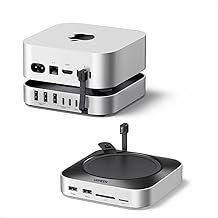
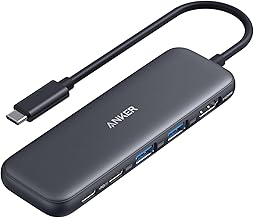
These products range from pocketable to desk-anchored. Compact hubs like the Anker 5-in-1 and 7-in-1 are slim aluminum units meant to travel with the laptop, while full docks like the Plugable UD-6950PDH and the WAVLINK triple-monitor station are built to stay on the desk with dedicated power input and more ports. The Anker 7-in-2 Mac Dock clips neatly to the MacBook’s two USB-C ports for a tidy look. Build quality across the Anker, Plugable, and WAVLINK range is reliably solid, with metal housings that manage heat well during extended use.
Performance
The critical factor for MacBook users is display support. Apple silicon MacBook Airs drive only one native external monitor, so multi-display docks like the Plugable UD-6950PDH (dual 4K@60Hz) and the WAVLINK triple-4K station rely on DisplayLink software to add extra screens, a key detail to understand before buying. MacBook Pro models with M-series Pro/Max chips handle more native displays. For a single big monitor plus peripherals, the Anker 7-in-2 nails 4K@60Hz with Thunderbolt 4 compatibility. Data speeds across the 5Gbps USB ports keep drives responsive, and 100W-class power delivery keeps any MacBook charged.
Pros & Cons
- One-cable desktop setup with power, video, and data.
- 4K@60Hz output on the quality hubs and docks.
- Multi-monitor support via DisplayLink on the bigger docks.
- Compact travel and full desk options across the range.
- Apple silicon Airs need DisplayLink for a second display.
- Cheaper hubs can warm up under sustained 4K load.
- Port mixes vary, so confirm you get what you need.
Alternatives to Consider
If you only need one external monitor and a few ports, a slim Anker 5-in-1 or 7-in-1 saves money and space over a full dock. Power users running three displays should consider a Thunderbolt 4 dock with native outputs, or the WAVLINK triple station with DisplayLink. And Intel MacBook owners, who drive dual monitors natively, can skip DisplayLink-dependent docks for a simpler dual-HDMI hub.
Frequently Asked Questions
Why won’t my MacBook Air show two monitors?
Apple silicon Airs support only one native external display. Docks like the Plugable UD-6950PDH use DisplayLink drivers to enable a second screen.
Will a dock charge my MacBook?
Yes, these docks provide up to 100W pass-through power, comfortably charging any MacBook Air or Pro while connected.
Do I need Thunderbolt?
For most users a quality USB-C dock suffices. Thunderbolt matters mainly for the highest bandwidth storage and daisy-chaining displays natively.
Which dock is best for three monitors?
The WAVLINK triple-4K station handles three displays via DisplayLink; verify your macOS version supports the required driver.
Verdict
The best MacBook dock depends on your display needs. For a single 4K monitor and peripherals, the Anker 7-in-2 Mac Dock is a clean, reliable choice. If you need two or three screens, the Plugable UD-6950PDH or WAVLINK triple station deliver, provided you accept DisplayLink on Apple silicon. Travelers should grab a slim Anker 5-in-1 instead.