Key takeaways
- Built-in dual screens offer a seamless, cable-free experience with premium OLED panels.
- Extenders are far cheaper and upgrade any laptop you already own.
- Extenders are portable, folding flat and traveling in a laptop bag.
- Flexible layouts, from a single extra panel to a full triple-monitor spread.
“Laptop with 2 screens” can mean two very different things, and knowing which you want will save you money and frustration. On one hand there are true dual-screen laptops with a second built-in display baked into the chassis. On the other, there are clip-on screen extenders that attach to any ordinary laptop and add one or more panels on demand. Both get you more usable space; they just take opposite paths.
We compared examples of each, from folding dual-OLED machines to lightweight triple extenders, so you can decide whether to buy a whole new laptop or simply upgrade the one you own. Here is our full breakdown.
Our top picks




As an Amazon Associate we earn from qualifying purchases at no extra cost to you. Ratings are shown as listed on Amazon.
🎮 Get More From Your Setup — Free
Prime Gaming gives you free PC games every month, in-game loot, and a free Twitch channel sub — plus fast free shipping on all the gear above. New members get a 30-day free trial.
Watch: Laptop With 2 Screens: Review & Buyer’s Guide — Video Review
Design & Build
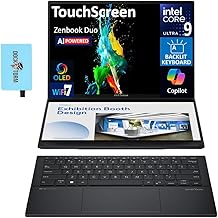
The built-in options are engineering showcases. The Lenovo Yoga Book 9i pairs two 13.3-inch 2.8K OLED touchscreens in a slim convertible, while the ASUS Zenbook Duo stacks a second display above the keyboard for a genuinely productive two-panel machine. On the extender side, models like the APILDELLA triple and the FHD IPS travel extender clip onto your existing 13 to 17.3-inch laptop and fold flat for transport. The dual-screen laptops feel premium and integrated; the extenders win on flexibility and price, letting you keep the laptop you already like.
Performance
A true dual-screen laptop like the Zenbook Duo, with its Intel Ultra 9 and 32GB of RAM, is a fast, self-contained productivity powerhouse that needs no accessories. The Yoga Book 9i is similarly capable and versatile in its many folding modes. Extenders, by contrast, borrow their power from your laptop, so performance depends on your machine and how many extra panels you drive. The Leudaich one-cable and APILDELLA extenders deliver crisp FHD output over USB-C or HDMI, though some triple units require a driver install and add to your laptop’s display workload.
Pros & Cons
- Built-in dual screens offer a seamless, cable-free experience with premium OLED panels.
- Extenders are far cheaper and upgrade any laptop you already own.
- Extenders are portable, folding flat and traveling in a laptop bag.
- Flexible layouts, from a single extra panel to a full triple-monitor spread.
- Dual-screen laptops are expensive and lock you into that specific machine.
- Extenders add weight to the lid and can require drivers or extra cables.
Alternatives to Consider
If you want the cleanest possible experience and have the budget, a purpose-built machine like the ASUS Zenbook Duo is unbeatable. If you already own a good laptop, a quality extender such as the APILDELLA triple gives you most of the benefit for a fraction of the cost. And a standalone portable monitor like the KYY sits in between, offering a big second screen without permanently attaching to your lid.
Frequently Asked Questions
Is a dual-screen laptop better than an extender?
It depends on priorities. Built-in dual screens are more elegant and integrated, while extenders are cheaper, portable, and work with your current laptop. Choose based on budget and whether you want to replace your machine.
Do screen extenders work with any laptop?
Most support a wide 13 to 17.3-inch range and connect over USB-C or HDMI. Confirm your laptop’s ports support external displays before buying.
Are two-screen laptops heavy?
Convertibles like the Yoga Book 9i stay reasonably portable, but adding a second built-in panel or a clip-on extender does increase overall weight compared to a single-screen laptop.
Can I game on these?
Built-in dual-screen laptops game according to their internal specs. Extenders display gameplay fine at 60Hz and some accept console input, but they rely on your laptop’s graphics power.
Verdict
For an all-in-one solution, the ASUS Zenbook Duo is the standout dual-screen laptop, with the Lenovo Yoga Book 9i close behind for versatility. If you would rather upgrade your current setup affordably, the APILDELLA triple extender is our pick for adding screens without buying a whole new machine.