The Alienware m16 can be a capable gaming laptop, but whether it is worth buying depends on its generation, graphics configuration, and price. The Alienware m16 R2 offers a 16-inch QHD+ display with a 240Hz refresh rate, NVIDIA GeForce RTX 40-series graphics, and upgradeable memory and storage. Its main drawbacks include limited display brightness, substantial weight, and restricted battery life during demanding workloads.
This review focuses on the Alienware m16 R2 (2024), covering its design, specifications, gaming performance, cooling, battery life, upgradeability, and buying value. The assessment uses published manufacturer specifications and independent reviews rather than firsthand testing by Real Gaming News.
Alienware m16 R2: Quick Verdict
The Alienware m16 R2 is best suited to gamers who want a substantial 16-inch laptop for gaming, productivity, and everyday use. Its high-refresh-rate display, solid construction, and connectivity make it practical for a desk-based gaming setup.
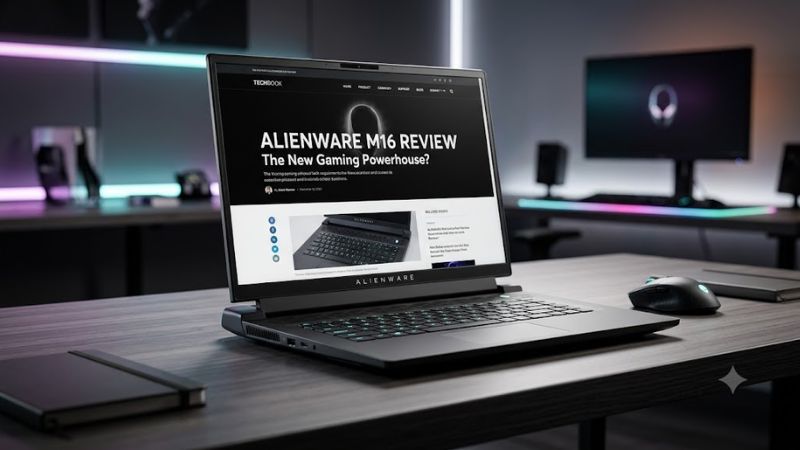
However, its 300-nit IPS panel is less compelling for bright rooms and HDR-focused gaming. Buyers should also compare its price with newer gaming laptops before purchasing an older RTX 40-series model.
Verdict: Consider the Alienware m16 R2 if you find a competitively priced RTX 4060 or RTX 4070 configuration. Look elsewhere if you prioritize OLED picture quality, lightweight portability, or extended unplugged gaming.
Alienware m16 R2 Specifications
Dell’s published specifications describe the m16 R2 as a 16-inch gaming laptop available with Intel Core Ultra processors and three NVIDIA graphics options.
| Specification | Alienware m16 R2 |
| Processor | Intel Core Ultra 7 155H or Core Ultra 9 185H |
| Graphics | NVIDIA GeForce RTX 4050, RTX 4060, or RTX 4070 Laptop GPU |
| GPU memory | 6GB GDDR6 on RTX 4050; 8GB GDDR6 on RTX 4060 and RTX 4070 |
| Display | 16-inch IPS, 2560 × 1600 resolution |
| Refresh rate | 240Hz |
| Brightness | 300 nits, manufacturer specification |
| Color coverage | 100% sRGB, manufacturer specification |
| Memory | DDR5-5600, two SO-DIMM slots |
| Maximum memory | Up to 64GB |
| Storage | M.2 PCIe NVMe SSDs, two internal M.2 slots |
| Battery | 90Wh |
| Connectivity | USB-A, USB-C, Thunderbolt 4, HDMI 2.1, Ethernet, headset jack, microSD reader |
| Operating system | Windows 11 Home or Pro, depending on configuration |
| Weight | Approximately 5.7 pounds |
Specifications and available configurations can vary by region and individual model. Confirm the exact configuration before purchasing.
Which configuration should you choose?
- RTX 4050: Suitable for less demanding games and competitive titles with adjusted graphics settings. Its 6GB of VRAM can limit performance in some demanding games.
- RTX 4060: A balanced option for gaming at 1080p and QHD, depending on the game and graphics settings. Its 8GB of VRAM provides more capacity than the RTX 4050.
- RTX 4070: The highest graphics option listed for the m16 R2. It offers a higher performance tier but still has 8GB of VRAM.
For multitasking and newer games, 32GB of RAM is a sensible target. The laptop’s upgradeable memory and storage also make it possible to expand capacity later, subject to supported specifications.
Design and Build Quality
The m16 R2 uses a more restrained chassis design than the original m16 R1. Its revised layout makes it more conventional to carry while retaining the styling associated with Alienware gaming laptops.
Independent reviews have praised aspects of its construction, keyboard, touchpad, and connectivity. However, at approximately 5.7 pounds before adding the power adapter, it remains a substantial machine rather than an ultraportable laptop.
The keyboard and integrated RGB lighting suit a gaming setup. Ethernet is useful for wired online gaming, while HDMI and USB-C display connectivity simplify connecting external monitors.
The main trade-off is portability. The m16 R2 can move between home, school, and work, but its weight and power adapter make it less convenient for frequent travel than a lightweight productivity laptop.
Display Review: Is the 240Hz Panel Good?
The Alienware m16 R2 features a 16-inch IPS display with a 2560 × 1600 resolution, a 240Hz refresh rate, G-SYNC support, and 100% sRGB color coverage according to Dell.
The resolution provides a sharp image for gaming and productivity, while the 16:10 aspect ratio offers additional vertical workspace for browsing, coding, and editing documents.
Gaming performance and refresh rate
The 240Hz refresh rate is useful in competitive games where the hardware can produce high frame rates. However, a high-refresh-rate display does not guarantee 240 FPS in every game.
Less demanding games are more likely to take advantage of the panel’s full refresh rate. Graphically intensive games may require reduced settings or upscaling, especially with the RTX 4050 configuration.
Display brightness limitations
The manufacturer’s 300-nit brightness rating is a limitation for users who play in bright environments. Independent reviews have also identified brightness as a weakness of the tested panel.
The display should be adequate for many indoor gaming setups, but it is less appealing for direct sunlight, HDR-focused gaming, or creative work requiring wider color coverage than sRGB.
If display quality is your main priority, compare the m16 R2 with gaming laptops that offer brighter panels or OLED options.
Gaming Performance: What Can You Expect?
The Alienware m16 R2’s gaming performance depends primarily on its GPU configuration, game, resolution, and graphics settings. The RTX 4060 and RTX 4070 versions are generally more appropriate for demanding QHD gaming than the entry-level RTX 4050 model.
Independent testing provides useful evidence of the laptop’s capabilities.
Published gaming benchmarks
Tom’s Guide tested an Alienware m16 R2 with an RTX 4070 Laptop GPU, Intel Core Ultra 7 processor, and 16GB of RAM. Its published gaming results at 2560 × 1600 included the following averages:
| Game | Reported average FPS |
| Assassin’s Creed Mirage | 73 FPS |
| Borderlands 3 | 64 FPS |
| Cyberpunk 2077 | 21 FPS |
| Far Cry 6 | 71 FPS |
These figures come from Tom’s Guide’s review, not independent testing by Real Gaming News. The cited results do not establish a fully comparable graphics preset for every game, so they should not be used as a controlled ranking against other laptops.
The results illustrate an important point: QHD+ gaming is possible, but demanding titles may require reduced graphics settings or upscaling. The RTX 4070 configuration is not guaranteed to maintain high frame rates in every modern AAA game.
CPU and productivity performance
The Core Ultra 7 155H and Core Ultra 9 185H processors can handle everyday productivity, multitasking, and many creative applications.
In Tom’s Hardware’s testing, the Core Ultra 7 155H configuration scored 12,382 in Geekbench multi-core and completed its 4K-to-1080p HandBrake conversion test in 3 minutes and 54 seconds.
These results provide context for productivity performance, but they should not be compared directly with results from different software versions, power settings, or hardware configurations.
For game development, the m16 R2 can suit coding, smaller projects, and general engine work. Large projects, shader compilation, and demanding workloads may benefit from a laptop with a higher-power processor, more graphics memory, or stronger sustained performance.
Cooling, Fan Noise, and Thermals
The Alienware m16 R2 uses active cooling to manage its CPU and dedicated GPU. As with other performance-oriented gaming laptops, expect audible fans during demanding games and sustained workloads.
Independent reviewers reported different temperatures under their respective test conditions. Tom’s Hardware measured 99°F near the G and H keys and 104°F on the underside during its Metro Exodus thermal test. Laptop Mag reported a 150°F underside hotspot during its gaming tests.
These measurements reflect different test methods and locations, so they should not be treated as directly comparable readings.
For better everyday operation:
- Keep the air intakes and exhaust vents unobstructed.
- Use the laptop on a hard, flat surface.
- Expect increased fan noise in high-performance modes.
- Keep the system’s supported drivers and firmware updated.
- Investigate persistent throttling, unexpected shutdowns, or abnormal fan noises on used units before purchasing.
High temperatures alone do not prove that a laptop is defective. Performance, fan behavior, power limits, and workload must be considered together.
Battery Life: How Long Does It Last?
The m16 R2 has a 90Wh battery, but real-world runtime varies with display brightness, refresh rate, workload, GPU activity, and power settings.
Published battery results include:
| Publication | Test method | Reported battery life |
| Tom’s Hardware | Web browsing, video streaming, and OpenGL testing over Wi-Fi at 150 nits | 6 hours 13 minutes |
| Laptop Mag | Continuous web browsing over Wi-Fi at 150 nits | 6 hours 13 minutes |
| PCWorld | Local 4K video playback, airplane mode enabled, keyboard lighting off, at 250 nits | 7 hours 15 minutes |
| Reviewed | Chrome browsing at 200 nits with the discrete GPU disabled and an efficient power profile | About 4 hours |
These results come from different test procedures and should not be treated as a single guaranteed runtime.
Video playback and light browsing are generally less demanding than mixed productivity workloads. Gaming places much greater demands on the GPU, so expect substantially shorter battery life during demanding gaming sessions.
The m16 R2 is best suited to users who usually play near a power outlet rather than those who need extended unplugged gaming.
Upgradeability and Connectivity
One advantage of the Alienware m16 R2 is that its memory and storage are upgradeable. Dell documents two SO-DIMM memory slots supporting up to 64GB of DDR5-5600 RAM and two internal M.2 SSD slots.
This gives buyers flexibility to increase memory or storage later, provided the components meet the manufacturer’s requirements.
Before upgrading, verify the installed configuration and supported components. Back up important files before replacing storage or opening the chassis.
Ports and external displays
The laptop’s published connectivity includes:
- Two USB-A ports.
- One Thunderbolt 4 USB-C port.
- An additional USB-C port with DisplayPort support.
- One HDMI 2.1 output.
- One Ethernet port.
- One 3.5mm headset jack.
- One microSD card reader.
These connections are useful for external monitors, wired networking, storage devices, and gaming peripherals.
Check the exact port capabilities when selecting a dock or monitor. USB-C charging support does not mean a small USB-C charger can necessarily power the laptop during demanding gaming; the supplied power adapter is the safer choice for full-performance use.
Alienware m16 R2 Price and Value in 2026
As of October 22, 2026, Dell’s US listing marks the Alienware m16 R2 as unavailable. A current new-unit selling price could not be verified, so historical launch prices should not be treated as today’s offers.
Tom’s Hardware reported a starting price of $1,499.99 for an RTX 4050 configuration and $1,849.99 for the RTX 4070 configuration it reviewed in March 2024. These figures are historical launch-period prices, not verified current deals.
Which configuration offers the best value?
| Configuration | Buying advice |
| RTX 4050 with 16GB RAM | Consider it if the price is low enough to justify the entry-level GPU and 6GB VRAM. |
| RTX 4060 with 16GB or 32GB RAM | A balanced option if it costs meaningfully less than a comparable newer laptop. |
| RTX 4070 with 32GB RAM | Consider it for the higher graphics tier when the asking price is competitive. |
| Refurbished or used m16 R2 | Check battery health, SSD condition, warranty, return terms, and cooling before buying. |
Compare machines with similar memory, storage, display quality, and GPU configurations. A laptop with a higher graphics tier may not be the better value if it costs substantially more or has other significant compromises.
Also consider whether a newer model offers a more recent GPU generation, better display technology, or a longer warranty for a similar total cost.
Pros and Cons
Pros
- High-refresh-rate 2560 × 1600 display with G-SYNC support.
- Multiple graphics configurations for different gaming needs.
- Upgradeable DDR5 memory and two internal M.2 SSD slots.
- Useful connectivity, including Thunderbolt 4, HDMI 2.1, and Ethernet.
- Solid construction and comfortable input devices reported by independent reviewers.
- Suitable for gaming, productivity, and moderate creative workloads.
Cons
- The 300-nit IPS display is less compelling for bright environments.
- RTX 4070 is the highest listed graphics option for the m16 R2.
- The RTX 4060 and RTX 4070 configurations have 8GB of VRAM.
- Gaming battery life is limited compared with plugged-in use.
- The chassis is relatively heavy.
- Current new-unit availability through Dell’s US listing is limited.
Alternatives to Consider
Before buying the Alienware m16 R2, compare it with other gaming laptop families that may better suit your budget or priorities.
Lenovo Legion Pro 5i
The Lenovo Legion Pro 5i is worth considering if you want a gaming-focused laptop with different processor and graphics configurations. Compare GPU power limits, cooling, display specifications, and memory capacity for the exact generation.
ASUS ROG Strix G16
The ASUS ROG Strix G16 is another option for buyers who prioritize gaming performance. Check its specific CPU and GPU configuration, cooling behavior, display, and chassis dimensions before comparing it with the Alienware.
ASUS ROG Zephyrus G16
The ASUS ROG Zephyrus G16 is worth evaluating if you prefer a slimmer design or an OLED display option. Compare sustained gaming performance and battery results rather than choosing based on display technology or advertised GPU tier alone.
The value of these alternatives depends on the exact model year, configuration, current price, and warranty. No universal winner can be established without a like-for-like comparison.
Frequently Asked Questions
Is the Alienware m16 R2 good for gaming?
Yes, the Alienware m16 R2 is capable of gaming, particularly in its RTX 4060 and RTX 4070 configurations. Independent benchmarks show that it can run demanding games at QHD+ resolution, although some titles require reduced settings or upscaling for smoother performance.
Can the Alienware m16 R2 run games at 240 FPS?
Yes, in some games, but not consistently across all titles. Less demanding competitive games are more realistic candidates for very high frame rates, while demanding AAA games can run well below 240 FPS at native QHD+ resolution.
Can you upgrade the RAM and SSD in the Alienware m16 R2?
Yes, the m16 R2 supports RAM upgrades through two SO-DIMM slots and SSD expansion through two internal M.2 slots. Dell specifies up to 64GB of DDR5-5600 memory, but you should confirm compatibility before purchasing components.
Is the Alienware m16 R2 worth buying in 2026?
It can be worth buying if a verified listing offers the right configuration at a competitive price. Since Dell’s US listing currently marks the model unavailable, compare the seller’s warranty, return policy, condition, and asking price against newer gaming laptops.
Final Verdict: Should You Buy the Alienware m16?
The Alienware m16 R2 remains a capable gaming laptop based on its specifications and published independent reviews. Its high-refresh-rate QHD+ display, solid construction, connectivity, and upgradeable memory and storage make it a practical choice for gaming and everyday work.
Its weaknesses are meaningful: the IPS display is relatively dim, the chassis is heavy, and its graphics options stop at the RTX 4070 Laptop GPU. Battery life also varies significantly by workload and is limited during demanding gaming.
Buy it if you find a well-maintained RTX 4060 or RTX 4070 configuration at a competitive price and usually game near a power outlet.
Skip it if a comparable newer laptop costs about the same, you need OLED or stronger HDR performance, or you prioritize lightweight portability and extended unplugged use.
The final decision should come down to the exact configuration, verified asking price, condition, and warranty—not the Alienware name or its original launch price alone.