Our Top Picks
A 1000W label is a statement about headroom, not about what your PC will draw from the wall. Most gaming towers, even with a flagship graphics card, spend much of their time well below that figure. So why do builders keep asking for a kilowatt unit? Because a supply running at roughly half its rating tends to be cooler, quieter, and kinder to transient power spikes, and because the newest graphics cards use a single 12V-2×6 cable that every serious 1000W model now provides or supports.
This guide is for buyers who have already settled on 1000 watts and now face the narrower question of which unit. The choices split along a few lines: Gold or Platinum efficiency, a native modern GPU cable or an adapter, fan behavior at low load, and how much confidence a brand’s warranty and capacitors inspire. Across 2026 listings, ATX 3.1 and PCIe 5.1 wording has become standard, so the differences that remain are in noise, build details, and extras.
Quick Picks

be quiet! Pure Power 13 M 1000W Power Supply, 80+ Gold, Cybenetics Platinum | PCIe 5.1, ATX 3.1, Fully Modular PSU, LLC Topology, Semi-Passive Fan, Single-Rail, For Overclocked GPUs, 10 Year Warranty
One of the consumer electronics options compared in this guide.
View on Amazon
CORSAIR RM1000x ATX 3.1 PCIe 5.1 1000W Power Supply – Black | Native 12V-2x6 Connector, Fully Modular, Low-Noise, Cybenetics Gold, NA
One of the consumer electronics options compared in this guide.
View on Amazon
Auotac 1000W Fully Modular Power Supply, 80+ Gold PSU, ATX 3.1 & PCIe 5.1 Ready, Native Dual-Color 12V-2x6 Cable, RGB Low-Noise Smart Fan, 105°C-Rated Capacitors, Black
One of the consumer electronics options compared in this guide.
View on Amazon
ASUS ROG Strix 1000W Platinum (Fully Modular Power Supply, 80 Plus Platinum Certified, ATX 3.1, Cybenetics Lambda A+, GaN MOSFET, GPU-First Intelligent Voltage Stabilizer, 10-Year Warranty)
One of the consumer electronics options compared in this guide.
View on Amazon
Rosewill VMG 1000W 80+ Gold, ATX 3.0 & 3.1 Compatible, Full Modular Low-Noise Power Supply, PCIe 5.1 12V-2x6 Connector, 100% Japanese Electrolytic Capacitor, 120mm FDB Silent Fan - 5 Year Warranty
One of the consumer electronics options compared in this guide.
View on Amazon
1000W Fully Modular Power Supply, 80+ Gold Certified PSU | ATX 3.1 & PCIe 5.1 Ready | 12V-2x6 Connector | 140mm Low-Noise Fan | 105℃ Japanese Capacitors | Black PSU
One of the consumer electronics options compared in this guide.
View on Amazon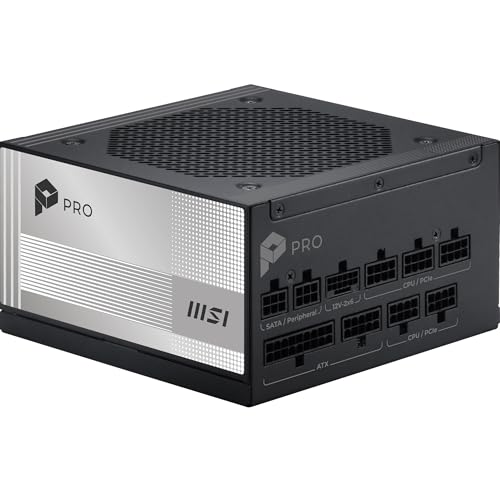
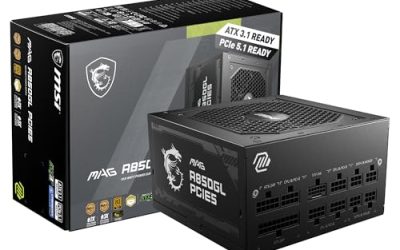
MSI PRO A1000PL PCIE5, Fully Modular Gaming 1000W Power Supply, 80+ Platinum, 12V-2x6 Cables, Server-Grade Capacitor, ATX 3.1 & PCIe 5.1 Ready, Low-Noise, Embossed Jacket Cables, 7 Year Warranty
One of the consumer electronics options compared in this guide.
View on Amazon
NZXT C1000 Gold ATX 3.1 - 1000W Fully Modular Power Supply | 1000W 80 PLUS Gold ATX 3.1 PSU, fully modular and quiet. PCIe 5 ready for modern GPUs, backed by a 10-year warranty.
One of the consumer electronics options compared in this guide.
View on Amazon| Product | Best for | Key spec from the title |
|---|---|---|
| be quiet! Pure Power 13 M 1000W | Quiet builds with strong efficiency | 80+ Gold, Cybenetics Platinum, semi-passive fan |
| CORSAIR RM1000x ATX 3.1 | A familiar, proven modular choice | Native 12V-2×6, fully modular, Cybenetics Gold |
| Auotac 1000W Fully Modular | Cost-conscious modular builds with lighting | 80+ Gold, dual-color 12V-2×6 cable, RGB fan |
| ASUS ROG Strix 1000W Platinum | Premium, feature-rich systems | 80 Plus Platinum, Cybenetics Lambda A+, GaN MOSFET |
| Rosewill VMG 1000W | Value Gold with listed capacitor quality | 80+ Gold, Japanese electrolytic capacitors |
| MSI PRO A1000PL | Platinum efficiency with server-grade parts | 80+ Platinum, server-grade capacitor |
| NZXT C1000 Gold ATX 3.1 | Clean, simple Gold unit | 80 PLUS Gold, fully modular, PCIe 5 ready |
| be quiet! Power Zone 2 1000W | Zero RPM with a right-angle cable | 80+ Platinum, 140mm fan, 90 degree 12V-2×6 |
The 8 Best Options
One listing was left out because its title carries no brand name at all, only a generic 1000W Gold description, which makes warranty and support impossible to judge from the page. The eight below follow the order of the shortlist. Where a title is cut off, the write-up says so and points you to the product page.
be quiet! Pure Power 13 M 1000W
The title for this unit stacks several useful details: 1000W, 80+ Gold, a Cybenetics Platinum mark, PCIe 5.1, ATX 3.1, fully modular cables, LLC topology, and a semi-passive fan. It is aimed at buyers who want a modern, quiet supply from a brand best known for acoustics, and who would rather not pay the premium that a Platinum badge usually carries.
The semi-passive fan label means the fan can stay off at low load, which suits desktops that idle or run lighter games for long stretches. LLC topology is a design term for the resonant converter stage, and its presence in the title signals a more current platform than older group-regulated designs. The Cybenetics Platinum wording is an extra third-party reference on top of the 80+ Gold label.
- A Gold rating together with a Cybenetics Platinum mention points to strong efficiency.
- Fully modular cabling keeps a mid-size case tidy.
- Semi-passive fan behavior helps with silence at low load.
- The headline stacks several certifications, so read which one covers efficiency and which covers noise.
- It sits in the mainstream Gold class, not the Platinum tier.
Skip it if you want a visible RGB fan or a showpiece shroud. Compared with the Corsair next, it leans harder on quiet operation and less on brand familiarity.
CORSAIR RM1000x ATX 3.1
The RM1000x is one of the most recognizable names in this class. The title lists ATX 3.1, PCIe 5.1, 1000W, a black finish, a native 12V-2×6 connector, fully modular cables, low-noise operation, and a Cybenetics Gold rating. Nothing about the listing is exotic, and that is part of the appeal for people who want a predictable purchase.
A native 12V-2×6 connector means the graphics card cable plugs into the supply directly, without an adapter, which is the cleaner route for a high-power card. Buyers who value an established brand and a straightforward specification will find this a comfortable choice, particularly in a build where the supply will stay in service across more than one graphics upgrade.
- A native modern GPU connector removes the need for an adapter.
- Fully modular cabling suits clean builds.
- A Cybenetics Gold rating gives a third-party efficiency reference.
- The title does not mention a zero RPM mode, so fan behavior at idle is unclear.
- A Gold unit is not the highest efficiency tier available in this list.
Skip it if you want a semi-passive fan or Platinum efficiency. Next to the Auotac, it offers the same wattage and Gold-class efficiency with a better-known name behind it.
Auotac 1000W Fully Modular
The Auotac is the least familiar brand here, and its title tries to make up for that with detail: 1000W, fully modular, 80+ Gold, ATX 3.1, PCIe 5.1 readiness, a native dual-color 12V-2×6 cable, an RGB low-noise smart fan, and 105 degree Celsius-rated capacitors.
Shoppers who want modern connector support and lighting without a premium label may find it appealing. The capacitor temperature rating is a useful figure, because parts rated for higher temperatures are generally associated with longer life. At the same time, an unfamiliar brand means you should read the warranty terms and the return policy carefully before committing a high-end graphics card to it.
- A dual-color native 12V-2×6 cable is listed.
- 105 degree capacitors are named, a sign of attention to build quality.
- An RGB smart fan adds lighting for display builds.
- Brand recognition is low, so support history is harder to judge.
- RGB lighting adds little for a case without a window.
Skip it if you are powering an expensive graphics card and want the reassurance of an established name. Compared with the ASUS next, it offers the opposite proposition: feature-rich and cost-focused, but unproven.
ASUS ROG Strix 1000W Platinum
This ROG unit is the showpiece. The title shows 1000W, fully modular cables, 80 Plus Platinum, ATX 3.1, Cybenetics Lambda A+, GaN MOSFET, and a GPU-first design feature whose name is cut off in the listing. Together the labels describe a premium engineering approach and a unit meant to be seen.
Platinum efficiency, a quiet-operation certification, and a GaN-based design suggest a supply aimed at enthusiasts who treat the power supply as part of the theme of the build. It suits a system built around the ROG ecosystem and a buyer who values features over a lean cost. Because the title is truncated, read the product page to see what the GPU-first feature actually does.
- Platinum efficiency is listed, one tier above the Gold units.
- Lambda A+ is a noise certification, which supports quiet operation.
- GaN MOSFET technology is named in the title.
- It is a premium-tier unit, and the cost reflects that.
- The title is truncated, so some feature details are not visible.
Skip it if you want a plain, low-profile supply or are watching the budget. Against the Rosewill next, it sits at the opposite end of the list.
Rosewill VMG 1000W
The Rosewill VMG is a value-oriented Gold supply. The title lists 80+ Gold, ATX 3.0 and 3.1 compatibility, full modularity, a low-noise design, a PCIe 5.1 12V-2×6 connector, and 100 percent Japanese electrolytic capacitors. It is the kind of listing that appeals to builders who read specification sheets before they read brand names.
The capacitor claim is the headline. Japanese electrolytic parts are often associated with longevity, and a manufacturer that puts the claim in the title is signaling pride in its components. The ATX 3.0 and 3.1 compatibility wording is slightly less direct than the plain ATX 3.1 label on some other units, so buyers with the very newest graphics cards should confirm the connector on the product page.
- Japanese electrolytic capacitors are named for the whole unit.
- Full modularity eases cable management.
- A PCIe 5.1 12V-2×6 connector is listed.
- The compatibility wording is less specific than a plain ATX 3.1 label.
- Brand cachet is lower than the major players.
Skip it if you want the strongest brand reputation. Compared with the MSI next, it is Gold against Platinum, with a similar focus on capacitor quality.
MSI PRO A1000PL
The MSI PRO A1000PL moves into Platinum territory. The title lists PCIe 5, fully modular design, a gaming focus, 1000W, 80+ Platinum, 12V-2×6 cables, a server-grade capacitor, ATX 3.1 and PCIe 5.1 readiness, and a low-noise design. It reads like a well-rounded spec sheet from a major component brand.
A Platinum rating suggests better efficiency at typical load, and the server-grade capacitor mention is a durability signal. This unit suits buyers who want a premium efficiency tier without the visual flourish of the ROG line, and it fits neatly into a build that already uses MSI components. The title does not mention a zero RPM mode, so fan behavior at idle is worth checking.
- Platinum efficiency from a major component brand.
- Server-grade capacitors are named.
- 12V-2×6 cables are included.
- It costs more than the Gold alternatives on the list.
- The title does not mention a zero RPM mode.
Skip it if Gold efficiency is enough for your needs. Against the NZXT next, it is the more efficient and more detailed of the two.
NZXT C1000 Gold ATX 3.1
The NZXT C1000 is the clean, simple option. The title states 1000W, 80 PLUS Gold, ATX 3.1, fully modular design, quiet operation, and PCIe 5 readiness for modern graphics cards. It leaves out the long list of component claims that other titles include, which makes it easy to read at a glance.
It is the supply for builders who like NZXT’s understated aesthetic and want a straightforward Gold unit that matches an NZXT case. The title is shorter on technical details than some rivals, such as capacitor type or fan behavior, so buyers should confirm those on the product page before ordering. For a mainstream gaming build, the headline specifications are all present.
- 80 PLUS Gold efficiency is stated clearly.
- Fully modular cabling.
- PCIe 5 readiness for modern graphics cards is listed.
- Few technical details appear in the title.
- No zero RPM or Platinum mention.
Skip it if you want detailed component information up front. It compares with the final pick as the simpler option against a feature-rich Platinum design.
be quiet! Power Zone 2 1000W
The Power Zone 2 completes the list with a second be quiet! model. The title lists ATX 3.1, PCIe 5.1, 80+ Platinum, a zero RPM low-noise design, a Pure Wings 3 140mm fan, a 90 degree 12V-2×6 connector, and a Cybenetics mark whose details are cut off.
The 90 degree connector is a practical detail: it lets the cable run along the side of the card instead of bending sharply at the plug, which helps in tight cases and for builders who dislike strain near the socket. Combined with Platinum efficiency and a zero RPM mode, it is a thoughtful design for quiet systems that sit under a desk.
- Platinum efficiency and zero RPM operation.
- A 90 degree 12V-2×6 connector helps with cable routing.
- A 140mm fan is listed.
- It is a premium-tier model, so the cost is higher than Gold units.
- The title is truncated, so check the certification details.
Skip it if your case has plenty of room and you do not care about connector angle. Compared with the Pure Power 13 M at the top of the list, it moves up to Platinum efficiency and a right-angle cable.
Who Needs a 1000W Power Supply
A kilowatt unit is not mandatory for most builds, but it is the right call in several situations. Here is how to decide whether yours is one of them, and how to avoid paying for capacity you will never use.
Flagship graphics card owners
If you run a top-tier graphics card, especially one with a high power limit, 1000W gives comfortable headroom for transient spikes that last only a few milliseconds but can trip a smaller supply. The newest cards also pair with the 12V-2×6 connector, which every unit here includes or supports, so a native cable keeps the build clean.
Overclockers and heavy multitaskers
A processor and graphics card pushed past stock settings draw noticeably more power. A 1000W unit also suits workstations that render, encode, and game on the same machine, because those mixed loads can keep the CPU and GPU busy at once. In that case the extra capacity is not wasted.
Upgrade planners
Buying 1000W now means a later graphics card swap will not force a second supply purchase. If you plan to keep the case for many years, headroom is cheap insurance, and a unit with a long warranty can move to the next build. If you have no plan to upgrade, a smaller supply is perfectly fine. Think about the next two graphics cards you might own, not only the one in the box today, because that is the horizon over which a bigger unit pays back.
How to Choose a 1000W Power Supply
Efficiency rating: Gold or Platinum
80 Plus Gold requires about 90 percent efficiency at half load, while Platinum requires about 92 percent. The practical difference is small: slightly less waste heat and a slightly lower electric bill. Cybenetics ratings add a second reference for both efficiency and noise, and several titles here quote them. Treat the 80 Plus tier as a floor, not a promise of quality, because two Gold units can differ widely in component choices. Efficiency also changes with load: most units peak near half load, which is another reason a 1000W model suits a system that normally draws a few hundred watts.
Modular cabling
Fully modular supplies let you connect only the cables you need, which improves airflow and tidiness. Semi-modular designs hard-wire the main cables. At 1000W, full modularity is worth insisting on, because a high-power build often needs several PCIe cables but few SATA leads, and unused cables clutter the case. Flat, ribbon-style cables are easier to route behind a motherboard tray than round sleeved ones, though they can be stiffer to bend in tight corners.
Connector support
Look for a native 12V-2×6 cable if you own or plan to buy a new graphics card. Also count the PCIe 8-pin and CPU 8-pin connectors, and the number of SATA and Molex leads for your drives and fans. A supply that uses a 90 degree connector, like the Power Zone 2, can help in cases where the side panel sits close to the card. Finally, check how many separate PCIe cables the supply provides, since some high-power cards still use three or four 8-pin connectors and you do not want to daisy-chain them on a heavy load.
Fan design and noise
A semi-passive or zero RPM mode keeps the fan off at low load. A 135 to 140mm fan can spin slower for the same airflow than a 120mm fan, which usually means less noise. Look for fluid dynamic or similarly durable bearings, and remember that Cybenetics noise grades are a better guide than marketing words such as silent. Also consider where the supply sits: a unit mounted fan-down over a bottom vent behaves differently from one with its fan facing a closed shroud, and case airflow decides how often the fan needs to spin at all.
Capacitors, protection, and warranty
Japanese or 105 degree capacitors and a listed warranty of ten years or more point to confident manufacturing. Protection features such as over-current, over-power, over-voltage, and short-circuit protection should be standard. A longer warranty is the simplest signal of what the maker expects the unit to survive.
What to ignore, and where budget units cut corners
Ignore RGB fans, glossy shrouds, and long lists of adjectives. Budget units cut corners in capacitor quality, protection circuits, ripple suppression, and warranty length. A 1000W label from an unknown brand deserves extra skepticism, since the number on the box is easy to print and hard for a buyer to verify. Another shortcut is quoting a peak wattage instead of a continuous one, so read the label on the unit itself when it arrives and compare the 12V rail rating to the claim on the listing.
Gold vs Platinum at 1000W
The most common fork in this category is Gold against Platinum. The table summarizes what changes between the groups that appear in this guide.
| Factor | 80 Plus Gold | 80 Plus Platinum |
|---|---|---|
| Listed models | Pure Power 13 M, RM1000x, Auotac, Rosewill, NZXT | ROG Strix, MSI A1000PL, Power Zone 2 |
| Efficiency at half load | About 90 percent | About 92 percent |
| Heat and noise | Low | Slightly lower |
| Cost | Lower | Higher |
| Best for | Most gaming builds | Premium or always-on systems |
When Gold is enough
For a gaming PC used a few hours a day, the energy saved by Platinum is small. Gold units from reputable brands offer the same protections and cables at a lower cost, so most buyers do well here. The savings can go toward a better graphics card or a larger drive, which will change your daily use far more than a few percentage points of efficiency.
When Platinum makes sense
If the machine runs long hours, sits in a warm room, or you simply want the quietest possible operation, Platinum is the better choice. It is also common in premium lines that add better fans, cables, and warranty terms, which are the real benefits for many buyers. A Platinum unit also tends to include higher-grade capacitors and protection circuits, but the label alone does not guarantee those, so compare the component notes in the titles above.
Setup, Compatibility and Upgrade Tips
What to check before buying
Measure the space for the supply and its cables, and confirm the case supports a standard ATX power supply. Check the graphics card’s power connector: a card with the newer connector works best with a native cable. Count the drives, fans, and lighting controllers you will connect so you know how many SATA and peripheral leads you need. Look at the depth of the unit as well, because a long supply can collide with drive cages or the back of a cable cover in compact cases.
What to upgrade first
Replace the supply before it becomes the limit. If your current unit is below 750W and you add a high-end card, upgrade the supply first, then the card. Keep the original cables in a labeled bag in case you resell or reuse the unit later, but never mix cables between brands. When you swap the supply, photograph the old wiring first, turn off the rear switch, and press the power button once to drain the board before unplugging anything.
Common compatibility traps
Modular cables are not interchangeable between brands, even when the plugs look identical, and a wrong pin layout can damage components. Do not use a leftover cable from another supply. Avoid bending the 12V-2×6 cable sharply near the connector, and push it fully into the socket until it seats. Finally, make sure the supply fan faces the right way for your case airflow, and leave a little slack in every cable so that nothing pulls on a connector when the side panel closes. If the build uses a vertically mounted graphics card, double-check that the connector clearance still works with the stiffer 12V-2×6 cable.
Which One Fits Your Situation
You want the quietest system
Choose the be quiet! Power Zone 2 1000W. It combines Platinum efficiency, zero RPM operation, and a 140mm fan, so it is the strongest match for a desk-side build where fan noise would be heard. The right-angle cable also suits compact cases.
You want a trusted name with a native GPU cable
Choose the CORSAIR RM1000x ATX 3.1. It is a familiar modular unit with a native 12V-2×6 connector and a Cybenetics Gold rating. It is the safest pick for a first-time builder who wants a name with plenty of community support.
You want a premium showpiece
Choose the ASUS ROG Strix 1000W Platinum. It brings Platinum efficiency, a Lambda A+ mark, and GaN MOSFET design to a visible build, and it is the one to pick if the supply will sit behind a glass panel.
You want solid value
Choose the Rosewill VMG 1000W for Gold efficiency and Japanese capacitors, or the Auotac if you want an RGB fan and a dual-color cable. Pick the NZXT C1000 if your case matches its minimalist look, and the MSI PRO A1000PL if you want Platinum efficiency with a plainer appearance.
Common Mistakes
- Buying 1000W for a mid-range card that draws far less, when a smaller Gold unit would run just as well.
- Choosing an unfamiliar brand because of a long feature list.
- Reusing modular cables from another supply.
- Using an adapter when a native 12V-2×6 cable is available.
- Forgetting that case space limits long supplies and that thick cables need room behind the tray.
- Paying for Platinum when Gold meets your needs, or assuming Gold means low quality.
Related guides
- External Hard Drive For Xbox Series X
- How To Check Gpu Temperature While Gaming
- 7.1 Surround Sound Gaming Headsets
Frequently Asked Questions
Is 1000W too much for a gaming PC?
For most systems, it is more than needed, but it is not wasteful. A unit at half load often runs quieter and cooler. It is a good match for flagship graphics cards and future upgrades. Just be sure the money spent on wattage does not come out of the graphics card budget.
Does a higher wattage use more electricity?
No. A PC draws only what it needs, regardless of the supply rating. Efficiency affects waste heat, not the rated wattage on the label.
What does ATX 3.1 mean?
It is the current power supply standard, with better handling of power spikes and the 12V-2×6 connector. ATX 3.0 and 3.1 supplies both work with modern cards. The newer revision refines the connector details.
Do I need a native 12V-2×6 cable?
If your card uses that connector, a native cable is the cleanest option. Adapters work, but they add a connection point and bulk. Every unit in this guide lists the connector. If your card ships with an adapter, keep it as a backup but prefer the supply cable.
What is a semi-passive fan?
The fan stays off until the load or temperature rises. It makes the supply silent at idle and during light use. Zero RPM mode is another name for the same behavior. Under a heavy gaming load the fan will spin up, so a quiet fan curve still matters.
How long should a power supply last?
A good unit often carries a warranty of ten years or more and can serve across several builds. Replace it if it shows instability, unusual noise, or visible damage. Even a healthy unit is worth retiring if you move to a platform with different connector needs.
Final Words
The right 1000W supply is the one that matches your priorities. The Corsair RM1000x and NZXT C1000 are the familiar Gold options, the Pure Power 13 M adds quiet operation, the Rosewill and Auotac cover value, and the ROG Strix, MSI A1000PL, and Power Zone 2 reach for Platinum efficiency. Look for a native 12V-2×6 cable, full modularity, and a long warranty, and you will have a supply that can outlast several graphics cards. Confirm the case clearance and the exact connector on your card before you order, and keep the original box until the system has run stably for a few weeks.