Our Top Picks
 MUSETEX Y6 PC Case16.73"D x 10.83"W x 15.67"H16.73 x 10.83 x 15.67 inches13.09 poundsCheck on Amazon
 MUSETEX ATX PC Case 7 PWM ARGB Fans16.73"D x 8.35"W x 18.5"H16.73 x 8.35 x 18.5 inches15 PoundsCheck on Amazon
A fish tank PC case is a showpiece first and an enclosure second. The name comes from the wraparound glass, where one panel on the front and another on the side meet at a corner with no pillar in between, so the whole inside of the machine reads like a display aquarium. People shop for these cases because they want to see the graphics card, the cooler, and the cable runs, and because a tidy build looks better in a glass box than in a plain steel one. That visual goal changes how you should choose: the question is not just whether the parts fit, but how the finished build will look from the angle where you sit.
This guide covers seven cases that match the style, from compact micro-ATX boxes to full ATX towers with a pre-installed fan array. Each is judged only from what its listing states: panel layout, fan count, ports, motherboard support, clearance figures, and cooling room. Glass cases trade some airflow and some weight for looks, so the guide also explains where that trade shows up and how to plan around it in 2026. If you are building around a bright cooler and a long graphics card, read the clearance notes before you read the style notes.
Quick Picks
MUSETEX Y6 PC Case, Pre-Installed 4 Non-LED Fans, ATX Mid Tower Case, Computer Case with Type-C, 270° Full View Tempered Glass, Black
One of the consumer electronics options compared in this guide.
View on Amazon
MUSETEX Y6 PC Case, Pre-Installed 7 Infinity Mirror PWM ARGB Fans, ATX Mid Tower Computer Case, Gaming PC Case with Type-C, 270° Full View Tempered Glass, Black
One of the consumer electronics options compared in this guide.
View on Amazon
FOIFKIN F600 PC Case - Pre-Installed 7 PWM ARGB Fan, ATX Mid-Tower Gaming PC Case, 270° Panoramic Glass with Type-C, FOIFKIN (Black, F600)
One of the consumer electronics options compared in this guide.
View on AmazonMUSETEX ATX PC Case 7 PWM ARGB Fans Pre-Installed, Type-C Mid Tower Computer Case with Full-View Dual Tempered Glass, Gaming PC Case, Black(K2)
One of the consumer electronics options compared in this guide.
View on Amazon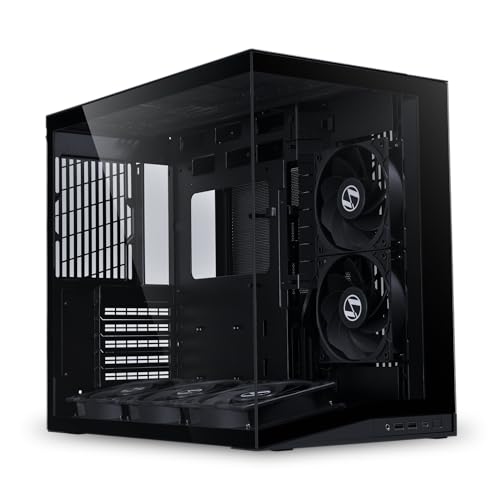
Lian Li O11D Mini V2 Flow ATX PC Case with 5 Non-RGB Reverse Fans, Black | Includes five 120mm reverse-blade fans, panoramic glass, 10° angled intake and support for ATX, M-ATX and Mini-ITX builds.
One of the consumer electronics options compared in this guide.
View on Amazon
Lian Li V100-ATX Mid-Tower PC Case-Black-V100RX | Side I/O USB-C | Dust Filiter | Support 420mm GPUs & 360mm Radiator | Included GPU Bracket | LED & Display Platform (V100RX)
One of the consumer electronics options compared in this guide.
View on Amazon
RUIX OV303 ATX Mid-Tower PC Case, Pre-Installed 4 x 120mm Prism ARGB PWM Fans, USB 3.0 & Type-C Ports, High-Airflow Gaming Computer Case - Black
One of the consumer electronics options compared in this guide.
View on Amazon| Product | Best for | Key spec from the listing |
|---|---|---|
| MUSETEX Y6 | Full-glass look with a ready fan set | 7 infinity mirror PWM ARGB fans, 270 degree glass, Type-C |
| FOIFKIN F600 | Panoramic glass on a modest budget | 7 PWM ARGB fans, 270 degree panoramic glass, Type-C |
| MUSETEX K2 | Dual-glass layout | 7 PWM ARGB fans, full-view dual tempered glass, Type-C |
| Lian Li O11D Mini V2 Flow | Premium showcase with strong airflow | Five 120mm reverse-blade fans, panoramic glass |
| MONTECH TG3 Panoramic | Hidden-cable builds with big GPUs | Back-connect ready, 430mm GPU and 180mm cooler clearance |
| Thermaltake View 380 TG ARGB | Dual-glass tower with included fans | 4x120mm ARGB fans, front and side tempered glass |
| MOROVOL MATX V3 | Compact micro-ATX display build | 270 degree glass, 3 fans, USB 3.0 |
The 7 Best Options
MUSETEX Y6
The Y6 is the full-spectacle choice among the budget-friendly cases. The listing describes an ATX mid tower with seven pre-installed infinity mirror PWM ARGB fans, 270 degree full-view tempered glass, and a Type-C port on the front panel. That fan count is the headline: seven fans supplied means you do not have to buy a fan kit to make the case look finished, and the infinity mirror fan style is meant to create a tunnel-of-light effect through the glass.
It suits builders who want the look right away and who plan to fill the case with colored lighting. Since the fans are PWM, a motherboard header or controller can adjust their speed, which helps keep a build with this many fans from sounding like a hair dryer. A second Y6 listing with four non-LED fans exists, but it is the same case with a different fan set, so it is left out here as a duplicate.
- Seven pre-installed fans mean the case is ready to light up out of the box.
- 270 degree glass gives a wide view of the interior.
- A Type-C port on the front panel suits current peripherals.
- Seven RGB fans need enough header or hub capacity on the motherboard or controller.
- Maximum GPU length and cooler height are not stated in the title.
Picture the finished desk: the case sits where people can see it, the lights run in a slow cycle, and the glass corner reveals a graphics card standing in the middle of a ring of moving color. That is the exact scene this case was designed to produce. The cost of that look is a little extra planning, because a case that arrives with seven fans also arrives with seven cables that need a tidy path behind the motherboard tray.
Skip it if you prefer a subdued look with minimal lighting. Against the FOIFKIN F600 that follows, the Y6 emphasizes the infinity mirror fan style, while the F600 is a simpler panoramic design with the same fan count.
FOIFKIN F600
The F600 follows the same recipe: an ATX mid tower with seven pre-installed PWM ARGB fans, 270 degree panoramic glass, and Type-C on the front. The listing lists black as the color. In practical terms, this is another full-glass case that arrives with its cooling and lighting already installed, which saves both money and time on a first build.
What differentiates it is mostly style and brand. For a buyer comparing several seven-fan panoramic cases, the choice often comes down to which fan design and front panel look better in photos, plus which listing gives more detail about clearance. This one is light on dimensions in the title, so review the full page for GPU length, cooler height, and radiator support before ordering.
- Seven PWM ARGB fans are included, so you can build without buying extras.
- Panoramic glass gives a clean view of the motherboard and graphics card.
- Type-C front connectivity is listed.
- Clearance figures are not in the title, so fit must be verified separately.
- A large fan count adds cable work behind the motherboard tray.
For a first-time builder, the appeal is how few decisions remain. The case brings the fans, the glass, and the front ports, so the shopping list shrinks to the motherboard, processor, memory, storage, graphics card, and power supply. That simplicity is worth something, as long as you accept that a long list of included features comes with less detailed documentation in the product title than some pricier rivals provide.
Skip it if you want a premium finish and a clearly documented fan layout.
Compared with the MUSETEX K2, the F600 uses panoramic glass in a wraparound style, while the K2 emphasizes dual glass panels.
MUSETEX K2
The K2 is the sibling that takes a slightly different route. Its listing mentions seven pre-installed PWM ARGB fans, a Type-C port, and full-view dual tempered glass in an ATX mid tower. Dual glass means two glass surfaces, usually the front and side, which gives you the aquarium effect from the most common viewing angles.
Buyers who like the look but want a design that feels slightly more traditional than the Y6 may lean toward this model. As always with seven-fan cases, plan your lighting control early. Many motherboards have only a few ARGB headers, so a hub or controller can be a worthwhile add-on, and the listing does not mention one.
- Dual tempered glass shows off the interior from the front and the side.
- Seven fans arrive installed, which simplifies setup.
- Type-C is included for newer devices.
- Details like radiator support and GPU length are not in the title.
- Glass panels add weight, which makes moving the case more awkward.
One way to think about the K2 is as the version for people who find a full 270 degree wrap a bit much and prefer a more structured two-panel presentation. The corner of the case is still glass, so the view remains open, but the overall silhouette reads as a conventional tower with a generous window instead of a pure display cabinet. It pairs well with a white or black component palette and a single accent color.
Skip it if you want strong airflow documented in the listing. Against the Lian Li that follows, the K2 is the budget way into a dual-glass design, while the Lian Li is the premium take with stated fan direction.
Lian Li O11D Mini V2 Flow
This is the enthusiast pick. The listing describes an ATX case with five non-RGB reverse fans in black, five 120mm reverse-blade fans, panoramic glass, and an angled intake design of ten degrees. Reverse-blade fans are built so the blades face the glass side, which lets the case show the clean back of each fan and keeps the cooling pointed the right way.
It appeals to buyers who want a cleaner, less flashy aquarium look without the color explosion, since the fans are not RGB. The name signals an emphasis on airflow, and the angled intake is meant to help it breathe. It also suits people who plan to add their own lighting and want a neutral base. Check the full page for radiator and GPU limits, since the title is cut off before those details.
- Five 120mm reverse-blade fans are included.
- Panoramic glass delivers the signature aquarium view.
- Non-RGB fans give a neutral base for custom lighting.
- The lack of RGB means you must add lighting if you want it.
- A premium case typically means a higher cost than the budget cases on this list.
The reverse-blade detail deserves a moment. In many glass cases the fans mounted on the side face the wrong way for the view, and the back of the fan, with its motor and struts, becomes the visible side. Reverse-blade fans solve that by flipping the blade design so the good-looking face points outward while air still moves in the intended direction. It is a small touch, but it is the sort of detail showcase builders appreciate, and it explains part of why this case commands attention.
Skip it if you want a ready-lit build for the lowest cost. Compared with the MONTECH TG3, the Lian Li favors airflow and a designer feel, while the MONTECH emphasizes clearance and hidden connectors.
MONTECH TG3 Panoramic
The TG3 is the one to read if you are building around a very large graphics card. The listing describes an ATX panoramic case that is back-connect ready, with four ARGB fans, a tiered showcase layout, 430mm of GPU clearance, 180mm of cooler clearance, and support for a 360mm radiator. Those are the most specific numbers in this group, and they matter for a showcase build.
Back-connect ready means it is designed for motherboards that put power and fan connectors at the rear, so cables can be hidden on the back panel. That suits a visually clean build. The tiered showcase idea suggests that components are arranged to be seen, rather than hidden. With a 360mm radiator supported, liquid cooling is a realistic option in this case.
- 430mm of GPU clearance is stated outright.
- 180mm of cooler clearance helps with large air coolers.
- Support for a 360mm radiator opens the door to liquid cooling.
- Four fans are included, fewer than the seven-fan budget cases.
- Back-connect motherboards are not universal, so the feature may go unused.
This is also the case to consider if you like the idea of a build where almost no cable is visible. Hiding connectors on the rear of the board lets the glass show only the parts, which is the cleanest version of the aquarium effect. Before you commit, confirm that the motherboard you choose really is the back-connect type, and read the full page for the exact fan layout, since the title mentions four ARGB fans without describing where they mount.
Skip it if your motherboard has standard connectors and you do not care about hidden cabling.
Against the Thermaltake View 380, the MONTECH leans toward newer design ideas, while the Thermaltake is the more traditional tower.
Thermaltake View 380 TG ARGB
The View 380 is a name many builders recognize. The listing describes a black ATX case with four 120mm ARGB fans included, support for hidden-connector motherboards, and front and side dual tempered glass panels. The dual glass gives the aquarium look from two sides, and four fans cover a reasonable airflow baseline.
It fits builders who want a known brand and a dual-glass look without paying for a flagship case. Support for hidden-connector motherboards suggests a clean-cable build is possible, though you should confirm the compatible motherboard types in the full listing. Radiator and GPU dimensions are not given in the title, so verify them before choosing large components.
- Four 120mm ARGB fans are included.
- Front and side dual glass give a strong display angle.
- Hidden-connector motherboard support allows tidier cable routing.
- Clearance numbers are missing from the title.
- Dual glass adds weight and fingerprints.
The View line has long been associated with a clear-window approach, and this model carries that forward with glass on both the front and the side. For a buyer who has never built a PC, a familiar brand name can make the decision feel safer, because replacement parts, manuals, and community build photos are easy to find. Four ARGB fans are a sensible baseline set, and you can add more later if the airflow plan calls for it.
Skip it if you want the biggest fan count at the lowest cost. Compared with the MOROVOL that follows, the View 380 is a full ATX tower, which gives more room for expansion.
MOROVOL MATX V3
The MOROVOL is the compact entry. The listing calls it a micro-ATX case with 270 degree panoramic tempered glass, three fans pre-installed, USB 3.0, and a black finish. Micro-ATX boards are smaller than full ATX boards, so this case is the right size for a small desk and a modest build.
It is a good choice for buyers who want the fish tank look in a smaller footprint. The tradeoff is room: fewer expansion slots and less space for big coolers and long cards. USB 3.0 on the front panel covers common devices, but the listing does not mention Type-C, which may matter to newer-gadget users.
- Micro-ATX size suits small desks.
- 270 degree panoramic glass delivers the aquarium effect.
- Three fans come pre-installed.
- It supports a smaller motherboard class, which limits expansion.
- Type-C is not mentioned in the title.
Small cases reward careful part selection. Choose a compact graphics card, a low-profile air cooler or a small liquid loop, and a power supply with short, flexible cables. Done well, a micro-ATX glass build can look more intentional than a half-empty full tower, because every part is close to its neighbors and nothing floats in empty space. Done carelessly, it can end up cramped and hot.
Skip it if you want to use a full ATX motherboard or a long graphics card.
As the smallest case here, it serves as a counterpoint to every full-size tower above.
Three listings were left out. The Y6 variant with four non-LED fans duplicates the MUSETEX Y6 above. The Lian Li V100 and the RUIX OV303 are standard-style towers and do not match the wraparound glass look this keyword implies.
Who Should Buy a Fish Tank Case
Builders who want the parts to be the decoration
If you spent real money on a graphics card and a nice cooler, a glass case lets them be seen. The wraparound view makes sense for desks that face the room, not the wall, where visitors or viewers see the build every day.
Streamers and content creators
A glowing, glass-fronted machine looks good on camera. Creators who film their desk setups often treat the PC as a prop, and a fish tank case frames the hardware well. If you use it this way, plan lighting that matches your room and your camera exposure.
People who like to tinker
Open-feeling cases invite changes. If you like swapping fans, adding coolers, or routing custom cables, a glass case rewards the effort because every change is visible. If you prefer to build once and forget the machine, a plain case with better dust filtering may suit you better.
It also helps to be honest about maintenance. Glass shows dust and fingerprints more readily than a steel panel, and a showcase build only looks its best if you wipe it down now and then. If you live in a dusty room or keep pets, plan on regular cleaning, and favor cases that list dust filters. If you want a build that looks good with almost no upkeep, a smaller glass section or a darker tint can hide more.
How to Choose a Fish Tank PC Case
Confirm the motherboard size
Cases are rated for ATX, micro-ATX, or mini-ITX boards. A full ATX case accepts all three, while a micro-ATX case accepts the smaller two. Check the board size you own or plan to buy, and remember that ATX boards need more width and more expansion slots. Choose the case size that matches the build instead of forcing the build into the case.
Also look at how many expansion slots the case offers and where the drive bays sit. Showcase cases sometimes sacrifice drive bays for glass, so if you plan to use several storage drives, confirm there is a mounting spot that is not in the middle of the view. A few small checks here save a lot of rearranging later.
Check GPU length and cooler height
These two numbers decide whether the build fits. A large graphics card can exceed 300mm, and tall air coolers can touch the glass panel. The MONTECH listing states 430mm of GPU clearance and 180mm of cooler clearance, which is the kind of detail to seek out. If a listing does not state the numbers, look for them on the full product page or in the manual.
Plan for airflow in a glass box
Glass panels do not breathe, so airflow depends on the front, top, bottom, and rear openings. Cases with a front glass panel need side or bottom intakes, and the Lian Li listing addresses this with an angled intake. Count the fans, check their direction, and think about where the hot air leaves. A showcase case with poor airflow can throttle a hot graphics card. A practical layout is front or bottom intake paired with rear and top exhaust, so cool air enters low and hot air leaves high. If the front is glass, the intake must come from the side of the front panel, the bottom, or the back, which is why the airflow description in a listing matters.
When a listing offers no intake details at all, treat the case as a style purchase and expect to add or reposition fans. That is not a dealbreaker for a moderate build, but a hot GPU and a sealed glass front are a poor mix.
Think about radiator support
If you want liquid cooling, look for a stated radiator size, such as the 360mm support on the MONTECH. Also check where the radiator mounts, because a front-mounted radiator can interfere with a front glass panel in some designs. Air cooling is simpler in many glass cases, so decide early which route you will take.
Look at front-panel ports
Type-C is on several listings above. If you use newer devices, it is worth having. USB 3.0 covers most older peripherals, but a Type-C port future-proofs the case for new headsets and drives. Count the ports you need, since glass cases sometimes place them on the top or the side.
Know where budget cases cut corners
Budget glass cases often cut dust filters, cable management room, and thick steel. Also check how the glass panels are attached, since thumbscrews and hinges are easier than tricky clips. Ignore marketing claims about airflow if no fan placement is shown, and ignore the number of RGB fans as a quality indicator. More lights do not mean a better case. Another corner often cut is the power supply shroud and cable cutouts, which can leave the lower chamber messy and hard to hide in a glass case. Check photos of the interior with cables installed, not only the empty case on a clean background.
Seven-Fan Budget Cases Versus Premium Showcase Cases
| Factor | Seven-fan budget cases | Premium showcase cases |
|---|---|---|
| Examples here | MUSETEX Y6, FOIFKIN F600, MUSETEX K2 | Lian Li O11D Mini V2 Flow, MONTECH TG3 |
| Fans included | Seven ARGB fans | Four to five fans |
| Stated clearance | Often missing in the title | More detailed, such as GPU and cooler limits |
| Look | Bright and lit out of the box | Cleaner, more designed |
| Best fit | First builds and lighting fans | Large GPUs, liquid cooling, custom builds |
Why the fan count is not the whole story
Seven fans sound like a lot, but fan count says little about airflow quality. Fan placement, case openings, and the direction of each fan matter more. Budget cases that bundle many fans still often leave clearance and cable management as open questions.
When the premium route pays off
If your graphics card is large, or you plan a radiator, the premium group offers stated numbers and a design built around them. The extra cost buys less guesswork. For a modest build, the budget group delivers the look at a lower cost, so match the case to the parts. A good test is to write down your graphics card length, your cooler height, and your radiator plan, then see which listing answers all three. The one that does is usually the better fit for a serious build, while the one that leaves them blank suits a simpler, lighting-first project.
Setup, Compatibility and Upgrade Tips
What to check before buying
Measure your graphics card and cooler, and compare them to the stated clearances. Confirm the motherboard form factor, and see whether your board has enough ARGB headers for the fans. Also check the power supply length, since the cable chamber in showcase cases can be tight. If you plan to mount a radiator, confirm the mounting location and size. Finally, think about the room: will the case sit on the desk or on the floor, and which side faces you? Glass cases are built with a specific viewing side, and placing the wrong side toward the wall wastes the design.
What to upgrade first
Begin with the cable plan. Short, sleeved cables look far better in a glass case than a tangle of default leads. After cabling, upgrade the fans or add a controller so lighting and speed are easy to manage. A vertical graphics card mount is a popular addition, but check that the case supports it. Next comes airflow tuning: once the build is running, listen for fan noise at idle and under load, and adjust fan curves in the motherboard settings so the machine stays quiet when you are only browsing.
Common compatibility traps
Tall coolers can press against the glass, and long cards can block the front fans. Seven ARGB fans may overload the motherboard’s headers, so a hub is often needed. Glass panels are heavy, so keep the case upright and remove panels before moving it. Never overtighten the thumbscrews on tempered glass, because uneven pressure can crack it. Also test-fit the power supply cables before closing the back panel, because glass cases leave little space behind the tray and a bulging bundle can stop the panel from sitting flat.
Which One Fits Your Situation
You want maximum lighting for the lowest cost
The MUSETEX Y6 or the FOIFKIN F600 delivers seven ARGB fans in a panoramic glass case, ready to light up on day one.
You are building around a very large graphics card
The MONTECH TG3 Panoramic lists 430mm of GPU clearance and 180mm of cooler clearance, so it is the safe choice for big components.
You want a clean, designed look and strong airflow
The Lian Li O11D Mini V2 Flow offers five reverse-blade fans and panoramic glass, with a neutral base for custom lighting.
You have a small desk and a smaller motherboard
The MOROVOL MATX V3 brings the aquarium look to a micro-ATX footprint. If you need a bigger case with dual glass, the Thermaltake View 380 TG ARGB is the traditional option.
Common Mistakes
- Assuming every glass case fits any graphics card without checking the length.
- Counting RGB fans as a sign of quality airflow.
- Forgetting that seven ARGB fans need hub or header capacity.
- Ignoring the front-panel ports until after the case arrives.
- Overtightening thumbscrews on tempered glass panels.
- Buying a micro-ATX case and then trying to fit a full ATX board.
Related guides
- Budget Graphics Cards For 4K Video Editing
- External Hard Drive For Xbox Series X
- How To Check Gpu Temperature While Gaming
Frequently Asked Questions
What makes a fish tank case different from a normal glass case?
It usually has a corner with no pillar between the front and side glass panels. That gives an uninterrupted wraparound view of the interior.
Do glass cases run hotter?
They can, because glass panels do not breathe. Airflow depends on the openings and fans, so check the intake and exhaust layout before you buy.
Are seven pre-installed fans too many?
Not necessarily, but they require header or hub support for lighting and speed control. More fans do not guarantee better cooling.
Can I use liquid cooling in these cases?
Some can. The MONTECH listing states support for a 360mm radiator, while other listings do not give radiator details in the title.
Is Type-C on the front panel important?
It is useful for newer devices and fast drives. If you only use older peripherals, USB 3.0 may be enough.
Which case is best for a small desk?
The MOROVOL MATX V3 is the compact option in this list, built for micro-ATX boards.
Final Words
A fish tank case should flatter the parts inside it, so begin with the hardware you own or plan to buy, not with the lighting. For big graphics cards and liquid cooling, the MONTECH leads on stated clearance. For ready-to-glow builds, the seven-fan MUSETEX and FOIFKIN cases offer a lot of show. The Lian Li brings a polished airflow design, the Thermaltake is the familiar dual-glass tower, and the MOROVOL keeps things compact. Measure twice, check headers, and plan the cables before you order the glass. A case like this stays on your desk for years, through several rounds of part swaps, so it is worth choosing for fit and airflow first, then for lighting, then for the little extras. Get those priorities in order and the build will look as good in person as in photos.