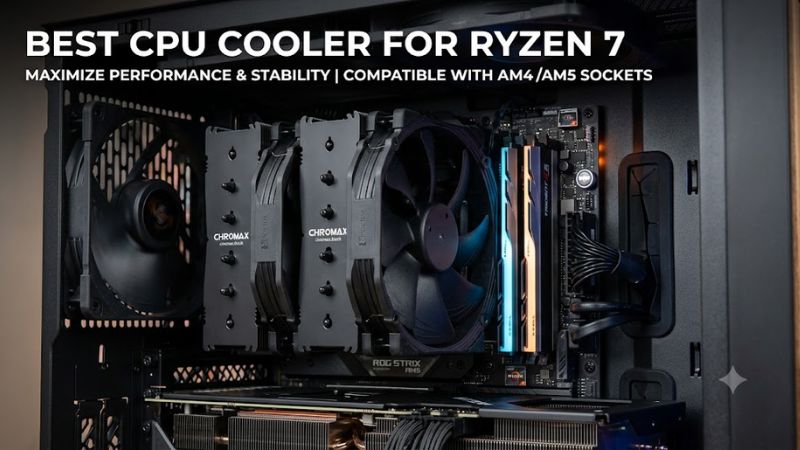
Choosing the best CPU cooler for Ryzen 7 depends on your processor generation, workload, PC case, and cooling budget. A Ryzen 7 9700X has different cooling requirements from a Ryzen 7 9800X3D, while older AM4 processors such as the Ryzen 7 5800X3D also need compatible mounting hardware.
For most gaming PCs, a quality dual-tower air cooler offers the best balance of cooling capacity, noise, reliability, and cost. The Thermalright Phantom Spirit 120 SE and Peerless Assassin 120 SE are excellent value-oriented options. Buyers seeking premium air cooling can consider the Noctua NH-D15 G2 LBC, while enthusiasts who prefer liquid cooling can look at the ARCTIC Liquid Freezer III Pro 360.
This guide compares five cooling options, explains their strengths and limitations, and covers the compatibility checks that matter before purchasing.
What to Consider When Choosing a Ryzen 7 CPU Cooler
Ryzen 7 is a processor family rather than one specific CPU. It includes multiple generations, different power ratings, and both standard and X3D models. Buying a cooler based only on the Ryzen 7 name can therefore lead to unnecessary spending or inadequate cooling.
Understand your processor’s cooling requirements
Some representative desktop Ryzen 7 processors illustrate the differences:
| Processor | Socket | Default TDP | Cooling considerations |
| Ryzen 7 5700X | AM4 | 65W | Quality single-tower or dual-tower air cooler |
| Ryzen 7 5800X3D | AM4 | 105W | Strong dual-tower air cooler recommended |
| Ryzen 7 7700 | AM5 | 65W | Midrange air cooling is generally sufficient |
| Ryzen 7 7800X3D | AM5 | 120W | Good dual-tower air cooler |
| Ryzen 7 9700X | AM5 | 65W | Quality air cooler for stock operation |
| Ryzen 7 9800X3D | AM5 | 120W | Strong air cooler or suitable AIO |
These TDP figures are manufacturer specifications, not direct measurements of maximum power consumption or the amount of heat a cooler must dissipate under every workload.
For example, the Ryzen 7 9700X does not automatically require a 360mm liquid cooler. A properly installed dual-tower air cooler is a reasonable choice for a stock gaming system.
The Ryzen 7 9800X3D has a higher default TDP and can benefit from additional cooling capacity during demanding workloads. However, liquid cooling is not mandatory.
AMD specifies a maximum operating temperature for each processor. A temperature approaching that limit under sustained workloads is not automatically evidence of a defective cooler. Boost behavior, ambient temperature, fan curves, case airflow, and motherboard power settings all influence readings.
Air cooling versus liquid cooling
Air coolers use a metal heatsink, heat pipes, and fans to transfer heat away from the processor. Their main advantages are straightforward installation, fewer components, and the absence of a pump.
Liquid coolers circulate coolant through a CPU block and radiator. They can provide substantial cooling capacity and offer more flexibility around the CPU socket, although radiator placement and case compatibility become important.
For a typical Ryzen 7 gaming PC, a good dual-tower air cooler is often the more economical purchase. An AIO makes more sense when the owner prefers its appearance, needs a radiator-based layout, or regularly runs sustained CPU-intensive workloads.
Best CPU Coolers for Ryzen 7
The following recommendations cover different budgets and cooling preferences. The selection prioritizes AM4 and AM5 compatibility, cooling capacity, physical dimensions, noise considerations, and published independent testing where available.
| CPU cooler | Best for | Type | Socket support | Main consideration |
| Thermalright Phantom Spirit 120 SE | Best overall value | Dual-tower air | AM4/AM5 | Large heatsink |
| Thermalright Peerless Assassin 120 SE | Budget gaming builds | Dual-tower air | AM4/AM5 | Memory clearance |
| Noctua NH-D15 G2 LBC | Premium air cooling | Dual-tower air | AM4/AM5 | High purchase cost |
| ARCTIC Liquid Freezer III Pro 360 | High-capacity liquid cooling | 360mm AIO | AM4/AM5 | Requires radiator space |
| Sudokoo SK700V | Premium alternative air cooling | Tower air | Verify mounting package | US availability |
1. Thermalright Phantom Spirit 120 SE – Best Overall Value
The Thermalright Phantom Spirit 120 SE is a strong starting point for Ryzen 7 gaming builds. It combines a dual-tower heatsink with seven heat pipes and two 120mm fans, providing substantial cooling hardware without requiring a liquid-cooling system.
Its published specifications include:
- Seven 6mm heat pipes.
- Two 120mm TL-C12B V2 PWM fans.
- Maximum fan speed of 1,500 RPM, with a stated tolerance of ±10%.
- Listed maximum airflow of 66.17 CFM per fan.
- 154mm overall heatsink height.
- AM4 and AM5 compatibility.
The seven heat pipes help transfer heat from the processor’s contact area into the aluminum fin stacks. The dual-fan configuration moves air through the heatsink, making this design suitable for CPUs that experience sustained gaming or productivity workloads.
For a Ryzen 7 9700X, 7700, or 7800X3D, this cooler is a practical option when the case supports its dimensions. It can also be considered for a Ryzen 7 9800X3D system running at standard settings.
One important limitation is physical clearance. Its 154mm height must fit within the case’s CPU cooler clearance specification. The front fan can also interfere with tall RAM modules, potentially requiring fan-height adjustment.
Pros
- Seven heat pipes and dual-tower construction.
- AM4 and AM5 mounting support.
- No pump or liquid-cooling components.
- Suitable for a wide range of Ryzen 7 builds.
Cons
- Large footprint around the CPU socket.
- Memory clearance needs checking.
- Less convenient than compact coolers in small cases.
Verdict: The Phantom Spirit 120 SE is the most sensible first choice for buyers seeking substantial cooling capacity without spending on an expensive AIO.
2. Thermalright Peerless Assassin 120 SE – Best Budget Choice
The Thermalright Peerless Assassin 120 SE is another attractive option for builders who want dual-tower cooling at an accessible price.
Its design includes six 6mm heat pipes, two 120mm fans, and a nickel-plated copper base. The manufacturer lists the heatsink at 155mm tall, with AM4 and AM5 compatibility.
Its two fans have a rated maximum speed of 1,550 RPM, ±10%, and a stated maximum airflow of 66.17 CFM per fan.
For a Ryzen 7 5700X, Ryzen 7 7700, or Ryzen 7 9700X, the Peerless Assassin provides a practical alternative to more expensive cooling products.
It can also be considered for the Ryzen 7 5800X3D and 7800X3D, although actual temperatures depend on case airflow, ambient temperature, workload, and motherboard settings.
The main distinction between the Peerless Assassin and Phantom Spirit is their heat-pipe configuration. The Phantom Spirit has seven heat pipes, compared with six on the Peerless Assassin. That specification alone does not establish a universal performance difference, but it helps explain why the two products occupy slightly different positions in Thermalright’s lineup.
Buyers should also remember that cooler dimensions and RAM clearance matter as much as advertised fan specifications. A large dual-tower heatsink may require moving the front fan upward to accommodate taller memory modules.
Pros
- Dual-tower heatsink design.
- Six heat pipes.
- Two PWM fans.
- AM4 and AM5 support.
- Suitable for value-focused gaming systems.
Cons
- Large physical dimensions.
- Memory clearance may require adjustment.
- Not intended as a compact low-profile solution.
Verdict: Choose the Peerless Assassin 120 SE when you want a capable dual-tower cooler without paying for premium branding or liquid-cooling features.
3. Noctua NH-D15 G2 LBC – Best Premium Air Cooler
The Noctua NH-D15 G2 is a premium dual-tower air cooler designed for buyers who prioritize cooling performance, construction quality, and long-term ownership.
The LBC version is particularly relevant to AMD owners. LBC stands for Low Base Convexity, referring to the geometry of its CPU contact surface.
Noctua also offers standard and HBC versions. The LBC model is the variation worth considering when building an AM4 or AM5 system.
Its published specifications include:
- Eight heat pipes.
- Two NF-A14x25r G2 PWM fans.
- 168mm total height.
- 150mm width.
- 152mm depth.
- AM4 and AM5 mounting compatibility.
- Six-year manufacturer warranty.
The cooler’s size and weight are important purchasing considerations. At approximately 1,525g with its fans installed, it is a substantial component. Buyers should verify case clearance and follow the manufacturer’s installation guidance.
Independent testing from GamersNexus provides useful evidence for its performance. In the publication’s Ryzen 7 9800X3D testing, the NH-D15 G2 led its noise-normalized air-cooling comparison by approximately 1–2°C over the A720 and Dark Rock Pro 5.
That result supports its premium positioning, but it does not mean every Ryzen 7 system needs this cooler.
The main disadvantage is value. Less expensive dual-tower coolers can deliver competitive results in ordinary gaming systems. Spending considerably more on the NH-D15 G2 makes the most sense when noise characteristics, premium construction, and warranty support are particularly important.
Pros
- Eight heat pipes.
- High-quality dual-fan configuration.
- AM4 and AM5 compatibility.
- Six-year warranty.
- Strong independent noise-normalized results.
Cons
- Expensive compared with value-oriented air coolers.
- Large and heavy construction.
- Requires careful case and memory clearance checks.
Verdict: The NH-D15 G2 LBC is a premium choice for enthusiasts who want high-end air cooling rather than a budget-focused upgrade.
4. ARCTIC Liquid Freezer III Pro 360 – Best 360mm AIO
For builders who prefer liquid cooling, the ARCTIC Liquid Freezer III Pro 360 is a strong option to consider.
This model uses a 360mm radiator and three P12 Pro fans. Its design provides a larger heat-dissipation surface than conventional compact air coolers, making it appropriate for systems that prioritize sustained cooling capacity.
The manufacturer’s published specifications include:
- AM4 and AM5 compatibility.
- 398 × 120 × 38mm radiator dimensions.
- Three P12 Pro radiator fans.
- PWM-controlled pump.
- 450mm tubing.
- Integrated VRM fan.
- Six-year warranty.
The 38mm radiator thickness deserves particular attention. Some PC cases advertise 360mm radiator support but have limited clearance once fans, motherboard components, and radiator thickness are considered.
Check the exact mounting position before purchasing. Top-mounted and front-mounted radiator configurations can also affect available space for other components.
The Liquid Freezer III Pro 360 is especially relevant to Ryzen 7 9800X3D owners who want liquid cooling for aesthetic or workload-related reasons. It is also a reasonable option for sustained CPU-heavy productivity workloads.
However, a 360mm radiator is generally unnecessary for ordinary gaming on a stock Ryzen 7 9700X or 7700.
An AIO introduces additional components that air cooling does not require. The pump, tubing, radiator, and liquid circulation system add installation complexity. Pump noise and eventual pump wear are also considerations over a long ownership period.
Pros
- Large 360mm radiator.
- Three P12 Pro fans.
- AM4 and AM5 compatibility.
- Integrated VRM fan.
- Six-year warranty.
Cons
- Requires substantial case clearance.
- More complicated installation than air cooling.
- Contains a pump and additional potential failure points.
- Often excessive for stock 65W Ryzen 7 processors.
Verdict: Choose this AIO if you specifically want a 360mm liquid-cooling setup or need its radiator-based layout. Do not buy it simply because your processor carries the Ryzen 7 name.
5. Sudokoo SK700V – Best Premium Alternative Air Cooler
The Sudokoo SK700V is worth considering for enthusiasts who want an alternative to traditional premium dual-tower coolers.
GamersNexus included the SK700V in its AM5-based cooler testing using the Ryzen 7 9800X3D. The publication measured 60.9°C Tdie at a reported 31.9 dBA during its 100% fan-speed 9800X3D workload.
The test used a 157W heat load, so the result should not be treated as an expected temperature for every Ryzen 7 processor or gaming PC.
GamersNexus also reported a noise-normalized result of 64.1°C over ambient at approximately 25 dBA for the 9800X3D workload.
The cooler received recognition in the publication’s 2025 roundup for its overall combination of construction and thermal performance.
These findings make it an interesting alternative for users who prioritize independently measured cooling performance rather than choosing exclusively by manufacturer specifications.
However, its availability, regional pricing, and exact mounting package should be checked before buying. Do not assume that every retail listing includes the same accessories or regional support.
Pros
- Independent 9800X3D testing.
- Strong measured cooling performance.
- Interesting alternative to established premium air coolers.
Cons
- Verify US availability before purchasing.
- Confirm the exact AM5 mounting package.
- Not necessarily the best value for ordinary Ryzen 7 gaming builds.
Verdict: The SK700V is an interesting enthusiast option, but the Phantom Spirit and Peerless Assassin remain easier starting points for value-oriented buyers.
How to Choose the Right Cooler for Your Ryzen 7
The best cooler is not necessarily the most expensive one. Match the cooling hardware to the processor, PC case, workload, and noise preferences.
Best cooler by Ryzen 7 processor
| Ryzen 7 processor | Recommended option | Reason |
| Ryzen 7 5700X | Peerless Assassin 120 SE | Good value for AM4 |
| Ryzen 7 5800X3D | Phantom Spirit 120 SE | Strong dual-tower cooling |
| Ryzen 7 7700 | Peerless Assassin 120 SE | Suitable for typical stock gaming |
| Ryzen 7 7800X3D | Phantom Spirit 120 SE | Balanced cooling and value |
| Ryzen 7 9700X | Peerless Assassin 120 SE | Practical stock configuration |
| Ryzen 7 9800X3D | Phantom Spirit 120 SE or NH-D15 G2 LBC | Depends on budget and noise priorities |
These are buying recommendations rather than guarantees of identical temperatures across different systems.
Check socket compatibility
Most modern Thermalright and Noctua recommendations in this guide support both AM4 and AM5.
Nevertheless, confirm that the specific retail package includes the correct mounting hardware. Older inventory, replacement parts, and secondhand products may not contain every required accessory.
AM4 and AM5 also use different motherboard platforms, so check the mounting instructions rather than assuming every older installation component transfers directly.
Measure your PC case
Before buying a large air cooler, check the manufacturer’s maximum CPU cooler height.
For example:
- Phantom Spirit 120 SE: 154mm.
- Peerless Assassin 120 SE: 155mm.
- NH-D15 G2: 168mm.
The case specification should provide at least the required clearance. A cooler that exceeds this limit may prevent the side panel from closing.
For an AIO, check radiator support, radiator thickness, fan thickness, motherboard clearance, and tubing placement.
Consider RAM clearance
Dual-tower coolers can overlap the memory area. This is particularly important when using tall RGB memory modules.
Some installations allow the front fan to move upward, but doing so increases the cooler’s overall height.
Measure the actual configuration rather than relying exclusively on the heatsink’s published height.
Evaluate case airflow
Even an expensive CPU cooler can struggle when the case has restricted airflow.
A practical gaming PC should have a clear airflow path:
- Front or bottom intake fans bring cooler air into the chassis.
- Rear and top exhaust fans remove heated air.
- CPU cooler fans direct air toward the rear exhaust where possible.
Dust buildup, obstructed filters, and poorly configured fan curves can also increase operating temperatures.
Do You Need a 240mm or 360mm AIO for Ryzen 7?
Not necessarily. Most Ryzen 7 gaming systems can use a capable air cooler without sacrificing practical performance.
A 240mm AIO can make sense when a builder wants a radiator-based installation but does not have room for a 360mm model. A 360mm AIO offers more radiator surface area, although the actual benefit depends on the processor, fan speed, ambient temperature, and workload.
| Situation | Recommended cooling |
| Ryzen 7 9700X stock gaming | Quality air cooler |
| Ryzen 7 7700 everyday gaming | Midrange air cooler |
| Ryzen 7 7800X3D gaming | Dual-tower air cooler |
| Ryzen 7 9800X3D gaming | Premium dual-tower air or AIO |
| Long productivity workloads | Strong air cooler or suitable AIO |
| Small PC case | Compact cooler compatible with case |
| Enthusiast liquid-cooled build | 240mm or 360mm AIO, depending on clearance |
An important distinction is that a larger radiator does not automatically produce higher gaming performance. CPU boost behavior, GPU limitations, game optimization, and memory configuration can all influence frame rates.
If your processor already operates within its expected thermal limits, replacing a capable air cooler with a 360mm AIO may produce little practical improvement in gaming.
Common CPU Cooler Buying Mistakes
A few purchasing mistakes can make an otherwise good cooling setup unnecessarily expensive or difficult to install.
Buying according to TDP alone: TDP is useful for understanding processor specifications, but it is not a complete measurement of real-world cooling requirements. Consider actual workload behavior and motherboard power settings.
Ignoring case dimensions: A 168mm cooler will not fit a case with only 160mm of CPU cooler clearance.
Assuming all Ryzen 7 processors need liquid cooling: A stock Ryzen 7 9700X does not require a 360mm AIO. A capable air cooler is generally sufficient.
Overlooking RAM interference: Large heatsinks and front fans can interfere with tall memory modules.
Ignoring radiator compatibility: A case advertised as supporting 360mm radiators may have restrictions involving radiator thickness, motherboard heatsinks, or graphics card clearance.
Choosing based on fan specifications alone: Maximum airflow and advertised noise figures do not establish the cooling performance of an entire cooler. Independent testing under controlled conditions provides more useful comparisons.
Frequently Asked Questions
1. What is the best CPU cooler for Ryzen 7 7800X3D?
The Thermalright Phantom Spirit 120 SE is a strong value-oriented choice for the Ryzen 7 7800X3D. Its seven heat pipes and dual-tower design provide substantial cooling capacity without requiring an AIO.
2. Is air cooling enough for Ryzen 7 9800X3D?
Yes, a high-quality dual-tower air cooler can handle the Ryzen 7 9800X3D in a properly configured gaming PC. A 240mm or 360mm AIO is an alternative for enthusiasts who prefer liquid cooling or need additional sustained-load cooling capacity.
3. Is a 360mm AIO better than an air cooler for Ryzen 7?
A 360mm AIO generally offers greater cooling capacity under demanding sustained workloads, but it is not automatically better for everyday gaming. A premium air cooler can provide excellent results with simpler installation and fewer components.
4. Can I use an AM4 cooler on an AM5 Ryzen 7 processor?
Many AM4-compatible coolers also support AM5, but compatibility depends on the mounting system. Check the manufacturer’s socket compatibility information and ensure the required mounting hardware is included.
Final Verdict
For most Ryzen 7 gaming PCs, the Thermalright Phantom Spirit 120 SE is the best starting point. Its seven heat pipes, dual-tower construction, two PWM fans, and AM4/AM5 support make it a practical choice across several processor generations.
The Peerless Assassin 120 SE is an attractive alternative for budget-conscious builders. Meanwhile, the Noctua NH-D15 G2 LBC is better suited to enthusiasts who prioritize premium air cooling and noise-normalized performance.
If liquid cooling is a priority, the ARCTIC Liquid Freezer III Pro 360 offers a substantial radiator-based solution, provided the case supports its dimensions.
Ultimately, identify your exact Ryzen 7 processor before purchasing. A suitable cooler that fits your case and matches your workload is generally a better investment than paying extra for cooling capacity your system does not need.