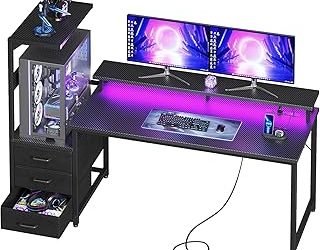
Our Top Picks
 ODK 53" L Shaped Gaming Desk with Shelves53 Inch53.15 x 39.37 x 58.27 inches46.1 poundsCheck on Amazon
 PRAISUN L Shaped Gaming Desk with LED Lights51.2 Inch39.4 x 51.2 x 29.5 inches38.1 poundsCheck on Amazon
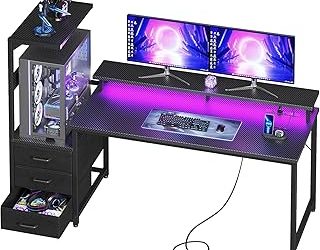
 Korfile 66'' L Shaped Gaming Desk with StorageLarge: 66 inches42.5 x 65.4 x 36.5 InchesCheck on Amazon
The best L shaped gaming desk in this lineup is the Korfile 66-inch model, because its larger footprint, storage drawers, built-in power outlets and LED lighting suit multi-monitor setups better than the smaller corner desks. An L shaped gaming desk uses two connected work surfaces so you can keep a keyboard and monitors on one wing and a second task, such as a console, a laptop or paperwork, on the other. The six desks here run from 47 to 66 inches on the main side, so the right choice depends mostly on how much wall you can give up.
Quick List
- AODK 53-Inch L Desk – best for a reversible 53-inch corner desk with a shelf and storage bag
- ODK 53-Inch L Desk – best for gamers who want a headset hook, gear bag and shelves for books or supplies
- PRAISUN L Desk – best for a large corner footprint with storage shelves and a bag
- Korfile 59-Inch L Desk – best for a home office or bedroom that needs four adjustable storage drawers
- Korfile 66-Inch L Desk – best overall for multiple monitors and the largest surface in the group
- OLIXIS 47-Inch L Desk – best for small rooms that still need shelves, drawers and LED lighting
Which One Is Right for You?
| If you… | Choose |
|---|---|
| Run two or three monitors and need the widest surface | Korfile 66-Inch L Desk |
| Have a compact room and a corner of about four feet | OLIXIS 47-Inch L Desk |
| Want a headset hook and a gear bag on the desk itself | ODK 53-Inch L Desk |
| Prefer drawers over open shelves for hiding clutter | Korfile 59-Inch L Desk |
| Want a reversible mid-size desk with shelf and storage bag | AODK 53-Inch L Desk |
| Need a big corner footprint with open shelves for a home office | PRAISUN L Desk |
Measure the corner first, then the height of your monitor stands, because shelves that sit on top of the desk can crowd a large display. Most of these desks are reversible, so the long wing can face left or right. Confirm the exact depth and height on the product page, as several listings state only the length of the main side.

AODK L Shaped Desk Gaming Desk with LED Light & Power Outlet | 53 Inch Black Reversible L Shaped Computer Table with Shelf & Storage Bag & Hook for Home Office
Picked as a relevant option in this category.
View on AmazonODK 53" L Shaped Gaming Desk with Shelves, LED & Outlets, Black | Hook for headset, bag for gear. Shelves for books & supplies. LED for gaming nights. Reversible. Home office computer desk.
Chosen because it specifies LED & Outlets and Black.
View on AmazonPRAISUN L Shaped Gaming Desk with LED Lights & Power Outlets | Reversible Computer Desk with Storage Shelves & Bag, Large Corner Home Office Desk with Pegboard for Work from Home, Black
Chosen because it specifies Reversible Computer Desk with Storage Shelves & Bag and Black.
View on Amazon
Korfile 59 inch L Shaped Computer Desk with Power Outlets, Black | Ideal for Home Office, Bedroom, Corner, 4 Adjustable Storage Drawers, 2 Monitor Stands, Reversible, Two Person Gaming Table
Chosen because it specifies Black and Ideal for Home Office.
View on AmazonKorfile 66'' L Shaped Gaming Desk with Storage Drawers, Power Outlets, LED | Large Reversible Computer Desk for Multiple Monitors, Black Corner with CPU Stand for Gaming, Work, Home Office, Bedroom
Chosen because it specifies Power Outlets and LED.
View on Amazon
OLIXIS 47 Inch L Shaped Gaming Desk, Corner Desks with Shelves, Black | Reversible Corner Gaming Desks with Drawers and Storage Shelves, LED Light, Power Station & Monitor Riser
Chosen because it specifies Corner Desks with Shelves and Black.
View on AmazonAll 6 Picks in Detail
1. AODK 53-Inch L Shaped Gaming Desk – Best for a Reversible Mid-Size Corner
As an Amazon Associate we earn from qualifying purchases at no extra cost to you.

The AODK desk is a 53-inch black corner desk with LED lighting and a power outlet, plus a shelf and a storage bag for extras. It suits a single-monitor or dual-monitor setup in a bedroom or small office where a full-size 60-inch-plus desk would crowd the room. Because the listing calls it reversible, you can place the extension on either side to fit the corner you have.
- Main side: 53 inches
- L shaped, reversible layout
- LED light and power outlet, per the listing name
- Shelf and storage bag included
- Black finish
- Depth, height and weight capacity: confirm on listing
Pros
- Mid-size footprint that fits most bedrooms
- Outlet and LED are built in, which cuts down cable clutter
- Reversible layout makes placement flexible
Cons
- Less surface than the 59-inch and 66-inch picks
- Details on shelf and bag size are not in the shortened title
Placement tips: because the layout is reversible, decide which wing will hold the monitors before you start building, since the orientation is set during assembly. A wall corner that already has an outlet nearby makes cable routing easier, and the built-in power strip then needs only one cord to reach the wall. People who sit with a tower PC on the floor should check that the return wing leaves room for their knees.
It is nearly identical in length to the ODK desk below, so decide between them on accessories: the ODK adds a headset hook, while this one leans on the shelf and storage bag. Before you plug in a monitor, console and speakers, add up their power draw and avoid daisy-chaining extension strips.
2. ODK 53-Inch L Shaped Gaming Desk – Best for Headset Hook and Gear Storage

ODK shares the 53-inch main side with the AODK desk but leans harder into gaming accessories. The listing mentions a hook for a headset, a bag for gear, shelves for books and supplies, and LED lighting with outlets. It is a good match for someone who wants the desk to hold everything, from controllers to notebooks, without buying separate organizers.
- Main side: 53 inches
- Shelves for books and supplies
- Hook for a headset and a bag for gear
- LED lighting and outlets
- Black finish
- Depth, height and load capacity: confirm on listing
Pros
- Headset hook keeps a headset off the desk surface
- Shelves give a place for books and supplies
- Built-in lighting and outlets
Cons
- Shelves can limit room for large monitors
- Similar size to the AODK model, so the extras decide the choice
The bag and hook are small details that matter on a day-to-day basis. A headset hanging at the side of the desk stays out of the way of a mouse arm, and a gear bag can hold controllers, cables and a spare battery pack. Shelves for books and supplies make the desk double as a study spot, which suits students who game in the same room where they do homework.
Against the AODK desk, it adds the headset hook and a bigger storage emphasis; against the OLIXIS 47-inch, it offers a longer main side. Check that the shelf height leaves enough clearance for your monitor stand before you assemble it.
3. PRAISUN L Shaped Gaming Desk – Best for a Large Corner Footprint

PRAISUN describes a large corner desk for a home office with LED lights, power outlets, storage shelves and a bag. It is the pick for someone who wants a roomy corner station and does not need a specific length figure, though the shortened listing does not state it. Confirm the dimensions on the product page before you measure your room.
- Large corner format, reversible
- LED lights and power outlets
- Storage shelves and a storage bag
- Suited to a gaming setup or a home office
- Length, depth and height: confirm on listing
Pros
- Large footprint is described as suitable for a gaming or office setup
- Outlets and LEDs are integrated
- Storage shelves help tidy a busy desk
Cons
- Key measurements are not visible in the shortened listing name
- Large desks need a generous corner and a way to route cables
Because the title does not give a length, the decision should rest on the product page. Look for the main-side length, the return length and the depth, then compare them with the wall space you have. A large corner desk is easiest to live with when you can reach every drawer or shelf without moving the chair, so sketch the layout on the floor with painter's tape before you commit.
It sits between the 53-inch pair and the Korfile 66-inch in intent, so use it when you want a roomy desk but are comfortable verifying size before buying.
4. Korfile 59-Inch L Shaped Computer Desk – Best for Drawers in a Bedroom or Office

This Korfile model is listed as an L shaped computer desk rather than a gaming desk, but it works as one because it has power outlets and four adjustable storage drawers. It suits a bedroom, home office or corner where you want a tidy surface and prefer closed storage to open shelves. At 59 inches, it offers a moderate step up in space from the 53-inch desks.
- Main side: 59 inches
- Power outlets, per the listing name
- Four adjustable storage drawers
- Black finish, for a home office, bedroom or corner
- LED lighting: not stated in the title, confirm on listing
Pros
- Drawers hide clutter better than open shelves
- Moderate length with outlets built in
- Works for both office and gaming use
Cons
- Marketed as a computer desk, so gaming-style lighting is not guaranteed
- Drawer capacity and monitor-shelf details are cut off in the title
The four adjustable drawers are the main reason to consider it. Adjustable usually means that the drawer units can be set on either wing, or that their position can change when you flip the desk layout. That helps when you share a room and want a place to put away controllers, chargers and paperwork, leaving a clear surface for a laptop or a console when you are finished playing.
The Korfile 66-inch is the upgrade when you want a longer surface and LED lighting; this one is the better fit if the room cannot take the extra seven inches.
5. Korfile 66-Inch L Shaped Gaming Desk – Best Overall for Multi-Monitor Setups

The 66-inch Korfile is the longest desk in this group and is billed for multiple monitors. The listing names storage drawers, power outlets and LED lighting, and calls the desk reversible. That makes it the strongest all-around choice for a gamer who streams, edits or works from home with two or three displays.
- Main side: 66 inches
- Storage drawers
- Power outlets and LED lighting
- Reversible layout, black finish
- Designed for multiple monitors, per the listing name
- Depth, height and load capacity: confirm on listing
Pros
- Longest main side in the group
- Drawers plus outlets plus LEDs in one desk
- Room for several monitors, a keyboard and a mouse pad
Cons
- Needs the most wall space
- Large surfaces can sag if loaded with heavy monitors, so check the weight capacity
The extra length gives you room to follow a common multi-monitor layout: a main display in the center and a smaller display to one side, with the other wing used for a laptop or a notes area. Heavy monitors on a long span are the main weak point on large desks, so use monitor arms with a clamp only if the manufacturer confirms the desktop thickness can take one, and keep the heaviest items over the legs and corners.
Compared with the 59-inch Korfile, it adds length and the gaming-specific features; compared with PRAISUN, it states its size and includes drawers.
6. OLIXIS 47-Inch L Shaped Gaming Desk – Best for Small Rooms

OLIXIS makes the smallest desk in this guide: a 47-inch reversible corner desk with shelves, drawers, storage shelves and LED lighting. It suits a dorm, a studio apartment or a bedroom where the corner is tight. You give up surface area compared with the larger desks, but you keep the L shaped idea in a form that fits a smaller room.
- Main side: 47 inches
- Corner desk with shelves and drawers
- Reversible layout
- LED lighting
- Black finish
- Outlets, depth and load capacity: confirm on listing
Pros
- Smallest footprint in the group
- Storage in both shelves and drawers
- LED lighting included
Cons
- Limited room for more than two monitors
- Power outlets are not stated in the shortened title
A smaller desk also costs less effort to move and assemble, which suits renters and students who relocate often. The trade-off is that a 47-inch main side leaves little room for a second large monitor, so it fits a single 27-inch display, a laptop dock or a console setup best. Use monitor risers sparingly, since shelves and drawers add height and can bring the display closer to the ceiling shelf.
It is the only pick under 50 inches, so choose it when space is the limit, and step up to the 53-inch AODK or ODK if you can spare six inches.
Specs Compared
| Desk | Main side | Reversible | LED lighting | Power outlets | Storage | Color |
|---|---|---|---|---|---|---|
| AODK 53-Inch | 53 in | Yes | Yes | Yes | Shelf and storage bag | Black |
| ODK 53-Inch | 53 in | Confirm on listing | Yes | Yes | Shelves, headset hook, gear bag | Black |
| PRAISUN | Confirm on listing | Yes | Yes | Yes | Storage shelves and bag | Confirm on listing |
| Korfile 59-Inch | 59 in | Confirm on listing | Confirm on listing | Yes | Four adjustable drawers | Black |
| Korfile 66-Inch | 66 in | Yes | Yes | Yes | Storage drawers | Black |
| OLIXIS 47-Inch | 47 in | Yes | Yes | Confirm on listing | Shelves and drawers | Black |
How We Chose These
This is a desk-research guide. We compared the listing names and specification fields of each desk against the traits buyers usually ask about in an L shaped gaming desk: main-side length, reversibility, built-in power and lighting, and the storage that comes with the desk. Where a listing title does not state a measurement, the comparison table says to confirm it on the product page instead of guessing. We favored desks whose listings put the key details in plain view, and we placed the largest, best-equipped desk first for multi-monitor setups while keeping smaller options for tight spaces. We have not assembled or used these desks, so treat the notes as a starting point for your own measurements.
What to Look For
Size, depth and the corner footprint
Start with the room. An L shaped desk has two wings, and you need space for both plus a clear walkway. Measure the wall length for the main side, then the length of the return wing, and leave at least 30 inches between the desk edge and the nearest wall or bed so the chair can move. Most gaming desks are 23 to 30 inches deep; a 24-inch depth is enough for one 27-inch monitor at an arm's-length viewing distance, while 30 inches helps with larger or curved screens. If a listing gives only the main-side length, confirm depth and return length before you buy.
Weight capacity and stability
Think about the load. A typical desk with two 27-inch monitors, a tower PC and speakers can reach 60 to 100 lb across the surface, and a corner desk concentrates weight near the joint where the two wings meet. Look for a stated capacity, a thick frame, and leveling feet so the desk does not wobble on uneven floors. Tighten all fasteners after the first week of use, since screws can settle. A cross brace or a sturdy corner connector is a good sign that the desk will stay square.
Power outlets, LED lighting and cable safety
Built-in outlets and USB ports look convenient, but they usually run through a small power strip with a modest total rating. A standard US household circuit is 15 amps, or 1,800 watts, and continuous loads should stay near 80 percent of that, which is about 1,440 watts. A gaming PC, two monitors and a speaker set rarely approach that, but adding a space heater, a printer and chargers can. Plug the desk's power cord into a wall outlet or a quality surge protector, avoid plugging one strip into another, and keep cables out of high-traffic spots where they can be pinched. LED strips draw very little power, though the controller and adapter should stay ventilated and away from fabric.
Storage: shelves, drawers and hooks
Open shelves are quick to reach and good for books, but they gather dust and expose cables. Drawers hide clutter, and adjustable drawers can be moved to either wing. A headset hook is a small feature that saves surface space. Check the shelf height against your monitor: if the shelf sits at 12 inches above the desk and your monitor stand is 14 inches tall, the monitor will not fit under it. Worked example: for a 66-inch main side, two 27-inch monitors (about 24 inches wide each) leave roughly 18 inches for a keyboard, mouse and controller zone, which is why the longer desks suit multi-monitor users.
Ergonomics for the long wing
An L shaped desk makes it easy to sit with the keyboard on one wing and the return on your side, so set the primary monitor directly in front of you rather than in the corner. The top edge of the screen should sit at or just below eye level, and the keyboard should leave your elbows near 90 degrees. Use the return wing for items you reach for less often, such as a printer, a controller dock or a charging station. If the corner joint creates a gap between the wings, cover it with a desk mat or a desk mat so objects do not slip into the seam.
Assembly and finish
Most L shaped desks arrive flat-packed and take one to two hours with two people. Look for a reversible design so you can set the return wing left or right, and make sure hardware is labeled in separate bags. Laminate or engineered wood surfaces resist scratches but not water, so use a desk mat for drinks.
Questions
Is an L shaped desk better than a straight desk for gaming?
It is better when you need two work zones, such as a gaming station and a work or study area. A straight desk takes less wall space, but an L shaped one uses the corner and offers a larger total surface.
How long should an L shaped gaming desk be for two monitors?
A main side of 47 to 55 inches fits two 24-inch monitors comfortably. For two 27-inch or larger displays, a 59 to 66-inch side leaves more room for a keyboard and mouse.
What does reversible mean on an L shaped desk?
A reversible desk can be assembled with the return wing on the left or on the right. It lets you adapt the desk to the corner you have without buying a different model.
Are built-in power outlets safe?
They are safe when you stay within the rating of the strip and the wall circuit. Do not chain power strips together, and unplug the desk if the cord or outlet becomes hot or damaged.
How much weight can these desks hold?
Weight capacity varies by model and is not stated in every listing name. Check the product page, and spread heavy items such as a tower PC and large monitors across the desk rather than at one corner.
Can I use a standing converter on an L shaped desk?
Many converters fit if the surface is flat and deep enough, but shelves on top of the desk can block them. Measure the desk depth and the converter footprint first.
Update History
- October 20, 2026 – Initial publication; product set drawn from current catalog listings.
- Check the product page for current specifications and availability before buying.
Sources
- Retailer listing titles and specification fields for each of the six desks
- Brand and model names as shown in each listing (AODK, ODK, PRAISUN, Korfile, OLIXIS)
- General desk-sizing and ergonomic setup guidelines for depth, clearance and monitor spacing