Our Short List of 3
All 5 Picks at a Glance
| Product | Specs | Action |
|---|---|---|
 Sabrent M.2 NVMe PS5 Heatsink (SB-PSHS) | Check price on Amazon | |
 be quiet! MC1 M.2 SSD Cooler (BZ002) | Check price on Amazon | |
 MHQJRH M.2 2280 SSD Heatsink (SRP-002) | Check price on Amazon | |
 ELUTENG M.2 SSD Heatsink 4PCS | Check price on Amazon | |
 WAVLINK NVMe Heatsink 880X | Check price on Amazon |
Our Top Picks
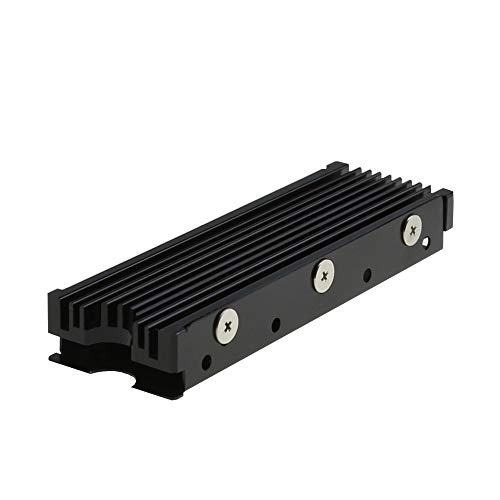
- MHQJRH M.2 2280 SSD heatsink for PC /Double Side Heatsink(black)3 x 0.95 x 0.4 inches0.1 poundsCheck on Amazon
Sony requires a heat-dissipation part on any M.2 SSD fitted to the PS5 expansion bay, yet many fast Gen4 drives ship bare. A standalone heatsink closes that gap, and the five below cover both design families: a full replacement bay cover and slim plates that strap or clamp onto the drive itself. Every pick is a heatsink only, with no SSD included, and each one stays inside Sony’s published size limits for the bay.
As an Amazon Associate, we earn from qualifying purchases.
Quick answer
Start with the Sabrent SB-PSHS if you want the neatest fit, because it replaces the bay cover entirely and contacts the drive across its full length. The be quiet! MC1 suits owners who want a slim, branded plate for a 2280 drive, while the MHQJRH, ELUTENG and WAVLINK kits cover double-sided drives, multi-drive households and adjustable-height mounting on simpler hardware.
Sabrent M.2 NVMe PS5 Heatsink (SB-PSHS)
The Sabrent SB-PSHS takes a different approach from every strap-on plate in this roundup: it is a machined aluminum cover that replaces the PS5’s own M.2 bay cover, with the heatsink block formed into its underside. Sabrent calls the arrangement a sandwich design, because the drive sits between the console’s mounting hardware and the cover, and the included thermal silicone pad presses along the top of the drive so heat moves into the large cover plate. That plate then sits in the airflow path the console’s main fan creates through the bay, which is the same negative-pressure route Sony designed around the stock cover.
Specs from the listing: model SB-PSHS; aluminum construction; thermal silicone pad included; fits M.2 lengths 2230, 2242, 2260, 2280 and 22110; works with single-sided and double-sided drives. Because the cover spans the whole bay, it is not limited to 2280 drives, which matters for longer 22110 models. Two cautions apply. First, this listing is the heatsink on its own; Sabrent also sells bundles that pair it with a Rocket SSD under different listings, so check the title before ordering. Second, the cover is shaped for the launch PS5, so Slim owners should confirm fit against the listing’s compatibility notes.
be quiet! MC1 M.2 SSD Cooler (BZ002)
The MC1 is the slim, branded option for a single 2280 drive. be quiet! builds it as a low-profile aluminum cooler that wraps the drive with thermal pads on both faces, and the manufacturer lists it as compatible with the PS5 expansion slot, which is not true of every PC-focused plate. Its low height is the point: Sony allows up to 11.25 mm of total thickness for drive and heatsink together, and a thin cooler leaves more of that budget for a double-sided drive with chips on both faces.
Specs from the listing and the manufacturer’s data: model BZ002; dimensions 74 x 24 x 10 mm; fits single-sided and double-sided M.2 2280 modules; passive design with no fan and no heat pipe; manufacturer warranty of three years. The trade-off against the Pro variant in the same line is headroom: there is no heat pipe here, so the MC1 relies on pad contact and surface area alone. It is also a 2280-only part, so it cannot cover a 22110 drive, and it keeps the PS5’s own bay cover in place rather than replacing it. For a standard 2280 Gen4 drive in either console generation, though, its published dimensions make the fit easy to verify before buying.
MHQJRH M.2 2280 SSD Heatsink (SRP-002)
The MHQJRH SRP-002 is a grooved aluminum plate that cools both faces of a 2280 drive. The listing describes a double-sided layout with a thermal silicone pad, which the maker calls a nano thermal pad, seated between the drive and the metal so the controller and memory chips transfer heat into the finned top surface. Grooves across the body increase the exposed area compared with a flat plate, and the whole assembly stays thin enough for the PS5 bay while also suiting a desktop M.2 slot.
Specs from the listing: model SRP-002; aluminum alloy body with silver plating and an anodic oxidation finish; dimensions 3 x 0.95 x 0.4 inches; net weight 1 ounce; minimum installation height 12 mm in a PC slot; compatibility covers M.2 2280 PCIe NVMe and M.2 SATA drives in desktops and the PlayStation 5. The maker rates the cooling effect at 10 to 30 degrees Celsius depending on environment, a claim worth treating as a ceiling rather than a promise, since the sealed PS5 bay moves less air than an open PC case. Retention is by the pad and the plate’s fit around the drive rather than a cover screw, so take care to seat it evenly before sliding the drive into the bay.
ELUTENG M.2 SSD Heatsink 4PCS
The ELUTENG kit is the multi-drive option: one box carries four identical aluminum heatsinks, four thermal silicone pads and eight black rubber straps, so a household with a PS5 and one or more PCs can cool every 2280 drive from a single purchase. Each plate uses a grooved, double-sided design, and the listing offers two ways to attach it, metal clips or the rubber straps, which lets you choose the firmer hold of clips where clearance allows.
Specs from the listing: four heatsinks sized about 0.87 x 3.15 inches (22 x 80 mm); aluminum alloy construction; pads and straps included for all four pieces; compatibility covers M.2 2280 NVMe and M.2 SATA drives in PCs and the PS5, including the Slim’s bay. The maker rates the cooling effect at 10 to 25 degrees Celsius depending on environment. The honest weakness is retention over time: rubber straps can age and loosen, so the clips are the better default inside a console you may not open again for years, and the straps are best kept as spares. Pad condition matters too; a pad that has been peeled and refitted loses contact, so use a fresh pad from the kit for the console install.
WAVLINK NVMe Heatsink 880X
The WAVLINK 880X answers a specific fitting problem: drives whose chip height varies. Its aluminum alloy body uses an adjustable-height design, listed at 3 mm of adjustment, so the top plate can sit flat against controllers of different thicknesses instead of rocking on the tallest chip. It ships with dual thermal silicone pads, which suits double-sided 2280 drives that need contact on both faces, a group that includes many high-capacity Gen4 models used in the PS5.
Specs from the listing: model Heatsink 880X; aluminum alloy body; dual thermal silicone pads included; adjustable height of 3 mm; supports 2280 NVMe and SATA SSDs; listed for PC, PS5 and small-form-factor motherboard builds. Because the height adjusts, confirm the final stack still clears Sony’s 11.25 mm total thickness limit before closing the bay; a taller setting that helps in an open PC slot can foul the PS5 cover. The listing does not state a weight for the heatsink, so judge it on dimensions rather than mass. For a double-sided drive that sits unevenly under a fixed plate, that adjustability is a genuine functional difference rather than a styling one.
How to choose
Work from Sony’s limits first. The console maker caps the combined drive and heatsink at 110 mm long, 25 mm wide and 11.25 mm thick, with no more than 8.0 mm above the board and 2.45 mm below it, and it requires some form of heat conductor on the drive. Any pick that publishes dimensions can be checked against those numbers in a minute. Next, match the design to your console: cover-replacement models such as the Sabrent are shaped for the launch PS5 bay, while slim plates fit under the stock cover of either generation. Then check your drive: double-sided models need a cooler that pads both faces, and 22110 drives need a full-length cover design. Finally, prefer screws or clips over rubber straps for a console install, since straps can degrade with heat and age. None of these five passive parts carries electronics, and none appears in a CPSC recall; the realistic risks are fit and pad contact, not safety defects.
Who should skip
Skip a standalone heatsink if your SSD already wears a factory heatsink that fits the bay, because stacking two coolers exceeds the thickness limit and usually will not close. Skip the whole category if you only use the console’s internal storage or an external USB drive, since neither needs one. Owners of drives with tall pre-fitted PC heatsinks should also pass: those coolers must come off before any of these fit, and some makers treat removal as warranty-relevant, so check the drive’s terms first.
FAQ
Does the PS5 actually require a heatsink on an M.2 SSD?
Sony’s guidance says an M.2 SSD in the expansion bay needs a heat-dissipation mechanism, such as a heatsink or heat transfer sheet, attached to it. The console will still recognise a bare drive, but sustained transfers and long installs can push a bare controller into thermal throttling, which cuts write speeds. A slim heatsink that fits the published size limits is the simple way to follow the requirement.
Will a cover-style heatsink fit the PS5 Slim?
Not always. Cover-replacement heatsinks are machined to the launch console’s bay cover shape, and the Slim uses a different cover arrangement, so a launch-model cover may not seat correctly. Slim and Pro owners should either pick a slim plate that fits under the stock cover or choose a cover model whose listing names their console explicitly. The size limits for the drive itself are the same across models.
Can I use one of these heatsinks in a PC as well?
Yes, in most cases. The MHQJRH, ELUTENG and WAVLINK plates and the be quiet! MC1 are standard M.2 2280 coolers that also fit desktop slots, and their listings name PC use. The exception is the Sabrent SB-PSHS, whose cover shape is specific to the PS5 bay and has no role in a PC. In a desktop, check graphics card clearance, since a finned plate adds height above the slot.
How thick can the heatsink be before the bay will not close?
Sony’s ceiling is 11.25 mm for the drive and heatsink combined, split as up to 8.0 mm above the board and 2.45 mm below it. Measure the full stack, including thermal pads, rather than the metal alone. If a plate plus pads pushes past those figures, the cover will not sit flush and the bay’s airflow path is broken, so choose a slimmer cooler instead.
Final verdict
For most PS5 owners the Sabrent SB-PSHS is the cleanest answer, since it replaces the cover, contacts the full drive length and covers every M.2 size the console accepts. The be quiet! MC1 is the better pick when you want a slim, warranted plate from an established cooling brand, while the MHQJRH and WAVLINK kits handle double-sided and uneven drives, and the ELUTENG four-pack wins on simple value for multi-drive homes.
Product and ASIN Reference
| Product | ASIN |
|---|---|
| Sabrent M.2 NVMe PS5 Heatsink (SB-PSHS) | B09HSQQWCL |
| be quiet! MC1 M.2 SSD Cooler (BZ002) | B08YRSZPH8 |
| MHQJRH M.2 2280 SSD Heatsink (SRP-002) | B07KDDKDNN |
| ELUTENG M.2 SSD Heatsink 4PCS | B0CR69GG3W |
| WAVLINK NVMe Heatsink 880X | B0CWRJKHQJ |
FAQ
Does the PS5 actually require a heatsink on an M.2 SSD?
Will a cover-style heatsink fit the PS5 Slim?
Can I use one of these heatsinks in a PC as well?
How thick can the heatsink be before the bay will not close?
More from Amazon
Programs that pair well with the guide above. Offers and eligibility are set by Amazon and may change.
Free shipping on eligible items, Prime Video and more. Eligible new members can start with a free trial.
Start a Prime free trialAd-free music streaming. Eligible new subscribers can start with a free trial.
Try Music Unlimited freeA Prime membership for ages 18-24 with a trial period. Eligibility is set by Amazon.
See Prime for Young AdultsAudiobooks and podcasts to listen to on the go. Eligible new members can start with a free trial.
Try Audible freeAs an Amazon Associate we earn from qualifying purchases.