Key takeaways
- Bands and speed tier: Dual-band units like BE3600 handle typical homes well, while tri-band BE9000-plus models add a second 5GHz or 6GHz lane for heavy simultaneous use. Match the tier to your internet plan.
- Wired ports: Look for at least one 2.5G port, and a 10G port if you have a fiber plan above 2 Gbps. Full 2.5G LAN is a huge plus for wired PCs and NAS devices.
- Coverage and mesh: Check the square-footage rating, and favor EasyMesh or eero-style expandable systems if you have a large or multi-story home with dead zones.
- Multi-Link Operation: MLO is the signature WiFi 7 trick, letting devices use several bands at once for lower latency and steadier throughput. Confirm your router advertises it.
- Security and management: Built-in protection like HomeShield plus a clean app for parental controls and VPN makes long-term ownership far easier and safer.
What's inside
WiFi 7 has gone from bleeding-edge to genuinely practical in 2026, and the routers driving it are faster, smarter, and more affordable than the first wave. With multi-gig internet plans becoming common and homes packed with dozens of connected devices, upgrading to the latest wireless standard finally makes real sense for gamers, streamers, and remote workers alike.
The headline features are Multi-Link Operation, 320MHz channels, and a flood of 2.5G and 10G wired ports. But specs vary wildly between a compact dual-band unit and a tri-band powerhouse. Here are the WiFi 7 routers worth your money this year, along with a plain-English guide to picking the right one for your space.
As an Amazon Associate we earn from qualifying purchases at no extra cost to you.



⚡ Save on Your Next PC — Amazon Prime
Prime members get fast free shipping on the systems above, plus early access to Prime Day & Black Friday PC deals. New members get a 30-day free trial.
Watch: Best WIFI 7 Router 2026 — Video Review
How to Choose a WiFi 7 Router in 2026
- Bands and speed tier: Dual-band units like BE3600 handle typical homes well, while tri-band BE9000-plus models add a second 5GHz or 6GHz lane for heavy simultaneous use. Match the tier to your internet plan.
- Wired ports: Look for at least one 2.5G port, and a 10G port if you have a fiber plan above 2 Gbps. Full 2.5G LAN is a huge plus for wired PCs and NAS devices.
- Coverage and mesh: Check the square-footage rating, and favor EasyMesh or eero-style expandable systems if you have a large or multi-story home with dead zones.
- Multi-Link Operation: MLO is the signature WiFi 7 trick, letting devices use several bands at once for lower latency and steadier throughput. Confirm your router advertises it.
- Security and management: Built-in protection like HomeShield plus a clean app for parental controls and VPN makes long-term ownership far easier and safer.
The Best WiFi 7 Routers Reviewed
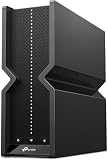
TP-Link Archer BE600 (BE9700)
The Archer BE600 is a tri-band monster built for demanding homes. A 10G port, a dedicated 2.5G port, and three more 2.5G LAN connections mean nothing gets bottlenecked, and 320MHz channels push serious throughput. It covers up to 2,600 square feet and 120 devices while HomeShield keeps the network locked down.
TP-Link Archer BE230 (BE3600)
For most households, the dual-band Archer BE230 hits the sweet spot on price and capability. It offers 2×2.5G plus three gigabit ports, USB 3.0, and a quad-core processor, along with EasyMesh, MLO, and a private IoT network. It is the easy recommendation for a mainstream upgrade.
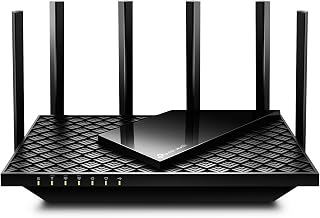
TP-Link Archer BE550 (BE9300)
Sitting between the two, the Archer BE550 delivers six streams and full 2.5G ports across a tidy six-antenna design. It reaches roughly 2,000 square feet and supports EasyMesh expansion, making it a strong choice for growing setups that want tri-band headroom without the top-tier price.
Amazon eero Pro 7
If simplicity is your priority, the eero Pro 7 is a tri-band mesh unit that supports plans up to 5 Gbps and blankets around 2,000 square feet per node. The setup is famously painless, and you can add nodes seamlessly as your coverage needs grow.
NETGEAR Nighthawk RS90
The Nighthawk RS90 is a clean dual-band pick with BE3600 speeds up to 3.6 Gbps and a 2.5 Gig internet port. Rated for 2,000 square feet and around 50 devices, it is a dependable single-router solution backed by NETGEAR’s free expert support.
Frequently Asked Questions
Do I need WiFi 7 devices to benefit from a WiFi 7 router?
You get the biggest gains from WiFi 7 clients, but these routers are fully backward compatible and still improve older devices through better hardware and wider channels. It is a future-proof upgrade even if only some gear supports the new standard today.
Is a dual-band or tri-band WiFi 7 router better?
Dual-band routers are cheaper and plenty for average homes, while tri-band adds a third lane that shines when many devices stream and game at once. Larger households and multi-gig plans benefit most from tri-band.
What internet speed do I need to justify WiFi 7?
WiFi 7 makes the most sense on plans above 1 Gbps, especially multi-gig fiber, where its wired ports and wide channels prevent bottlenecks. On slower plans you still gain from lower latency and better device handling.
Should I choose a mesh system or a single router?
A single powerful router covers most apartments and mid-size homes, but large or multi-floor houses with dead zones do better with an expandable mesh like eero. You can also start with one node and add more later.
Final Thoughts
WiFi 7 is finally worth the upgrade in 2026, and the right pick depends on your home. The Archer BE600 is the enthusiast’s dream, the BE230 nails value for typical households, and the eero Pro 7 wins for hands-off mesh coverage. Match the port layout and coverage rating to your space, and you will feel the difference the moment you connect.