Key takeaways
- Capacity over raw speed: Modern games routinely exceed 100GB installed. A 1TB drive at 5,000 MB/s will serve you far better than a 500GB drive at 7,000 MB/s, because running out of space is a real problem while the speed difference is measured in fractions of a second.
- PCIe 4.0 is the value sweet spot: Gen 4 drives have hit commodity pricing and saturate what current games can actually use. PCIe 5.0 drives run hotter, cost significantly more, and deliver almost no measurable gaming benefit — save that money for capacity.
- Check DRAM vs. HMB: DRAM-less drives use Host Memory Buffer to borrow system RAM. It works fine for gaming, but DRAM-equipped drives hold up better under sustained writes and heavy multitasking. At this budget, HMB is an acceptable compromise; just know what you’re getting.
- Verify the form factor and slot: Nearly every recommendation here is M.2 2280 NVMe. Confirm your motherboard has a free M.2 slot with Gen 4 support, and check laptop clearance — some ultrabooks only accept single-sided drives.
- Endurance (TBW) matters less than you think: Gaming is a read-heavy workload. Even modest TBW ratings will outlast the useful life of the drive for typical gamers. Prioritize warranty length and brand reliability over chasing endurance figures.
What's inside
Storage prices have finally settled after years of volatility, but shopping for a gaming SSD under $100 is still a minefield. The listings that dominate search results are stuffed with flagship drives that blow past the budget the moment you add capacity, while genuinely affordable options hide behind spec sheets full of numbers that barely affect real-world load times. Meanwhile, the drive you actually need depends on whether you’re filling a spare M.2 slot in a gaming PC, upgrading a laptop, or expanding a console — three very different jobs.
This guide focuses on drives that deliver the most gaming performance per dollar in 2026, with an emphasis on options that stay realistically within a $100 budget. That means being honest about capacity trade-offs: at this price point, 1TB is the sweet spot, 500GB is the safe floor, and 2TB is achievable only during genuine sales. We cover what actually matters for load times, which specs are marketing noise, and which drives are worth your money right now.
As an Amazon Associate we earn from qualifying purchases at no extra cost to you.


⚡ Save on Your Next PC — Amazon Prime
Prime members get fast free shipping on the systems above, plus early access to Prime Day & Black Friday PC deals. New members get a 30-day free trial.
Watch: Best SSD Under $100 — Video Review
How to Choose SSD Under $100
- Capacity over raw speed: Modern games routinely exceed 100GB installed. A 1TB drive at 5,000 MB/s will serve you far better than a 500GB drive at 7,000 MB/s, because running out of space is a real problem while the speed difference is measured in fractions of a second.
- PCIe 4.0 is the value sweet spot: Gen 4 drives have hit commodity pricing and saturate what current games can actually use. PCIe 5.0 drives run hotter, cost significantly more, and deliver almost no measurable gaming benefit — save that money for capacity.
- Check DRAM vs. HMB: DRAM-less drives use Host Memory Buffer to borrow system RAM. It works fine for gaming, but DRAM-equipped drives hold up better under sustained writes and heavy multitasking. At this budget, HMB is an acceptable compromise; just know what you’re getting.
- Verify the form factor and slot: Nearly every recommendation here is M.2 2280 NVMe. Confirm your motherboard has a free M.2 slot with Gen 4 support, and check laptop clearance — some ultrabooks only accept single-sided drives.
- Endurance (TBW) matters less than you think: Gaming is a read-heavy workload. Even modest TBW ratings will outlast the useful life of the drive for typical gamers. Prioritize warranty length and brand reliability over chasing endurance figures.
The Best Picks Reviewed
Kingston NV3 1TB
The NV3 is the clearest value play in this roundup — a PCIe 4.0 Gen 4×4 drive rated up to 6,000 MB/s that consistently lands well under $100 at 1TB. It’s DRAM-less, so sustained large file transfers will taper off, but for loading games and general system duty it’s indistinguishable from drives costing twice as much.
SanDisk Optimus 5100 500GB
At up to 6,600 MB/s read over PCIe 4.0 x4, this is a genuinely quick drive in a compact 500GB capacity, making it a smart pick for a secondary game library or a laptop with limited space. The trade-off is obvious — 500GB fills fast in 2026 — so treat it as a targeted upgrade rather than your primary storage.
Samsung 990 PRO 1TB
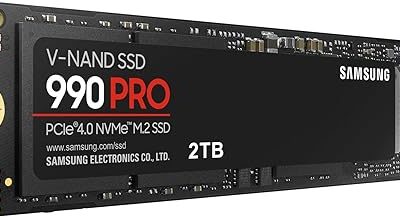
Samsung’s 990 PRO remains the benchmark for PCIe 4.0 performance at up to 7,450 MB/s, with proper DRAM cache, excellent thermals, and best-in-class controller firmware. It typically sits just above the $100 line, so watch for sales — when it dips under, it’s the best drive on this list without qualification.
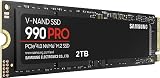
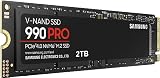
Samsung 990 PRO 2TB
The 2TB version delivers identical top-tier speeds with double the headroom, which matters when a handful of modern installs can consume a terabyte on their own. It’s realistically an aspirational pick for a sub-$100 budget and only makes sense during aggressive seasonal discounts.
Samsung 9100 PRO 1TB
The 9100 PRO pushes PCIe 5.0 to up to 14,700 MB/s, and it’s a legitimately impressive drive for content creation and heavy production workloads. For pure gaming, however, it sits well outside a $100 budget and delivers negligible load-time gains over the Gen 4 options above — buy it for the work, not the games.
Frequently Asked Questions
Is a PCIe 5.0 SSD worth it for gaming in 2026?
Not at this budget. Game engines and DirectStorage implementations still don’t saturate PCIe 4.0 bandwidth, so the difference between a 7,000 MB/s drive and a 14,000 MB/s drive in actual load times is typically under a second. The extra cost is better spent on capacity.
How much SSD capacity do I actually need for gaming?
1TB is the practical minimum for a primary gaming drive in 2026, given that flagship titles regularly install at 100–150GB. 500GB works well as a secondary drive or in a laptop where you rotate a handful of games, but expect to manage installs actively.
Do I need a heatsink on a budget NVMe SSD?
For PCIe 4.0 drives like the NV3 or 990 PRO, most motherboard-supplied M.2 heatsinks are more than sufficient for gaming workloads. PCIe 5.0 drives run considerably hotter and genuinely benefit from active cooling, which is another reason they’re overkill at this price tier.
Will these drives work in a PlayStation 5?
PCIe 4.0 M.2 2280 drives meeting Sony’s speed requirements are generally compatible, and the 990 PRO in particular is a well-established console upgrade. Always confirm current console firmware requirements and heatsink clearance before purchasing, as specifications can change.
Final Thoughts
For most gamers shopping under $100, the Kingston NV3 1TB is the easy recommendation — it hits the capacity sweet spot at a price that leaves budget for other upgrades, and its Gen 4 speeds are more than the current generation of games can exploit. If you find the Samsung 990 PRO 1TB discounted into range, take it; the DRAM cache, thermal behavior, and warranty support justify the premium. And if you’re filling a secondary slot or working with a space-constrained laptop, the SanDisk Optimus 5100 500GB is a fast, sensible way to add a dedicated game library without overspending.