Key takeaways
- Load times: Level and save loads that take 40 seconds on an HDD often drop to under 10 seconds on a good NVMe SSD.
- Texture streaming: Open-world and modern engines stream assets on the fly. Slow storage causes pop-in and blurry textures; fast storage keeps the world sharp as you move.
- DirectStorage titles: A growing number of 2026 games use DirectStorage, which is built around NVMe speed and barely benefits an HDD at all.
- System responsiveness: Installing your OS and launcher on an SSD makes the whole PC boot and respond faster, not just games.
What's inside
- Watch: SSD vs HDD for Gaming: Which Do You Need? — Video Review
- How SSDs and HDDs Actually Differ
- What Faster Storage Actually Does in Games
- Where an HDD Still Earns Its Place
- Choosing the Right SSD Tier
- Installation and Setup Considerations
- Tips
- Related Guides
- Frequently Asked Questions
- Conclusion
- Related Articles
If you have ever watched a loading screen crawl while your friends have already spawned into the match, you already understand why storage matters for gaming. In 2026 the gap between a fast solid-state drive and a traditional spinning hard disk is bigger than ever, and it directly shapes how quickly your games launch, how smoothly open worlds stream in new areas, and whether you spend more time playing or waiting.
- Watch: SSD vs HDD for Gaming: Which Do You Need? — Video Review
- How SSDs and HDDs Actually Differ
- What Faster Storage Actually Does in Games
- Where an HDD Still Earns Its Place
- Choosing the Right SSD Tier
- Installation and Setup Considerations
- Tips
- Related Guides
- Frequently Asked Questions
- Conclusion
- Related Articles
This guide breaks down the real differences between SSDs and HDDs for gaming, explains where each one still makes sense, and helps you decide how to split your budget between raw speed and sheer capacity. By the end you will know exactly what to prioritize for your next build or upgrade.
As an Amazon Associate we earn from qualifying purchases at no extra cost to you. Product prices and availability are accurate as of the date shown and are subject to change.


The picks above are the drives we reach for most when building or upgrading a gaming rig, spanning fast, sensible value NVMe SSDs all the way up to cutting-edge PCIe 5.0 models for people who want the shortest possible load times.
⚡ Save on Your Next PC — Amazon Prime
Prime members get fast free shipping on the systems above, plus early access to Prime Day & Black Friday PC deals. New members get a 30-day free trial.
Watch: SSD vs HDD for Gaming: Which Do You Need? — Video Review
How SSDs and HDDs Actually Differ
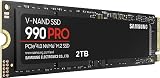
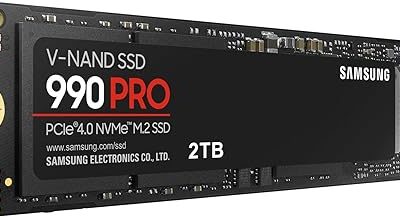
A hard disk drive stores data on spinning magnetic platters that a mechanical arm reads, which caps typical throughput at roughly 100 to 200 MB/s. An SSD has no moving parts; it reads from flash memory chips, so a modern NVMe drive like the Samsung SSD 990 PRO 2TB can hit around 7,450 MB/s, and PCIe 5.0 models such as the Samsung SSD 9100 PRO push past 14,000 MB/s. That is not a small percentage improvement, it is a difference of ten to seventy times faster, and it is why an SSD is the single most noticeable upgrade most gamers can make.
What Faster Storage Actually Does in Games
- Load times: Level and save loads that take 40 seconds on an HDD often drop to under 10 seconds on a good NVMe SSD.
- Texture streaming: Open-world and modern engines stream assets on the fly. Slow storage causes pop-in and blurry textures; fast storage keeps the world sharp as you move.
- DirectStorage titles: A growing number of 2026 games use DirectStorage, which is built around NVMe speed and barely benefits an HDD at all.
- System responsiveness: Installing your OS and launcher on an SSD makes the whole PC boot and respond faster, not just games.
Where an HDD Still Earns Its Place
Hard drives are not dead, they are just no longer the right home for your active game library. Because you can buy several terabytes cheaply, an HDD is excellent as a bulk archive for recordings, screenshots, finished games you rarely reopen, and media. A common smart setup is a fast NVMe SSD for your operating system and the ten or so games you play most, paired with a large HDD holding everything else. When you want to play an archived title, you copy it to the SSD first.
Choosing the Right SSD Tier
Not every gamer needs the fastest drive on the market. A Gen4 NVMe drive like the Kingston NV3 1TB or the WD_Black SN7100 delivers the vast majority of the real-world benefit for most systems. Step up to a flagship PCIe 4.0 model such as the 990 PRO if you want extra headroom and endurance, and consider a PCIe 5.0 drive like the 9100 PRO only if your motherboard supports it and you specifically want the best DirectStorage and content-creation performance. Just as important as the peak number is capacity: modern games routinely exceed 100 GB, so 1TB is a practical minimum and 2TB is the comfortable sweet spot in 2026.
Installation and Setup Considerations
Most current gaming motherboards have at least one, and often several, M.2 slots that accept 2280-size NVMe drives, and installation is usually as simple as seating the drive at an angle and securing it with a single screw or latch. Check whether your slot is wired for PCIe 4.0 or 5.0, since running a fast drive in a slower slot limits its speed. Many boards also ship with a small heatsink for the M.2 slot, which helps a high-performance drive avoid thermal throttling during long sessions.
Tips
- Put your OS, launcher, and most-played games on the fastest SSD, and use an HDD only for cold storage.
- Buy at least 1TB; the small savings on a 500GB drive disappear after installing two or three big games.
- Match the drive to your slot; a PCIe 5.0 SSD in a PCIe 4.0 slot still works but runs at Gen4 speeds.
- Leave roughly 10 to 15 percent of an SSD free so it can maintain peak write performance over time.
Frequently Asked Questions
Will an SSD increase my in-game frame rate?
Not directly. Frame rate is driven mainly by your GPU and CPU. An SSD improves load times, texture streaming, and stutter caused by slow asset loading, so the experience feels smoother even though the raw FPS number is largely unchanged.
Do I need a PCIe 5.0 SSD for gaming in 2026?
No. A quality Gen4 NVMe drive already loads games faster than almost anything can take advantage of. PCIe 5.0 is worth it mainly if you also do heavy content creation or simply want the fastest possible DirectStorage performance and have a compatible board.
Is it fine to keep some games on an HDD?
Yes, especially older or story-driven titles you are not actively grinding. You will notice longer initial loads, but for a game you play occasionally that trade-off is perfectly reasonable given the extra cheap capacity.
How much SSD storage do I really need?
Plan around your actual library. With many modern games at 80 to 150 GB each, 1TB fills up quickly if you keep several installed, so 2TB is the more future-proof choice for most gamers building in 2026.
Conclusion
For gaming, an SSD is no longer a luxury, it is the baseline that makes everything from booting to open-world exploration feel responsive, while an HDD remains a smart, low-cost archive for the games and files you do not touch every day. Aim for a 1TB to 2TB NVMe drive as your primary storage, add bulk HDD capacity only if you need it, and you will spend far more time playing and far less time staring at loading screens.