Our Top Picks
 Crucial P510 PCIe Gen5 NVMe 1TB SSD1TB Without Heatsink3.1 x 0.86 x 0.09 inches0 PoundsCheck on Amazon
 Crucial P510 PCIe Gen5 NVMe 1TB SSD with1TB With Heatsink3.1 x 0.9 x 0.38 inches0.1 poundsCheck on Amazon
Gen5 NVMe drives live in an awkward spot. On paper they roughly double the headline speed of the Gen4 drives that dominated the last few years, with listings now quoting sequential reads from 11,000MB/s to nearly 15,000MB/s. In daily use, though, a game launch or a Windows boot is limited by many things besides sequential throughput, so the decision is less about chasing the biggest number and more about whether your workload, your motherboard, and your cooling plan can actually use what a Gen5 drive offers.
This guide is for builders and upgraders who have already decided to go Gen5, whether for large file transfers, video editing, scratch disks, or simply to get a long-lived boot drive on the newest interface. We compare eight distinct drives using the facts in each listing: capacity, quoted speeds, NAND type, form factor, and the feature lines that sellers include. Quoted speeds are the makers’ own figures, so treat them as a way to rank tiers, not as promises for your system in 2026. Heat, controller quality, and the slot on your motherboard all shape the result.
Quick Picks
Crucial P510 PCIe Gen5 NVMe 1TB SSD, Up to 11,000MB/s, TLC NAND, Laptop & Desktop (PC) Compatible, for Gamers & Creatives, Solid State Drive – CT1000P510SSD8-01
One of the consumer electronics options compared in this guide.
View on Amazon
Crucial T705 PCIe Gen5 NVMe 4TB SSD, Up to 14,100MB/s, TLC NAND, Intel & Ryzen Compatible, for Hardcore Gaming & High-Speed Storage, Solid State Drive, Includes 1Mo Adobe CC – CT4000T705SSD3
One of the consumer electronics options compared in this guide.
View on AmazonCrucial P510 PCIe Gen5 NVMe 1TB SSD with Heatsink, Up to 11,000MB/s, TLC NAND, Laptop & Desktop (PC) Compatible, for Gamers & Creatives, Solid State Drive – CT1000P510SSD5-01
One of the consumer electronics options compared in this guide.
View on AmazonCrucial T705 PCIe Gen5 NVMe 2TB SSD, Up to 14,500MB/s, TLC NAND, Intel & Ryzen Compatible, for Hardcore Gaming & High-Speed Storage, Solid State Drive, Includes 1Mo Adobe CC – CT2000T705SSD3
One of the consumer electronics options compared in this guide.
View on Amazon
Acer Predator GM9 M.2 Gen5 SSD 1TB, up to 14500 MB/s, NVMe 2.0 PCIe 5.0 Internal Solid State Drive for AI Workloads, Gaming & Content Creation, Compatible with DirectStorage, Laptop and Desktop PC
One of the consumer electronics options compared in this guide.
View on Amazon
SIX NVME M.2 SSD 1TB - PCIe gen 5.0x4 X15000 M.2 2280, Seq. Speed Up to 14,300MB/s,AI Computering Gaming by Internal Solid State Hard Drive for Laptop/Desktop PC Nvme m2 PCIe 5 1TB with Heatsink
One of the consumer electronics options compared in this guide.
View on Amazon
BIWIN Black Opal X570 Gen5 SSD 1TB, M.2 2280 PCIe 5.0 NVMe 2.0, Up to 14500 MB/s, Directstorage Compatible Internal PC Solid State Drive for Laptop, Desktop - BX570NN01TB-RGX
One of the consumer electronics options compared in this guide.
View on Amazon
Crucial T710 PCIe Gen5 NVMe 1TB SSD, Up to 14,900 MB/s, Laptop & Desktop Compatible (PC), for Creatives and Hardcore Gamers, Solid State Drive, Includes 1Mo Adobe CC – CT1000T710SSD8-01
One of the consumer electronics options compared in this guide.
View on Amazon| Product | Best for | Key spec from the listing |
|---|---|---|
| Crucial P510 1TB | Entry into Gen5 | Up to 11,000MB/s, TLC NAND |
| Crucial T705 2TB | Capacity with top-tier speed | Up to 14,500MB/s, TLC NAND |
| Crucial T710 1TB | Newest Crucial flagship tier | Up to 14,900MB/s, laptop and desktop compatible |
| Acer Predator GM9 1TB | Gaming and content creation | Up to 14,500MB/s, NVMe 2.0, PCIe 5.0 |
| SanDisk Optimus GX PRO 8100 2TB | High write speed and capacity | Up to 14,900MB/s read, up to 14,000MB/s write |
| BIWIN Black Opal X570 1TB | DirectStorage-minded gaming builds | M.2 2280, PCIe 5.0 NVMe 2.0, up to 14,500MB/s |
| SIX NVMe M.2 SSD 1TB | Lower-profile brand alternative | PCIe 5.0 x4, M.2 2280, up to 14,300MB/s |
| fanxiang 1TB PCIe 5.0 | Creative work on a tighter budget | Up to 14,000MB/s, aimed at video editing and gaming |
The 8 Best Options
Crucial P510 1TB
The P510 is the approachable way into the Gen5 generation. The listing quotes speeds up to 11,000MB/s, names TLC NAND, and says the drive works in laptops and desktops, aimed at gamers and creatives. At 11,000MB/s it sits below the 14,000MB/s-class drives in this guide, but it is still a large step above Gen4, and the lower ceiling usually means it asks less of your cooling.
That makes it a good match for a builder who wants the Gen5 interface for its upgrade runway and a boot-and-games drive, but who does not do sustained heavy transfers. A second listing adds a heatsink to the same 1TB drive, which is why only one P510 entry appears here. If your motherboard slot already has a heatsink, the plain version is the sensible choice.
- TLC NAND is stated in the listing.
- Works in both laptops and desktops, according to the title.
- The lower speed ceiling suggests less demanding thermals than the fastest drives.
- The quoted speed is well below the 14,000MB/s-class drives.
- 1TB fills quickly with a modern game library.
A realistic buyer for the P510 is someone upgrading from a Gen3 or an early Gen4 drive who wants a visible jump in speed without turning the build into a cooling project. Because the listing quotes the lowest figure in this guide, the drive is also the easiest to fit into a laptop or a small desktop where airflow is limited. Treat it as the sensible default for people who like new standards but do not live in file-transfer windows.
Skip it if you move huge files regularly and want the highest throughput. Compared with the Crucial T705 next, the P510 is the practical tier, while the T705 pushes the speed ceiling much higher.
Crucial T705 2TB
The T705 is the established flagship from Crucial. The listing quotes up to 14,500MB/s on the 2TB model, TLC NAND, and compatibility with Intel and Ryzen platforms, with positioning aimed at hardcore gaming and high-speed storage. A 4TB version quotes up to 14,100MB/s, but it is the same drive in a different capacity, so it is left out here. The 2TB size is a comfortable middle for many users.
For a builder who wants a long-term primary drive on a high-end platform, the T705 delivers headline speed with enough capacity for both a game library and projects. It is a drive that rewards good cooling, and many motherboards include a heatsink for the top M.2 slot, which is often enough. Look at the full page for endurance and warranty details that the title does not show.
- Up to 14,500MB/s is quoted at the 2TB size.
- TLC NAND is stated in the title.
- Intel and Ryzen compatibility is called out directly.
- High-speed Gen5 drives generate more heat than Gen4 drives.
- The newer Crucial T710 quotes a higher figure in the same family.
Think of the T705 as the safe choice in a risky category. A recognized brand, TLC NAND named in the title, and a capacity that does not run out quickly mean fewer unknowns than with obscure names. The platform note about Intel and Ryzen compatibility is also reassuring for buyers who are mixing parts from different generations and want a drive that does not care which logo is on the processor.
Skip it if you only need a boot drive and light gaming. Against the T710 that follows, the T705 offers more capacity in this listing, while the T710 lists a faster headline speed at 1TB.
Crucial T710 1TB
The T710 is the newer entry in the same performance family. The listing quotes up to 14,900MB/s and states the drive is compatible with laptops and desktops, aimed at creatives and hardcore gamers. The title continues beyond what is shown, so open the full page to see what is included with the drive. The capacity is 1TB, which is a modest size for a drive of this class.
This is the drive for someone who wants the most current top-tier Crucial model and does not need a large capacity. The headline speed is the highest figure in the list, tied with the SanDisk. If you plan to pair it with a second storage drive for bulk files, 1TB works well as a fast system and game drive, while a larger bulk drive handles the rest.
- Quoted read speed of up to 14,900MB/s.
- Laptop and desktop compatibility is stated.
- Newer model in the Crucial flagship line.
- 1TB is a limited capacity for a drive of this class.
- The title is cut off, so included extras are unclear.
Because the speed gap between the T705 and the T710 is small on paper, the decision between them is mostly about capacity and timing. If you want 2TB, the T705 listing is the one that offers it here. If you want the newest design and are content with 1TB, the T710 is the pick, and a separate bulk drive can handle large archives without slowing the primary drive.
Skip it if you need a single large drive for everything. Compared with the Acer Predator GM9 next, the T710 quotes a higher speed, while the Acer takes a gaming-brand angle.
Acer Predator GM9 1TB
The Predator GM9 pitches itself at gaming and creative work. The listing describes a 1TB M.2 Gen5 SSD with speeds up to 14,500MB/s, NVMe 2.0, and PCIe 5.0, with copy that mentions AI workloads, gaming, and content creation. It is the choice for a buyer who prefers a gaming-brand name on the drive and wants current protocol versions.
The listing calls out NVMe 2.0, which is the newer protocol revision that many recent drives support. That detail matters less to everyday users than to people who like to match specifications across a build. The drive occupies a similar speed tier to the Crucial T705, so the decision between them often comes down to brand preference and capacity.
- Up to 14,500MB/s is quoted.
- NVMe 2.0 and PCIe 5.0 are stated.
- Marketing targets gaming, AI work, and content creation.
- 1TB is modest for creative projects.
- Controller and NAND details are not in the title.
Gaming brands often differentiate through styling and bundled software, so check the full page for a heatsink, a warranty period, and any utility software that comes with the drive. If the drive ships bare, you will need to rely on your motherboard cooling. The brand also matters for buyers who want parts that match the rest of a themed build.
Skip it if you want a drive whose NAND type is clearly stated. Against the SIX NVMe drive next, the Acer is the better-known brand, while the SIX is a quieter, lesser-known alternative.
SIX NVMe M.2 SSD 1TB
This one is the lesser-known name in the group. The listing describes a 1TB drive on PCIe Gen 5.0 x4, M.2 2280 form factor, with a model label of X15000 and sequential speeds up to 14,300MB/s, aimed at AI computing and gaming for laptops and desktops. It sits in the same speed tier as the better-known drives.
The appeal is straightforward: a Gen5 interface and a high quoted speed from a less prominent brand. The cost of that choice is information. The title does not name the NAND type, the controller, or the warranty, so a careful buyer should read the full page before committing. For a secondary drive or a budget-conscious build, it can be a reasonable option.
- PCIe Gen 5.0 x4 and M.2 2280 are clearly stated.
- Up to 14,300MB/s is quoted.
- Marketed for both laptops and desktops.
- NAND type and controller are not named in the title.
- The brand is less established than the larger names here.
Treat the X15000 label in the title with care. It reads like a speed claim, but the listing itself backs it with a quoted 14,300MB/s figure, and that quoted figure is the one to compare against other drives. When a product name implies a number that does not match the specification line, trust the specification line and ask for the missing details before relying on the drive for important data.
Skip it if long-term support and a clear warranty record matter to you. Compared with the BIWIN next, the SIX shares the 1TB size but offers fewer named features.
BIWIN Black Opal X570 1TB
The Black Opal X570 is a gaming-oriented 1TB drive. The listing states Gen5, M.2 2280, PCIe 5.0 NVMe 2.0, and speeds up to 14,500MB/s, and it mentions DirectStorage compatibility along with use in PCs and laptops. DirectStorage is a Windows technology that lets games load assets more directly from fast storage, so the mention is relevant to the gaming crowd.
For buyers who want a Gen5 drive aimed squarely at games, this fits. The drive matches the Acer’s quoted speed and protocol level, so the choice between them is mostly about brand, warranty, and how each looks in your motherboard. As with other lesser-known names, review the full listing for endurance and warranty details.
- DirectStorage compatibility is stated.
- Up to 14,500MB/s with NVMe 2.0 and PCIe 5.0.
- Standard M.2 2280 form factor.
- Brand recognition is lower than the Crucial and SanDisk options.
- 1TB is limited for large libraries.
If you are curious why DirectStorage gets so much attention, the idea is that games can move data to the graphics card with less processor involvement, which reduces loading delays when the game is written to use it. The benefit depends on the game, so it is an extra to appreciate, not a reason to choose one drive over another when the rest of the specification is equal.
Skip it if you prefer a household-name brand on your boot drive. Against the SanDisk that follows, the BIWIN has lower capacity and a lower write-speed profile on paper.
SanDisk Optimus GX PRO 8100 2TB
The SanDisk is the one that quotes both ends of the speed range. The listing gives a 2TB capacity, PCIe 5.0 NVMe, M.2 2280, read speeds up to 14,900MB/s, and write speeds up to 14,000MB/s. Seeing the write figure matters, since many listings quote only reads, and sustained writes are what video editors and people who copy big folders care about.
The capacity of 2TB gives room for a game library and working files on one drive. For a builder who wants a no-compromise Gen5 primary drive with a major storage brand behind it, this is a strong candidate. Check the full page for NAND type, endurance figures, and warranty, since the title does not list them.
- Both read and write speeds are quoted in the title.
- 2TB capacity suits mixed gaming and creative use.
- A major storage brand name.
- The Gen5 heat load calls for a heatsink or good airflow.
- NAND and endurance details are not in the title.
A drive with this much capacity and speed works well as the only drive in a compact build, because it covers the operating system, the games, and the working files without a second device. The tradeoff is that everything shares one heat source, so give it a good heatsink and keep the airflow path clear. For editors, the write figure in the title is the more interesting number, since exporting and caching lean on writes.
Skip it if you only need a small, cool-running boot drive. Compared with the fanxiang that follows, the SanDisk is the premium option with a clearer feature set.
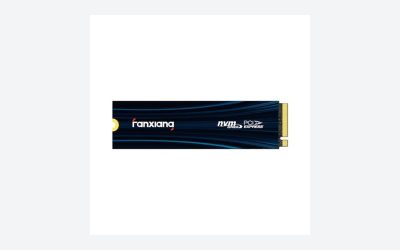
fanxiang 1TB PCIe 5.0
The fanxiang drive is the value-oriented creative option. The listing describes a 1TB PCIe 5.0 NVMe M.2 SSD with speeds up to 14,000MB/s, aimed at 8K video editing, AI training, gaming, and use in PCs and laptops. The quoted ceiling is slightly lower than the top drives, though still in the 14,000MB/s class.
It suits a buyer who wants a Gen5 drive for creative work without paying top-tier attention to brand. As with other lesser-known names, the title leaves out NAND type, controller, and warranty. For a secondary scratch disk or a second drive in a build, it is a reasonable candidate once you have read the full page.
- Up to 14,000MB/s is quoted.
- Marketed for video editing, AI work, and gaming.
- PCIe 5.0 NVMe on an M.2 form factor.
- Lower brand recognition than the major storage names.
- NAND and controller details are not in the title.
The mention of 8K video editing in the title is aspirational. Eight-K footage produces very large files, and handling it smoothly depends on the processor, memory, and graphics card as much as on the drive. What the drive contributes is fast file access and quick exports, which help any heavy creative workflow. Treat the copy as a pointer to the intended audience, not as proof of a specific result.
Skip it if you want the strongest warranty and support record. It sits at the lower end of this list in quoted speed, which makes it a sensible counterpoint to the 14,900MB/s drives above.
Two listings were left out. The Crucial P510 with a heatsink is the same 1TB drive as the P510 above, and the 4TB Crucial T705 is the same model in a larger capacity.
Who Actually Benefits From a Gen5 Drive
Video editors and large-file workers
Moving large camera files, exporting projects, and loading big caches are the tasks where a faster drive shows its value. If your work involves copying hundreds of gigabytes at a time, the higher sequential speeds and the write figures matter. For these users, the SanDisk with its listed write speed and the 2TB T705 are natural fits.
Builders planning for the long term
A Gen5 drive in a Gen5 slot gives you the newest interface now and keeps the platform current for years. Even if today’s games do not saturate the drive, future software may. Buyers who keep a computer for many years can justify paying for the interface up front.
Think too about who else shares the machine. A family PC used for photos, school projects, and the occasional game will not stress a Gen5 drive, while a workstation that handles raw video, large databases, or virtual machines will. The more your daily work resembles a long sequential copy, the more the interface pays you back.
Everyday gamers
For gaming alone, the gap between Gen4 and Gen5 in load times is often small, because games depend on processor, decompression, and memory as well as raw read speed. If you mostly play and browse, an affordable Gen4 drive may feel almost the same. A Gen5 drive is a reasonable choice if the cost difference is small, but it is not essential.
There is also a group in between: people who build a PC once and keep it for six or seven years. For them, a Gen5 boot drive is less about today’s load times and more about avoiding a storage bottleneck when software catches up with the interface. If that sounds like you, buying the faster drive now is a defensible bet, provided your motherboard really has a Gen5 slot and you give the drive some airflow.
How to Choose a Gen5 NVMe SSD
Confirm your motherboard has a Gen5 M.2 slot
Not every M.2 slot runs at Gen5 speed. Many motherboards provide one Gen5 slot, usually the one closest to the processor, while the others run at Gen4. Check the manual for the slot labeled PCIe 5.0 and note whether using it disables a SATA port or changes the graphics card slot speed. A Gen5 drive in a Gen4 slot still works but runs at the slower speed.
Read quoted speeds as ranking tiers
Sequential read figures in the 14,000MB/s class are quoted under ideal conditions. Real transfers depend on the controller, cache, drive fullness, and temperature. Use the quoted figures to compare tiers, not to predict a specific result. Look for write speeds too, and for random performance figures if the listing provides them, since random access affects everyday responsiveness more than sequential speed does.
A good habit is to compare drives in pairs. Put two candidates side by side and list capacity, quoted read, quoted write, NAND type, form factor, and warranty. Wherever a listing leaves a field blank, mark it as unknown and weigh that gap. The drive with fewer unknowns is often the safer buy, even when its headline number is slightly lower.
Plan for heat
Gen5 drives run hotter than Gen4 drives, and a hot drive may slow itself to protect the hardware. Use a motherboard heatsink or a drive heatsink, and keep some airflow over the slot. Check that a drive with its own heatsink fits under your graphics card or motherboard shroud, because tall heatsinks can collide with other parts. Also watch the case airflow: an M.2 slot sitting directly under a hot graphics card can cook a Gen5 drive even if it carries a good heatsink. Moving the drive to a slot with more clearance, or adding a small fan aimed at the area, is a simple fix.
Choose capacity with your workload in mind
One terabyte works for a system drive and a few games, 2TB suits a larger library or creative projects, and 4TB suits large archives. Drives often perform best when they are not nearly full, so leave free space. If you need bulk storage, pair a fast Gen5 drive with a cheaper, larger secondary drive.
Look at NAND type and endurance
TLC NAND, as listed on the Crucial drives, is common in higher-performance drives and offers a good balance of speed and endurance. Check the endurance figure, usually expressed as terabytes written, and the warranty length. A longer warranty and a higher endurance figure are signs of a drive designed for heavy use.
Know where lesser-known drives cut corners
Budget drives often leave out heatsinks, trim warranty terms, and give few details about the controller. Ignore marketing phrases such as AI computing, which do not describe a real hardware feature, and check for endurance, warranty, and support. A high speed number alone does not make a reliable drive. Also be wary of drives that slow sharply once their fast cache fills, which can happen during long copies; a bigger capacity usually helps, because larger drives generally hold more cache and sustain speed longer. Where the listing is silent, a drive from a maker with a clear support page is the safer choice.
Gen5 Versus Gen4: Is the Step Worth It?
| Factor | Gen5 drives | Gen4 drives |
|---|---|---|
| Quoted sequential read | 11,000MB/s to 14,900MB/s in this guide | Lower, typically up to the 7,000MB/s class |
| Heat | Higher, heatsink strongly advised | Lower, often fine with a basic heatsink |
| Motherboard needs | A Gen5 M.2 slot for full speed | Works on a wider range of boards |
| Everyday gaming feel | Often similar to Gen4 | Often similar to Gen5 |
| Best fit | Large files, editing, long-term platforms | Gaming and general use |
Where Gen5 is clearly better
Large sequential transfers, big project files, and workloads that move many gigabytes at once benefit from Gen5. If you often copy raw footage or work with huge datasets, the speed advantage is real, and the newer interface will age better.
Where Gen4 is enough
For booting, loading games, and general use, a good Gen4 drive is already fast, and it runs cooler. If your budget is limited and you do not move large files, the saving can go toward more capacity or a better graphics card.
A middle path is to buy a Gen5 drive only for the role where it matters, such as a scratch disk for editing or a project drive, and to keep a Gen4 drive for the operating system. That split keeps heat down in the main slot and puts the speed where the workload can use it. It also means you can choose a smaller Gen5 capacity, which keeps the spending in check.
Whichever route you take, remember that the platform matters. Gen5 storage is most useful on a board that also provides Gen5 lanes without stealing them from the graphics card, and you should verify that arrangement in the manual before you buy.
Setup, Compatibility and Upgrade Tips
What to check before buying
Find the Gen5 M.2 slot on your motherboard and note its length support, since the drives here are M.2 2280. Check whether the slot has a heatsink and whether a drive with its own heatsink will clear the graphics card. Confirm your processor and chipset support Gen5 storage. Laptops are different, so check that your model supports the drive and has room for it. Many thin laptops have a single short slot and no space for a heatsink, and a Gen5 drive can run into thermal limits there, so look at the manufacturer’s supported-drive list first.
It also pays to prepare your tools. Have a small screwdriver ready for the M.2 standoff screw, and keep the thermal pad film in mind: heatsink pads often have a plastic layer that must be peeled off before installation. Forgetting that layer is a common reason for poor cooling.
What to upgrade first
Update the motherboard firmware before installing, since newer versions improve Gen5 compatibility. Move your operating system to the new drive with a clean install or a cloning tool, and keep the old drive for storage. Enable the motherboard’s heatsink and fan profile for quiet but effective cooling. After setup, check the drive’s temperature in a monitoring tool during a large copy. If it climbs close to its throttle point, improve airflow or add a taller heatsink. Then consider a second drive for bulk files, so the fast drive stays lightly filled and keeps its speed.
Common compatibility traps
Using the Gen5 slot can reduce lanes for the graphics card on some boards, so read the manual. Heatsinks that are too tall may not fit under large coolers. Some drives get hot enough to slow down during long transfers, so avoid placing them next to a hot graphics card. Finally, keep the drive’s quoted speed in perspective, since it is an upper bound.
Which One Fits Your Situation
You edit video or move huge files
The SanDisk Optimus GX PRO 8100 2TB lists both read and write speeds and gives room for projects, making it the clear pick for creative work.
You want a flagship primary drive
The Crucial T705 2TB delivers high quoted speed, TLC NAND, and a size that holds a full library. The Crucial T710 1TB is the newer alternative when capacity matters less.
You want a gaming-focused drive
The Acer Predator GM9 1TB and the BIWIN Black Opal X570 1TB both target gaming, with the BIWIN stating DirectStorage compatibility.
You want Gen5 at a gentler level
The Crucial P510 1TB offers the interface at a lower speed tier, while the fanxiang 1TB and the SIX NVMe 1TB are the less established alternatives for tighter budgets.
Common Mistakes
- Buying a Gen5 drive for a board with no Gen5 M.2 slot.
- Skipping a heatsink and letting the drive slow itself down.
- Treating quoted speeds as real-world results.
- Choosing the fastest drive but too little capacity for the workload.
- Ignoring warranty and endurance on lesser-known brands.
- Installing a tall drive heatsink that collides with the graphics card.
Related guides
- Budget Graphics Cards For 4K Video Editing
- External Hard Drive For Xbox Series X
- How To Check Gpu Temperature While Gaming
Frequently Asked Questions
Do I need a Gen5 drive for gaming?
No. Gen4 drives load games quickly, and the difference is often small. Gen5 is a reasonable choice if the cost gap is small or you want a long-lived platform.
Will a Gen5 drive work in a Gen4 slot?
Yes, it is backward compatible, but it will run at the slower slot speed. You lose the headline advantage.
Do Gen5 drives need a heatsink?
They generate more heat than Gen4 drives, so a heatsink and some airflow are strongly advised. Without cooling, a drive may slow itself to avoid overheating.
What does TLC NAND mean?
It stores three bits per cell and is common in performance drives, balancing speed, capacity, and endurance. Check the endurance figure and warranty for more detail.
Is DirectStorage important?
It helps supported games load assets more efficiently from fast storage. Few games use it today, so treat it as a future benefit.
How much capacity should I buy?
One terabyte suits a system drive and a few games, while 2TB is better for large libraries or creative work. Leave free space for best performance.
Final Words
The best Gen5 drive is the one your board can use, your cooling can handle, and your workload can justify. The SanDisk and Crucial T705 are strong picks for people who move big files, the T710 and Acer suit current high-end gaming builds, and the P510 is a gentle entry. BIWIN, SIX, and fanxiang offer other routes for those who read the fine print. Check the slot, plan the heatsink, and treat quoted speeds as ranking tiers, not guarantees. A drive is a part you install once and forget until it fails, so the unglamorous details, warranty length, endurance, and cooling, deserve as much attention as the number on the box.