
Key takeaways
- Broad compatibility: Windows runs the widest range of software and games.
- Every budget covered: From ultra-cheap to capable thin-and-light performers.
- Strong value configs: 16GB RAM and SSD models offer smooth multitasking.
- Flexible form factors: Traditional laptops and 2-in-1 touchscreens available.
What's inside
For all the buzz around alternative operating systems, a Windows laptop remains the most versatile choice for the widest range of users, running the software, games, and productivity tools most people rely on daily. The catch is that “Windows laptop” spans everything from ultra-budget browsing machines to capable thin-and-light performers, so knowing what specs deliver a smooth experience matters more than the OS label. This review looks at Windows laptops across the value spectrum.
We examine affordable and mid-range Windows machines from HP, Dell, dynabook, and NIMO, covering both new and renewed options. The aim is to help you match the right Windows laptop to your budget and needs, avoiding both underpowered bargains and overspending on features you won’t use.
As an Amazon Associate we earn from qualifying purchases at no extra cost to you.


🎮 Get More From Your Setup — Free
Prime Gaming gives you free PC games every month, in-game loot, and a free Twitch channel sub — plus fast free shipping on all the gear above. New members get a 30-day free trial.
Watch: Laptop That Has Windows: Review & Buyer’s Guide — Video Review
Design & Build
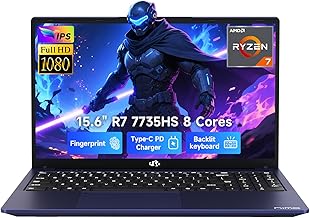
Windows laptops come in every shape and price. The NIMO thin-and-light and dynabook Portégé X40-M favor slim, portable business designs with quality keyboards and modern builds, while the HP 14-inch and Stream models keep things compact and lightweight for everyday carry. Renewed Dell Latitude 3190 2-in-1 units add touchscreen flexibility in durable education-grade bodies. The premium picks feel notably more refined, but even the budget machines are built to travel and handle daily use.
Performance
Performance varies widely by configuration. The NIMO with a Ryzen 7 7735HS and 16GB RAM and the dynabook with a Core Ultra 7 and 16GB deliver smooth multitasking, content work, and even light gaming, backed by fast SSDs. Budget machines like the HP Stream and renewed Dell Latitude models with 4GB RAM handle browsing, documents, and streaming but struggle with heavy multitasking. For a responsive everyday experience, prioritize 16GB of RAM and an SSD; for basic tasks and a tight budget, the entry configs suffice.
Pros & Cons
- Broad compatibility: Windows runs the widest range of software and games.
- Every budget covered: From ultra-cheap to capable thin-and-light performers.
- Strong value configs: 16GB RAM and SSD models offer smooth multitasking.
- Flexible form factors: Traditional laptops and 2-in-1 touchscreens available.
- Entry models are slow: 4GB RAM machines limit multitasking.
- Renewed condition varies: Buy from reputable sellers and check warranty.
Alternatives to Consider
If you only browse and use cloud apps, a Chromebook is cheaper and simpler, though far less flexible. For demanding creative or gaming work, a higher-end laptop with a dedicated GPU is worthwhile. But for the broadest everyday versatility, a mid-range Windows machine with 16GB of RAM hits the sweet spot.
Frequently Asked Questions
How much RAM does a Windows laptop need?
8GB is the practical minimum, but 16GB delivers noticeably smoother multitasking and better longevity, making it the ideal target for most users.
Are renewed Windows laptops reliable?
Reputable renewed units offer great value and work well for everyday tasks. Verify the seller, warranty, and stated condition before buying.
Is a 2-in-1 Windows laptop worth it?
If you value touchscreen flexibility for notes and media, yes. Models like the renewed Dell Latitude 3190 add versatility for casual and educational use.
Can budget Windows laptops handle everyday work?
Entry machines manage browsing, documents, and streaming, but for smooth multitasking, a 16GB configuration like the NIMO or dynabook is a better long-term choice.
Verdict
A Windows laptop remains the most versatile everyday choice, and the right pick depends on your budget. For smooth performance, the NIMO with a Ryzen 7 and the dynabook Portégé with 16GB RAM stand out, while budget HP and renewed Dell models cover basic needs affordably. Prioritize 16GB of RAM and an SSD, and your Windows laptop will serve you well for years.







