Key takeaways
- Outstanding all-day ergonomic comfort for long work sessions
- Excellent MagSpeed scroll wheel with quiet, satisfying clicks
- Multi-device Flow switching and tracking on almost any surface
- Weeks of battery life with fast USB-C top-ups
What's inside
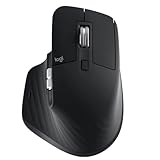
The Logitech MX Master 3S is a productivity mouse first and a gaming mouse never, and that framing matters. It is the polished refinement of Logitech’s flagship work mouse, adding quieter clicks and an 8000 DPI sensor while keeping the sculpted ergonomic body, MagSpeed electromagnetic scroll wheel and multi-device switching that made the line famous.
It is built for people who spend their day in spreadsheets, timelines, code editors and creative apps, and who want a mouse that reduces hand fatigue and moves seamlessly between a laptop and a desktop. Gamers should look elsewhere, but for creators, developers and office power users, this is one of the most comfortable tools you can put under your palm.
As an Amazon Associate we earn from qualifying purchases at no extra cost to you.




⚡ Save on Your Next PC — Amazon Prime
Prime members get fast free shipping on the systems above, plus early access to Prime Day & Black Friday PC deals. New members get a 30-day free trial.
Watch: Logitech MX Master 3S Review — Video Review
Design & Build
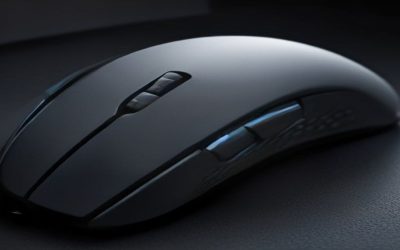
The MX Master 3S is unapologetically large and right-handed, with a tall arch that supports the whole palm and a dedicated thumb rest hiding a horizontal scroll wheel and gesture button. The materials feel premium, the buttons are reassuringly solid, and the standout MagSpeed wheel shifts between ratcheted and free-spin scrolling with a satisfying mechanical thunk. The downsides are inherent to the design: it is heavy and bulky by mouse standards, strictly for right hands, and its size can overwhelm smaller hands or cramped bags.
Performance
Where this mouse shines is everyday flow. The quiet clicks are genuinely quieter than the older Master 3 without feeling mushy, the 8000 DPI sensor tracks accurately even on glass, and Logitech Flow lets you glide the cursor and copy files across two computers as if they were one. Battery life is measured in weeks, and a quick USB-C charge buys hours of use.
For work it is close to flawless, but it is worth being clear about its limits. The sensor and shape are tuned for precision and comfort, not speed, so it feels sluggish and heavy the moment you load a shooter. Treat it as the productivity companion it is, and it rarely puts a foot wrong.
Pros & Cons
- Outstanding all-day ergonomic comfort for long work sessions
- Excellent MagSpeed scroll wheel with quiet, satisfying clicks
- Multi-device Flow switching and tracking on almost any surface
- Weeks of battery life with fast USB-C top-ups
- Large, heavy body is unsuitable for gaming
- Right-handed only with no ambidextrous version
- Premium price for a productivity-focused mouse
Alternatives to Consider
If you want the newest features and can stretch the budget, the Logitech MX Master 4 adds haptic feedback to the same proven formula. Those who travel or have smaller hands should consider the Logitech MX Anywhere 3S, a compact take on the same fast-scrolling philosophy. And if you are building a full desk setup, the Logitech MX Keys S Combo pairs a matching keyboard and mouse for a cohesive productivity workspace.
Frequently Asked Questions
Can I use the MX Master 3S for gaming?
You can, but you should not expect much. Its weight, ergonomic shape and productivity-tuned sensor make it poor for fast competitive titles, though it is fine for slower strategy or management games.
What is the difference between the 3S and the older Master 3?
The 3S mainly adds noticeably quieter clicks and a higher 8000 DPI sensor. The shape and core experience are otherwise very similar, so upgrading is optional if you already own a Master 3.
Does it really track on glass?
Yes, on glass at least 4mm thick. In practice it works on almost every desk surface you are likely to use, which removes the need for a mousepad.
How does multi-device switching work?
With Logitech Options and Flow you can pair up to three devices and move the cursor between two computers, even copying and pasting files across them. It is one of the mouse’s most useful features for multi-machine setups.
Verdict
The Logitech MX Master 3S is the benchmark productivity mouse, delivering superb comfort, a class-leading scroll wheel and seamless multi-device workflow that justify its price for anyone who works at a computer all day. It is emphatically not for gaming, and its size and right-handed design won’t suit everyone, but for its intended audience it is close to essential.