Our Top Picks

AMD Ryzen 7 7800X3D 8-Core, 16-Thread Desktop Processor
Chosen because it specifies 16-Thread Desktop Processor.
View on Amazon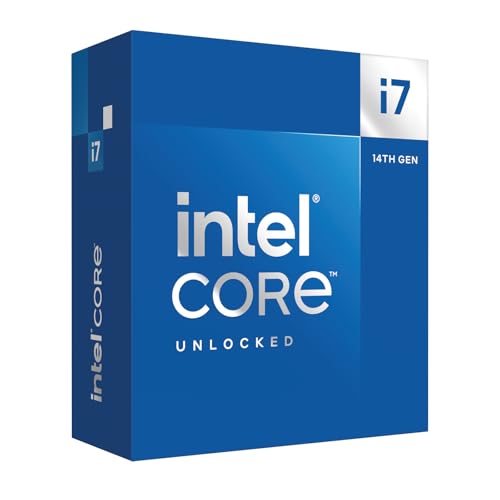
Intel Core i7-14700K new gaming desktop processor, 20 cores (8 P-cores + 12 E-cores) with integrated graphics - unlocked
Chosen because it specifies 20 cores (8 P-cores + 12 E-cores) with integrated graphics and unlocked.
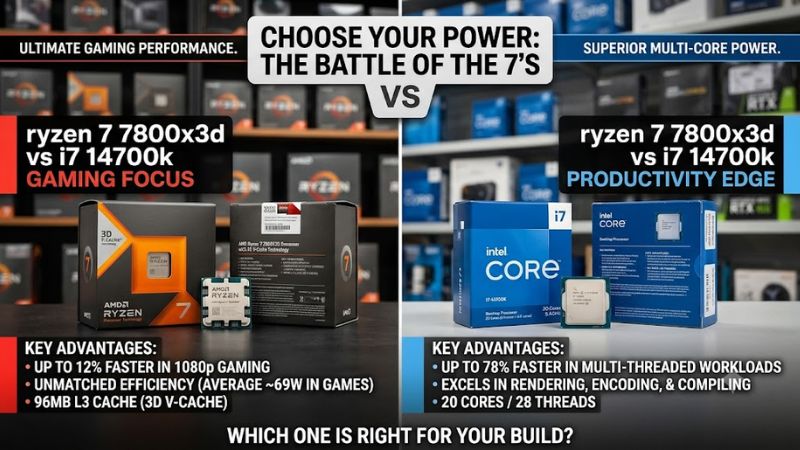
View on AmazonThe Ryzen 7 7800X3D vs i7-14700K comparison comes down to two different priorities: gaming performance and multitasking power. AMD’s Ryzen 7 7800X3D is an eight-core processor designed around 3D V-Cache technology, while Intel’s Core i7-14700K combines eight Performance-cores with 12 Efficient-cores for a total of 20 cores and 28 threads.
For a gaming-focused desktop, the Ryzen 7 7800X3D is generally the stronger choice, particularly in CPU-limited games where its large L3 cache can improve frame rates and consistency. The i7-14700K is more attractive for demanding productivity applications, video editing, rendering, and workloads that benefit from additional processing cores.
However, neither processor is automatically the better purchase. Motherboard compatibility, memory requirements, cooling, electricity consumption, existing hardware, and current US pricing all affect the final decision.
Ryzen 7 7800X3D vs i7-14700K: Specifications Compared
Both processors launched in 2023 and target enthusiast desktop systems, but their underlying architectures and platform requirements are substantially different.
| Specification | Ryzen 7 7800X3D | Core i7-14700K |
| Architecture | Zen 4 | Raptor Lake Refresh |
| Generation | Ryzen 7000 | Intel 14th Gen |
| CPU cores | 8 | 20 |
| Core configuration | 8C / 16T | 8P + 12E |
| Threads | 16 | 28 |
| Maximum boost | Up to 5.0 GHz | Up to 5.6 GHz |
| L3 cache | 96MB | 33MB |
| L2 cache | 8MB | 28MB |
| Default power rating | 120W TDP | 125W Processor Base Power |
| Maximum rated power | 162W PPT | 253W Maximum Turbo Power |
| Socket | AM5 | LGA1700 |
| Memory | DDR5 | DDR4 or DDR5 |
| Integrated graphics | Radeon Graphics | Intel UHD Graphics 770 |
| PCIe support | PCIe 5.0 | PCIe 5.0 and 4.0 |
Specifications are manufacturer-published values. AMD’s 162W figure represents its package power tracking limit, while Intel’s 253W figure is Maximum Turbo Power. These are not identical measurement categories.
The most important architectural difference is cache design. AMD equips the 7800X3D with 96MB of L3 cache through its second-generation 3D V-Cache implementation. This gives compatible games access to a larger pool of nearby data, potentially reducing the need to retrieve information from system memory.
Intel takes a different approach. The 14700K uses a hybrid architecture with Performance-cores for demanding tasks and Efficient-cores for additional parallel processing capacity. Its 20-core configuration gives it a substantial advantage in many heavily threaded applications.
Neither core count nor clock speed alone determines gaming performance. Cache behavior, memory latency, game-engine design, GPU limitations, and scheduling all influence the actual experience.
Gaming Performance: Which Processor Delivers More FPS?
Winner: Ryzen 7 7800X3D
Gaming is the strongest argument for choosing the Ryzen 7 7800X3D. Its 3D V-Cache architecture is particularly useful in games that repeatedly access large amounts of data, including simulation titles, strategy games, open-world environments, and competitive games targeting high frame rates.
The i7-14700K remains a capable gaming processor. Its higher clock speeds and hybrid core configuration provide strong performance across different game engines. However, additional cores do not automatically translate into higher FPS.
Why the 7800X3D performs well in games
The 7800X3D has 96MB of L3 cache, substantially more than the 14700K’s 33MB. This additional cache can reduce memory access delays in workloads that benefit from keeping frequently used game data close to the CPU cores.
The practical advantages can include:
- Higher average FPS in cache-sensitive games.
- Better performance in CPU-limited scenarios.
- Potentially stronger frame-time consistency in selected titles.
- More room to maintain high frame rates when using powerful graphics cards.
These advantages are most noticeable when the graphics card is not already limiting performance.
For example, someone using an RTX 4080 or RTX 4090 at 1080p competitive settings may notice a larger difference between these processors than someone playing demanding AAA games at 4K with maximum graphics settings.
What independent gaming benchmarks show
Several established hardware publications have compared the 7800X3D with Intel’s 14th-generation processors.
TechSpot’s Core 14th Gen testing reported that the Ryzen 7 7800X3D averaged approximately 10% higher gaming performance than the Core i7-14700K across its selected 12-game test suite.
GamersNexus also demonstrated why results vary between games. Its testing showed strong 7800X3D performance in titles such as F1 2023, while Intel remained competitive or performed better in certain other workloads and games.
These results should not be treated as a universal FPS multiplier. Different processors, graphics cards, game versions, memory configurations, and graphics settings can change the outcome.
A useful way to interpret the evidence is:
| Gaming scenario | More attractive CPU | Reason |
| Competitive gaming at 1080p | 7800X3D | Strong CPU-limited performance |
| High-refresh-rate gaming | 7800X3D | Large cache benefits selected games |
| CPU-heavy simulation games | 7800X3D | Cache-sensitive workloads |
| AAA gaming at 1440p | 7800X3D | Often strong CPU performance, although GPU limits matter |
| AAA gaming at 4K | Depends on GPU | Graphics card often becomes the main bottleneck |
| Gaming while streaming | Depends on workload | Both processors have different multitasking strengths |
The 1440p and 4K distinction is important. A faster CPU cannot produce a substantial frame-rate improvement when the GPU is already working at its practical performance limit.
For buyers planning to use a midrange graphics card, spending significantly more on the CPU may provide less benefit than investing in a stronger GPU.
Average FPS versus 1% lows
Average FPS is useful, but it does not explain the entire gaming experience.
The 1% low metric helps illustrate performance during slower portions of a benchmark. It can reveal situations where average frame rates look impressive but occasional slow frames affect perceived smoothness.
The 7800X3D’s large cache can help in certain games where memory access and CPU scheduling influence frame times. However, it does not guarantee better 1% lows in every title.
Stuttering can also originate from shader compilation, asset streaming, background applications, insufficient memory, storage performance, or game-engine problems.
For that reason, buyers should examine both average FPS and frame-time behavior instead of selecting a processor based on one benchmark number.
Productivity Performance: Why the i7-14700K Has the Advantage
Winner: Core i7-14700K
Gaming is only one part of a desktop PC’s workload. If the system will also handle video editing, 3D rendering, software compilation, content creation, or heavy multitasking, the Core i7-14700K becomes considerably more attractive.
Its 20-core configuration includes:
- Eight Performance-cores.
- Twelve Efficient-cores.
- Twenty-eight total processing threads.
By comparison, the Ryzen 7 7800X3D has eight cores and 16 threads.
This difference gives Intel more parallel processing resources for applications that can distribute work across multiple cores.
Video editing and content creation
The i7-14700K is generally the stronger choice for CPU-heavy video editing and rendering workloads.
Applications such as Adobe Premiere Pro and DaVinci Resolve can use multiple CPU cores, although actual performance also depends on GPU acceleration, codecs, storage, memory capacity, and the specific project.
Intel’s integrated UHD Graphics 770 also supports Intel Quick Sync Video. This can be useful in supported media workflows involving hardware-accelerated video decoding and encoding.
The 7800X3D has basic integrated Radeon graphics, but it does not offer the same Quick Sync feature set.
That does not mean AMD cannot handle video editing. Its eight Zen 4 cores remain capable, and supported applications can use a discrete GPU to accelerate many tasks.
However, buyers who regularly export large projects or run multiple demanding creative applications should generally favor the Intel processor.
3D rendering and workstation workloads
CPU rendering is another area where the 14700K benefits from its additional cores.
Tom’s Hardware’s original 7800X3D review found that the processor’s gaming specialization came with weaker productivity performance compared with higher-core-count competitors.
More recent comparison data from CPU-Monkey’s Cinebench 2024 results also shows the 14700K ahead in both single-core and multicore performance.
These results should be interpreted as benchmark evidence rather than guaranteed application performance. Rendering engines differ in how effectively they use additional cores, and GPU rendering can change the overall ranking.
For Blender CPU rendering, large software builds, compression, and other heavily threaded tasks, Intel is generally the more suitable option.
Programming, streaming, and multitasking
The better choice depends on the actual workload.
Developers compiling large projects may benefit from the 14700K’s additional cores. However, programming performance also depends on compiler behavior, project size, storage, and memory.
For gaming streams, both processors can work well with a modern NVIDIA or AMD GPU that supports hardware encoding.
The 14700K offers additional CPU resources for simultaneously running games, editing applications, browsers, and background workloads. Nevertheless, streaming performance should not be judged by core count alone.
A GPU-based encoder can reduce the CPU workload considerably, making the 7800X3D a perfectly reasonable gaming-and-streaming option.
| Workload | Better choice | Explanation |
| CPU-based video rendering | i7-14700K | More processing cores |
| CPU-based 3D rendering | i7-14700K | Stronger multicore resources |
| Large software compilation | i7-14700K | More parallel processing capacity |
| Gaming and GPU encoding | 7800X3D | Gaming-oriented architecture |
| Heavy multitasking | i7-14700K | More cores and threads |
| Basic productivity | Both | Either processor is sufficiently capable |
Power Consumption, Temperatures, and Cooling
Power consumption is an important difference that can influence the total cost of ownership.
AMD specifies a 120W TDP for the 7800X3D, while Intel lists 125W Processor Base Power and 253W Maximum Turbo Power for the 14700K.
These specifications should not be interpreted as identical measurements or as predictions of constant real-world consumption.
Actual power consumption depends on the workload, motherboard firmware, BIOS configuration, cooling, and power limits.
Ryzen 7 7800X3D power efficiency
The 7800X3D is particularly attractive for buyers who want strong gaming performance without requiring the same level of power delivery as a heavily loaded 14700K system.
Its gaming-oriented design can deliver high frame rates while maintaining relatively modest CPU power consumption.
However, lower power consumption does not mean the processor never gets hot.
AMD lists an operating temperature limit of 89°C for this model. The processor can operate at elevated temperatures under demanding conditions while managing its boost behavior.
A quality air cooler can be suitable for many configurations, although cooler selection should account for case airflow, ambient temperature, noise expectations, and the desired operating conditions.
Core i7-14700K cooling requirements
The i7-14700K has a higher potential power demand, especially during sustained multicore workloads.
A capable dual-tower air cooler or appropriately sized liquid cooler is worth considering, depending on the motherboard’s power settings and the workload.
An inadequate cooler can cause thermal throttling, reducing sustained performance.
Buyers should also consider:
- Motherboard VRM quality.
- Case airflow.
- CPU cooler clearance.
- Radiator compatibility if using liquid cooling.
- BIOS power settings.
- Fan noise under sustained workloads.
A 14700K system designed for long rendering sessions requires more attention to cooling and power delivery than a typical gaming-focused 7800X3D build.
Platform Compatibility: AM5 vs LGA1700
Platform compatibility can determine which processor makes financial sense, particularly when upgrading an existing desktop.
The 7800X3D uses AMD’s AM5 socket, while the 14700K uses Intel’s LGA1700 socket. Their motherboards are not interchangeable.
AMD AM5 platform
Advantages
- Supports DDR5 memory exclusively.
- Compatible with multiple AM5 chipset families.
- Offers a platform with newer processor upgrade possibilities.
- Supports PCIe 5.0 connectivity, depending on motherboard implementation.
The 7800X3D is compatible with supported A620, B650, B650E, X670, X670E, B840, B850, X870, and X870E motherboards.
However, motherboard BIOS support must still be checked before installation.
One important advantage is the potential upgrade path. AMD has continued supporting the AM5 platform across multiple Ryzen generations, although future processor compatibility always depends on manufacturer support and BIOS availability.
For someone building a new gaming PC, this can make AM5 attractive beyond the immediate performance comparison.
Intel LGA1700 platform
The i7-14700K supports compatible Intel 600-series and 700-series motherboards.
Examples include:
- B660 and B760.
- Z690 and Z790.
- H670 and H770.
Not every motherboard offers identical features or power delivery. Some boards also require BIOS updates before they can recognize a 14th-generation processor.
Intel supports both DDR4 and DDR5 with the 14700K, depending on the motherboard.
This flexibility can reduce upgrade costs for someone reusing a compatible DDR4 memory kit and motherboard.
However, DDR4 and DDR5 cannot be mixed on the same motherboard. Buyers must select the memory type supported by their specific board.
Platform comparison
| Platform consideration | Ryzen 7 7800X3D | i7-14700K |
| Socket | AM5 | LGA1700 |
| DDR4 support | No | Yes, compatible boards |
| DDR5 support | Yes | Yes |
| Chipset options | AM5 chipsets | Intel 600/700 series |
| BIOS checks | Required where applicable | Particularly important for 14th-gen upgrades |
| Future upgrade flexibility | Generally stronger | More limited within LGA1700 |
| Existing DDR4 reuse | No | Possible |
For a completely new system, AM5 is generally the more attractive long-term platform. For someone upgrading an existing LGA1700 system, the 14700K may offer better value if the motherboard and memory can be reused.
Intel 14th-Gen Stability: An Important Buying Consideration
There is another issue worth considering before purchasing the i7-14700K: Intel’s reported Vmin Shift Instability problem affecting certain 13th- and 14th-generation desktop processors.
Intel has acknowledged the issue and identified operating conditions involving elevated voltage and temperature that can contribute to processor instability.
As of November 2, 2026, Intel’s support guidance recommends:
- Updating the motherboard BIOS to a version containing microcode 0x12F or later.
- Using the appropriate Intel Default Settings in BIOS.
- Avoiding unnecessarily aggressive motherboard power and voltage configurations.
- Checking processor warranty eligibility if instability occurs.
Intel also provides an additional two-year warranty extension for eligible affected processors, including the i7-14700K, subject to its warranty conditions.
This does not mean every 14700K will develop instability. However, buyers should verify the BIOS version and warranty status, especially when purchasing used hardware or older motherboard inventory.
The 7800X3D does not have this particular Intel-specific issue, although it still requires appropriate motherboard firmware and normal system maintenance.
Price and Overall Value in 2026
Pricing can change the recommendation considerably.
The original MSRP of the Ryzen 7 7800X3D was $449, while Intel listed the i7-14700K at 409–419.
Those launch prices are historical reference points, not reliable indicators of current retail value.
A US price-tracking snapshot from October 30, 2026, showed the 7800X3D at approximately $420 at the cheapest recorded in-stock retailer listing. Actual checkout prices and availability can change.
For the 14700K, buyers should compare current boxed and tray listings carefully rather than assume its original suggested price represents today’s market.
The total platform cost matters more than the CPU price alone.
For a new PC, calculate:
- Processor purchase price.
- Compatible motherboard.
- DDR5 memory or reusable DDR4 memory.
- CPU cooler.
- PSU requirements.
- Potential additional case cooling.
The 7800X3D may cost more initially, but its gaming efficiency and AM5 platform can make it attractive over a longer ownership period.
The 14700K can be more economical if an existing compatible motherboard and DDR4 memory kit are available.
Which CPU Should You Buy?
The right processor depends on what you expect your desktop to do.
Choose the Ryzen 7 7800X3D if:
- Gaming is your primary activity.
- You want strong performance in CPU-limited games.
- You play competitive games at high refresh rates.
- You prioritize gaming performance per watt.
- You are building a new AM5 desktop.
- You want a platform with a broader potential CPU upgrade path.
Choose the Core i7-14700K if:
- You regularly perform CPU-heavy rendering.
- Video production is an important part of your workload.
- You compile large software projects.
- You frequently multitask across demanding applications.
- You already own a compatible LGA1700 motherboard.
- You want the option of reusing compatible DDR4 memory.
For mixed gaming and productivity, the decision becomes more complicated. Someone who spends most of their time gaming but occasionally edits videos will probably benefit more from the 7800X3D. Someone who spends several hours rendering or compiling projects may find the 14700K more useful.
Frequently Asked Questions
Is the Ryzen 7 7800X3D faster than the i7-14700K in gaming?
Generally, yes. Independent gaming benchmarks show that the 7800X3D can outperform the 14700K across selected game suites, although individual game results vary.
Is the i7-14700K better for video editing?
Generally, yes, particularly for CPU-intensive editing, rendering, and encoding workloads. Its 20 cores and 28 threads provide more parallel processing resources, while Intel Quick Sync can benefit supported video workflows.
Does the Ryzen 7 7800X3D support DDR4 RAM?
No. The Ryzen 7 7800X3D requires a DDR5-compatible AM5 motherboard. The i7-14700K supports either DDR4 or DDR5, depending on the motherboard.
Is the Ryzen 7 7800X3D worth buying in 2026?
Yes, it remains a compelling gaming processor if its current price is competitive. However, buyers should compare it with newer available CPUs and consider whether its gaming performance justifies the complete platform cost.
Final Verdict
The Ryzen 7 7800X3D and Core i7-14700K are both capable desktop processors, but they serve different priorities.
The Ryzen 7 7800X3D is the better overall choice for a gaming-focused PC because its 3D V-Cache technology delivers strong gaming performance, while its power requirements are relatively manageable.
The Core i7-14700K is the stronger productivity-oriented option, particularly for multicore rendering, compilation, and demanding multitasking. Its DDR4 compatibility can also make it attractive for existing Intel system owners.
For a new gaming desktop in 2026, AMD gets the recommendation. For a workstation that also handles gaming, Intel remains a competitive option, provided the system uses appropriate BIOS updates and cooling.
The best purchase ultimately depends on the games you play, applications you run, graphics card you own, and total system budget.
More from Amazon
Programs that pair well with the guide above. Offers and eligibility are set by Amazon and may change.
Free shipping on eligible items, Prime Video and more. Eligible new members can start with a free trial.
Start a Prime free trialAd-free music streaming. Eligible new subscribers can start with a free trial.
Try Music Unlimited freeA Prime membership for ages 18-24 with a trial period. Eligibility is set by Amazon.
See Prime for Young AdultsAudiobooks and podcasts to listen to on the go. Eligible new members can start with a free trial.
Try Audible freeAs an Amazon Associate we earn from qualifying purchases.