Our Top Picks
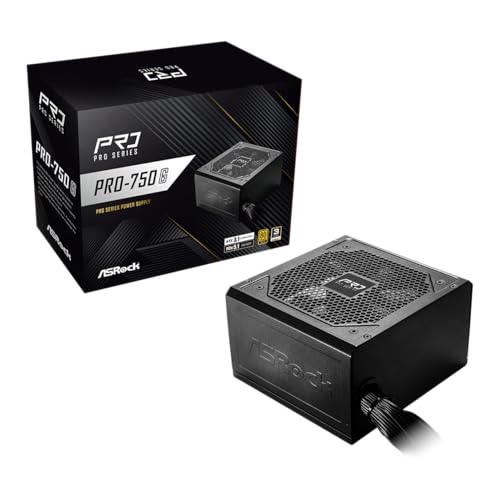
ASRock PRO 750G Power Supply - 750W 80 Plus Gold Certified, ATX 3.1 & PCIe 5.1 Ready, Native 12V-2x6 Connector, 120mm Low-Noise Fan, 3-Year Warranty
Chosen because it specifies 750W 80 Plus Gold Certified and ATX 3.1 & PCIe 5.1 Ready.
View on Amazon
Rosewill VMG 750W 80+ Gold, ATX 3.0 & 3.1 Compatible, Full Modular Low-Noise Power Supply, PCIe 5.1 12V-2x6 Connector, 100% Japanese Electrolytic Capacitor, 120mm FDB Silent Fan - 5 Year Warranty
Chosen because it specifies ATX 3.0 & 3.1 Compatible and Full Modular Low-Noise Power Supply.
View on Amazon
ASRock PRO 850G Power Supply - 850W 80 Plus Gold Certified, ATX 3.1 & PCIe 5.1 Ready, Native 12V-2x6 Connector, 120mm Low-Noise Fan, 3-Year Warranty
Chosen because it specifies 850W 80 Plus Gold Certified and ATX 3.1 & PCIe 5.1 Ready.
View on Amazon
Thermaltake Toughpower GT 850W ATX 3.1 Standard Power Supply; 80 Plus Gold Efficiency; Smart Zero Fan; Native 450W PCIe 5.1 Connector; PS-TPT-0850FNFAGU-3; 5 Year Warranty
Picked as a relevant option in this category.
View on AmazonChoosing between a 750W and 850W power supply can affect your gaming PC’s upgrade flexibility, power headroom, and overall build cost. The 750w vs 850w psu for gaming decision comes down to your GPU, CPU, and future hardware plans. Both capacities can support powerful gaming systems, but they are not interchangeable in every configuration.
How to Choose the Right PSU Wattage for Gaming
The right PSU capacity depends on the combined power requirements of your components rather than the graphics card alone. A 750W unit can be sufficient for many gaming PCs, while an 850W model provides additional capacity for demanding hardware. Consider these four factors before deciding.
1. GPU Power Requirements
Your graphics card is usually the most important component when choosing PSU wattage. Different GPUs have different power requirements, and manufacturers publish recommended system power figures to help builders select an appropriate power supply.
For example, NVIDIA specifies 850W system power for its GeForce RTX 5080 Founders Edition, while the RTX 5070 Ti has a 750W recommendation. AMD lists a 750W minimum PSU recommendation for the Radeon RX 9070 XT. These figures are useful starting points, not universal requirements for every custom configuration.
2. CPU Power Consumption
The processor also affects how much power your system needs. Mainstream gaming CPUs generally require less power than high-end processors operating with aggressive motherboard power limits or sustained all-core workloads.
When comparing a 750W and 850W PSU, consider your actual CPU model and its power limits. A high-end Intel Core Ultra or AMD Ryzen 9 processor paired with a powerful GPU may justify additional capacity, especially if you intend to overclock or upgrade components later.
3. Future Upgrade Flexibility
Your current configuration is not necessarily the configuration you will use throughout the PSU’s lifespan. You might replace a midrange graphics card with a more demanding model, install additional storage, or move to a higher-power processor.
An 850W unit offers 100W more rated capacity than a 750W model. That additional headroom can make future upgrades easier without replacing the power supply immediately. However, it does not mean every future GPU will work with an 850W unit; always check the new graphics card’s requirements.
4. PSU Quality and Efficiency
Wattage alone does not determine whether a power supply is suitable for gaming. Two 850W models can differ considerably in electrical performance, protection features, cooling, noise, and component quality.
Look for reputable manufacturers, independent PSU reviews, appropriate safety protections, and a suitable warranty. An 80 PLUS rating describes power efficiency under specified conditions, but it does not independently establish overall PSU quality. A well-designed 750W unit can be a better purchase than a poorly designed 850W alternative.
750W vs 850W PSU for Gaming: Key Differences
The main difference between these capacities is available power headroom, not gaming performance. An 850W PSU can supply more power when the system requires it, but a PC does not automatically consume additional electricity simply because its power supply has a higher rating. The following comparison explains where that extra capacity matters.
1. Power Capacity and Headroom
A 750W PSU provides up to 750W of rated output under its specified operating conditions. An 850W model provides another 100W of rated capacity, giving demanding systems more room for simultaneous CPU and GPU workloads.
In the 750w vs 850w psu for gaming comparison, this difference matters most when a build approaches the practical limits of a 750W unit. A system comfortably below that limit does not necessarily benefit from purchasing the larger capacity.
2. Gaming Performance and System Stability
An 850W PSU does not directly increase FPS, improve graphics quality, or reduce game loading times. Those results depend on components such as the GPU, CPU, RAM, and storage.
However, insufficient power capacity or a PSU with poor electrical performance can contribute to shutdowns, instability, or crashes under demanding workloads. Choosing an appropriately rated, high-quality unit helps the system operate within its intended power limits.
3. Compatibility With Modern Graphics Cards
Modern graphics cards can have substantial power requirements and specific connector expectations. Before purchasing either capacity, check the manufacturer’s recommended PSU wattage and the exact graphics card’s supplementary power connectors.
For newer GPUs, an ATX 3.1 PSU with a native PCIe 5.1 12V-2×6 cable can simplify power delivery when the graphics card supports that connection. A suitable older PSU may still work through supported adapters, but cable availability and manufacturer instructions must be checked carefully.
4. Cost, Efficiency, and Long-Term Value
An 850W PSU often costs more than an equivalent 750W model, although pricing varies by brand, product generation, efficiency certification, and retailer. The extra capacity is worthwhile when your components need it or when an anticipated upgrade makes the additional headroom useful.
Efficiency also deserves attention. A PSU’s efficiency changes with its load, so neither 750W nor 850W is automatically more efficient in every gaming scenario. Compare independent efficiency measurements rather than assuming the higher-wattage option always saves electricity.
Direct Comparison Table
| Comparison Factor | 750W PSU | 850W PSU |
| Rated output capacity | 750W | 850W |
| Additional headroom | Lower | 100W more |
| Midrange gaming PCs | Often suitable | Suitable |
| High-end gaming PCs | Depends on components | More flexibility |
| RTX 5080 Founders Edition | Below NVIDIA’s 850W recommendation | Meets NVIDIA’s recommendation |
| RX 9070 XT | Meets AMD’s 750W minimum recommendation | Additional headroom |
| Future GPU upgrades | More limited | More flexibility |
| Purchase cost | Often lower | Often higher |
| FPS improvement | None from wattage alone | None from wattage alone |
Which PSU Should You Choose for Different Gaming Builds?
| Gaming Configuration | Suggested Direction | Important Consideration |
| Mainstream GPU and gaming CPU | 750W | Check total system requirements |
| RTX 5070 gaming PC | 750W | NVIDIA specifies 650W system power for the reference configuration |
| RTX 5070 Ti gaming PC | 750W | NVIDIA specifies 750W system power |
| RTX 5080 gaming PC | 850W | NVIDIA specifies 850W system power |
| RX 9070 XT gaming PC | 750W or 850W | AMD recommends at least 750W |
| High-end CPU with future GPU upgrades | 850W or higher | Calculate the complete system requirements |
These recommendations use manufacturer guidance for reference GPU configurations. Factory-overclocked graphics cards, high-power processors, and unusual system configurations can require different capacities.
FAQ
Is a 750W PSU enough for a gaming PC?
Yes, a 750W PSU is enough for many gaming PCs, particularly systems using mainstream or upper-midrange graphics cards. It can also support certain high-performance configurations when the GPU manufacturer’s recommendation and the complete system’s power requirements allow it. Always check the exact graphics card model rather than relying on its GPU family name alone.
Is an 850W PSU better for gaming than a 750W PSU?
An 850W PSU provides more available power capacity, but it does not automatically make games run faster. Its main advantage is additional headroom for demanding components and future upgrades. If your current PC operates comfortably within a quality 750W unit’s capabilities, spending extra on 850W may not provide an immediate practical benefit.
Does an 850W PSU consume more electricity than a 750W PSU?
No, a higher wattage rating does not mean the computer automatically consumes more electricity. Actual consumption depends on the components and their workloads. For example, a gaming PC drawing the same DC power from either PSU does not suddenly use more power because the second unit is rated at 850W. Efficiency differences between individual models can affect electricity consumption.
Should I upgrade from a 750W to an 850W PSU?
You should consider upgrading when your new graphics card or processor requires more capacity than your existing PSU can appropriately provide. Check the manufacturer’s recommendations, available connectors, PSU condition, and system configuration first. If your existing 750W unit meets the requirements of your new components and remains in good condition, replacing it solely for an additional 100W is usually unnecessary.
Final Thoughts
The 750w vs 850w psu for gaming decision ultimately depends on your hardware requirements and upgrade plans. A quality 750W unit remains a sensible choice for many gaming builds, while 850W offers more flexibility for demanding configurations. Check your GPU’s official recommendation and prioritize PSU quality before purchasing.
More from Amazon
Programs that pair well with the guide above. Offers and eligibility are set by Amazon and may change.
Free shipping on eligible items, Prime Video and more. Eligible new members can start with a free trial.
Start a Prime free trialAd-free music streaming. Eligible new subscribers can start with a free trial.
Try Music Unlimited freeA Prime membership for ages 18-24 with a trial period. Eligibility is set by Amazon.
See Prime for Young AdultsAudiobooks and podcasts to listen to on the go. Eligible new members can start with a free trial.
Try Audible freeAs an Amazon Associate we earn from qualifying purchases.