Our Top Picks
 LIAN LI LANCOOL 216 RGB Black ATX Mid-TowerMid-tower Case18.94 x 9.26 x 19.36 inches23.1 poundsCheck on Amazon

NZXT H6 Flow - Compact Dual-Chamber ATX PC Case - Black | Compact dual-chamber ATX case with panoramic glass and 3 included 120mm fans. Airflow-optimized for clean, cool builds.
Chosen because it specifies Compact Dual-Chamber ATX PC Case and Black.
View on AmazonLIAN LI LANCOOL 216 RGB Black ATX Mid-Tower Case, 2x160mm ARGB Fans | Airflow mesh case includes two 160mm ARGB front fans and one 140mm rear fan, with 392mm GPU and 360mm radiator support.
Chosen because it specifies 2x160mm ARGB Fans and with 392mm GPU and 360mm radiator support..
View on Amazon
Fractal Design North Charcoal Black Tempered Glass Dark - Genuine Walnut Wood Front - Glass Side Panel - Two 140mm Aspect PWM Fans Included - Type C USB - ATX Airflow Mid Tower PC Gaming Case
Chosen because it specifies Genuine Walnut Wood Front and Glass Side Panel.
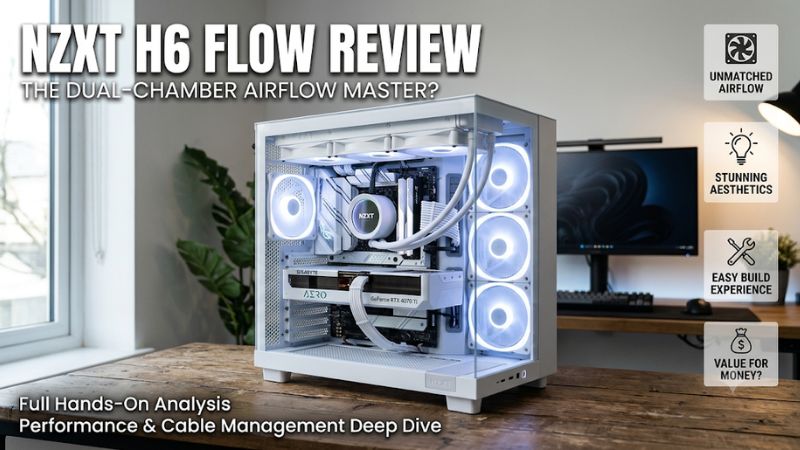
View on AmazonThe NZXT H6 Flow review examines a dual-chamber mid-tower designed for gaming PC builders who want strong ventilation, panoramic glass, and an organized interior. Its angled intake fans and 360mm radiator support make it appealing, but limited storage capacity, noise considerations, and component clearances deserve attention before purchasing.
How to Choose a Gaming PC Case
Choosing a PC case involves more than appearance. Airflow, component compatibility, cooling capacity, and build convenience determine whether a chassis works well with a gaming system. The NZXT H6 Flow combines an unusual angled intake layout with a separate PSU compartment, creating a distinctive design with several practical advantages and limitations.
1. Airflow Design and Cooling Performance
Airflow is one of the H6 Flow’s strongest selling points. Instead of placing intake fans directly behind a conventional front panel, NZXT positions three 120mm fans along the angled front-right section. This arrangement directs incoming air toward the main component chamber, particularly the graphics card area.
The perforated ventilation panels also help air move through the enclosure. For gaming systems with powerful GPUs, this arrangement offers an attractive starting point. However, actual temperatures depend on the graphics card, CPU cooler, room temperature, fan configuration, and system power consumption.
2. Component Compatibility and Internal Space
The case supports ATX, Micro-ATX, and Mini-ITX motherboards. Its 365mm GPU clearance accommodates many full-size graphics cards, while the 163mm CPU cooler height limit supports numerous tower-style air coolers.
There are important restrictions to consider. The H6 Flow does not officially support E-ATX or back-connect motherboard layouts such as BTF and Project Zero. Builders should also check GPU thickness, power connector positioning, and radiator dimensions rather than relying exclusively on the advertised graphics card length.
3. Cooling Expansion and Fan Configuration
The three included front-right fans provide an immediate intake configuration without requiring an additional purchase. The chassis also supports three 120mm or two 140mm fans at the top, two 140mm fans at the bottom, and one 120mm fan at the rear.
Liquid cooling is another advantage. A radiator up to 360mm can be installed at the top, while the rear supports a 120mm radiator. The top radiator and fan assembly needs particular attention because NZXT specifies a 30mm radiator thickness and warns that thicker combinations can interfere with motherboard components.
4. Noise, Storage, and Everyday Convenience
A visually attractive case is not necessarily a quiet one. The H6 Flow’s included fans provide useful airflow, but noise can become noticeable when they operate at higher speeds. Builders prioritizing quiet operation should consider adjustable fan curves and potentially quieter replacement fans.
Storage capacity is another compromise. The case provides two dedicated 2.5-inch drive positions and one 3.5-inch drive position. This is sufficient for many modern gaming systems using NVMe SSDs, but less appealing to users maintaining several traditional hard drives.
NZXT H6 Flow Review: Specifications, Features, and Value
The H6 Flow is best understood as a mid-range showcase case rather than a compact budget enclosure. Its dual-chamber construction separates the power supply and cable storage from the main component area, while the angled intake creates a recognizable appearance. The following sections examine its specifications, cooling, building experience, and purchasing value.
Design and Build Quality
The H6 Flow measures 435 × 287 × 415mm and has an approximate volume of 51.8 liters. Its dual-chamber construction provides a cleaner main compartment because much of the power supply and cable management hardware sits behind the motherboard area.
The wraparound tempered-glass presentation is particularly attractive for systems with coordinated components and RGB lighting. NZXT uses SGCC steel alongside tempered glass, giving the enclosure a conventional metal chassis structure with a more distinctive visual presentation.
The top and side panels offer tool-free access, making component installation and maintenance more convenient. Cable routing also benefits from dedicated channels, straps, and approximately 91mm of cable management clearance.
Specifications and Included Equipment
The standard H6 Flow and H6 Flow RGB share the same fundamental chassis dimensions and component compatibility. Their primary difference is the included fan configuration.
| Specification | NZXT H6 Flow |
| Case type | Dual-chamber mid-tower |
| Dimensions | 435 × 287 × 415mm |
| Volume | 51.8 liters |
| Motherboard support | ATX, Micro-ATX, Mini-ITX |
| GPU clearance | Up to 365mm |
| CPU cooler clearance | Up to 163mm |
| PSU clearance | Up to 200mm |
| Included fans | 3 × 120mm F120Q |
| Maximum top radiator | 360mm |
| Rear radiator | Up to 120mm |
| 2.5-inch drive positions | 2 |
| 3.5-inch drive positions | 1 |
| Expansion slots | 7 |
| Warranty | 2 years |
The standard version includes three F120Q airflow fans with a rated speed of 1,200 RPM ±240 RPM, airflow of 62.18 CFM, and a specified noise level of 25.1 dBA. These are three-pin DC fans rather than PWM models.
The front I/O provides two USB 3.2 Type-A ports, one USB 3.2 Gen 2×2 Type-C port, and a headset connection. An important distinction is that the standard H6 Flow does not include an RGB controller. Builders wanting lighting effects should examine the RGB version and its connection requirements.
Cooling Performance: What Independent Reviews Show
The angled intake arrangement is more than a cosmetic feature. In its November 2023 review, Tom’s Hardware reported impressive thermal results for the H6 Flow RGB, particularly considering its dual-chamber layout. Its review used an Intel Core i7-12700K and a Gigabyte RTX 3070 Ti, with controlled fan configurations for thermal measurements.
The reviewer also identified noise as a weakness, particularly when the included fans operated at high speeds. This distinction matters because strong cooling performance and quiet operation are separate purchasing considerations.
Guru3D’s February 2024 review provides another perspective. Its examination covered acoustic behavior, CPU and GPU temperatures, and different cooling configurations. The findings highlighted that fan speed and airflow arrangement can affect the overall thermal and acoustic balance.
These results should not be interpreted as guaranteed temperatures for every gaming PC. A modern high-power graphics card, different CPU cooler, and different fan arrangement can produce substantially different results. The most reasonable conclusion is that the chassis has a promising airflow design, but fan tuning remains important.
Price and Overall Value
The H6 Flow originally occupied approximately the $110 price category, while the RGB version carried a higher launch price of approximately $135. NZXT’s US product listing currently displays a price of $109.99 for the standard H6 Flow. This is a manufacturer-listed price, not a guarantee of availability or identical pricing across retailers.
At around $110, the case offers a compelling combination of panoramic glass, three included fans, a dual-chamber layout, and 360mm radiator support. Buyers receive a relatively complete starting configuration without immediately purchasing additional intake fans.
However, its value becomes less attractive if the final build requires several additional fans, quieter cooling hardware, or extra storage accessories. Builders should calculate the complete case-and-cooling cost rather than comparing the chassis price alone.
FAQ
1. Is the NZXT H6 Flow good for gaming PCs?
Yes, the NZXT H6 Flow is a good option for gaming PCs that prioritize airflow, component visibility, and organized cable management. Its three angled intake fans and generous GPU clearance make it suitable for many mainstream and high-performance builds.
However, graphics card dimensions, cooling requirements, and noise preferences still matter. Buyers using particularly large GPUs should check both card length and thickness before installation.
2. Does the NZXT H6 Flow come with fans?
Yes, the standard H6 Flow includes three 120mm F120Q airflow fans positioned at the front-right intake area. The RGB version includes three F120 RGB Core fans instead.
Neither configuration should be confused with a complete cooling package containing every possible fan position. Additional top, bottom, or rear fans are optional upgrades depending on the components and desired airflow configuration.
3. Can the NZXT H6 Flow fit a 360mm AIO cooler?
Yes, the H6 Flow supports a radiator up to 360mm at the top of the case. However, radiator thickness and fan dimensions must be checked carefully because thicker combinations can interfere with motherboard components.
Before purchasing an AIO cooler, compare its complete radiator-and-fan dimensions with the case specifications. Do not assume every 360mm liquid cooler will fit simply because the radiator has the correct nominal length.
4. Is the NZXT H6 Flow worth buying in 2026?
Yes, it remains worth considering around its listed $109.99 US price if you want a dual-chamber case with three included intake fans and a distinctive glass design.
However, buyers should compare its total cost with newer alternatives and check whether the original H6 Flow’s motherboard and GPU restrictions suit their components. It is less attractive for storage-heavy builds or systems where low noise is the highest priority.
Final Thoughts
The NZXT H6 Flow review points to a capable gaming PC case with distinctive angled intake fans, generous graphics card clearance, and useful 360mm radiator support. Its limited drive capacity and noise considerations prevent it from being ideal for every build. At around $110, it is a worthwhile choice for airflow-focused showcase PCs, provided compatibility is checked first.
More from Amazon
Programs that pair well with the guide above. Offers and eligibility are set by Amazon and may change.
Free shipping on eligible items, Prime Video and more. Eligible new members can start with a free trial.
Start a Prime free trialAd-free music streaming. Eligible new subscribers can start with a free trial.
Try Music Unlimited freeA Prime membership for ages 18-24 with a trial period. Eligibility is set by Amazon.
See Prime for Young AdultsAudiobooks and podcasts to listen to on the go. Eligible new members can start with a free trial.
Try Audible freeAs an Amazon Associate we earn from qualifying purchases.