Choosing between a fully modular vs semi modular PSU comes down to how much cable flexibility you need when building or upgrading a gaming PC. Both designs can deliver reliable power, but they differ in cable attachment, installation convenience, customization, and price. Understanding these differences helps you choose a power supply that fits your build without overspending.
What Is the Difference Between Fully Modular and Semi Modular PSUs?
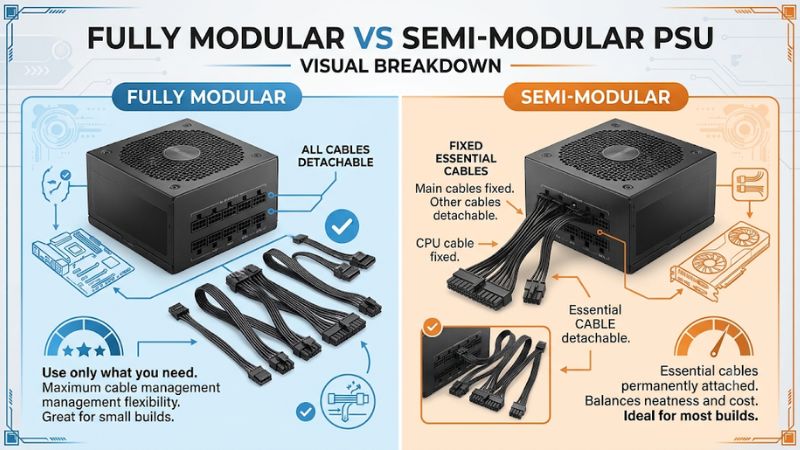
The main difference is that a fully modular power supply allows every power cable to be detached, while a semi-modular model keeps certain essential cables permanently attached. Both can support gaming systems with the appropriate wattage and connectors. The better choice depends on your case layout, cable management preferences, and budget rather than gaming performance alone.
Fully Modular PSU: How It Works
A fully modular PSU has detachable connections for all its DC output cables, including the 24-pin motherboard cable, CPU power cable, PCIe graphics card cables, and SATA power cables. You connect only the cables required by your hardware, leaving unused cables in the accessory box.
This arrangement makes installation and cable routing more flexible, particularly in cases with limited space behind the motherboard tray. It also makes custom sleeved cable installations easier. However, you must connect every required cable yourself, so beginners should carefully follow the PSU manual.
Semi Modular PSU: How It Works
A semi-modular PSU combines permanently attached cables with removable connections. The 24-pin motherboard cable and CPU power cable are commonly fixed to the unit because most desktop systems require them. Additional PCIe, SATA, and peripheral power cables are usually detachable.
This design provides much of the cable management convenience of a fully modular unit without requiring every connection to be installed separately. It can be a practical choice for mainstream gaming PCs that use standard motherboard and graphics card configurations.
Does Modularity Affect Gaming Performance?
No. Fully modular and semi-modular designs do not inherently provide different FPS, processing performance, or electrical efficiency. Modularity describes how the PSU cables connect to the power supply, not how effectively it delivers power to the CPU or GPU.
Gaming performance depends on factors such as available wattage, voltage regulation, power delivery quality, and the capabilities of the connected components. A high-quality semi-modular PSU can be a better purchase than a poorly designed fully modular model, even when both advertise the same wattage.
Which Design Offers Better Cable Management?
Fully modular units provide greater flexibility because every cable can be removed. This is useful when routing cables through narrow openings, replacing cable sets, or building a system with a visible PSU compartment. You can also leave unnecessary SATA and PCIe cables disconnected instead of hiding them inside the case.
Semi-modular units still provide good cable management because most optional connections can be removed. The permanently attached motherboard and CPU cables must be routed and stored, but these are normally required anyway. For many standard ATX gaming builds, the practical difference is relatively small.
Fully Modular vs Semi Modular PSU: Key Buying Differences
When comparing these two PSU designs, consider more than the number of detachable cables. Installation convenience, case dimensions, customization, and long-term maintenance all influence the buying decision. The following comparison highlights where each design offers an advantage and helps identify whether paying extra for complete modularity makes sense for your gaming setup.
Cable Flexibility and Installation
Corsair RM850 850W 80 Plus Gold Full Modular | PcComponentes.fr
A fully modular power supply offers the most freedom during installation. You can connect the motherboard and CPU cables first, then add graphics card and storage connections as needed. This approach can make cable routing easier when working with a crowded case or a complicated component layout.
A semi-modular unit requires less initial cable selection because its essential connections are already attached. However, the fixed cables can make installation slightly less convenient when routing them through tight spaces. Both designs require careful cable organization and proper connector placement.
Airflow and Internal Case Space
Removing unused cables can make the PSU compartment easier to organize. A fully modular unit has an advantage because no unnecessary output cables need to remain attached. This is particularly useful in cases with limited space for storing excess wiring.
However, modularity alone does not determine cooling performance. Airflow also depends on fan placement, case ventilation, component layout, and cable routing. A properly managed semi-modular build can have equally effective cooling. Choosing a fully modular PSU does not automatically lower CPU or GPU temperatures.
Price and Overall Value
Semi-modular power supplies can offer better value when their electrical specifications and build quality match a more expensive fully modular alternative. Since the essential cables are already attached, manufacturers can use a simpler connection arrangement, although actual retail pricing depends on the model and market.
Fully modular models are worth considering when you value complete cable flexibility, custom cable options, or easier PSU-side disconnection during maintenance. Nevertheless, the additional convenience should not take priority over electrical quality, appropriate wattage, warranty coverage, and GPU connector support.
Maintenance and Future Upgrades
A fully modular PSU makes it possible to disconnect every output cable directly from the power supply. This can simplify removing the unit when replacing it or reorganizing a build. It also provides greater flexibility when selecting compatible replacement cable sets.
Semi-modular models offer similar maintenance convenience for their detachable connections, but permanently attached cables must remain part of the removal process. Neither design makes incompatible cables safe to use. Always use cables approved for the exact PSU model and series because PSU-side pinouts are not universally standardized.
Side-by-Side Comparison
| Comparison Factor | Fully Modular PSU | Semi Modular PSU |
| Cable attachment | All output cables detachable | Essential cables fixed; others detachable |
| 24-pin motherboard cable | Removable | Usually fixed |
| CPU power cable | Removable | Usually fixed |
| PCIe GPU cables | Detachable | Usually detachable |
| SATA power cables | Detachable | Usually detachable |
| Cable management | Maximum flexibility | Good flexibility |
| Installation | More cable selection required | Essential cables already attached |
| Custom cable support | Greater flexibility | More limited |
| Maintenance | All PSU-side connections removable | Some connections remain fixed |
| Price | May carry a higher premium | Often more budget-friendly |
| Gaming performance | Depends on PSU quality and specifications | Depends on PSU quality and specifications |
Which PSU Should You Choose for Your Gaming PC?
The choice between a fully modular vs semi modular PSU depends on your actual build requirements. A standard gaming desktop may not benefit enough from complete modularity to justify a substantial price difference. However, a showcase build or a system requiring extensive cable customization can make the additional flexibility worthwhile.
Choose Fully Modular for Custom Gaming Builds
A fully modular PSU is a strong option for gaming PCs with tempered glass panels, custom sleeved cables, or complicated internal layouts. Being able to remove every output cable makes it easier to organize the visible connections and avoid unnecessary wiring inside the PSU compartment.
It is also useful if you frequently rebuild systems or change component configurations. You can connect only the cables required by the current setup. However, this does not mean you can reuse arbitrary cables from an older power supply. Check manufacturer compatibility before installing replacement cables.
Choose Semi Modular for Mainstream Gaming PCs
A semi-modular PSU is a sensible option for conventional gaming desktops using one motherboard, one CPU, and one graphics card. Since the motherboard and CPU power connections are normally required, having them permanently attached does not create much additional inconvenience.
It can also help keep the overall build cost under control. If the semi-modular model offers sufficient wattage, suitable GPU connectors, good electrical performance, and an appropriate warranty, there is little reason to reject it simply because some cables cannot be removed.
Consider Your PC Case Before Buying
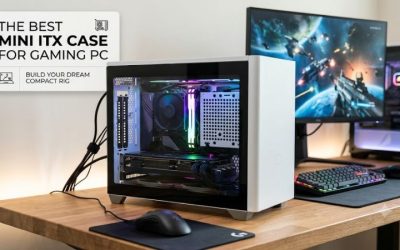
Your case layout can influence which PSU design is more convenient. Compact cases and systems with narrow cable-routing spaces can benefit from the flexibility of a fully modular unit. Being able to attach cables after positioning the PSU may make assembly easier.
However, check the PSU form factor and physical dimensions separately. ATX, SFX, and SFX-L describe different PSU size categories, while modularity describes cable attachment. A fully modular ATX unit is not automatically compatible with an SFX-only case. Always check the case manufacturer’s PSU clearance specifications.
Prioritize PSU Quality Over Modularity
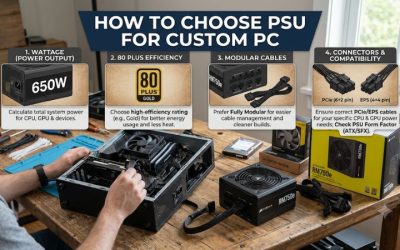
Modularity should be one of the final considerations when selecting a gaming power supply. Start by checking the total system power requirements, recommended PSU capacity for your graphics card, available PCIe or 12V-2×6 connections, and CPU power connectors.
You should also consider the PSU’s electrical platform, protection features, efficiency certification, warranty, and independent technical reviews. ATX 3.1 compatibility can be relevant when selecting a PSU for newer graphics cards, but it is a separate specification from modularity. A quality semi-modular model is preferable to an unreliable fully modular alternative.
FAQ
Is a Fully Modular PSU Better Than a Semi Modular PSU?
A fully modular PSU is better for complete cable management flexibility, but it is not automatically better in electrical quality or gaming performance. A semi-modular unit can provide everything a conventional gaming PC needs while costing less.
Does a Fully Modular PSU Improve Airflow?
A fully modular PSU can make cable organization easier by allowing unused cables to remain disconnected. However, actual airflow improvements depend on the case layout and cable placement. A well-organized semi-modular build can achieve similarly effective airflow.
Can You Use Semi Modular Cables on a Fully Modular PSU?
Not necessarily, because modular PSU cables can have different pinouts even when their connectors look identical. Only use cables explicitly approved for the exact PSU model or series. Mixing incompatible cables can damage the power supply and connected components.
Is a Semi Modular PSU Good Enough for a High-End Gaming PC?
Yes, a quality semi-modular PSU can power a high-end gaming PC if its wattage, connectors, and electrical specifications meet the system requirements. Check the graphics card manufacturer’s PSU recommendations and ensure the unit supports the required GPU power connections.
Final Thoughts
Choosing a fully modular vs semi modular PSU is primarily a decision about cable management, installation convenience, and budget. Fully modular models suit custom builds and frequent upgrades, while semi-modular units offer excellent practicality for mainstream gaming desktops. Compare electrical quality and compatibility first, then choose the cable design that fits your build.
More from Amazon
Programs that pair well with the guide above. Offers and eligibility are set by Amazon and may change.
Free shipping on eligible items, Prime Video and more. Eligible new members can start with a free trial.
Start a Prime free trialAd-free music streaming. Eligible new subscribers can start with a free trial.
Try Music Unlimited freeA Prime membership for ages 18-24 with a trial period. Eligibility is set by Amazon.
See Prime for Young AdultsAudiobooks and podcasts to listen to on the go. Eligible new members can start with a free trial.
Try Audible freeAs an Amazon Associate we earn from qualifying purchases.