Key takeaways
- Actuation feel: Mechanical switches register partway through the keypress with a crisp, consistent break; membrane keys require you to bottom out against a rubber dome, which feels mushier and less predictable.
- Durability: Mechanical switches are typically rated for 50–100 million presses per key, while rubber domes soften and lose responsiveness after a few million — often within two or three years of heavy use.
- Noise: Membrane is naturally quiet. Mechanical ranges from loud clicky blues, as on the Redragon K580, to genuinely hushed linears like the silent yellows in the Razer BlackWidow V4 X.
- Anti-ghosting and N-key rollover: Most gaming mechanicals register every simultaneous keypress; budget membranes frequently cap out at six keys or fewer, which bites during complex movement-plus-ability inputs.
- Customization: Hot-swappable mechanicals let you change switches without soldering and swap keycaps freely. Membrane boards are essentially sealed — what you buy is what you keep.
- Price and weight: Membrane still undercuts mechanical at the very bottom of the market and travels lighter; mechanicals are heavier, which most players consider a stability advantage.
What's inside
Few upgrades change how a game feels in your hands as much as swapping your keyboard. The choice usually comes down to two technologies: mechanical, where every key sits on its own spring-loaded switch, and membrane, where a single rubber-dome sheet sits under the entire board. They look nearly identical on a desk, but they behave very differently the moment you start strafing, spamming abilities, or typing a long Discord message at 2 a.m.
In 2026 the decision matters more than it used to, and for a surprising reason: mechanical boards have gotten cheap. Hot-swappable sockets, pre-lubed switches, gasket mounts, and PBT keycaps — features that were enthusiast-only a few years ago — now show up on entry-level gaming keyboards. Membrane hasn’t stood still either; it’s quieter, slimmer, and more travel-friendly than ever. Below we break down where each one genuinely wins so you can spend your money once.
As an Amazon Associate we earn from qualifying purchases at no extra cost to you.


⚡ Save on Your Next PC — Amazon Prime
Prime members get fast free shipping on the systems above, plus early access to Prime Day & Black Friday PC deals. New members get a 30-day free trial.
Watch: Mechanical vs Membrane Keyboard: 2026 Guide — Video Review
Quick Verdict
Choose mechanical if you game competitively, type for hours, or want a keyboard you can customize and keep for a decade — boards like the AULA F75 Pro and the RK ROYAL KLUDGE R104 deliver enthusiast features at mainstream prices. Choose membrane if you need near-silence in a shared room, want the lowest possible cost, or value a thin, spill-resistant board for a laptop setup. Hybrids like the SteelSeries Apex 5 sit in the middle, pairing a membrane-style cushion with a mechanical click bar.
Key Differences
- Actuation feel: Mechanical switches register partway through the keypress with a crisp, consistent break; membrane keys require you to bottom out against a rubber dome, which feels mushier and less predictable.
- Durability: Mechanical switches are typically rated for 50–100 million presses per key, while rubber domes soften and lose responsiveness after a few million — often within two or three years of heavy use.
- Noise: Membrane is naturally quiet. Mechanical ranges from loud clicky blues, as on the Redragon K580, to genuinely hushed linears like the silent yellows in the Razer BlackWidow V4 X.
- Anti-ghosting and N-key rollover: Most gaming mechanicals register every simultaneous keypress; budget membranes frequently cap out at six keys or fewer, which bites during complex movement-plus-ability inputs.
- Customization: Hot-swappable mechanicals let you change switches without soldering and swap keycaps freely. Membrane boards are essentially sealed — what you buy is what you keep.
- Price and weight: Membrane still undercuts mechanical at the very bottom of the market and travels lighter; mechanicals are heavier, which most players consider a stability advantage.
Mechanical Keyboards
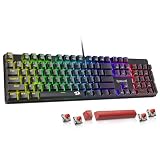
The core advantage is consistency. Because each key has its own switch, the tenth press feels exactly like the first, and the actuation point stays the same across the board. That predictability is what competitive players are actually paying for — not the sound. Linear switches suit fast repeated inputs in shooters, tactile switches give a bump that helps typing accuracy, and clicky switches are purely for the satisfaction. A wired board with hot-swappable red switches, like the Redragon Mechanical Gaming Keyboard, lets you test all three without buying a new keyboard.
The 2026 value story is strong. The AULA F75 Pro packs a 75% layout, a control knob, pre-lubed switches, and triple connectivity (2.4GHz, Bluetooth 5.0, USB-C) into a compact footprint. The RK ROYAL KLUDGE R104 offers a full-size gasket-mounted build with a number pad and quiet linears for spreadsheet-and-shooter dual duty. If you want dedicated macro keys and media controls, the Razer BlackWidow V4 X and Redragon K580 both cover MMO and MOBA workflows well.
Membrane Keyboards
Membrane’s real strengths are practical rather than performance-related. A rubber-dome board is quiet enough for a bedroom, a dorm, or an open-plan office; it’s light enough to toss in a bag; and its sealed sheet gives it better resistance to crumbs and minor spills. For casual play, single-player games, and general productivity, the difference in raw input speed between a decent membrane and a mechanical is smaller than enthusiast forums suggest.
The compromises show up under pressure. Mushy bottom-out feel makes light, rapid taps harder to control, key rollover limits can drop inputs during frantic sequences, and the domes gradually get spongier as the board ages. If quiet operation is your reason for considering membrane, a hybrid such as the SteelSeries Apex 5 — with its aluminum frame, OLED display, and cushioned hybrid switches — or a silent linear mechanical will usually serve you better long term.
Which Should You Buy?
- For competitive FPS: pick a mechanical with linear switches — the BlackWidow V4 X or a red-switch Redragon.
- For MMO and MOBA players: pick a macro-equipped mechanical like the Redragon K580, with onboard keybinding and a media wheel.
- For small desks or dual-device setups: pick the AULA F75 Pro for its 75% layout and wireless switching.
- For work and play on one board: pick a full-size quiet mechanical such as the RK ROYAL KLUDGE R104.
- For the strictest noise or budget limits: pick membrane, or step up to a hybrid like the SteelSeries Apex 5.
Frequently Asked Questions
Are mechanical keyboards actually faster for gaming?
Marginally, and mostly through consistency rather than raw speed. Defined actuation points and full anti-ghosting mean fewer dropped or mistimed inputs, which matters most in fast shooters and rhythm games.
Can a mechanical keyboard be quiet?
Yes. Silent linear switches, pre-lubed stems, and gasket-mounted cases make modern boards quieter than many older membranes. Avoid clicky blue switches if noise is a concern.
What does hot-swappable mean?
The switches sit in sockets rather than being soldered in, so you can pull them out with a puller and install different ones in minutes — no tools, no warranty risk, no new keyboard.
Do I need PBT keycaps?
They’re not essential, but PBT resists the greasy shine that ABS develops over time and holds its texture longer. On a keyboard you plan to use daily for years, it’s a worthwhile upgrade.
Final Verdict
Mechanical is the right default in 2026 — the price gap has closed, the feature set is far richer, and a good board will outlast several GPU upgrades. Membrane still earns its place where silence, weight, or an absolute rock-bottom budget rules the decision, but for anyone who games seriously or types all day, a hot-swappable mechanical is the better long-term investment.