Key takeaways
- Latency: Wired is still technically first past the post, but the gap is now roughly 0.2–1ms on quality 2.4GHz dongles — imperceptible in play. Bluetooth, by contrast, is noticeably slower and should be treated as a travel mode only.
- Weight: Wired mice avoid battery mass, but the best wireless models have caught up. The AJAZZ AJ200 and G Pro X2 Superstrike both hit 61g with a cell inside, which is lighter than plenty of budget wired mice.
- Upkeep: Wired mice have zero maintenance. Wireless means charging — though a 250-hour rating on the G305 or 285 hours on the Basilisk V3 X reduces that to a monthly chore at most.
- Price per spec: At any given price, wired gets you a better sensor and switches. The Redragon M810 Pro is the exception, undercutting most of the field while still offering 10,000 DPI and remappable keys.
- Desk feel: Cable drag is the single most underrated factor. Even a good paracord tugs on flick shots unless you use a bungee — which adds cost and desk clutter that wireless removes entirely.
- Longevity: Wired mice fail at the cable strain relief; wireless mice degrade at the battery. Both are multi-year problems, but a swappable AA (as in the G305) sidesteps the issue completely.
For most of the last decade, the answer to “wired or wireless?” was easy: if you cared about winning, you plugged in. That advice is now out of date. Modern low-latency radio protocols like Logitech’s Lightspeed and Razer’s HyperSpeed have closed the response-time gap to the point where it is measured in fractions of a millisecond — well below the threshold any human can perceive. In 2026, the real trade-offs have shifted to weight, battery management, price, and how much cable drag you are willing to tolerate on your mousepad.
That does not mean wired mice are dead. They remain the cheapest way to get a good sensor, they never need charging, and a well-designed paracord cable is genuinely light. But the flagship tier — the mice with the best sensors, the newest switch technology, and the lowest weights — is now almost exclusively wireless. Below we break down where each option still wins, and which specific mice are worth your money right now.
Our top picks
 Logitech G305 Lightspeed Wireless Gaming Mouse
- Ultra-fast LIGHTSPEED wireless technology in this wireless mouse…
- G305 wireless computer mouse boasts an incredible 250…
- The durable, compact design with built-in nano receiver…
 Redragon M810 PRO Wireless RGB Gaming Mouse
- Wireless for Boundless Winning - Cables truly will…
- Adjustable DPI to 10000 - Geared with 5…
- Easy Keybinding with Macro - All 8 programmable…
 AJAZZ AJ200 AI Gaming Mouse
- AI Gaming Assistant & Smart Analysis - Take…
- AI Performance Reports & Personalized Training - Receive…
- Tri-Mode Connectivity & Stable Wireless Performance - Enjoy…
| Product | Key specs | |
|---|---|---|
| Logitech G305 Lightspeed Wireless Gaming Mouse | Ultra-fast LIGHTSPEED wireless technology in this wireless mouse… G305 wireless computer mouse boasts an incredible 250… The durable, compact design with built-in nano receiver… | Check price |
| Redragon M810 PRO Wireless RGB Gaming Mouse | Wireless for Boundless Winning - Cables truly will… Adjustable DPI to 10000 - Geared with 5… Easy Keybinding with Macro - All 8 programmable… | Check price |
| AJAZZ AJ200 AI Gaming Mouse | AI Gaming Assistant & Smart Analysis - Take… AI Performance Reports & Personalized Training - Receive… Tri-Mode Connectivity & Stable Wireless Performance - Enjoy… | Check price |
 Logitech G PRO X2 SUPERSTRIKE Wireless Gaming | Designed With Pros, Engineered to Win: Designed alongside… Dominate with industry-leading speed: 30 ms faster clicks… Haptic Feedback: This breakthrough haptic gaming mouse with… | Check price |
 Logitech G703 Lightspeed Wireless Gaming Mouse | LIGHTSPEED Wireless: Pro-level responsiveness and connectivity for long… POWERPLAY wireless charging: Never worry about your gaming… Supreme Comfort and Quality: This mouse for gaming… | Check price |
 Razer Basilisk V3 X HyperSpeed Customizable Wireless | Designed for comfort and control, the signature Basilisk… Switch between ultra-low-latency HyperSpeed Wireless for competitive gaming… Stay in the game longer with up to… | Check price |
 Corsair Harpoon v2 Wireless Gaming Mouse | Iconic ergonomic shape: Enjoy comfortable precision for serious… 26K DPI CORSAIR MARKSMAN Sensor: The 26K DPI… 6 Programmable buttons: Optimize your controls to keep… | Check price |
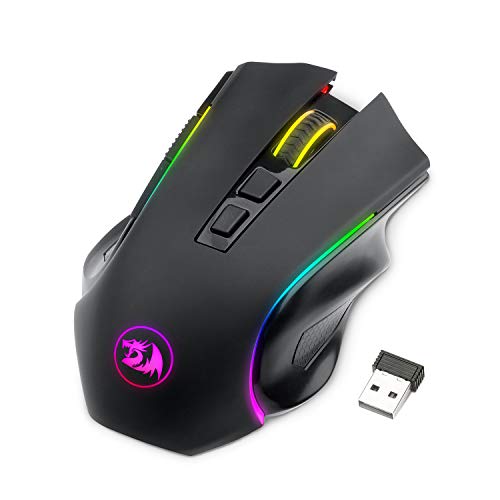 Redragon M602 Griffin RGB Gaming Mouse | 【𝐅𝐮𝐥𝐥𝐲 𝐏𝐫𝐨𝐠𝐫𝐚𝐦𝐦𝐚𝐛𝐥𝐞 𝐆𝐚𝐦𝐢𝐧𝐠 𝐌𝐨𝐮𝐬𝐞】- Redragon Wireless Gaming Mouse… 【𝐄𝐧𝐡𝐚𝐧𝐜𝐞 𝐘𝐨𝐮𝐫 𝐆𝐚𝐦𝐢𝐧𝐠 𝐈𝐦𝐦𝐞𝐫𝐬𝐢𝐨𝐧】UP to 9 RGB light… 【𝟑-𝐌𝐨𝐝𝐞 𝐂𝐨𝐧𝐧𝐞𝐜𝐭𝐢𝐨𝐧】Type-C Wired, Bluetooth and 2.4GHz 3 connectivity… | Check price |
As an Amazon Associate we earn from qualifying purchases at no extra cost to you.
⚡ Save on Your Next PC — Amazon Prime
Prime members get fast free shipping on the systems above, plus early access to Prime Day & Black Friday PC deals. New members get a 30-day free trial.
Watch: Wired vs Wireless Gaming Mouse in 2026 — Video Review
Quick Verdict
Wireless is the better default in 2026 for nearly everyone. If you play competitively, want the lightest possible shell, or simply hate cable drag, a modern 2.4GHz mouse like the Logitech G Pro X2 Superstrike or the Razer Basilisk V3 X HyperSpeed is worth the premium. Wired remains the smarter buy if you are building to a strict budget, share a machine with multiple users, or want a mouse you never have to think about again — and the Logitech G305 Lightspeed sits neatly in between, offering wireless freedom at close to wired pricing.
Key Differences
- Latency: Wired is still technically first past the post, but the gap is now roughly 0.2–1ms on quality 2.4GHz dongles — imperceptible in play. Bluetooth, by contrast, is noticeably slower and should be treated as a travel mode only.
- Weight: Wired mice avoid battery mass, but the best wireless models have caught up. The AJAZZ AJ200 and G Pro X2 Superstrike both hit 61g with a cell inside, which is lighter than plenty of budget wired mice.
- Upkeep: Wired mice have zero maintenance. Wireless means charging — though a 250-hour rating on the G305 or 285 hours on the Basilisk V3 X reduces that to a monthly chore at most.
- Price per spec: At any given price, wired gets you a better sensor and switches. The Redragon M810 Pro is the exception, undercutting most of the field while still offering 10,000 DPI and remappable keys.
- Desk feel: Cable drag is the single most underrated factor. Even a good paracord tugs on flick shots unless you use a bungee — which adds cost and desk clutter that wireless removes entirely.
- Longevity: Wired mice fail at the cable strain relief; wireless mice degrade at the battery. Both are multi-year problems, but a swappable AA (as in the G305) sidesteps the issue completely.
Wired Gaming Mice: Cheap, Consistent, Uncomplicated
The case for wired is simplicity. There is no dongle to lose, no firmware pairing dance, no low-battery warning mid-raid, and no polling rate that quietly drops when the receiver is plugged into the back of your case. For LAN players, shared family PCs, and office machines that double as gaming rigs, that reliability has real value.
Budget is the other half of the argument. Under roughly $30, wired mice comfortably outclass wireless ones on sensor quality and switch durability. If your total peripheral budget is tight and you would rather spend the difference on a better mousepad or headset, a solid wired mouse is not a compromise — it is a sensible allocation. Just prioritise a flexible paracord cable and pair it with a bungee.
Wireless Gaming Mice: Where the Flagships Live
Every meaningful innovation of the last two years has landed in wireless first. The G Pro X2 Superstrike introduces magnetic analog switches with adjustable rapid trigger and click haptics — features with no wired equivalent at this level. The AJAZZ AJ200 pairs a PAW3311 sensor and up to 24,000 DPI with a tri-mode connection and an RGB charging dock, so it is effectively never flat. The Logitech G703 remains a favourite for larger hands, with a Hero 25K sensor, rubber side grips, and Powerplay compatibility that charges the mouse through the mousepad itself.
For the value-focused, the picture is just as strong. The G305 Lightspeed has been the default budget recommendation for years thanks to its Hero sensor, 250-hour AA battery, and on-board memory. The Razer Basilisk V3 X HyperSpeed adds nine programmable controls, Gen-2 mechanical switches, and an 18K optical sensor for players who want buttons to spare. And the Redragon M810 Pro proves that cable-free gaming no longer requires a flagship budget.
Which Should You Buy?
- For competitive FPS: pick the G Pro X2 Superstrike or AJAZZ AJ200 — 61g shells with rapid, consistent tracking.
- For a tight budget: pick the Redragon M810 Pro, or the G305 Lightspeed if you can stretch slightly further.
- For MMO, MOBA, and macro-heavy play: pick the Basilisk V3 X HyperSpeed for its nine programmable controls.
- For large hands and long sessions: pick the G703 Lightspeed, with its palm-friendly shell and optional 10g weight.
- For laptops and travel: pick the AJAZZ AJ200 — tri-mode connectivity means Bluetooth on the road, 2.4GHz at the desk.
Frequently Asked Questions
Is wireless still slower than wired in 2026?
On paper, marginally. In practice, no. Reputable 2.4GHz implementations sit within about a millisecond of wired, which is far below human reaction thresholds. Pro players across every major esport now compete wireless.
How often will I need to charge?
Less than you expect. Mice rated for 250–285 hours of use typically need charging every three to six weeks with RGB disabled. Docks and Powerplay mousepads remove the question entirely.
Can I use a wireless mouse as a wired one?
Almost always, yes. Models with USB-C — including the AJ200, G Pro X2 Superstrike, G703, and Basilisk V3 X — keep working while charging, so a flat battery costs you nothing but a temporary cable.
Is Bluetooth good enough for gaming?
For slower-paced and turn-based games, yes. For anything requiring precise timing, use the 2.4GHz dongle. Treat Bluetooth as a convenience mode for laptops and travel rather than your primary connection.
Final Verdict
Buy wireless unless price is the deciding factor. The performance argument for cables has effectively expired, and the best mice available today — lighter, smarter, and better-sensored than anything wired at the same tier — are all cordless. Spend big on the G Pro X2 Superstrike or AJAZZ AJ200 if you play seriously, grab the G305 Lightspeed or Redragon M810 Pro if you do not, and keep a USB-C cable in the drawer for the rare day you forget to charge.
FAQ
Is wireless still slower than wired in 2026?
How often will I need to charge?
Can I use a wireless mouse as a wired one?
Is Bluetooth good enough for gaming?
More from Amazon
Programs that pair well with the guide above. Offers and eligibility are set by Amazon and may change.
Free shipping on eligible items, Prime Video and more. Eligible new members can start with a free trial.
Start a Prime free trialAd-free music streaming. Eligible new subscribers can start with a free trial.
Try Music Unlimited freeA Prime membership for ages 18-24 with a trial period. Eligibility is set by Amazon.
See Prime for Young AdultsAudiobooks and podcasts to listen to on the go. Eligible new members can start with a free trial.
Try Audible freeAs an Amazon Associate we earn from qualifying purchases.