Key takeaways
- Linear: Smooth and consistent from top to bottom with no bump, like the red switches on many Redragon boards. Popular with gamers for fast, quiet actuation.
- Tactile: A noticeable bump partway down tells you the key has registered, which many typists prefer for accuracy.
- Clicky: A tactile bump paired with an audible click, satisfying but loud, and best avoided in shared spaces.
- Hybrid and speed switches: Variations like the yellow switches on the Razer BlackWidow V4 X aim for fast, light linear presses tuned for gaming.
What's inside
- Watch: Mechanical Keyboard Switches Explained — Video Review
- The Three Main Switch Types
- Understanding Switch Specifications
- Choosing a Switch for Gaming Versus Typing
- Why Hot-Swappable Boards Change the Game
- Keycaps, Sound, and the Feel of the Board
- Tips
- Related Guides
- Frequently Asked Questions
- Conclusion
- Related Articles
- Related Guides
The switches under your keycaps are what make a mechanical keyboard feel the way it does. They decide whether a keypress is clicky and loud, smooth and quiet, or crisp with a tactile bump, and they shape everything from your typing accuracy to your reaction time in a fast match. Understanding switches is the key to choosing a keyboard you will genuinely love instead of one that just looks good in a product photo.
- Watch: Mechanical Keyboard Switches Explained — Video Review
- The Three Main Switch Types
- Understanding Switch Specifications
- Choosing a Switch for Gaming Versus Typing
- Why Hot-Swappable Boards Change the Game
- Keycaps, Sound, and the Feel of the Board
- Tips
- Related Guides
- Frequently Asked Questions
- Conclusion
- Related Articles
- Related Guides
This guide demystifies mechanical switches, explaining the main types, the specs that describe them, and how to match a switch to the way you type and game. By the end you will be able to read a switch spec sheet, know the difference between linear, tactile, and clicky, and understand why hot-swappable boards have become so popular.
As an Amazon Associate we earn from qualifying purchases at no extra cost to you. Product prices and availability are accurate as of the date shown and are subject to change.








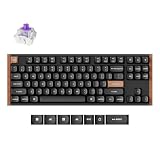
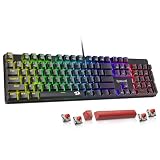
The keyboards above showcase a range of switch types, from linear reds to clicky and hybrid designs, including hot-swappable models that let you experiment, and they are great starting points for finding the feel you prefer.
⚡ Save on Your Next PC — Amazon Prime
Prime members get fast free shipping on the systems above, plus early access to Prime Day & Black Friday PC deals. New members get a 30-day free trial.
Watch: Mechanical Keyboard Switches Explained — Video Review
The Three Main Switch Types
- Linear: Smooth and consistent from top to bottom with no bump, like the red switches on many Redragon boards. Popular with gamers for fast, quiet actuation.
- Tactile: A noticeable bump partway down tells you the key has registered, which many typists prefer for accuracy.
- Clicky: A tactile bump paired with an audible click, satisfying but loud, and best avoided in shared spaces.
- Hybrid and speed switches: Variations like the yellow switches on the Razer BlackWidow V4 X aim for fast, light linear presses tuned for gaming.
Understanding Switch Specifications
Switches are described by a few key numbers. Actuation force, measured in grams, tells you how hard you must press before the key registers; lighter switches feel effortless while heavier ones resist accidental taps. Actuation distance and total travel describe how far the key moves, and speed-oriented switches shorten the actuation point for quicker response. Some switches, like the whisper-quiet gaming switches on the SteelSeries Apex 3, are engineered specifically to reduce noise. Reading these specs lets you predict how a switch will feel before you ever press it.
Choosing a Switch for Gaming Versus Typing
There is no single best switch, only the best switch for you. Competitive and fast-paced gamers often favor light linear or speed switches because the smooth, quick presses make rapid inputs easier and rebounds fast. Writers and coders frequently prefer tactile switches, since the bump provides feedback that confirms each keystroke and can reduce typos. Clicky switches suit people who love the sound and game alone or in a private room. If you do a bit of everything, a light tactile or a smooth linear is a versatile middle ground.
Why Hot-Swappable Boards Change the Game
Traditionally, switches were soldered in place, so the feel you bought was the feel you kept. Hot-swappable keyboards, like the AULA F75 Pro and many current Redragon models, let you pull out switches by hand and drop in new ones with no soldering. This is a huge advantage: you can try different switch types, replace a single failed switch instead of the whole board, or gradually tune your keyboard to perfection. For anyone unsure which switch they prefer, a hot-swappable board is the smartest way to experiment risk-free.
Keycaps, Sound, and the Feel of the Board
Switches do not act alone; the keycaps and the board’s construction shape the final experience. Durable PBT keycaps, like the double-shot caps found on several Redragon boards, resist shine and wear far better than cheaper ABS and add a slightly different feel and sound. Pre-lubed switches, such as the reaper switches on the AULA, glide more smoothly and sound less scratchy. Even the case material and internal foam affect the acoustics, which is why two keyboards with the same switch can still sound and feel noticeably different.
Tips
- If you are unsure, start with a light linear or tactile switch, the most versatile choices for mixed use.
- Choose a hot-swappable board so you can experiment with switch types without soldering.
- Avoid clicky switches in shared or quiet spaces; opt for silent or linear switches instead.
- Look for PBT keycaps and pre-lubed switches for a more durable, smoother, and better-sounding board.
Frequently Asked Questions
Which switch type is best for gaming?
Many gamers prefer light linear or speed switches because their smooth, quick actuation suits rapid inputs. That said, plenty of players game happily on tactile switches, so the best choice comes down to whether you value speed or feedback more.
What is the difference between linear and tactile switches?
Linear switches move smoothly from top to bottom with no bump, giving a consistent feel favored for gaming. Tactile switches have a noticeable bump when the key registers, which provides feedback many typists like for accuracy.
Are clicky switches too loud for most people?
They can be. Clicky switches produce an audible click on every press, which is satisfying but disruptive in offices, shared rooms, or on voice calls. If noise is a concern, a silent linear or tactile switch is a better fit.
Is a hot-swappable keyboard worth it?
For most people, yes. Being able to swap switches by hand means you can try different feels, replace a single faulty switch, and tune the board over time without soldering, which makes it especially valuable if you are still figuring out your preference.
Conclusion
Mechanical switches are the soul of a keyboard, and once you understand the difference between linear, tactile, and clicky, plus the specs that define them, choosing the right board becomes far easier. Match the switch to how you type and game, lean toward a hot-swappable design if you want to experiment, and pay attention to keycaps and build quality for the finishing touches. Get it right and every keystroke will feel exactly the way you want.