Our Top Picks
 TP-Link AC1200 Gigabit Dual Band WiFi RouterWi-Fi 5 AC12008.46 x 4.92 x 1.81 inches0.71 poundsCheck on Amazon
Swapping a router antenna is one of the cheapest upgrades in networking, and also one of the easiest to get wrong. The decision is rarely “which antenna is strongest.” It is a handful of narrower questions: does the connector on your router match, does the antenna cover the bands your router actually broadcasts, and do you need coverage in every direction or one hard-to-reach corner? A stubby omnidirectional replacement and a large directional panel are built for opposite jobs, and mixing them up leaves you with a dead zone and a purchase that looks wrong on the spec sheet.
This guide is for people with a router, access point, or desktop Wi-Fi card that exposes removable RP-SMA antenna posts. If your router has fixed internal antennas, no replacement will fit. The five models below cover the realistic range: 3dBi dual-band replacements in two-pack and four-pack form, two magnetic-base tri-band antennas with extension cables that move the receiver away from a metal case, and one outdoor 15dBi directional panel for long reach. Use the table to match the antenna to the job, then read the buying notes so you know which numbers matter in 2026 and which are marketing.
Quick Picks
TP-Link AC1200 Gigabit Dual Band WiFi Router (Archer A6) | MU-MIMO Wireless Internet Router, 4 x Antennas, OneMesh and AP Mode, Long Range Coverage
One of the consumer electronics options compared in this guide.
View on Amazon
TP-Link Dual-Band BE3600 Wi-Fi 7 Router, Archer BE230 | 4-Stream | 2×2.5G + 3×1G Ports, USB 3.0, 2.0 GHz Quad Core, 4 Antennas | VPN, EasyMesh, HomeShield, MLO, Private IOT
One of the consumer electronics options compared in this guide.
View on Amazon
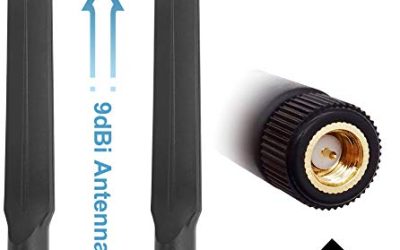
Bingfu Dual Band WiFi 2.4GHz 5GHz 5.8GHz 3dBi MIMO RP-SMA Male Bluetooth Antenna (2-Pack) for PC Computer WiFi Router Wireless Network Card USB Adapter Security IP Camera Video Surveillance Monitor
One of the consumer electronics options compared in this guide.
View on Amazon
Eightwood WiFi 6E Tri-Band Antenna 6GHz 5GHz 2.4GHz Gaming WiFi Antenna | RP-SMA Magnetic Base Antenna with 6.5ft Extension Cable for PC Desktop Computer PCIe WiFi 6E Card, Router
One of the consumer electronics options compared in this guide.
View on Amazon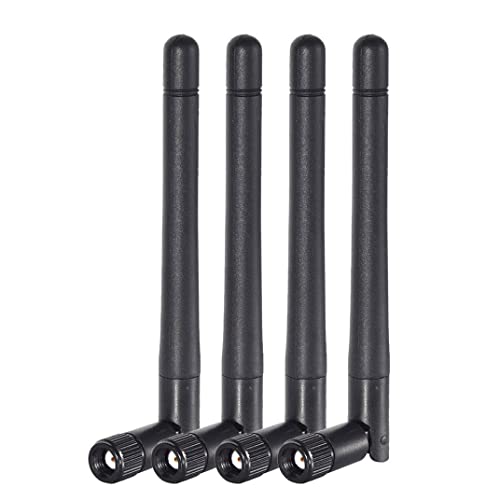
Bingfu Dual Band WiFi 2.4GHz 5GHz 5.8GHz 3dBi MIMO RP-SMA Male Antenna (4-Pack) for WiFi Router Wireless Network Card USB Adapter Security IP Camera Video Surveillance Monitor
One of the consumer electronics options compared in this guide.
View on Amazon| Product | Best for | Key spec from the title |
|---|---|---|
| Bingfu Dual Band 2-Pack | Simple router or card swap | 2.4/5/5.8GHz, 3dBi MIMO, RP-SMA male |
| Eightwood WiFi 6E Tri-Band | Desktop cards that need a better position | 6GHz/5GHz/2.4GHz, magnetic base, 6.5ft cable |
| Bingfu Dual Band 4-Pack | Multi-antenna routers and spare sets | 3dBi MIMO, RP-SMA male, four antennas |
| Outdoor 15dBi Directional Panel | Long-range point-to-point links | 15dBi, dual band, 10ft cable |
| Eifagur WiFi 6/6E Tri-Band | Gaming PCs with a PCI Wi-Fi card | 2.4GHz/5GHz/6GHz, magnetic base |
How to Choose
Match the connector and the band
Start at the back of the device. Every antenna in this guide is listed with an RP-SMA connector or intended for RP-SMA ports, which look like a threaded barrel with a center pin on the antenna side for “male” ends. A standard SMA or a different connector will not thread on properly, so verify what your router uses before buying. Then check bands. A dual-band antenna covers 2.4GHz and 5GHz and is correct for Wi-Fi 5 and most Wi-Fi 6 routers. If your device is Wi-Fi 6E or newer and broadcasts on 6GHz, a tri-band antenna that lists 6GHz is the one that will not throw away the new spectrum.
Gain: what dBi actually does
Gain is a measure of how the antenna shapes its signal, not how much power it adds. A 3dBi omnidirectional antenna spreads signal in a doughnut around itself, which works for a typical apartment or a two-floor house. Raising gain to 9 or 15dBi pushes more energy toward the horizon or into a narrow beam, and at 15dBi on a panel the beam is tight enough that you must aim it. Higher gain helps range in one direction while shrinking the vertical coverage, so a tall antenna on a ground-floor router can leave an upstairs room weaker than the stock antenna would.
Placement, magnetic bases, and cable length
A router stuffed behind a television is a bad place for any antenna. Magnetic bases with extension cables let you lift the antenna onto a metal shelf or the top of a cabinet, away from the case and desk clutter. A cable of around 6 to 10 feet is generous, but every foot of cable loses a little signal, so shorter is better when it still reaches a good spot. For ceilings and walls, a panel antenna with a mounting bracket and a longer lead is easier to aim than a stub.
A simple way to plan placement is to think in three zones. Keep antennas at least a few feet from microwave ovens and cordless phone bases, which crowd the 2.4GHz band. Keep them off the floor, where furniture soaks up signal. And keep them vertical on omnidirectional models, because the doughnut-shaped pattern is designed to radiate sideways from an upright element; laid flat, it pushes energy toward the ceiling and floor instead of your devices.
What to ignore and where budget models cut corners
Ignore claims of “boosting” a router’s range beyond its transmit power; the radio inside still sets the ceiling. Be skeptical of antennas that list bands they never advertise gain for. Cheaper products often cut corners on connector plating, cable shielding, and swivel joints that loosen over time, so a threaded connector should snug down without wobble. If your router has three or four antenna posts, replace all of them with matching models, because mixing gains can unbalance the MIMO streams.
The 5 Best Options
Bingfu Dual Band 2-Pack (3dBi, RP-SMA)
This pair is listed for 2.4GHz, 5GHz, and 5.8GHz, with 3dBi MIMO gain and an RP-SMA male connector, and the title names PC computers, Wi-Fi routers, wireless network cards, and USB adapters. It suits anyone with a two-antenna router or card who wants a like-for-like swap.
- Strength: a dual-band design that covers both of the most common home bands.
- Strength: the 3dBi omnidirectional pattern spreads coverage evenly, which suits small homes.
- Trade-off: no 6GHz support is listed, so it is a poor match for a Wi-Fi 6E radio.
Skip it if your router has more than two antenna posts or if you need a noticeable gain jump. It also makes sense as a diagnostic step: if swapping in a fresh pair changes nothing, the problem is probably router placement or interference rather than the antennas themselves.
Eightwood WiFi 6E Tri-Band Antenna (Magnetic Base)
Eightwood lists coverage across 6GHz, 5GHz, and 2.4GHz, an RP-SMA magnetic base, and a 6.5-foot extension cable, with a gaming focus on the title. It is built for desktop owners whose Wi-Fi card sits behind the case and picks up weak signal there.
- Strength: the tri-band listing covers 6GHz for newer Wi-Fi 6E hardware.
- Strength: the extension cable and magnetic base allow placement on top of a metal case or shelf.
- Trade-off: the title is aimed at PC cards, so confirm your router has a matching RP-SMA post before using it there.
Skip it if your router is stuck with fixed antennas or if you only need a basic dual-band replacement. A buyer with a Wi-Fi 6E card and a case tucked under the desk is the clearest match, because the extension cable solves the placement problem that stock antennas cannot.
Bingfu Dual Band 4-Pack (3dBi, RP-SMA)
The four-pack gives the same 2.4/5/5.8GHz coverage and 3dBi MIMO gain as the two-pack, and the title also lists security cameras and USB adapters. It is the fit for routers with four posts or for households that want spares for several devices.
- Strength: four matched antennas keep a multi-post router balanced across all of its streams.
- Strength: the multi-device listing makes spares useful for cameras and adapters with the same connector.
- Trade-off: it is dual-band only, so it does not add anything for 6GHz networks.
Skip it if your router has only two posts, since you would be paying for antennas you cannot mount. Also remember that a four-pack only helps when all four posts are removable; some routers pair two detachable antennas with fixed internal ones, and the extras would sit unused.
Outdoor 15dBi Directional Panel Antenna (10ft Cable)
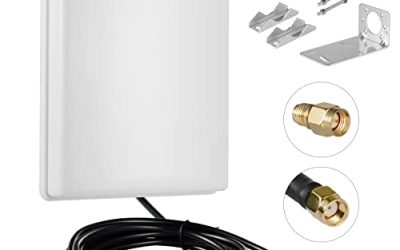
This is the outlier in the group: a 15dBi directional panel for 2.4GHz, 5GHz, and 5.8GHz with a 10-foot cable, listed for routers, network cards, and security cameras. It is for pushing a signal to one far location such as a detached garage, workshop, or outbuilding.
- Strength: 15dBi of directional gain concentrates signal toward a single target.
- Strength: the 10-foot cable and outdoor listing make wall or pole mounting practical.
- Trade-off: the narrow beam covers little area, and you must aim it carefully.
Skip it if you want even coverage through a house, since a panel antenna leaves the rest of the rooms behind it weak. It also needs a proper mount and some patience while you adjust the angle, so it is a project more than a plug-and-play swap.
Eifagur WiFi 6/6E Tri-Band Magnetic Antenna
Eifagur lists 2.4GHz, 5GHz, and 6GHz coverage on a magnetic base, with PC desktop, gaming motherboard, Wi-Fi router, and PCI card named in the title. It is a straightforward upgrade for builders replacing the stock antennas on a Wi-Fi 6 or 6E card.
- Strength: tri-band coverage keeps 6GHz usable on newer cards and routers.
- Strength: the magnetic base lets you lift the antenna to a better spot than the back panel.
- Trade-off: the title does not state gain or cable length, so the real reach is hard to judge from the listing alone.
Skip it if you need a documented long cable or a specific gain figure before buying. Builders who want to compare it with the Eightwood should line up the two listings side by side and note which one states cable length, since that detail often decides where the antenna can sit.
Which One Fits Your Situation
You have a two-antenna Wi-Fi 5 router and weak rooms
The Bingfu 2-Pack is the like-for-like fix. Repositioning the router often helps as much as the swap, so try raising it before buying.
You have a four-post router or several devices to refresh
The Bingfu 4-Pack keeps every stream matched and leaves spares for a camera or adapter.
Your desktop sits under the desk and you are moving to Wi-Fi 6E
The Eightwood with its 6.5-foot cable or the Eifagur tri-band on a magnetic base moves the receiver onto the desk surface, and both list 6GHz coverage for newer cards. Mount the base on a shelf at desk height and run the cable so it is not pinched behind the case.
You need to reach a building across the yard
The 15dBi Outdoor Directional Panel is the only one built for that job. Aim it at the receiving device and keep the path clear of trees and metal. Because the panel’s beam is narrow, a second antenna at the far building pointing back will make the link more dependable than one-sided gain alone.
Common Mistakes
- Buying without checking that the router uses removable RP-SMA connectors, then finding the antenna will not thread on.
- Choosing a dual-band antenna for a Wi-Fi 6E router and leaving 6GHz underused.
- Assuming higher gain always means better coverage, when a 15dBi panel narrows the beam sharply.
- Replacing only some of the antennas on a multi-post router and unbalancing its streams.
- Leaving the router behind a television or inside a cabinet, where no antenna can compensate.
Related guides
- External Hard Drive For Xbox Series X
- How To Check Gpu Temperature While Gaming
- 7.1 Surround Sound Gaming Headsets
Frequently Asked Questions
Will a new antenna make my internet faster?
Not directly. It improves signal strength and stability in weak areas, which can raise real-world speed there. It cannot exceed the speed your internet plan or the router’s radio supports.
Can I use any antenna on any router?
Only if the connector and band match. Most consumer routers with detachable antennas use RP-SMA, but confirm before buying, and make sure the antenna lists the bands your router broadcasts.
Is a directional antenna better than an omnidirectional one?
For a single far target, yes. For covering a whole home, no. A directional panel gives range in one direction while an omnidirectional unit spreads signal around itself.
Do I need a tri-band antenna if my router is not Wi-Fi 6E?
No. If your router only uses 2.4GHz and 5GHz, a dual-band antenna covers everything it can send. Tri-band models make sense when you expect to upgrade to a 6GHz router or card.