The RTX 4060 vs RTX 3060 comparison comes down to more than raw gaming performance. NVIDIA’s newer RTX 4060 generally delivers higher frame rates, better power efficiency, DLSS Frame Generation support, and AV1 encoding. However, the RTX 3060 12GB retains an important advantage: its larger video memory capacity can help with demanding games, high-resolution textures, and certain creative workloads.
For most gamers building a new 1080p gaming PC, the RTX 4060 is the stronger overall choice. The RTX 3060 12GB can still make sense when it is substantially cheaper, when additional VRAM matters, or when buying a used graphics card with a limited budget.
Both GPUs belong to NVIDIA’s mainstream GeForce lineup, but they use different architectures and memory configurations. Understanding those differences is important before spending money, particularly if you play newer AAA games or plan to keep your graphics card for several years.
RTX 4060 vs RTX 3060: Specifications Compared
The biggest architectural difference is that the RTX 4060 uses NVIDIA’s Ada Lovelace architecture, while the RTX 3060 uses the older Ampere architecture. The newer GPU has fewer CUDA cores but higher clock speeds, a larger L2 cache, and improved power efficiency.
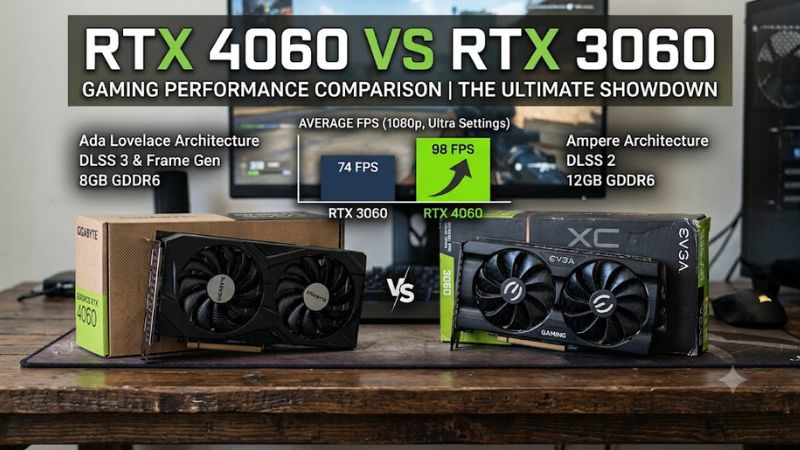
The following comparison focuses on the desktop RTX 4060 8GB and the desktop RTX 3060 12GB, the most commonly discussed versions of these graphics cards.
| Specification | RTX 4060 | RTX 3060 12GB |
| Architecture | Ada Lovelace | Ampere |
| GPU | AD107 | GA106 |
| CUDA cores | 3,072 | 3,584 |
| Boost clock | 2.46 GHz | 1.78 GHz |
| VRAM | 8GB GDDR6 | 12GB GDDR6 |
| Memory bus | 128-bit | 192-bit |
| Memory bandwidth | 272 GB/s | 360 GB/s |
| L2 cache | 24MB | 3MB |
| Ray tracing cores | 24, 3rd generation | 28, 2nd generation |
| Tensor cores | 96, 4th generation | 112, 3rd generation |
| PCIe interface | PCIe 4.0 x8 | PCIe 4.0 x16 |
| Total graphics power | 115W | 170W |
| Launch MSRP | $299 | $329 |
Specifications are reference figures. Actual clock speeds, dimensions, cooling systems, and power limits can vary between graphics card manufacturers.
NVIDIA+3
Why Does the RTX 4060 Have Fewer CUDA Cores?
At first glance, the RTX 3060 appears stronger because it has 3,584 CUDA cores compared with the RTX 4060’s 3,072. However, CUDA core counts alone do not determine gaming performance.
The RTX 4060 operates at considerably higher clock speeds and benefits from improvements in the Ada Lovelace architecture. Its larger 24MB L2 cache also helps reduce the amount of data that must travel between the GPU and video memory.
This is particularly important because the RTX 4060 has a narrower 128-bit memory interface. Its theoretical memory bandwidth is lower than the RTX 3060’s, but the newer cache design helps compensate for that difference in many gaming workloads.
Consequently, the RTX 4060 can outperform the RTX 3060 despite having fewer processing cores and less raw memory bandwidth.
RTX 4060 8GB vs RTX 3060 12GB: The VRAM Difference
Video memory is one of the most important differences between these GPUs.
The RTX 4060 includes 8GB of GDDR6 memory, while the standard desktop RTX 3060 configuration includes 12GB. That gives the older card a 50% capacity advantage.
More VRAM can be useful when playing games with large texture packages, using high-resolution texture settings, working with large creative projects, or running applications that need substantial GPU memory.
However, additional VRAM does not automatically translate into higher frame rates.
If a game comfortably fits within 8GB, the RTX 4060’s faster architecture generally gives it the advantage. When a workload exceeds available memory, the situation becomes more complicated. The GPU may need to move data between VRAM and system memory, potentially affecting frame rates, frame consistency, or texture quality.
The RTX 3060 12GB can therefore be more comfortable in certain memory-heavy workloads, even though it is generally slower at conventional gaming settings.
One important purchasing detail: NVIDIA also released an 8GB desktop RTX 3060 configuration. Do not assume every RTX 3060 listing has 12GB. Check the exact manufacturer’s product specifications before buying.
NVIDIA Newsroom+2
RTX 4060 vs RTX 3060 Gaming Performance
For conventional gaming, the RTX 4060 is generally faster than the RTX 3060 12GB. However, the size of the performance difference depends on the game, resolution, graphics settings, and CPU configuration.
Independent reviews provide a more useful picture than comparing theoretical specifications alone.
1080p Gaming Performance
Full HD is the resolution where the RTX 4060 makes the strongest case for itself.
In TechSpot’s RTX 4060 review, the graphics card delivered approximately 21% higher performance than the RTX 3060 in Fortnite at 1080p. This demonstrates the advantage of the newer architecture in a supported gaming workload.
However, the improvement is not consistent across every game. In the same review, the RTX 4060’s advantage over the RTX 3060 in Resident Evil 4 was approximately 5% at 1080p.
Tom’s Hardware also compared the RTX 4060 against the RTX 3060 12GB across a broader collection of games. Its results showed an overall advantage of approximately 20% for the RTX 4060 at 1080p.
These findings suggest that the newer GPU is a better choice for most 1080p gaming systems, although buyers should not expect a uniform 20% improvement in every title.
TechSpot+1
For competitive games, the RTX 4060 can be particularly attractive when paired with a suitable processor and a high-refresh-rate monitor. Games such as Counter-Strike 2, Valorant, and Fortnite can benefit from additional GPU performance, although CPU limitations may become more noticeable at lower resolutions.
For players targeting 1080p at 60–100 FPS, both cards can remain practical choices depending on the game. Those targeting higher refresh rates should consider the RTX 4060’s performance advantage, but should also evaluate their processor and memory configuration.
1440p Gaming Performance
At 1440p, the comparison becomes more interesting because higher resolutions increase the demands placed on graphics memory and bandwidth.
TechSpot reported that the RTX 4060 was approximately 11% faster than the RTX 3060 in Fortnite at 1440p. In its broader comparison, Tom’s Hardware found an advantage of approximately 20% for the RTX 4060 across its test suite.
These results should not be treated as contradictory. They come from different game selections and testing conditions.
The RTX 3060 12GB can benefit from its additional memory in demanding titles, especially when texture quality is high. Nevertheless, the RTX 4060 generally retains its performance advantage in the tested workloads.
For someone building a 1440p gaming PC, neither card should be considered an ideal long-term high-settings solution for every demanding AAA release. Both may require adjustments to texture quality, ray tracing, or other graphics settings.
The RTX 4060 is the faster option, but its 8GB memory capacity is a limitation worth considering.
4K Gaming Performance
Neither graphics card is designed primarily for demanding native 4K gaming.
The RTX 4060 can run lighter games at 4K, particularly when graphics settings are reduced. The RTX 3060 12GB also benefits from its additional VRAM in memory-heavy situations.
However, the extra memory does not overcome the RTX 3060’s lower processing performance in most conventional gaming workloads.
Tom’s Hardware found that the RTX 4060 remained more than 10% faster overall at 4K Ultra in its test suite. There were individual exceptions where the RTX 3060 performed better, but those cases generally involved frame rates that were already too low for a comfortable gaming experience.
For 4K gaming, buyers should consider a stronger GPU rather than choosing between these two cards solely because one has more VRAM.
Tom’s Hardware+1
Gaming Performance Summary
| Gaming scenario | Better choice | Main reason |
| 1080p gaming | RTX 4060 | Higher average performance |
| Competitive gaming | RTX 4060 | Better performance potential |
| 1440p gaming | RTX 4060 | Generally faster rendering |
| Memory-heavy games | RTX 3060 12GB can help | Additional VRAM |
| Native 4K gaming | Neither is ideal | Limited performance headroom |
| Lower-power gaming PC | RTX 4060 | Lower power consumption |
| GPU memory-intensive applications | RTX 3060 12GB may help | Larger memory capacity |
These are general recommendations, not guarantees for every game or application.
Power Consumption and Cooling: RTX 4060 Has a Clear Advantage
Power efficiency is one of the strongest reasons to choose the RTX 4060.
NVIDIA specifies a total graphics power of 115W for the RTX 4060, compared with 170W for the desktop RTX 3060 12GB. That is a 55W difference in rated board power.
The actual consumption depends on the card model, workload, power limit, and operating conditions. Nevertheless, the newer GPU generally delivers more performance while using less electricity.
Tom’s Hardware’s testing also supports this conclusion. Its comparison found that the RTX 4060 consumed approximately 30–40W less power during gaming, depending on the resolution and workload.
NVIDIA+1
What Does Lower Power Consumption Mean for Gamers?
Lower power consumption can provide several practical advantages:
- Less heat generated: The RTX 4060 generally places a lower power burden on the graphics card’s cooling system.
- Potentially quieter operation: Some RTX 4060 models can maintain comfortable temperatures with less fan activity, although cooler design and fan curves matter.
- Lower electricity consumption: Regular gamers may benefit from reduced energy use over time.
- More flexibility for compact builds: A lower-power GPU can be easier to accommodate in systems with limited thermal capacity.
However, a 115W graphics card is not automatically silent or cool. A poorly designed cooler, restricted case airflow, or aggressive factory overclock can still produce noticeable temperatures and fan noise.
PSU Requirements and Compatibility
NVIDIA lists a 550W recommended system power for the RTX 4060. Its reference specifications list 115W total graphics power.
The RTX 3060 12GB also has a 550W recommended system power, despite its higher 170W graphics power rating.
NVIDIA+2
Before purchasing either card, check the following:
- Power supply quality: Confirm that your PSU provides sufficient continuous power for the complete PC, not just the GPU.
- Power connectors: Check the exact graphics card model. Many RTX 4060 cards use one 8-pin PCIe connector, while connector arrangements can vary.
- Case clearance: Measure available GPU length and thickness. Partner cards do not all share identical dimensions.
- Motherboard compatibility: Both GPUs use PCI Express, so they can work with compatible older PCIe platforms, although performance can vary.
- Cooling: Make sure your case has sufficient intake and exhaust airflow.
The RTX 4060 uses a PCIe 4.0 x8 interface, while the RTX 3060 uses PCIe 4.0 x16. Both are backward-compatible with older PCIe generations, but the RTX 4060’s narrower connection makes the platform worth checking, particularly on older systems.
For most modern gaming PCs, compatibility should not be a major obstacle. However, users with older motherboards should consider the complete system rather than assuming every upgrade will deliver identical performance.
Features and Technology: DLSS, Ray Tracing, and AV1
The RTX 4060 introduces several architectural improvements that make it more attractive for modern gaming and streaming. Both graphics cards support ray tracing, DLSS Super Resolution, NVIDIA Reflex, and other GeForce software features, but they do not support every feature at the same level.
DLSS Frame Generation
The RTX 4060 supports NVIDIA DLSS Frame Generation, a feature introduced with the RTX 40 Series.
Frame Generation creates additional frames using AI-assisted processing. When supported by a game, it can increase displayed frame rates beyond what conventional rendering alone produces.
The RTX 3060 supports DLSS Super Resolution but does not support NVIDIA’s RTX 40-series DLSS Frame Generation feature.
This gives the RTX 4060 an advantage in compatible games, particularly when players want smoother output without moving to a more expensive graphics card.
However, generated frames are not equivalent to traditionally rendered frames. Frame Generation does not automatically improve the underlying responsiveness of a game, and it works best when the GPU already delivers a reasonably stable base frame rate.
It is also important to distinguish DLSS Super Resolution from Frame Generation. Both GPUs can use DLSS Super Resolution, so the RTX 3060 is not excluded from NVIDIA’s upscaling technology.
NVIDIA+1
Ray Tracing Performance
Both GPUs support hardware-accelerated ray tracing, but the RTX 4060 uses third-generation RT cores, compared with second-generation RT cores in the RTX 3060.
The newer architecture provides improvements to ray-tracing processing, but that does not mean the RTX 4060 can run every modern game with maximum ray tracing settings.
In demanding titles, enabling ray tracing can significantly reduce performance on both graphics cards.
For practical gaming, the RTX 4060 is generally the better option, especially when DLSS and supported Frame Generation features are available. The RTX 3060 12GB remains usable for lighter ray-tracing workloads, but players may need to reduce settings to maintain comfortable frame rates.
AV1 Encoding for Streaming and Recording
Another important difference is AV1 encoding.
The RTX 4060 includes eighth-generation NVIDIA NVENC encoding hardware with AV1 encoding support. The RTX 3060 uses the previous generation of NVENC and does not support AV1 encoding.
AV1 is a modern video codec that can deliver efficient compression while maintaining good visual quality. This is useful for creators who record gameplay, stream supported platforms, or produce gaming videos.
For gamers who regularly capture footage, the RTX 4060 provides a meaningful feature advantage.
The RTX 3060 still supports hardware-accelerated video encoding using other supported formats, so it remains perfectly usable for conventional streaming and recording workflows.
NVIDIA+2
Pricing and Value: Which GPU Makes More Financial Sense?
The original launch prices provide useful context:
- RTX 4060: $299 US MSRP.
- RTX 3060 12GB: $329 US launch MSRP.
The RTX 4060 launched at a lower official price despite being the newer generation.
However, launch MSRP does not determine which graphics card offers better value in November 2026. Both products are older generations, and current retail prices can differ substantially depending on availability, manufacturer, condition, and remaining inventory.
There is no single verified nationwide street price that can be applied to every RTX 4060 or RTX 3060 listing. Buyers should compare actual prices rather than relying on historical launch figures.
When Is the RTX 4060 Worth Buying?
The RTX 4060 is generally the better purchase when:
- Its price is close to or only moderately higher than the RTX 3060.
- You primarily play games at 1080p.
- You want lower GPU power consumption.
- You use games that support DLSS Frame Generation.
- You stream or record gameplay and want AV1 encoding.
- You are building a new gaming PC and want a more efficient graphics card.
Its combination of performance, efficiency, and newer features makes it a more balanced choice for mainstream gaming.
When Is the RTX 3060 12GB Worth Buying?
The RTX 3060 12GB deserves consideration when:
- It is considerably cheaper than the RTX 4060.
- You need additional VRAM for specific games or applications.
- You work with projects that exceed 8GB of available GPU memory.
- You find a used card in good condition with a reasonable price.
- Your workload benefits more from memory capacity than additional GPU processing performance.
The important point is to compare the 12GB model specifically. An 8GB RTX 3060 does not offer the same memory advantage.
Buying a Used RTX 3060 or RTX 4060
Both cards can appear on the secondhand market, but buying a used graphics card requires additional caution.
Before completing a purchase, consider these checks:
- Confirm the exact model: Verify whether the RTX 3060 has 8GB or 12GB of VRAM.
- Inspect physical condition: Look for damaged connectors, corrosion, damaged fans, and signs of previous repairs.
- Check operating temperatures: Run a sustained gaming or graphics workload and monitor GPU temperature and hotspot readings.
- Check stability: Look for visual artifacts, driver crashes, unexpected shutdowns, or abnormal fan behavior.
- Verify the warranty: Ask whether the original purchase documentation and transferable warranty are available.
- Compare total value: Include the card’s condition, warranty, expected remaining lifespan, and asking price.
A cheaper used RTX 3060 is not automatically a better deal if its condition is uncertain or the price difference is small.
Should You Upgrade From an RTX 3060 to an RTX 4060?
For most existing RTX 3060 owners, moving directly to an RTX 4060 is not a particularly attractive upgrade.
Although the newer card is faster, the performance improvement is generally not large enough to justify purchasing another graphics card solely for additional frame rates.
The upgrade also reduces available VRAM from 12GB to 8GB if you currently own the standard RTX 3060 12GB model.
That can be an undesirable trade-off for someone who already uses memory-heavy applications or games.
Instead, existing RTX 3060 owners should consider saving for a more substantial performance improvement.
A higher GPU tier may provide a more noticeable upgrade, although the final choice should depend on the available budget, power supply, monitor resolution, and workload.
There is also an important distinction between upgrading an existing PC and building a new one.
For a new system, the RTX 4060 can be a sensible choice if its current price is competitive. For an existing RTX 3060 system, keeping the older GPU may be the more financially reasonable decision.
RTX 4060 vs RTX 3060: Pros and Cons
| Category | RTX 4060 | RTX 3060 12GB |
| Gaming performance | Generally faster | Generally slower |
| VRAM capacity | 8GB | 12GB |
| Power efficiency | Excellent for its class | Higher power consumption |
| DLSS Frame Generation | Supported | Not supported |
| AV1 encoding | Supported | Not supported |
| Memory bandwidth | Lower | Higher |
| Ray tracing architecture | Newer | Older |
| 1080p gaming | Stronger overall | Still capable |
| Memory-heavy workloads | More limited | More flexible |
RTX 4060 Pros
- Higher average gaming performance in most tested comparisons.
- Lower rated graphics power.
- Newer Ada Lovelace architecture.
- DLSS Frame Generation support.
- AV1 hardware encoding.
- Better performance per watt.
RTX 4060 Cons
- Only 8GB of VRAM.
- Narrower 128-bit memory interface.
- Limited appeal as an upgrade from an existing RTX 3060 12GB.
- Not designed for demanding native 4K gaming.
RTX 3060 12GB Pros
- Larger 12GB VRAM capacity.
- Wider 192-bit memory interface.
- Can be attractive on the used market.
- Useful for certain memory-intensive applications.
- Still supports DLSS Super Resolution and hardware ray tracing.
RTX 3060 12GB Cons
- Lower average gaming performance.
- Higher power consumption.
- Older Ampere architecture.
- No NVIDIA RTX 40-series DLSS Frame Generation.
- No AV1 hardware encoding.
Frequently Asked Questions
1. Is the RTX 4060 better than the RTX 3060 for gaming?
Yes, the RTX 4060 is generally faster in conventional gaming workloads. Independent testing shows improvements that vary by game and resolution, with approximately 20% higher overall performance in Tom’s Hardware’s comparison against the RTX 3060 12GB.
2. Is 8GB VRAM enough for gaming in 2026?
Yes, 8GB can still be sufficient for many 1080p gaming workloads, but it is becoming a more important limitation in demanding games. Players may need to reduce texture quality or other graphics settings when memory requirements exceed available VRAM.
3. Can the RTX 3060 run games at 1440p?
Yes, the RTX 3060 can run many games at 1440p, although demanding AAA titles may require reduced graphics settings. Its 12GB memory configuration can help with higher-resolution textures, but it does not guarantee better performance than the RTX 4060.
4. Should I upgrade from an RTX 3060 to an RTX 4060?
Generally, no. The RTX 4060 offers better efficiency and higher gaming performance, but the improvement is relatively modest for an upgrade purchase. Existing RTX 3060 owners may benefit more from saving for a higher-tier GPU.
Final Verdict: RTX 4060 vs RTX 3060
The RTX 4060 is the better overall graphics card for most gamers choosing between these two GPUs. Its newer Ada Lovelace architecture, higher gaming performance, lower power consumption, DLSS Frame Generation support, and AV1 encoding make it a more attractive option for a new 1080p gaming PC.
However, the RTX 3060 12GB should not be dismissed. Its larger memory capacity provides flexibility for certain demanding games and GPU-intensive applications, especially when the card is available at a substantially lower price.
The buying decision is straightforward:
- Choose the RTX 4060 for better gaming performance, efficiency, and newer features.
- Choose the RTX 3060 12GB when additional VRAM is important and the price makes sense.
- Keep your RTX 3060 if you already own one and are considering a direct upgrade to the RTX 4060.
Ultimately, neither card is a universal solution for every gaming setup. Your target resolution, game library, memory requirements, and actual purchase price should determine which GPU offers the better experience.