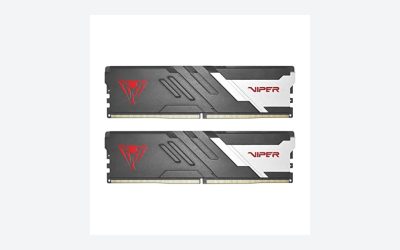
Choosing the best DDR4 RAM for budget gaming is about getting enough memory, maintaining good compatibility, and avoiding unnecessary spending on specifications that deliver little practical improvement. Although DDR5 is now the standard for newer desktop platforms, DDR4 remains a sensible option for gamers upgrading older PCs or building affordable systems around compatible AMD and Intel motherboards.
For most budget gaming PCs, a matched 16GB kit (2 × 8GB) is a reasonable starting point, while 32GB (2 × 16GB) is the more comfortable target for newer games, multitasking, and longer-term use. DDR4-3200 CL16 offers a particularly practical balance between cost and performance. DDR4-3600 CL18 is another option, especially for compatible Ryzen systems, but it is not automatically worth paying more for.
This guide compares five DDR4 memory options from Corsair, G.Skill, TEAMGROUP, Kingston, and Silicon Power. It also explains which specifications matter, when 16GB is sufficient, and how to avoid compatibility problems when upgrading.
What Makes DDR4 RAM Good for Budget Gaming?
Before choosing a memory kit, consider three factors: capacity, memory speed, and latency. These specifications influence gaming performance differently, and spending more on one does not necessarily compensate for choosing poorly in another.
Capacity: 16GB or 32GB?
Capacity should be the first consideration for most budget gaming builds.
A 16GB configuration with two 8GB modules can handle many games, everyday applications, and typical esports workloads. It remains appropriate for older gaming desktops, entry-level systems, and upgrades where the motherboard or processor platform is approaching the end of its useful life.
However, 32GB is a more flexible configuration for a gaming PC in 2026. Modern games can compete for memory with Windows, browser tabs, voice-chat applications, game launchers, and background utilities. When available memory becomes insufficient, the system may rely more heavily on storage-backed virtual memory, potentially contributing to stuttering and slower application switching.
For most people assembling or significantly upgrading a DDR4 gaming PC, a 2 × 16GB kit is the better long-term purchase if the price difference is reasonable.
Speed: DDR4-3200 vs. DDR4-3600
DDR4 memory is commonly advertised using data rates such as 2666, 3200, and 3600 MT/s. Retail listings sometimes call these speeds MHz, but MT/s is the technically appropriate unit for DDR data rates.
DDR4-3200 is a strong budget target because it is widely supported by compatible desktop platforms. DDR4-3600 can offer additional memory bandwidth, particularly on certain AMD Ryzen systems, but actual benefits depend on the processor, motherboard, memory controller, and configuration.
A faster kit does not guarantee a proportional increase in gaming FPS. The graphics card, CPU, game engine, resolution, and graphics settings can have considerably greater influence.
CAS Latency: Understanding CL16 and CL18
CAS latency describes the number of memory clock cycles between a read command and the availability of the requested data.
For budget gaming, DDR4-3200 CL16 and DDR4-3600 CL18 are useful comparison points.
Their approximate first-word CAS latency is similar:
- DDR4-3200 CL16: 10 nanoseconds.
- DDR4-3600 CL18: 10 nanoseconds.
This does not mean the complete memory systems perform identically. Other timings, bandwidth, memory-controller behavior, and platform configuration also matter.
The practical lesson is simple: do not purchase a more expensive kit just because its advertised data rate is higher.
The 5 Best DDR4 RAM Kits for Budget Gaming
The following shortlist focuses on established DDR4 product families with documented desktop configurations. The recommendations are based on manufacturer specifications, platform compatibility, and independent editorial comparisons rather than firsthand Real Gaming News testing.
Configurations can differ within the same product family. Confirm the exact part number, capacity, speed, and timings before purchasing.
1. Corsair Vengeance LPX DDR4-3200 — Best Overall for Budget Gaming
Best overall
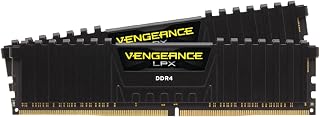
The Corsair Vengeance LPX DDR4 is a strong starting point for gamers who want a straightforward memory upgrade without paying extra for RGB lighting.
Its 32GB (2 × 16GB) DDR4-3200 CL16 configuration provides a useful balance between capacity and speed. The black aluminum heat spreader gives the modules a relatively understated appearance, making them suitable for gaming desktops where appearance is less important than compatibility and cost.
Corsair’s documented CMK32GX4M2E3200C16 configuration includes:
- Capacity: 32GB (2 × 16GB).
- Memory type: DDR4 desktop UDIMM.
- Rated speed: 3200 MT/s.
- Tested latency: CL16.
- Tested voltage: 1.35V.
- Memory profile: Intel XMP 2.0.
- Heat spreader: Anodized aluminum.
The low-profile design is another practical advantage. It can make installation easier in systems with large air coolers, although users should still verify the actual module dimensions and cooler clearance.
Why consider it: A matched 32GB kit gives gamers sufficient capacity for gaming alongside everyday applications. DDR4-3200 CL16 is also a sensible target for many AM4 and DDR4 Intel systems.
Main limitation: Vengeance LPX is available in multiple speeds, capacities, and timings. Not every listing represents the same configuration. Its price can also fluctuate significantly, so the brand name alone does not make a particular listing a good deal.
Best for: Budget-conscious gamers who want a practical 32GB upgrade without RGB features.
2. G.Skill Ripjaws V DDR4-3600 — Best for Ryzen Gaming Builds
G.Skill Ripjaws V DDR4 is worth considering for users building or upgrading an AMD Ryzen desktop with an AM4 motherboard.
The Ripjaws V family offers multiple capacities, including 16GB (2 × 8GB) and 32GB (2 × 16GB) configurations. G.Skill also lists DDR4-3600 versions and Intel XMP 2.0 profile support.
Its main attraction is the availability of higher-speed configurations without requiring buyers to move to an expensive enthusiast memory series.
For a Ryzen 5000 system, a compatible DDR4-3600 kit can be an interesting alternative to DDR4-3200. However, the improvement depends on the CPU’s memory controller, motherboard, BIOS, and memory configuration.
AMD lists DDR4-3200 as the official maximum memory specification for processors such as the Ryzen 5 5600X. Faster memory profiles are therefore operating beyond that standard specification and should be treated as memory overclocking rather than a guaranteed operating speed.
Why consider it:
- Multiple capacity and speed configurations.
- DDR4-3600 options for compatible platforms.
- XMP 2.0 support on applicable models.
- Traditional heat-spreader design.
- Available in matched dual-channel kits.
Main limitation: Ripjaws V is a product family rather than one fixed specification. Buyers must check the exact model number because timings, voltage, capacity, and rated speeds differ between versions. DDR4-3600 operation is also not guaranteed on every Ryzen configuration.
Best for: Ryzen 3000 and Ryzen 5000 desktop owners who want to explore DDR4-3600 without purchasing premium RGB memory.
3. TEAMGROUP T-Force Vulcan Z DDR4 — Best Affordable 16GB Option
TEAMGROUP T-Force Vulcan Z DDR4 is a practical alternative for gamers trying to keep an older desktop upgrade inexpensive.
The series offers multiple configurations, including 16GB kits using two 8GB modules. Its specifications include DDR4-3200 CL16 and DDR4-3600 CL18 variants, depending on the specific model.
The manufacturer documents support for Intel and AMD motherboards, along with Intel XMP 2.0 profiles.
Its understated heat spreader makes it suitable for systems where RGB lighting is unnecessary. This is useful for budget builders who would rather allocate their spending toward a graphics card, SSD, or other components.
Important specifications available within the product family include:
- DDR4 desktop 288-pin UDIMM.
- Non-ECC, unbuffered memory.
- Dual-module configurations.
- DDR4-3200 and DDR4-3600 options.
- XMP 2.0 support.
- Multiple timing configurations.
Why consider it: The Vulcan Z provides a straightforward path to dual-channel DDR4 memory. Its 2 × 8GB configuration is particularly relevant for older gaming desktops that currently use a single 8GB module.
Main limitation: A 16GB kit can become restrictive when running demanding games alongside multiple background applications. If the price difference between 16GB and 32GB is small, buying the larger matched kit may make more sense.
Best for: Entry-level gaming PCs, esports systems, and older DDR4 desktops with a limited upgrade budget.
4. Kingston FURY Beast DDR4 — Best for Straightforward Upgrades
Kingston FURY Beast DDR4 offers another sensible option for gamers who prioritize a familiar memory brand and straightforward specifications.
Kingston lists DDR4-3200 and DDR4-3600 configurations, with capacities ranging from individual modules to larger multi-module kits.
Depending on the configuration, the product family supports CL16, CL17, and CL18 timings. It also includes Intel XMP support and compatibility positioning for AMD Ryzen platforms.
A 32GB (2 × 16GB) kit is particularly attractive for gamers who want enough memory for modern games, voice chat, web browsing, and background applications.
The relatively simple heat spreader avoids unnecessary lighting features. This keeps the design appropriate for both gaming-focused desktops and everyday productivity systems.
Why consider it:
- Multiple capacities and rated speeds.
- DDR4-3200 and DDR4-3600 variants.
- XMP support.
- Low-profile design on applicable configurations.
- Limited lifetime warranty according to Kingston’s product information.
Main limitation: The different FURY Beast configurations should not be treated as interchangeable. Buyers need to check the exact module combination and timings. Some versions are taller than others, which can matter when using large CPU air coolers.
Best for: Gamers upgrading an existing DDR4 desktop who want a 16GB or 32GB matched kit with straightforward specifications.
5. Silicon Power XPOWER Turbine DDR4 — Best Alternative for Value Hunting
Silicon Power XPOWER Turbine DDR4 deserves consideration when comparing less expensive alternatives to Corsair, Kingston, and G.Skill.
The manufacturer lists multiple desktop memory configurations, including a 32GB (2 × 16GB) DDR4-3600 CL18 kit. It also documents DDR4-3200 configurations with CL16 timings.
These options make the series relevant to both entry-level and midrange DDR4 gaming systems.
One useful detail is that Silicon Power provides model-specific specifications rather than presenting every XPOWER Turbine configuration as identical. Buyers can use the product numbers to distinguish memory capacity, speed, timing, and voltage.
Why consider it:
- Multiple speed and capacity options.
- 32GB dual-channel configuration available.
- DDR4-3200 and DDR4-3600 variants.
- XMP and BIOS profile support on applicable configurations.
- Limited lifetime warranty listed by the manufacturer.
Main limitation: Availability and exact model configurations can vary between retailers. A listing for a single 16GB module is not equivalent to a matched 32GB dual-channel kit. Buyers should also check the motherboard compatibility list.
Best for: Gamers who compare several brands and want to find a suitable 32GB DDR4 kit at a competitive price.
DDR4 RAM Comparison: Which Kit Should You Choose?
The following table summarizes the most useful configurations to compare rather than treating every product-family variant as identical.
| Memory kit | Recommended configuration | Best use |
| Corsair Vengeance LPX | 32GB, 3200 CL16 | General budget gaming |
| G.Skill Ripjaws V | 16GB or 32GB, 3600 | Compatible Ryzen systems |
| TEAMGROUP Vulcan Z | 16GB, 3200 CL16 | Lower-cost upgrades |
| Kingston FURY Beast | 32GB, 3200 or 3600 | Everyday gaming and multitasking |
| Silicon Power XPOWER Turbine | 32GB, 3200 CL16 or 3600 CL18 | Value-focused builds |
Our recommendation: Start by comparing the Corsair Vengeance LPX and Kingston FURY Beast 32GB configurations. If TEAMGROUP or Silicon Power offers a meaningfully better price for an equivalent supported configuration, either can be a sensible alternative.
For Ryzen owners specifically interested in faster memory, G.Skill Ripjaws V DDR4-3600 is worth comparing against a standard 3200 CL16 kit.
Do not assume that the fastest advertised kit is automatically the best purchase.
How to Choose DDR4 RAM Without Wasting Money
Selecting memory involves more than comparing the number printed on the product packaging. The following considerations can prevent unnecessary spending and compatibility problems.
1. Check Motherboard Compatibility First
DDR4 and DDR5 are physically different memory standards. Their modules use different key positions, so they cannot be substituted for each other.
This matters particularly with Intel desktop systems. Some LGA1700 motherboards support DDR4, while others support DDR5. The processor’s compatibility with both memory standards does not mean a motherboard accepts both.
For example, Intel’s 12th-, 13th-, and 14th-generation desktop platforms include DDR4 motherboard variants, but the actual motherboard determines which memory type can be installed.
AMD AM4 desktop systems generally use DDR4, while AM5 desktop platforms use DDR5.
Before purchasing, check:
- The motherboard’s exact model number.
- Whether it supports DDR4.
- Supported memory capacities.
- Maximum supported memory speeds.
- Available DIMM slots.
- The motherboard’s memory QVL, where available.
The motherboard manual should be the primary reference.
2. Prefer Two Matching Memory Modules
A matched dual-channel kit is generally preferable to buying one large memory module.
For example:
- 2 × 8GB provides 16GB.
- 2 × 16GB provides 32GB.
- 2 × 32GB provides 64GB.
Dual-channel operation allows compatible systems to access two memory channels, increasing available memory bandwidth compared with a single-channel configuration.
Install the modules in the motherboard’s recommended slots. Many four-slot motherboards recommend A2 and B2 for a two-module configuration, but the manual should determine the correct placement.
Avoid assuming that two separately purchased kits will operate reliably together at their advertised XMP speeds, even if their specifications look identical.
3. Understand XMP and Rated Speeds
Many DDR4 gaming kits advertise speeds above their default JEDEC settings.
For example, a DDR4-3200 CL16 kit may initially start at a lower speed until its performance profile is enabled.
Intel XMP allows supported motherboards to load the memory’s advertised settings through the BIOS or UEFI interface.
Depending on the motherboard manufacturer, AMD systems may provide options such as DOCP or A-XMP for loading compatible memory profiles.
After enabling the profile:
- Save the BIOS settings and restart.
- Open Windows Task Manager.
- Select Performance, then Memory.
- Check the displayed memory speed.
- Run a memory stability test if the system is being upgraded for regular gaming use.
Remember that the actual achievable speed depends on the processor, motherboard, BIOS, and number of installed modules.
4. Consider RAM Height and CPU Cooler Clearance
Memory heat spreaders can interfere with large air coolers.
Low-profile options such as Corsair Vengeance LPX can be helpful in compact desktop builds. However, the precise height must still be checked against the cooler manufacturer’s clearance specifications.
RGB memory and taller heat spreaders can create additional installation challenges.
For a budget build, spending extra on decorative lighting is rarely more important than getting the correct capacity and compatibility.
5. Compare the Total Upgrade Cost
DDR4 is an older memory standard, but that does not guarantee every DDR4 kit is inexpensive in 2026.
Supply conditions, retailer inventory, and regional availability can influence pricing. A discontinued or scarce configuration can sometimes cost more than expected.
Compare the actual cost of equivalent 16GB and 32GB kits before purchasing.
If a 32GB kit is only slightly more expensive, it may offer better long-term value. If the upgrade is for an older system that will soon be replaced, a lower-cost 16GB kit may be more reasonable.
Common Mistakes When Buying Budget DDR4 RAM
Even an affordable memory kit can become an expensive mistake if the configuration is unsuitable for the system.
Avoid these common purchasing errors:
- Buying DDR5 for a DDR4 motherboard: The two memory standards are physically incompatible.
- Choosing one 16GB module instead of a matched pair: This can sacrifice dual-channel bandwidth on platforms with two memory channels.
- Ignoring memory timings: Two kits with the same data rate can have different latency specifications.
- Assuming XMP works automatically: The advertised speed may require BIOS configuration.
- Mixing different memory kits: Combining separate kits can introduce stability problems, even when their advertised specifications match.
- Paying extra for unnecessary RGB: Lighting does not directly improve gaming performance.
- Ignoring upgrade limitations: Check the motherboard’s maximum memory capacity and available slots before purchasing.
A little research before ordering can prevent compatibility issues and unnecessary returns.
Frequently Asked Questions
1. Is 16GB DDR4 RAM enough for gaming in 2026?
Yes, 16GB can still handle many games, particularly esports titles and older releases. However, 32GB is a more comfortable target for newer games, multitasking, and demanding applications. If building a new DDR4 gaming PC, consider 32GB when the additional cost is reasonable.
2. Is DDR4-3200 CL16 better than DDR4-3600 CL18?
Neither configuration is universally better because both have approximately 10ns of CAS latency. DDR4-3600 offers higher theoretical bandwidth, but actual gaming performance depends on the processor and memory configuration. DDR4-3200 CL16 remains a sensible budget choice.
3. Does DDR4 RAM improve gaming FPS?
DDR4 RAM can improve gaming performance when a system has insufficient memory or when its existing memory configuration limits CPU performance. However, upgrading RAM does not guarantee a significant FPS increase. Capacity, memory speed, dual-channel operation, and the game’s hardware requirements all influence the outcome.
4. Can I mix different DDR4 RAM brands?
Yes, different DDR4 brands can sometimes operate together, but compatibility and stability are not guaranteed. Different timings, voltages, memory chips, and module configurations can prevent the system from operating at its advertised speed. A matched kit is generally the safer choice.
Final Verdict: Which DDR4 RAM Is Best for Budget Gaming?
The Corsair Vengeance LPX DDR4-3200 CL16 is our leading general recommendation for budget gaming because its 32GB dual-channel configuration offers a sensible combination of capacity, speed, and straightforward design.
However, it is not the only worthwhile option. G.Skill Ripjaws V is worth considering for compatible Ryzen systems, TEAMGROUP T-Force Vulcan Z is a practical choice for lower-cost 16GB upgrades, and Kingston FURY Beast provides another established 32GB alternative. Silicon Power XPOWER Turbine is also worth comparing when shopping for value.
For most gamers, the purchasing priorities should be:
- Confirm DDR4 motherboard compatibility.
- Choose 32GB (2 × 16GB) when the budget allows.
- Target DDR4-3200 CL16 for straightforward value.
- Consider DDR4-3600 CL18 when the platform supports it and the price is competitive.
- Enable and verify the appropriate memory profile.
Ultimately, the best DDR4 RAM is not necessarily the fastest or most expensive kit. It is the compatible memory configuration that delivers sufficient capacity and dependable operation without taking money away from more important gaming hardware.