Key takeaways
- Switch type: Linear switches suit twitchy shooters, tactile switches reward typists and MOBA players; a hot-swappable board like the AULA F75 Pro lets you change your mind later without soldering.
- Layout and size: A 75% layout keeps arrow keys and function row while freeing desk space for mouse sweeps, whereas a full-size combo such as the RedThunder K84 gives you a numpad for productivity.
- Connectivity: Wired guarantees the lowest latency, but modern 2.4GHz wireless on boards like the YUNZII B75 PRO is effectively lag-free and cuts cable clutter.
- Build and stabilizers: Look for a metal top plate and pre-lubed stabilizers; a rattly spacebar is the fastest way to spot a bargain-bin compromise.
- Onboard features: Programmable macros, N-key rollover, and southern RGB that does not blind you matter more day to day than a flashy spec sheet.
What's inside
A great gaming keyboard no longer demands a three-figure budget. In 2026 the entry-level tier has matured to the point where hot-swappable switches, gasket-mounted plates, and genuine wireless freedom show up on boards that cost less than a couple of new releases. The tricky part is knowing which corners a manufacturer cut to hit that price, because a cheap keyboard that feels mushy or chatters keys under pressure will cost you rounds where reaction time actually matters.
This roundup cuts through the noise and focuses on budget mechanical and membrane boards that punch above their weight for fast-paced play. We looked at switch feel, build rigidity, latency over both wired and 2.4GHz connections, and the little extras like onboard macros and southern-facing RGB that make daily use nicer. Whether you want a compact 75% deck or a full-size combo with a mouse thrown in, there is something here that will not wreck your wallet.
As an Amazon Associate we earn from qualifying purchases at no extra cost to you.


⚡ Save on Your Next PC — Amazon Prime
Prime members get fast free shipping on the systems above, plus early access to Prime Day & Black Friday PC deals. New members get a 30-day free trial.
Watch: Best Budget Gaming Keyboards 2026 — Video Review
How to Choose a Budget Gaming Keyboard
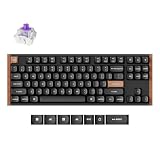
- Switch type: Linear switches suit twitchy shooters, tactile switches reward typists and MOBA players; a hot-swappable board like the AULA F75 Pro lets you change your mind later without soldering.
- Layout and size: A 75% layout keeps arrow keys and function row while freeing desk space for mouse sweeps, whereas a full-size combo such as the RedThunder K84 gives you a numpad for productivity.
- Connectivity: Wired guarantees the lowest latency, but modern 2.4GHz wireless on boards like the YUNZII B75 PRO is effectively lag-free and cuts cable clutter.
- Build and stabilizers: Look for a metal top plate and pre-lubed stabilizers; a rattly spacebar is the fastest way to spot a bargain-bin compromise.
- Onboard features: Programmable macros, N-key rollover, and southern RGB that does not blind you matter more day to day than a flashy spec sheet.
The Best Budget Gaming Keyboards Reviewed
AULA F75 Pro Wireless
The F75 Pro is the value darling of the group, pairing a 75% hot-swappable board with a gasket mount and tri-mode connectivity. Typing feels surprisingly premium thanks to foam dampening, and being able to swap switches means it grows with you rather than becoming disposable.
YUNZII B75 PRO
YUNZII leans into aesthetics with its Matcha Green and Cocoa colorways, but the B75 PRO backs the looks with a hot-swappable PCB and stable wireless. It is a strong pick if you want a keyboard that looks boutique without the boutique price tag.
GravaStar Mercury K1 Pro
With its industrial styling and 75% layout, the Mercury K1 Pro brings custom-board RGB and solid wireless performance to a budget audience. The chassis feels denser than most keyboards near this price, giving it a reassuring thock on every press.
RedThunder K84 Combo
If you want everything in one box, the K84 wireless keyboard and mouse combo covers the basics with rainbow backlighting and rechargeable batteries. It is the practical choice for a new build where every dollar counts and you still need a mouse.
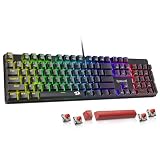
Redragon K521
Redragon remains the reliable budget default, and the K521 delivers a full 104-key mechanical feel with rainbow LEDs at a rock-bottom price. It is not fancy, but the wired connection and durable switches make it a dependable workhorse.
Frequently Asked Questions
Are membrane keyboards fine for gaming?
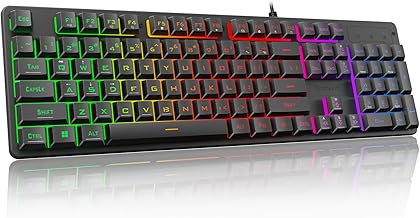
Membrane and hybrid boards can absolutely work for casual play and combos like the K1 RGB set are inexpensive, but mechanical switches give crisper actuation and longer lifespans that competitive players tend to prefer.
Is wireless too slow for competitive games?
Not anymore. Modern 2.4GHz dongles poll fast enough that the latency difference versus wired is imperceptible in real play; only Bluetooth introduces noticeable lag, so reserve that for typing.
What does hot-swappable actually mean?
It means the switches sit in sockets you can pull and replace by hand, letting you tune the feel or fix a failed key without a soldering iron. It future-proofs a budget board considerably.
Do I need RGB lighting?
Purely cosmetic, but well-implemented southern-facing RGB improves legend visibility in dim rooms. If you dislike distraction, every board here lets you dim or disable it entirely.
Final Thoughts
Budget no longer means bad in 2026, and any board on this list will serve you well for years of play. If you want the most future-proof pick, the hot-swappable AULA F75 Pro is hard to beat; if you simply need a complete, no-fuss setup, the RedThunder K84 combo gets you gaming out of the box. Match the layout and switch feel to how you actually play, and you will not miss the extra hundred dollars.