
Key takeaways
- Refresh rate: Higher is smoother. 144Hz is a great baseline, while 165Hz and 240Hz panels reward fast shooters and competitive play.
- Resolution: FHD+ keeps frame rates high, while QHD and WQXGA panels sharpen detail if your GPU can push the extra pixels.
- Response time: A low gray-to-gray response reduces ghosting and blur, keeping fast motion crisp during intense action.
- Panel quality: IPS-level and OLED panels offer better color and viewing angles, with OLED adding deep contrast for immersive visuals.
- Aspect ratio: A 16:10 screen gives you extra vertical space for games and productivity compared with traditional 16:9.
What's inside
The display is the part of a gaming laptop you stare at for every second of play, yet it is often overlooked in favor of the GPU. Refresh rate, resolution, response time, and panel quality all shape how smooth and vivid your games look, and a great screen can make a mid-range machine feel far more premium than its spec sheet suggests.
To help you find a laptop with a screen worth staring at, we rounded up models that pair strong graphics with standout displays. From fast 240Hz panels to crisp WQXGA and OLED options, each pick balances visual quality with the performance to drive it.
As an Amazon Associate we earn from qualifying purchases at no extra cost to you.




🎮 Get More From Your Setup — Free
Prime Gaming gives you free PC games every month, in-game loot, and a free Twitch channel sub — plus fast free shipping on all the gear above. New members get a 30-day free trial.
Watch: Best Gaming Laptop Display — Video Review
How to Choose a Gaming Laptop Display
- Refresh rate: Higher is smoother. 144Hz is a great baseline, while 165Hz and 240Hz panels reward fast shooters and competitive play.
- Resolution: FHD+ keeps frame rates high, while QHD and WQXGA panels sharpen detail if your GPU can push the extra pixels.
- Response time: A low gray-to-gray response reduces ghosting and blur, keeping fast motion crisp during intense action.
- Panel quality: IPS-level and OLED panels offer better color and viewing angles, with OLED adding deep contrast for immersive visuals.
- Aspect ratio: A 16:10 screen gives you extra vertical space for games and productivity compared with traditional 16:9.
The Best Gaming Laptop Displays Reviewed
ASUS ROG Strix G16 (2025)
The ROG Strix G16 pairs an RTX 5060 with a 16-inch FHD+ 16:10 panel at 165Hz and a 3ms response. Its fast, roomy screen and Core i7 make it a superb all-around performer.
Alienware 16 Aurora (WQXGA 120Hz)
The Alienware 16 Aurora features a sharp WQXGA 120Hz display backed by an RTX 5050 and Core 7. Its higher resolution delivers crisp detail, making it a great pick for visual fidelity.
MSI Crosshair 18 HX AI (240Hz)
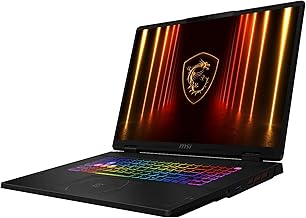
With an 18-inch 2560×1600 240Hz panel and an RTX 5070, the MSI Crosshair 18 HX is built for both speed and clarity. Its large, fast screen suits competitive players who want immersion too.
ASUS TUF Gaming F16 (144Hz IPS)
The TUF Gaming F16 offers a 16-inch FHD+ 144Hz IPS-level 16:10 display and an RTX 4050. It is a durable, value-focused option with a smooth, comfortable screen for everyday gaming.
Acer Nitro V 16S (180Hz WUXGA)
The Acer Nitro V 16S brings a 16-inch WUXGA IPS 180Hz panel paired with an RTX 5060 and 32GB of RAM. Its fast refresh and strong specs make it a compelling high-refresh choice.
Frequently Asked Questions
Is refresh rate or resolution more important?
For competitive gaming, prioritize refresh rate for smoothness. For single-player and visual immersion, a higher resolution panel adds welcome detail.
Do I need a 240Hz laptop screen?
Only if you play fast esports titles and have the GPU to push high frame rates. For most gamers, 144Hz to 165Hz is the sweet spot.
Are OLED gaming laptop screens worth it?
OLED delivers stunning contrast and color, ideal for immersive single-player games. The trade-offs are potential burn-in over time and a higher price.
What does 16:10 aspect ratio offer?
A 16:10 panel provides more vertical screen space than 16:9, which helps in games with tall interfaces and improves productivity and browsing.
Final Thoughts
For the best all-around display, the ASUS ROG Strix G16 nails refresh rate, aspect ratio, and performance, while the MSI Crosshair 18 HX AI is the pick for a large, fast 240Hz screen. Gamers chasing crisp detail should consider the Alienware 16 Aurora’s sharp WQXGA panel.







