
Key takeaways
- Weight and thickness: Aim for machines around four to five pounds; anything lighter usually means compromises on cooling or GPU power.
- Thermal headroom: Slim chassis run hotter, so favor models with proven cooling solutions to avoid throttling during long sessions.
- Battery life: Portability is pointless without endurance, so check real-world battery figures for unplugged productivity use.
- GPU balance: An RTX 5050 or 5060 is the ideal middle ground for thin laptops, offering strong performance without excessive heat.
- Port selection: A slim body still needs USB-C charging and enough ports to avoid living in dongle purgatory.
What's inside
The old stereotype of the gaming laptop as a bulky, backpack-straining brick is finally fading. A new generation of thin-and-light machines proves you no longer have to choose between real RTX horsepower and something you can comfortably carry to class, the office, or a friend’s couch for a LAN session.
Getting there requires clever thermal design and smart component choices, and not every “slim” laptop pulls it off. Below we highlight the lightweight gaming laptops that keep weight and thickness in check without gutting the frame rates, along with the trade-offs to weigh before you buy.
As an Amazon Associate we earn from qualifying purchases at no extra cost to you.





🎮 Get More From Your Setup — Free
Prime Gaming gives you free PC games every month, in-game loot, and a free Twitch channel sub — plus fast free shipping on all the gear above. New members get a 30-day free trial.
Watch: Best Lightweight Gaming Laptop — Video Review
How to Choose a Lightweight Gaming Laptop
- Weight and thickness: Aim for machines around four to five pounds; anything lighter usually means compromises on cooling or GPU power.
- Thermal headroom: Slim chassis run hotter, so favor models with proven cooling solutions to avoid throttling during long sessions.
- Battery life: Portability is pointless without endurance, so check real-world battery figures for unplugged productivity use.
- GPU balance: An RTX 5050 or 5060 is the ideal middle ground for thin laptops, offering strong performance without excessive heat.
- Port selection: A slim body still needs USB-C charging and enough ports to avoid living in dongle purgatory.
The Best Lightweight Gaming Laptops Reviewed
MSI Cyborg A15 AI
The Cyborg A15 is genuinely thin and light while packing a Ryzen 7 and RTX 5050, plus a 144Hz display and Wi-Fi 6E. Its portable design makes it one of the easiest slim recommendations of the year.
ASUS ROG Strix G16
While not the thinnest here, the Strix G16 balances a slim profile with serious RTX 5060 power and a 165Hz panel. It is the choice when you refuse to sacrifice performance for portability.
MSI Thin A15
True to its name, the Thin A15 keeps weight down with a Ryzen 5 and RTX 3050 while retaining Cooler Boost technology. It is a budget-friendly pick for players who prioritize a light carry.
NIMO Thin & Light 15.6″
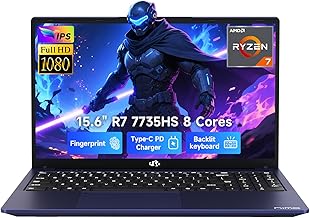
The NIMO offers a genuinely portable 15.6-inch body with a capable Ryzen 7 7735HS and 16GB of DDR5. Its 180-degree hinge and light frame suit students and mobile professionals.
Acer Nitro V 16S AI
Acer’s Nitro V 16S strikes a strong balance, delivering RTX 5060 muscle and 32GB of RAM in a reasonably slim 16-inch chassis. It is the value-forward option for portable performance.
Frequently Asked Questions
Do thin gaming laptops overheat?
They run warmer than thick machines by nature, but modern cooling keeps well-designed models in check. Look for reviews confirming sustained performance rather than headline specs alone.
What is a good weight for portability?
Four to five pounds is the practical sweet spot for a portable gaming laptop. Lighter models exist but usually trim GPU power or cooling capacity.
Can a slim laptop still run demanding games?
Yes. With an RTX 5050 or 5060, thin laptops handle modern titles at 1080p high settings comfortably, though they will not match thick flagships at maximum detail.
Is battery life good on gaming laptops?
It is improving but still modest under load. Expect solid endurance for office work and browsing, but keep the charger handy for actual gaming.
Final Thoughts
The MSI Cyborg A15 AI is our top lightweight pick for its blend of slim design and RTX 5050 performance, while the ASUS ROG Strix G16 wins for players unwilling to compromise on power. Budget-conscious buyers should give the MSI Thin A15 a serious look.







