
Key takeaways
- Start with the GPU: Even an entry RTX card transforms what games you can play. It’s the most important upgrade over a regular laptop, so don’t skip it.
- 16GB of RAM is ideal: It keeps games and background apps running smoothly. 8GB works for lighter titles but fills up quickly on modern games.
- 144Hz display: A high-refresh screen makes gameplay feel fluid and responsive, and it’s now common even on affordable models.
- SSD storage: A fast NVMe SSD means quick boot and load times. Aim for at least 512GB so you’re not deleting games constantly.
- Build and cooling: A sturdy chassis with decent cooling keeps performance steady and the laptop lasting, which matters more than flashy lighting.
What's inside
Buying your first gaming laptop is exciting, but the spec sheets can feel like alphabet soup. You don’t need the most expensive machine to get a great start, you need one that balances a capable GPU, enough memory, and a smooth display without overspending on features a newcomer won’t use yet. The goal is a laptop that grows with you.
We picked beginner-friendly gaming laptops that deliver real performance and reliability at approachable prices. Below are our recommendations, followed by a plain-language guide to the specs that actually matter when you’re just getting into PC gaming.
As an Amazon Associate we earn from qualifying purchases at no extra cost to you.




🎮 Get More From Your Setup — Free
Prime Gaming gives you free PC games every month, in-game loot, and a free Twitch channel sub — plus fast free shipping on all the gear above. New members get a 30-day free trial.
Watch: Best Beginner Gaming Laptop — Video Review
How to Choose a Beginner Gaming Laptop
- Start with the GPU: Even an entry RTX card transforms what games you can play. It’s the most important upgrade over a regular laptop, so don’t skip it.
- 16GB of RAM is ideal: It keeps games and background apps running smoothly. 8GB works for lighter titles but fills up quickly on modern games.
- 144Hz display: A high-refresh screen makes gameplay feel fluid and responsive, and it’s now common even on affordable models.
- SSD storage: A fast NVMe SSD means quick boot and load times. Aim for at least 512GB so you’re not deleting games constantly.
- Build and cooling: A sturdy chassis with decent cooling keeps performance steady and the laptop lasting, which matters more than flashy lighting.
The Best Beginner Gaming Laptops Reviewed
HP Victus 15 (RTX 2050/3050)
The Victus line is a beginner favorite, pairing an RTX GPU with a 144Hz display and 16GB DDR5 at a friendly price. It’s understated enough to double as a school or work laptop while handling real games.
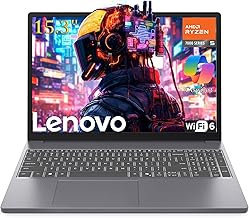
Lenovo 15 Gaming (Ryzen 5 7535HS)
This entry-level Lenovo offers a modern Ryzen 5, DDR5 memory, and a clean design ideal for first-timers. It’s a dependable, no-fuss machine for esports and lighter AAA titles.
ASUS TUF Gaming A16
Stepping up, the TUF A16 brings an RTX 4050, Ryzen 7, and 145Hz panel in a durable chassis. It’s the pick for beginners who want more headroom and room to grow into demanding games.
Acer Nitro V 16S AI
With an RTX 5060, 32GB DDR5, and a 180Hz screen, this Nitro delivers strong performance for a beginner willing to invest a bit more. It leaves plenty of ceiling for years of gaming.
NIMO 15.6″ Ryzen 5 6600H
For an ultra-affordable start, this NIMO with 16GB DDR5 and a fast SSD covers esports and everyday tasks well. Just note it relies on Radeon integrated graphics rather than a discrete GPU.
Frequently Asked Questions
What specs does a beginner gaming laptop need?
A discrete RTX GPU, 16GB of RAM, a fast SSD, and a 144Hz display cover the essentials for a smooth, enjoyable start.
How much should I spend on my first gaming laptop?
Solid beginner machines are available at mid-range prices. Spending a bit more on the GPU pays off with longer usable life.
Can a gaming laptop handle schoolwork too?
Yes. Models like the HP Victus are understated and powerful enough to serve as everyday laptops for study and work.
Is an RTX 3050 or 4050 good for beginners?
Both run modern games at 1080p with sensible settings. The 4050 offers more headroom, but either is a great starting point.
Final Thoughts
The HP Victus 15 is the ideal balanced beginner buy, the ASUS TUF A16 is the pick for those wanting more growth room, and the Acer Nitro V 16S is the choice if your budget stretches a little further.







