Choosing between cl30 vs cl36 ddr5 ram gaming comes down to more than the number printed on a memory kit. At the same DDR5 speed, CL30 has lower CAS latency and a measurable timing advantage. However, the actual FPS difference depends on your CPU, GPU, game, and complete memory configuration. Here’s how to choose without overspending.
What CL30 vs CL36 DDR5 RAM Really Comes Down To
CL30 and CL36 describe different CAS latency settings, not different DDR5 generations or memory capacities. When both kits operate at DDR5-6000, CL30 has a shorter nominal CAS delay than CL36. However, gaming performance also depends on transfer rate, secondary timings, processor architecture, and whether a game is CPU- or GPU-limited.
1. Understand CAS Latency and What the Numbers Mean
CAS latency (Column Address Strobe latency), usually abbreviated as CL, represents the number of memory clock cycles between a read command and the availability of the requested data from a DRAM column. A lower number means fewer cycles, but the duration of each cycle also matters.
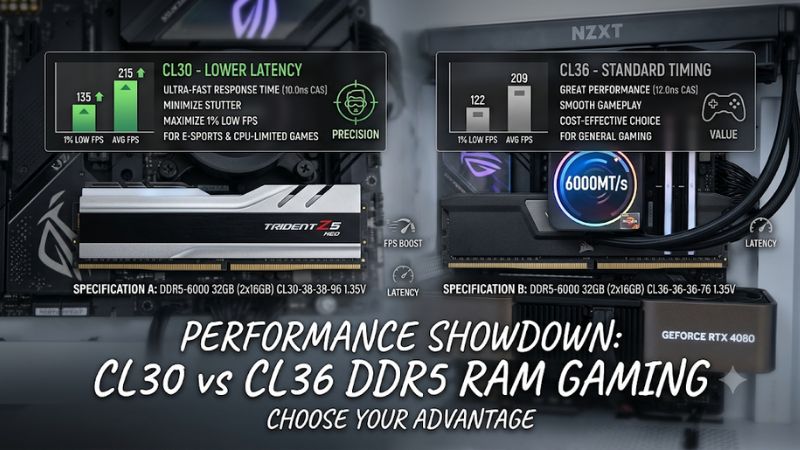
For example, DDR5-6000 CL30 requires 30 cycles, while DDR5-6000 CL36 requires 36 cycles for the CAS operation. This makes CL30 the faster-timed option when comparing these two configurations at the same transfer rate and otherwise equivalent conditions.
The difference becomes clearer when converted into nanoseconds. This calculation helps compare kits operating at different speeds instead of relying exclusively on the CL number printed on their packaging.
2. Compare Actual Latency at the Same DDR5 Speed
The approximate CAS latency formula is:
CAS latency (ns) = CL × 2000 ÷ Data rate (MT/s)
Using DDR5-6000 as an example:
| Memory configuration | CAS latency |
| DDR5-6000 CL30 | 10 ns |
| DDR5-6000 CL36 | 12 ns |
CL30 therefore provides approximately 2 ns less nominal CAS delay, a 16.7% reduction compared with CL36. This is a calculation of the CAS component, not total system memory latency or an FPS improvement.
An important distinction is that CL30 does not automatically outperform every CL36 kit. A DDR5-6400 CL36 kit, for example, has approximately 11.25 ns of nominal CAS latency. That is closer to DDR5-6000 CL30 than the numbers alone might suggest.
3. Consider the Other Memory Timings
CAS latency is only one part of a memory timing profile. Other important primary timings include tRCD (RAS to CAS Delay), tRP (Row Precharge Time), and tRAS (Row Active Time). These values influence how memory handles different operations.
For example, a kit advertised as DDR5-6000 CL30 might have timings of 30-38-38-96, while a CL36 kit might use 36-40-40-96. These are illustrative configurations, not specifications shared by every product.
When comparing CL30 vs CL36 DDR5 RAM gaming performance, examine the complete timing specification. Two kits with the same CAS latency can have different secondary timings, memory chips, voltage requirements, and performance characteristics.
4. Match Memory to Your Gaming Platform
Your processor and motherboard determine which DDR5 speeds and memory configurations your computer can support. A motherboard must use DDR5, and its supported memory speeds, BIOS version, processor memory controller, and DIMM configuration all influence compatibility.
AMD AM5 systems commonly use DDR5 memory with AMD EXPO profiles, while compatible Intel platforms can use Intel XMP profiles. These profiles apply predefined memory frequency, timing, and voltage settings beyond standard memory operating specifications.
Before purchasing, check the motherboard manufacturer’s memory support information and the processor’s specifications. A CL30 kit that requires an unsupported or unstable overclocked profile is not necessarily a better purchase than a compatible CL36 kit.
How to Compare CL30 vs CL36 DDR5 RAM for Gaming
The practical difference between these configurations depends on the complete memory kit and the games you play. Lower CAS latency can benefit memory-sensitive workloads, particularly when the processor is the performance bottleneck. However, a graphics-card-limited game may show little difference even when the memory timings are tighter.
CL30 vs CL36: Gaming Performance and Value Comparison
The following table summarizes the main differences when comparing DDR5 kits with the same transfer rate, capacity, and otherwise similar specifications.
| Comparison | DDR5 CL30 | DDR5 CL36 |
| CAS cycles | 30 | 36 |
| CAS latency at 6000 MT/s | 10 ns | 12 ns |
| Relative CAS delay | Lower | Higher |
| Memory bandwidth at equal speed | Same | Same |
| Potential gaming advantage | Better timing | Slightly higher latency |
| Typical buying consideration | Performance-focused builds | Budget-conscious builds |
| Compatibility | Depends on platform and profile | Depends on platform and profile |
1. Understand the Real FPS Difference
CL30 can improve gaming performance compared with CL36 when other memory specifications are similar, but the size of the improvement varies considerably. CPU-intensive games can respond more noticeably to memory latency than games limited primarily by GPU performance.
Independent testing by TechSpot of AMD EXPO Ultra Low Latency memory illustrates why the complete memory configuration matters. Its testing compared G.Skill DDR5-6000 configurations using Ryzen 7 9700X and Ryzen 7 9800X3D processors.
In Cyberpunk 2077: Phantom Liberty at 1080p with the Ultra Ray Tracing preset, the publication reported an approximately 8% improvement for its CL30 Ultra Low Latency configuration and 7% for its CL36 Ultra Low Latency configuration on the Ryzen 7 9700X. The Ryzen 7 9800X3D showed considerably smaller gains.
These results do not isolate CL30 versus CL36 because the tested profiles also differed in secondary and other memory timings. They demonstrate that complete memory profiles and processor architecture matter more than CAS latency alone.
2. Consider Your CPU and GPU Bottleneck
If your gaming PC uses a powerful graphics card and you play at 1080p with competitive settings, CPU and memory performance can become more important. In this situation, a tighter memory configuration may provide additional performance in some games.
At higher resolutions, particularly 4K with demanding graphics settings, the GPU often becomes the limiting component. In those situations, spending significantly more on CL30 instead of CL36 may produce little noticeable improvement.
This is why CL30 vs CL36 DDR5 RAM gaming comparisons should consider the intended resolution, graphics settings, and processor. A memory upgrade should address an actual performance limitation rather than simply target the lowest advertised CL number.
3. Decide Whether CL30 Is Worth the Extra Cost
CL30 is generally the more attractive choice when two DDR5 kits have identical capacity, transfer rate, similar timings, and compatible profiles. If the price difference is small, choosing the tighter timing configuration is a sensible way to get a better memory specification.
CL36 becomes more appealing when it costs considerably less while offering the same capacity and transfer rate. The money saved could go toward a stronger GPU, a larger SSD, or additional memory capacity, which may have a more noticeable effect on your gaming experience.
Avoid paying a substantial premium based only on the six-cycle difference. Compare the complete specifications and current retail prices before deciding.
4. Check Stability After Enabling XMP or EXPO
A DDR5 kit’s advertised CL30 or CL36 rating generally refers to its configured performance profile. Your motherboard may initially start the memory at a lower default JEDEC speed until you enable the appropriate profile in BIOS.
On compatible Intel systems, Intel XMP provides predefined memory settings. On supported AMD AM5 systems, AMD EXPO provides a similar function. Both involve memory overclocking beyond standard operating specifications, so stability depends on the complete platform.
After enabling a profile, check the reported memory frequency and timings using a utility such as CPU-Z or HWiNFO. Run a suitable memory stability test and monitor for crashes, boot problems, or memory errors. If instability occurs, return to default memory settings before troubleshooting further.
FAQ
Is CL30 noticeably faster than CL36 in gaming?
CL30 has lower nominal CAS latency than CL36 at the same DDR5 transfer rate, but the gaming performance difference is usually much smaller than the percentage difference in CAS delay. The actual result depends on the processor, GPU, game, and complete memory timings.
For CPU-limited gaming, tighter timings can provide an advantage. For GPU-limited gaming, the difference may be negligible. Therefore, CL30 is technically faster in this comparison, but it does not automatically deliver a substantial FPS increase.
Is DDR5-6000 CL30 better than DDR5-6400 CL36?
DDR5-6000 CL30 has approximately 10 ns of nominal CAS latency, while DDR5-6400 CL36 has approximately 11.25 ns. However, the faster-rated kit has greater theoretical memory bandwidth, and the complete timings also matter.
The better choice depends on your CPU memory controller, motherboard compatibility, and intended configuration. Check whether your processor and motherboard can reliably support the advertised transfer rate before prioritizing either specification.
Does CL30 or CL36 matter more for Ryzen gaming CPUs?
Both timings can matter on AMD Ryzen systems, particularly in CPU-limited games, but the difference depends on the processor architecture and memory configuration. Ryzen processors with 3D V-Cache can respond differently to memory tuning than conventional Ryzen processors.
For an AM5 gaming build, DDR5-6000 is a commonly recommended starting point, but it is not a mandatory speed for every processor. Check AMD’s compatibility information and your motherboard’s supported EXPO configurations before purchasing.
Can I mix CL30 and CL36 DDR5 RAM?
You can sometimes operate different DDR5 modules together, but mixing CL30 and CL36 kits is not recommended when predictable performance and stability are priorities. The motherboard may select common memory settings, potentially reducing the faster kit’s advertised performance.
For a new build or upgrade, purchase a matched memory kit with the capacity you need. If you already own different modules, check their compatibility and run memory stability tests rather than assuming both will operate at their individual advertised profiles.
Final Thoughts
Choosing between cl30 vs cl36 ddr5 ram gaming is straightforward when transfer rates, capacity, and other timings are comparable: CL30 offers lower CAS latency, while CL36 can provide better value. Prioritize a compatible, stable memory kit, and spend extra on tighter timings only when the price difference makes sense for your gaming build.