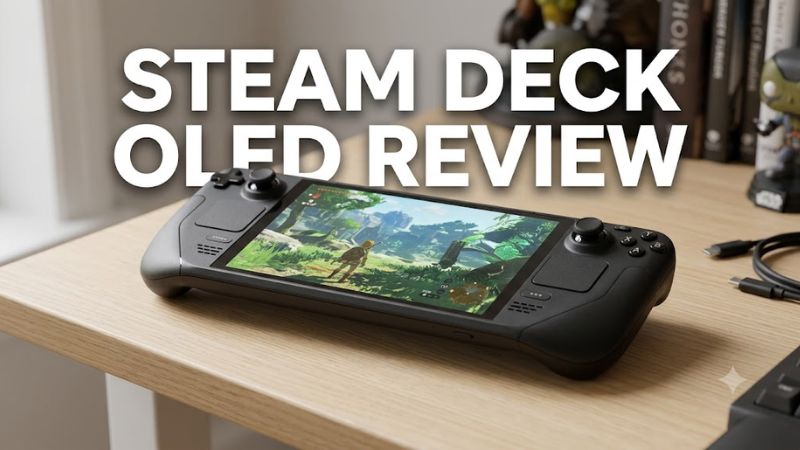
The Steam Deck OLED remains an appealing handheld gaming PC for players who want to take their Steam library on the go. Its 7.4-inch OLED display, improved battery capacity, comfortable controls, and console-like SteamOS interface make it an attractive portable gaming device. However, its gaming performance remains close to that of the original LCD model, and its higher price makes the purchase harder to justify in 2026.
The Steam Deck OLED is worth considering if you value display quality, battery life, and convenient access to compatible PC games. Players who prioritize maximum performance in demanding AAA titles may find better options among competing handheld gaming PCs.
This review examines the published specifications, independent review findings, practical limitations, and pricing considerations. It is based on available documentation and third-party reporting rather than firsthand testing by Real Gaming News.
Steam Deck OLED review Specifications
The Steam Deck OLED combines a custom AMD processor with integrated graphics, 16GB of memory, and a 1280 × 800 touchscreen. Valve retained the original model’s general performance class while improving the display, battery, wireless connectivity, and power efficiency.
| Specification | Steam Deck OLED |
| Processor | Custom AMD Zen 2 APU, 4 cores and 8 threads |
| Graphics | Custom AMD RDNA 2 GPU, 8 compute units |
| Memory | 16GB LPDDR5 |
| Display | 7.4-inch HDR OLED touchscreen |
| Resolution | 1280 × 800 |
| Refresh rate | Up to 90Hz |
| Battery | 50Wh |
| Storage | 512GB or 1TB NVMe SSD |
| Wireless | Wi-Fi 6E and Bluetooth 5.3 |
| Expansion | microSD card slot |
| Operating system | SteamOS |
| USB | USB-C with DisplayPort 1.4 and USB 3.2 Gen 2 support |
| Power adapter | 45W USB-C |
| Weight | Approximately 640g |
The two storage configurations share the same fundamental gaming hardware. The 512GB version has glossy screen glass, while the 1TB version uses etched anti-glare glass. Actual usable storage is lower than the advertised capacity because the operating system and other files occupy space.
Design and Controls: Comfortable but Not Lightweight
The Steam Deck OLED retains the wide, controller-integrated design of the original Steam Deck. Its built-in thumbsticks, D-pad, face buttons, shoulder controls, rear grip buttons, and trackpads accommodate a broad range of PC games.
The trackpads are especially useful for strategy games, desktop navigation, and titles designed around mouse input. They provide more flexibility than a conventional gamepad, although they cannot fully replace a mouse and keyboard in every game.
At approximately 640g, the device is relatively heavy compared with smaller handheld gaming systems. Its contoured grips help distribute the weight, but extended sessions may be less comfortable for players with smaller hands.
Valve also revised the internal design to improve cooling and reduce fan noise compared with the original LCD model. These refinements improve the overall experience without fundamentally changing the device’s shape or performance class.
Display Quality: The OLED Screen Is the Main Attraction
The 7.4-inch OLED panel is the most noticeable improvement over the original Steam Deck. It provides deeper blacks, stronger contrast, richer colors, and a refresh rate of up to 90Hz compared with the LCD model’s 60Hz display.
The 1280 × 800 resolution is reasonable for the screen size and hardware, although competing handhelds with higher-resolution displays can provide a sharper image. The 16:10 aspect ratio also offers slightly more vertical space than a standard 16:9 display.
HDR support adds another benefit for compatible games. High-contrast scenes can look more striking, particularly when bright highlights appear against dark environments. Valve specifies peak brightness of up to 1,000 nits for HDR content and up to 600 nits for SDR content. Actual brightness depends on content and operating conditions.
The 90Hz refresh rate can make movement smoother when a game produces enough frames to benefit from it. However, the screen’s refresh rate should not be confused with actual gaming performance. Demanding games will not automatically run at 90 frames per second.
The 1TB model’s etched anti-glare glass is useful under bright lighting, while the glossy screen on the 512GB version may appeal to players who prefer a conventional display finish.
Display verdict: The OLED screen makes games look better and improves the overall handheld experience. It is a meaningful upgrade for players who value image quality, but it does not compensate for the limitations of the underlying graphics hardware.
Gaming Performance: Capable, but Not a Major Upgrade
The Steam Deck OLED uses a custom AMD Zen 2 APU with integrated RDNA 2 graphics. Its processor is manufactured on a 6nm process, compared with the original LCD model’s 7nm chip. The newer process improves efficiency, but the fundamental performance target remains similar.
Independent reviews from GamersNexus and other specialist publications found that gaming performance was generally close to the original Steam Deck. Battery life, display quality, and efficiency are more significant improvements than raw frame rates.
The Steam Deck OLED should therefore be viewed as a refinement of the original handheld rather than a substantially more powerful successor.
What to Expect From Different Games
| Game category | Practical expectation |
| Indie and 2D games | Often an excellent fit, with many titles running smoothly |
| Older PC games | Generally suitable, depending on compatibility and graphics requirements |
| Moderately demanding games | Usually playable with appropriate settings |
| Demanding open-world games | May require lower graphics settings and reduced frame-rate targets |
| Competitive multiplayer games | Performance and anti-cheat compatibility vary by title |
| Recent, demanding AAA games | Check game-specific performance and compatibility before buying |
These are qualitative expectations based on the hardware specifications and published review findings, not benchmark results produced by Real Gaming News. Actual performance depends on the game version, graphics settings, software compatibility, and power consumption.
Why Newer AAA Games Can Be Challenging
The integrated GPU shares system resources rather than having the dedicated graphics hardware found in a gaming desktop. Modern games with complex environments, demanding lighting, and high-resolution assets can push the Deck’s limits.
Reducing graphics settings and adjusting the frame-rate limit can improve the experience in some games, but no universal configuration makes every demanding release run well. Certain titles may remain unsuitable because of performance demands, third-party launchers, or unsupported anti-cheat systems.
Players who primarily want to play the newest AAA releases at high frame rates should compare the Steam Deck OLED with more powerful handheld gaming PCs. These alternatives can offer better graphics performance, although their prices, battery life, ergonomics, and software experiences differ.
Battery Life: Better Endurance for Portable Gaming
Valve rates the Steam Deck OLED for approximately 3–12 hours of gameplay. Its 50Wh battery is larger than the original LCD model’s 40Wh battery, while the more efficient display and processor contribute to improved endurance.
The wide official range reflects the difference between lightweight games and demanding 3D titles. Indie games with modest graphics requirements can consume much less power than graphically intensive releases.
Higher brightness, sustained GPU usage, demanding settings, and faster refresh rates can shorten a gaming session. Players should not assume that every game will approach the upper end of Valve’s estimated range.
GamersNexus published battery comparisons involving video playback, Dead Cells, and F1 23. The results showed that the OLED model could last substantially longer than the LCD version, but the advantage varied with the workload and test conditions. Its F1 23 comparison used the medium graphics preset and 50% system brightness, so those results should not be treated as universal estimates for every game.
For travel, commuting, or gaming away from a power outlet, the OLED model is a better choice than the original LCD Deck. However, players planning long sessions with demanding games should consider carrying a compatible USB-C power source.
SteamOS and Game Compatibility
SteamOS is one of the strongest features of the Steam Deck OLED. Its controller-friendly interface makes it easy to browse a library, launch compatible games, adjust settings, and return to a suspended session.
However, the Steam Deck is still a PC, and not every Windows game automatically works on its Linux-based operating system.
Valve’s Steam Deck compatibility program uses four categories:
- Verified: The game works well on the device without additional configuration.
- Playable: The game works but may require adjustments or manual interaction.
- Unsupported: The game is not currently considered playable on the device.
- Unknown: Compatibility has not been established through the program.
These categories are useful starting points rather than guarantees of identical performance in every situation. Game updates, launcher changes, and anti-cheat requirements can affect compatibility. Players should check the specific games they intend to play, especially competitive multiplayer titles and games that rely on third-party launchers.
The desktop mode provides additional flexibility for compatible applications, peripherals, and system configuration. However, advanced setup can require more technical knowledge than using a traditional console.
Storage and Connectivity
The Steam Deck OLED comes with either a 512GB or 1TB internal NVMe SSD. Storage capacity matters because large PC games can consume substantial space, particularly when several titles are installed simultaneously.
Both versions support microSD expansion, allowing users to add storage without replacing the internal SSD. A suitable microSD card can be a convenient way to maintain a larger game library, although performance and load times can vary by card and game.
The USB-C port supports charging, data transfer, and external displays. With a compatible dock or USB-C hub, users can connect a monitor, keyboard, mouse, and other peripherals. Bluetooth supports compatible wireless accessories.
The Deck can function as a compact PC when connected to an external display. However, an external monitor does not increase the system’s graphics performance. Running a game at a higher resolution can place additional demands on the integrated GPU.
The 1TB model is convenient for players who install many large games and prefer anti-glare glass. The 512GB model provides the same general gaming performance and may be sufficient for users who regularly manage their installed games or use microSD expansion.
Steam Deck OLED Price and Value in 2026
The Steam Deck OLED’s value depends heavily on its current US price. Valve announced higher US prices for the OLED models on May 27, 2026, citing increased memory and storage costs.
The published US prices as of October 23, 2026, are:
| Model | US price | Best for |
| Steam Deck OLED 512GB | $789 | Buyers who want the OLED experience at the lower entry price |
| Steam Deck OLED 1TB | $949 | Players who need more internal storage and prefer etched anti-glare glass |
These figures are published prices rather than temporary sale prices. Taxes, shipping, and availability may affect the final amount.
The 512GB model’s current price is $240 higher than its original $549 price, while the 1TB model is $300 above its original $649 price. This increase changes the buying decision considerably because the underlying gaming performance has not received a comparable upgrade.
At these prices, prospective buyers should compare competing handhelds and consider certified refurbished options from reputable sellers. Warranty coverage, return terms, battery condition, and storage capacity are important factors when buying a used device.
The Steam Deck OLED still offers a strong combination of display quality, portability, and software convenience. However, it is no longer an automatic value winner for every handheld gaming buyer.
Pros and Cons
Pros
- Excellent OLED contrast, color reproduction, and HDR support.
- Larger 50Wh battery than the original LCD model.
- Up to 90Hz refresh rate.
- Comfortable integrated controls and useful trackpads.
- SteamOS offers a controller-friendly gaming interface.
- Expandable storage through the microSD card slot.
- USB-C display output and support for external peripherals.
Cons
- Gaming performance remains broadly similar to the original Steam Deck.
- Demanding AAA games can require significant graphics compromises.
- Some multiplayer games and third-party launchers have compatibility limitations.
- The 640g design is relatively heavy.
- Current US prices are much higher than the original launch prices.
- The 1280 × 800 display is less sharp than some competing handheld screens.
Steam Deck OLED Alternatives
The best alternative depends on whether you prioritize price, graphics performance, screen size, or operating system.
Steam Deck LCD
The original Steam Deck LCD is worth considering if you want the general SteamOS experience at a lower purchase price. It has a 7-inch LCD screen, a 40Wh battery, and a 60Hz refresh rate. Its gaming performance is broadly similar to the OLED model, so a substantial discount can make it an attractive option.
Availability and pricing vary, and buyers should compare the condition and warranty of used or refurbished units before purchasing.
ASUS ROG Ally X
The ASUS ROG Ally X is a Windows-based handheld gaming PC worth considering if you want greater graphics performance and broader compatibility with Windows applications. Its performance depends on the game and selected power settings, and its Windows interface may require more configuration than SteamOS.
Buyers should weigh its performance advantages against its price, battery life, software experience, and ergonomics.
Lenovo Legion Go S
The Lenovo Legion Go S is another option for players who prefer a larger-screen handheld. It is available in different configurations, including SteamOS and Windows variants, so processor, memory, operating system, and price should be checked for the specific model.
These alternatives have different hardware configurations and are not direct performance benchmarks against the Steam Deck OLED. Compare current prices and the games you intend to play before deciding.
Frequently Asked Questions
Is the Steam Deck OLED worth buying in 2026?
The Steam Deck OLED is worth buying in 2026 if its display, battery life, and SteamOS experience matter more to you than maximum performance or the lowest purchase price. Its current US starting price makes comparing alternatives particularly important.
How powerful is the Steam Deck OLED?
The Steam Deck OLED uses a custom AMD Zen 2 processor, RDNA 2 integrated graphics, and 16GB of LPDDR5 memory. It handles many indie, older, and moderately demanding games well, but recent AAA releases can require reduced graphics settings and lower frame-rate targets.
How long does the Steam Deck OLED battery last?
Valve rates the Steam Deck OLED for approximately 3–12 hours of gameplay, depending on the game and system settings. Demanding 3D games generally consume more power than lightweight 2D games, so actual runtime can be substantially shorter than the maximum estimate.
Is the Steam Deck OLED better than the original Steam Deck?
The Steam Deck OLED improves display quality, battery capacity, wireless connectivity, and power efficiency, but gaming performance remains broadly similar to the original LCD model. Existing owners should consider upgrading primarily for these quality-of-life improvements rather than expecting a major frame-rate increase.
Final Verdict: Should You Buy the Steam Deck OLED?
The Steam Deck OLED is a strong refinement of Valve’s original handheld gaming PC. Its display, battery capacity, controls, and SteamOS interface make it an appealing way to play compatible PC games away from a desk.
The main concern in 2026 is value. At $789 for 512GB and $949 for 1TB, the device is expensive for hardware whose gaming performance remains broadly comparable to the original model. The OLED screen makes the experience better, but it does not make demanding games run substantially faster.
Buy the Steam Deck OLED if you prioritize a polished handheld Steam experience, play compatible games, and value screen quality and battery life more than maximum graphics performance. If you already own the LCD model, an upgrade is difficult to justify on performance alone.
First-time handheld buyers should compare the OLED model with competing devices and refurbished options before spending nearly $800 or more. At its current price, the Steam Deck OLED is best viewed as a premium portable gaming experience rather than an automatic value winner.