Key takeaways
- Prioritize cache over core count: Games are far more sensitive to L3 cache and single-thread speed than to raw core totals. AMD’s 3D V-Cache chips consistently outperform processors with double the cores in gaming workloads, which is why they dominate this price bracket.
- Factor in the platform, not just the chip: An AM5 CPU needs a newer motherboard and DDR5 memory, which can add $150–250 to your build. AM4 chips run on cheap, mature boards with DDR4 — a genuine bargain if you already own one.
- Match the CPU to your GPU and resolution: At 1440p and 4K the GPU does most of the heavy lifting, so a midrange CPU is plenty. At 1080p with a high-refresh monitor, the processor becomes the limiting factor and cache-heavy chips pull far ahead.
- Check whether a cooler is included: Most high-performance chips ship bare, so budget $30–90 for a decent air or liquid cooler. A bundled cooler can be the difference between staying under $300 and blowing past it.
- Think about upgrade headroom: AM5 is supported through several more CPU generations, meaning today’s mid-tier chip can be swapped for a flagship later without replacing the board. That future-proofing is worth real money.
What's inside
Picking a gaming CPU under $300 has never been trickier. The market is crowded with chips spanning three generations, and raw core counts tell you almost nothing about how many frames you’ll actually see in the games you play. Spend carelessly and you’ll either overpay for cores your games never touch, or save $60 on a processor that bottlenecks a GPU worth three times as much.
This guide cuts through that. We’ve focused on the chips that deliver the highest real-world gaming performance per dollar in 2026, factoring in platform longevity, cooler requirements, and total build cost — not just the sticker price. Whether you’re building fresh on AM5 or squeezing one last upgrade out of an AM4 board, there’s a clear winner below.
As an Amazon Associate we earn from qualifying purchases at no extra cost to you.





⚡ Save on Your Next PC — Amazon Prime
Prime members get fast free shipping on the systems above, plus early access to Prime Day & Black Friday PC deals. New members get a 30-day free trial.
Watch: Best CPU for Gaming Under $300 — Video Review
How to Choose CPU for Gaming Under $300
- Prioritize cache over core count: Games are far more sensitive to L3 cache and single-thread speed than to raw core totals. AMD’s 3D V-Cache chips consistently outperform processors with double the cores in gaming workloads, which is why they dominate this price bracket.
- Factor in the platform, not just the chip: An AM5 CPU needs a newer motherboard and DDR5 memory, which can add $150–250 to your build. AM4 chips run on cheap, mature boards with DDR4 — a genuine bargain if you already own one.
- Match the CPU to your GPU and resolution: At 1440p and 4K the GPU does most of the heavy lifting, so a midrange CPU is plenty. At 1080p with a high-refresh monitor, the processor becomes the limiting factor and cache-heavy chips pull far ahead.
- Check whether a cooler is included: Most high-performance chips ship bare, so budget $30–90 for a decent air or liquid cooler. A bundled cooler can be the difference between staying under $300 and blowing past it.
- Think about upgrade headroom: AM5 is supported through several more CPU generations, meaning today’s mid-tier chip can be swapped for a flagship later without replacing the board. That future-proofing is worth real money.
The Best Picks Reviewed
AMD Ryzen 7 9800X3D
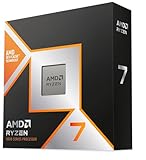
This is still the fastest gaming processor you can buy, and when it dips into the upper end of this budget it is an absolute steal. Eight Zen 5 cores paired with second-generation 3D V-Cache deliver chart-topping frame rates in CPU-bound titles like simulators, strategy games, and competitive shooters — and unlike the original X3D chips, it overclocks properly.
AMD Ryzen 7 7800X3D
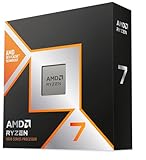
The chip that made 3D V-Cache famous remains a phenomenal value now that it sits comfortably below $300. It trades a handful of frames to its Zen 5 successor while sipping power, running cool, and dropping straight into any AM5 board — the smartest gaming buy in this guide for most people.
AMD Ryzen 7 5800X3D
If you’re on AM4, this is the endgame upgrade. It transforms an aging DDR4 build into a legitimate high-refresh gaming rig without a new motherboard or RAM, and it still keeps pace with far newer midrange chips in cache-sensitive games.
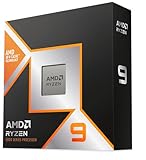
AMD Ryzen 5 9600X
Six Zen 5 cores with excellent single-thread performance make this the sensible entry point to the AM5 platform. It won’t match the X3D chips in the most demanding CPU-bound titles, but it’s efficient, affordable, and leaves plenty of budget for a stronger GPU — plus a clear upgrade path later.
AMD Ryzen 5 5500
The true budget pick, and it includes a Wraith Stealth cooler so there’s no hidden cost. Paired with a modest GPU at 1080p it delivers perfectly playable performance for well under $100, making it ideal for a first build or a family PC.
Frequently Asked Questions
Do I really need an X3D processor for gaming?
Not always. If you game at 1440p or 4K with a midrange GPU, a standard chip like the 9600X will perform nearly identically. X3D chips shine at 1080p, at very high refresh rates, and in simulation or strategy games with heavy CPU loads.
Is AM4 still worth buying in 2026?
Only if you already own an AM4 motherboard and DDR4 memory. In that case the 5800X3D or 5500 is a fantastic low-cost upgrade. For a brand-new build, AM5 is the better long-term investment thanks to ongoing CPU support.
Will these CPUs bottleneck a high-end graphics card?
The 9800X3D and 7800X3D will not bottleneck any current GPU at sensible settings. The 9600X may limit the very fastest cards at 1080p, and the 5500 is best paired with entry-level to midrange graphics hardware.
How much should I budget for a cooler?
Around $35–50 gets a capable dual-tower air cooler that handles any chip here comfortably. Only the Ryzen 5 5500 includes a cooler in the box, so factor that extra cost into your total build price.
Final Thoughts
For most gamers, the Ryzen 7 7800X3D is the pick to beat — it delivers near-flagship gaming performance, runs cool and efficient, and sits well within budget on a platform with years of upgrades ahead. Stretch to the Ryzen 7 9800X3D if you want the outright fastest gaming CPU available and can find it near the top of this range. And if you’re still on AM4, the Ryzen 7 5800X3D remains the single best value upgrade in PC gaming.