Key takeaways
- Switch type: Linear switches (red, yellow, “Reaper”) are smooth and quiet-ish, ideal for gaming. Tactile browns give a typing bump for mixed work-and-play use. Avoid clicky blues if you share a room or take calls.
- Hot-swap sockets: The single best feature to look for at this price. Hot-swap lets you replace switches without soldering, so one bad switch doesn’t kill the board and you can upgrade feel later for a few dollars.
- Keycap material: Double-shot PBT resists the greasy shine that plagues cheap ABS caps and keeps legends from wearing off. Many sub-$50 boards now include it — treat it as a tiebreaker.
- Layout and size: Full-size gives you a numpad; TKL frees desk space for low-sensitivity mouse swings; 75% keeps arrows and function row in a compact footprint. Pick based on desk space, not looks.
- Connectivity and polling: Wired USB-C is still the safest bet for latency and simplicity. If you want wireless, insist on a 2.4GHz dongle rather than Bluetooth alone — BT adds noticeable input lag in fast-paced games.
What's inside
Sub-$50 mechanical keyboards used to mean compromise: mushy imitation switches, wobbly stabilizers, and ABS keycaps that turned shiny within a month. That’s no longer the case. The budget tier has been reshaped by hot-swappable sockets, pre-lubed switches, and double-shot PBT keycaps trickling down from enthusiast builds — but the flood of near-identical listings makes it genuinely hard to tell a great $45 board from a bad one.
This guide cuts through that noise. We’ve focused on keyboards that stay realistically within a $50 budget while delivering the things that actually matter day to day: switch feel, keycap durability, stable typing, and software that isn’t a chore. Below you’ll find our top picks, a quick buying checklist, and answers to the questions we hear most from first-time mechanical buyers.
As an Amazon Associate we earn from qualifying purchases at no extra cost to you.








⚡ Save on Your Next PC — Amazon Prime
Prime members get fast free shipping on the systems above, plus early access to Prime Day & Black Friday PC deals. New members get a 30-day free trial.
Watch: Best Mechanical Keyboard Under $50 — Video Review
How to Choose Mechanical Keyboard Under $50
- Switch type: Linear switches (red, yellow, “Reaper”) are smooth and quiet-ish, ideal for gaming. Tactile browns give a typing bump for mixed work-and-play use. Avoid clicky blues if you share a room or take calls.
- Hot-swap sockets: The single best feature to look for at this price. Hot-swap lets you replace switches without soldering, so one bad switch doesn’t kill the board and you can upgrade feel later for a few dollars.
- Keycap material: Double-shot PBT resists the greasy shine that plagues cheap ABS caps and keeps legends from wearing off. Many sub-$50 boards now include it — treat it as a tiebreaker.
- Layout and size: Full-size gives you a numpad; TKL frees desk space for low-sensitivity mouse swings; 75% keeps arrows and function row in a compact footprint. Pick based on desk space, not looks.
- Connectivity and polling: Wired USB-C is still the safest bet for latency and simplicity. If you want wireless, insist on a 2.4GHz dongle rather than Bluetooth alone — BT adds noticeable input lag in fast-paced games.
The Best Picks Reviewed
AULA F75 Pro
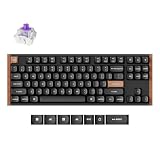
This is the closest thing to a custom build you’ll find under $50 — a 75% layout with a volume knob, gasket-style feel, hot-swap sockets, pre-lubed Reaper linears, and side-printed PBT caps. Triple connectivity (2.4GHz, Bluetooth 5.0, USB-C) makes it the most versatile pick here, and the 2.4GHz mode is genuinely fast enough for competitive play.
Redragon Hot-Swappable Mechanical Keyboard
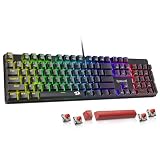
A no-nonsense wired board that nails the fundamentals: hot-swappable red switches, double-shot PBT keycaps, full anti-ghosting, and 11 backlight modes you can cycle without installing software. If you want a durable first mechanical keyboard with a clear upgrade path, this is the safest starting point.
Razer BlackWidow V4 X
Razer’s linear Yellow switches are fast, quiet, and factory-lubed, and the V4 X brings genuine brand-tier build quality — a rigid case, dedicated media controls, and per-key Chroma lighting through Synapse. It hovers at the very top of this budget and often needs a sale to land under $50, but it’s the most premium-feeling option on the list.
Logitech G413 SE
The G413 SE is the minimalist’s choice: a brushed aluminum top plate, tactile mechanical switches, PBT keycaps, and simple white backlighting with no software required. It’s plain by design, but the typing feel and build quality punch well above the price.
Redragon K580
Built for players who live in macros and hotkeys, the K580 pairs a full-size layout with a row of dedicated macro keys and a proper media wheel. Per-key RGB and reliable anti-ghosting round out one of the best feature-per-dollar packages in this bracket.
Frequently Asked Questions
Are cheap mechanical keyboards actually durable?
Yes — the switches themselves are typically rated for 50 to 100 million presses, the same as far pricier boards. Longevity at this price usually comes down to keycaps and stabilizers, which is why PBT caps and hot-swap sockets matter so much.
Is a membrane keyboard like the Logitech G213 worth considering?
It can be. The G213 Prodigy uses mech-style membrane keys with full RGB and spill resistance, and it’s a reasonable pick if you prioritize quiet operation and water tolerance over true mechanical feel. Just know you’re trading switch feel for those benefits.
Which switches are best for gaming?
Linear switches — red, Razer Yellow, or pre-lubed Reaper linears — are the standard choice because there’s no tactile bump to slow down rapid repeat presses. That said, plenty of pro players use tactiles; feel preference matters more than any marketing claim.
Do I need hot-swap if I never plan to mod?
It’s still worth having. Beyond letting you try different switches later, hot-swap means a single failed switch is a two-minute fix rather than a dead keyboard, which meaningfully extends the life of a budget purchase.
Final Thoughts
For most buyers, the AULA F75 Pro is the standout value in 2026 — hot-swap sockets, PBT keycaps, a knob, and 2.4GHz wireless at a price that would have bought a basic wired board two years ago. If you prefer wired simplicity with room to upgrade, the Redragon hot-swappable board is the smarter buy, while the Logitech G413 SE remains the pick for anyone who wants understated aluminum build quality over RGB and extra features.