Typing on a Mac deserves better than the flat, shallow feel of Apple’s stock keyboard. A good mechanical board brings tactile switches and satisfying travel, but Mac users have extra needs: proper Command and Option keys, macOS media shortcuts, and often a compact wireless layout that fits a tidy desk. Not every mechanical keyboard ships with a Mac layout, so it pays to choose one that does.
We picked boards that include Mac-specific keycaps or software remapping, support Bluetooth for clutter-free pairing, and offer the build quality Mac owners expect. Whether you want a slim low-profile board or a full custom hot-swappable deck, these options feel right the moment you plug them in.
Our top picks
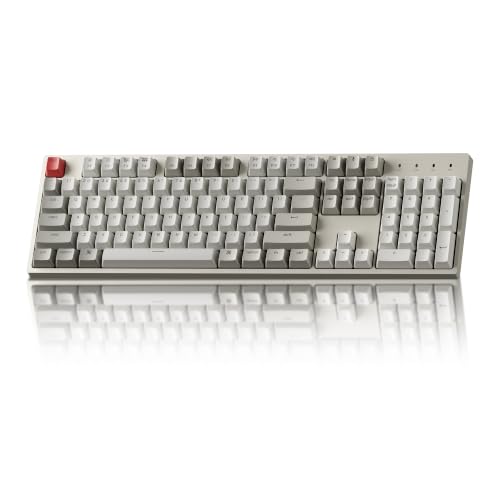 Keychron C2 Full Size Wired Mechanical Keyboard
- The Keychron C2 (non-backlight version) is a 104…
- With a layout optimized for Mac, the C2…
- Designed with reliability in mind, the C2 comes…
 Keychron K3 Version 2 QMK 75% Wireless
- Keychron K3, a compact 75% layout ultra-slim wireless…
- Be ready to multitask without missing a beat…
- With a unique Mac layout, the K3 has…
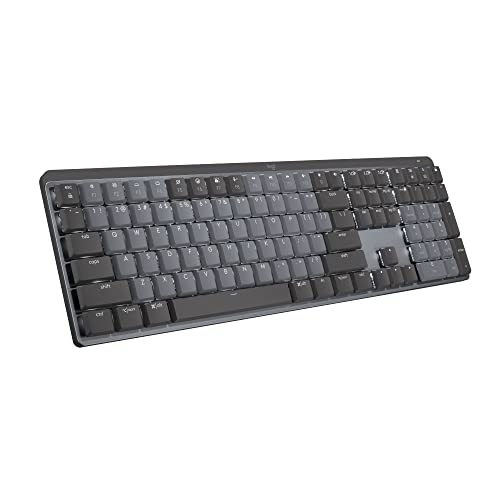 Logitech MX Mechanical Wireless Illuminated Keyboard Tactile
- Tactile Quiet mechanical key switches with a satisfying…
- Low-profile keys, more comfort: A keyboard layout designed…
- Smart illumination: Backlit keys light up the moment…
| Product | Key specs | |
|---|---|---|
| Keychron C2 Full Size Wired Mechanical Keyboard | The Keychron C2 (non-backlight version) is a 104… With a layout optimized for Mac, the C2… Designed with reliability in mind, the C2 comes… | Check price |
| Keychron K3 Version 2 QMK 75% Wireless | Keychron K3, a compact 75% layout ultra-slim wireless… Be ready to multitask without missing a beat… With a unique Mac layout, the K3 has… | Check price |
| Logitech MX Mechanical Wireless Illuminated Keyboard Tactile | Tactile Quiet mechanical key switches with a satisfying… Low-profile keys, more comfort: A keyboard layout designed… Smart illumination: Backlit keys light up the moment… | Check price |
 Kisnt KN85 Wireless Mechanical Keyboard | 【75% Space‑saving Layout】The KN85 series is a compact… 【Tri-Mode Connectivity for Multi-Device Workflow】Connect via USB‑C, 2.4GHz… 【Creamy Thocky Typing Sound】The gasket mount absorbs harsh… | Check price |
 AULA 99 Key Keyboard | Computer Keyboards 3 Connection Modes: AULA s99 full… Cool Keyboard RGB Backlit: This LED keyboard features… Full Size Keyboard: This 96% layout typewriter keyboard… | Check price |
 Keychron K10 Max QMK Wireless Custom Mechanical | 108 Keys QMK Wireless Keyboard: The K10 Max… 2.4 GHz and Bluetooth Connection: The 2.4 GHz… Program with QMK & web app: Simply connect… | Check price |
 AULA F75 Pro Wireless Mechanical Keyboard | Tri-mode Connection Keyboard: AULA F75 Pro wireless mechanical… Hot-swap Custom Keyboard: This custom mechanical keyboard with… Advanced Structure and PCB Single Key Slotting: This… | Check price |
As an Amazon Associate we earn from qualifying purchases at no extra cost to you.
⚡ Save on Your Next PC — Amazon Prime
Prime members get fast free shipping on the systems above, plus early access to Prime Day & Black Friday PC deals. New members get a 30-day free trial.
Watch: Best Mechanical Keyboard for Mac — Video Review
How to Choose
- Mac layout support: Choose a board with Mac keycaps or a Mac toggle so Command, Option, and media keys work without fiddling.
- Connectivity: Bluetooth and USB-C multi-device pairing let you switch between a MacBook and iPad cleanly.
- Switch feel: Tactile brown switches suit typing; linear reds suit gaming. Hot-swap sockets let you change your mind later.
- Profile and size: Low-profile boards echo Apple’s slim feel; 75% layouts save desk space while keeping arrow keys.
- Software and firmware: QMK/VIA support lets you remap keys deeply, which is ideal for macOS power users.
The Best Picks Reviewed
Keychron K3 V2 (75% Low-Profile)
Our top Mac pick around $60. Keychron builds for Mac first: this low-profile 75% board has a dedicated Mac layout, Bluetooth multi-device pairing, and a slim feel MacBook users love.
Keychron K10 Max (Full-Size QMK Wireless)
Near $90, the K10 Max adds a number pad, QMK/VIA remapping, and wireless for Mac users who want a full layout with deep customization and a gasket-mounted typing feel.
Logitech MX Mechanical (Tactile)
Around $160, the MX Mechanical is the productivity choice. Smart illumination, Easy-Switch across three devices, and full macOS support make it a premium desk companion.
Keychron C2 (Full-Size Wired)
At about $43 this wired full-size board is the value pick, shipping with Mac keycaps and tactile brown switches for reliable everyday typing on a budget.
AULA F75 Pro (75% Hot-Swappable)
Near $70, this hot-swappable 75% board lets you tune the switch feel yourself. It pairs over Bluetooth or 2.4GHz and remaps easily for a Mac layout, great for tinkerers.
Frequently Asked Questions
Do mechanical keyboards work with Mac?
Yes. Any USB or Bluetooth keyboard works, but Keychron and similar boards include Mac keycaps and a Command/Option layout so nothing needs remapping.
Bluetooth or wired for a Mac?
Bluetooth keeps your desk clean and lets you switch between Mac and iPad. Wired is simpler and cheaper if you never move the board.
Which switches are best for typing on a Mac?
Tactile brown switches give a satisfying bump without being loud, making them the most popular choice for mixed typing and light gaming.
Can I remap keys on macOS?
Yes. Boards with QMK/VIA like the K10 Max remap in software, and macOS itself lets you swap modifier keys under System Settings.
Final Thoughts
Keychron dominates the Mac space, and the K3 V2 low-profile is our overall pick for its slim feel and true Mac layout. Power users should look at the K10 Max for full-size QMK control, while the Logitech MX Mechanical is the premium productivity option.
FAQ
Do mechanical keyboards work with Mac?
Bluetooth or wired for a Mac?
Which switches are best for typing on a Mac?
Can I remap keys on macOS?
More from Amazon
Programs that pair well with the guide above. Offers and eligibility are set by Amazon and may change.
Free shipping on eligible items, Prime Video and more. Eligible new members can start with a free trial.
Start a Prime free trialAd-free music streaming. Eligible new subscribers can start with a free trial.
Try Music Unlimited freeA Prime membership for ages 18-24 with a trial period. Eligibility is set by Amazon.
See Prime for Young AdultsAudiobooks and podcasts to listen to on the go. Eligible new members can start with a free trial.
Try Audible freeAs an Amazon Associate we earn from qualifying purchases.